Choosing a password manager that genuinely works for a family comes down to a handful of specific criteria you can evaluate on any option sitting in front of you, not simply which one offers the most features for the lowest advertised price. A manager sized correctly for a single individual’s needs often falls apart once multiple family members, each with their own accounts and their own comfort level with technology, actually start relying on it together.
What actually decides this
The deciding factor is how well the manager supports genuinely separate accounts for each family member while still allowing appropriate sharing where it’s actually needed, not simply whether it offers a single shared vault everyone accesses identically. A family genuinely needs both individual privacy for personal accounts and deliberate sharing for accounts that are actually meant to be accessed by more than one person – a streaming service, a shared utility account – and a manager built around only one of these two needs handles family use poorly regardless of its other features.
This matters because most password manager marketing focuses on individual use, while a family’s actual usage pattern – multiple distinct users, varying technical comfort levels, both private and genuinely shared accounts – behaves meaningfully differently from that single-user assumption most reviews and comparisons are built around.
This is genuinely counterintuitive to many people first evaluating options, who naturally assume “family plan” simply means “more seats at a lower combined price,” treating it as a scaled-up individual plan rather than a genuinely different product built around a distinctly different usage pattern. The seat count matters far less than whether the underlying structure actually distinguishes between private and shared content in the first place.

The criteria that actually matter, in order
1. Genuine individual accounts within a family plan, not one shared login for everyone. Look specifically for a plan structure that gives each family member their own separate master password and private vault, with sharing as a deliberate, selective action rather than the default state. A plan without this distinction forces either constant oversharing of personal accounts, or everyone using separate individual subscriptions entirely, both of which defeat the actual purpose of choosing a family-oriented option in the first place.
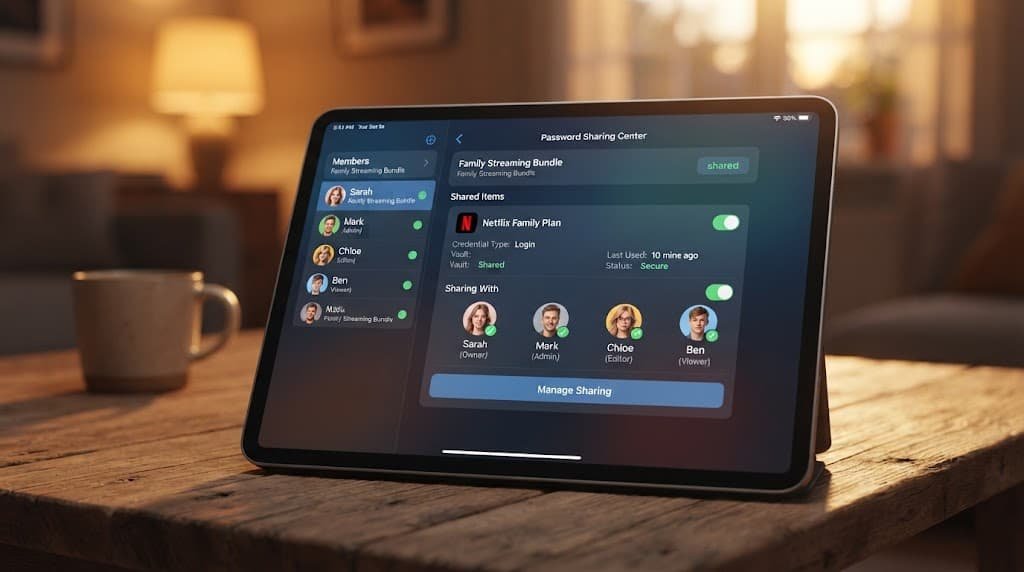
2. Selective sharing specifically for accounts meant to be genuinely shared. A family manager should let you designate specific accounts – streaming services, shared subscriptions – as visible to other family members, without exposing your entire personal vault in the process. This distinction between “shareable by design” and “private by default” is the core feature that actually makes a manager suited to family use rather than simply being an individual tool with more seats attached.
3. Genuine ease of use for the least technically confident family member. A manager with excellent features that only the most technically confident household member can actually configure tends to become that one person’s ongoing responsibility rather than a genuinely shared family resource. Considering whether every family member, including less technically confident ones, can independently manage their own vault matters more for long-term sustainability than any single advanced feature does.
4. A clear process for managing family members joining or leaving over time. Family composition changes – a child getting old enough for their own accounts, a family member moving out – and a plan that makes adding or removing someone straightforward preserves value over years of actual use, while a plan requiring complex restructuring for this kind of change becomes a recurring point of friction.
5. Recovery options that don’t depend entirely on one single family member. A family plan where only one person can approve account recovery for everyone else creates a genuine single point of failure – if that specific person is unavailable during an actual emergency, everyone else may be locked out simultaneously. A plan offering more distributed or flexible recovery options handles this realistic scenario considerably better.
What doesn’t matter as much as it’s made out to
The single largest advertised storage capacity or account limit is oversold for family use specifically, and it’s the figure many comparisons lead with. A generous account limit delivers little practical benefit if the underlying sharing structure doesn’t genuinely support the private-plus-shared pattern families actually need, regardless of how many total accounts the plan technically allows.
Advanced security features aimed primarily at technical power users are the second most oversold detail for typical family use. These can be genuinely valuable for someone who wants them, but prioritising a plan primarily for advanced features that most family members will never actually configure or use often means paying for capability that goes untouched by the majority of the household.
Matching the choice to your situation
If your family is relatively small, with genuinely similar technical comfort across everyone, prioritise the selective-sharing feature most heavily, since your main practical need is likely coordinating a handful of genuinely shared accounts without oversharing everything else.
If your family includes members with meaningfully different technical comfort levels – young children, less tech-confident older relatives – prioritise ease of use and clear recovery options most heavily, since these specific factors determine whether the manager actually gets used correctly by everyone, rather than becoming one person’s constant responsibility to manage on behalf of the whole household.

What to walk away from
Any family plan requiring every member to share one single set of login credentials, rather than genuinely separate individual accounts under one family plan, should end your interest immediately regardless of how favourable the price or feature list appears.
Shared credentials across a family eliminate individual privacy entirely, remove any way to track who added or changed a specific password, and mean a single compromised credential affects every family member’s stored passwords simultaneously. A plan built around genuinely separate individual accounts avoids all of this by design, which matters considerably more for a family’s actual long-term security than it might seem when simply comparing price or headline features.
The check before you commit
Before finalising any family plan, have the least technically confident family member attempt to set up their own individual account and add one password themselves, rather than assuming the process is intuitive based on your own comfort with the technology.
This single check reveals genuine everyday usability far more reliably than reading a feature comparison does, since a setup process that feels straightforward to someone comfortable with technology can be genuinely confusing to a family member with less confidence, undermining the actual shared, sustainable use a family plan is meant to provide.

Questions readers keep asking
How many accounts do most family plans actually support?
This varies considerably between options, so checking the specific account limit against your actual family size – including any children old enough to need their own accounts – matters more than assuming any given plan automatically accommodates a typical household’s size.
Can children have their own password manager account within a family plan?
Many family plans do genuinely support this specific option, though the specific age-appropriateness and any parental oversight features vary considerably between options, so checking exactly what visibility or control parents retain over a child’s individual vault is worth confirming before setting one up specifically for a younger family member.
Is a family plan always cheaper than separate individual accounts?
Generally yes for households with several people, though the actual savings depend on how many individual accounts you’d otherwise need – comparing the specific combined cost of separate accounts against one family plan for your actual household size is worth doing directly rather than assuming the family option is automatically the better value.
Does everyone in the family need to use the same password manager?
Not necessarily as a strict hard requirement, though it does genuinely eliminate the selective-sharing and coordinated-recovery benefits a genuine family plan specifically provides overall. Mixing different individual managers across family members works technically, but it means recreating manually the coordination a proper family plan would otherwise handle for you automatically.