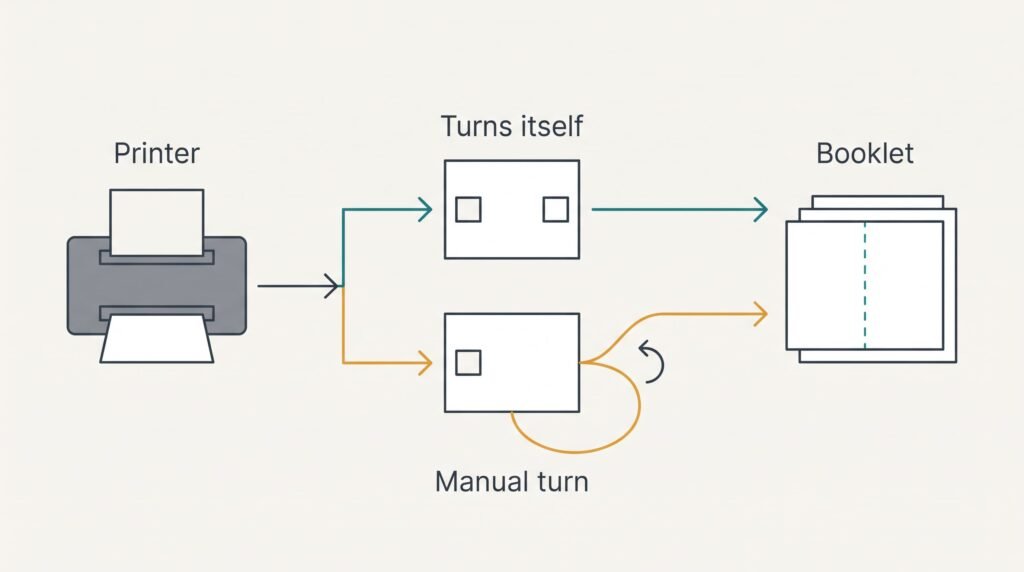
You can print a document as a folded booklet on a home printer in 8 minutes or so, with a 12-page A5 booklet needing only three sheets of A4. The route forks on one point: a printer that turns the sheet over by itself runs straight through the steps below, while one that doesn’t needs the manual turn described in the stall section. The guide follows an 11-page family recipe collection. Every time and sheet count here comes from that one sample document; rerun the arithmetic on yours. Gather the printer and the document, plus some plain A4 paper of ordinary office weight.
Before You Print a Folded Booklet on a Home Printer: the Step People Skip
What most people overlook is finding out if the printer turns sheets itself. A booklet puts four pages on every sheet, two on each side, which means each sheet passes through twice. A printer that can’t do that alone makes you carry the stack back to the tray, and one wrong turn wastes the sheet. Look in the printer’s settings for a two-sided option. A quick test settles it: print pages 1 and 2 as one double-sided sheet and hold it up to a window, where ink should show on both faces.
Hannah in Bristol has an 11-page recipe collection. She keeps the original untouched and works on a duplicate, because enlarging the type reflows every page and there’s no simple way back. Then she counts the pages. A booklet needs a multiple of four, which turns 11 into 12 with one blank page at the end.
Twelve pages make three sheets. Printed on a single face only, 11 pages would use 11 sheets, and the booklet saves 8 of them, which is 73%.
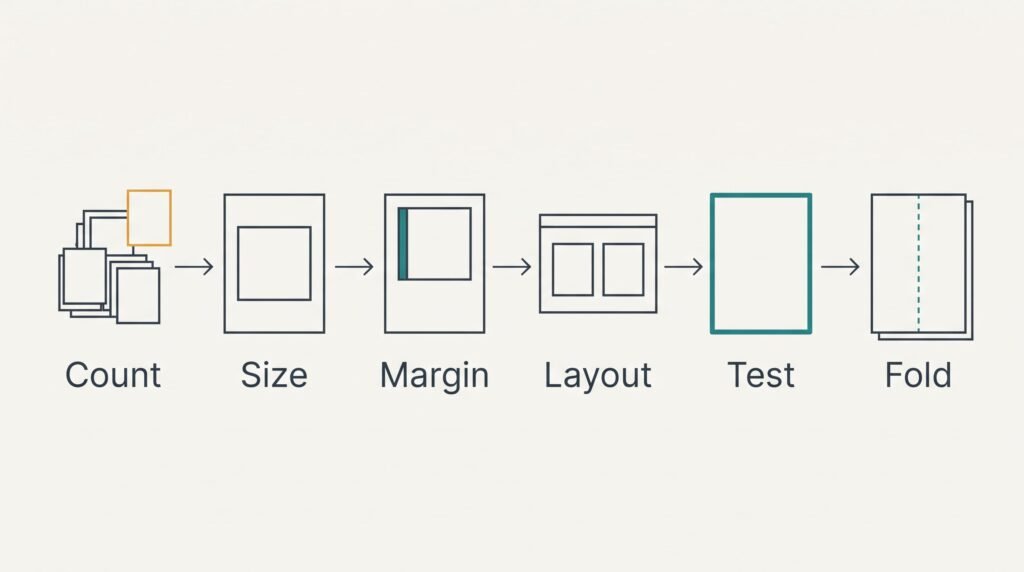
Six Steps to Print a Booklet, Folded at Home on Your Printer
1. Check the last page number and round it up to a multiple of four. Look for the total in the page counter, then add blank pages until it divides by four. Hannah’s 11 pages need one blank, placed last. Each sheet carries four pages, and a spare page would land deep inside the book. It’s right when the new total divides by four with nothing left over: 12 divided by 4 is 3. Allow 1 minute.
2. Set the type to at least 14 points on A4 portrait pages. Look for body text that stays comfortable to read in the preview. The booklet shrinks each page to 70.7% of its size, and 14 × 0.707 gives about 9.9 points, close to a normal book. Text set at 11 points would drop below 8. Allow 2 minutes.
3. Give the inner edge of every page about 10 mm of extra margin. Look for words that stay well clear of the centre line in the preview. The fold swallows a few millimetres of each page, and a tight inner margin makes the first letters vanish into the spine. It’s right when no line touches the centre. Allow 1 minute.
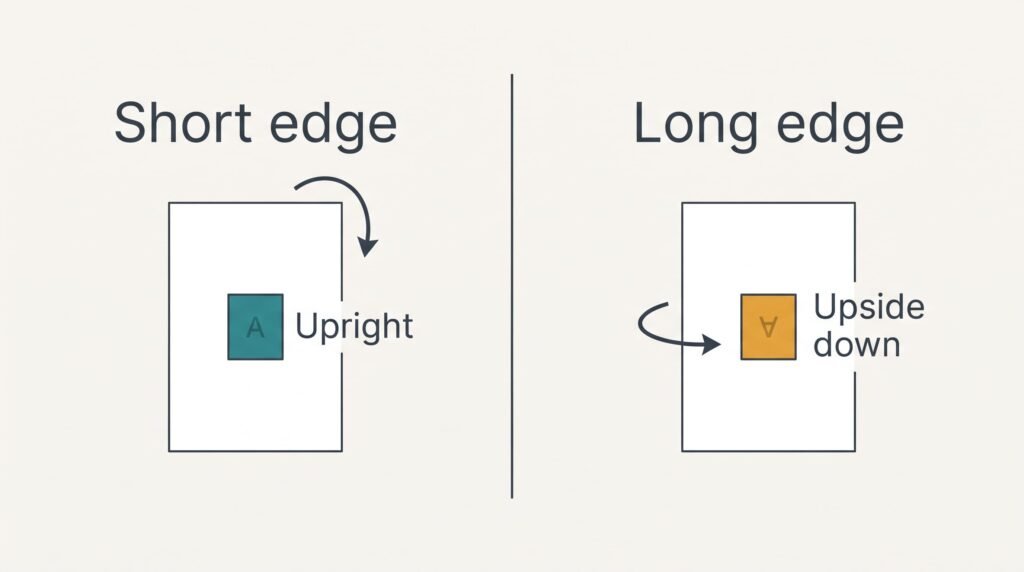
4. Open the print window and choose the booklet layout, with printing on both sides turned on and the sheet turned on its short edge. Look for the preview to show two pages side by side on each sheet. The layout does the page ordering for you, which would otherwise take a long list. The first sheet should show page 12 beside page 1. Allow 1 minute.
5. Print the first sheet alone as a test. Look at both sides after turning it like a page in a book. Both faces should read upright. One shows 12 beside 1, and the other shows 2 beside 11. The short-edge turn is what keeps the back from landing upside down. Keep that sheet beside you as a guide when you fold. Allow 1 minute.
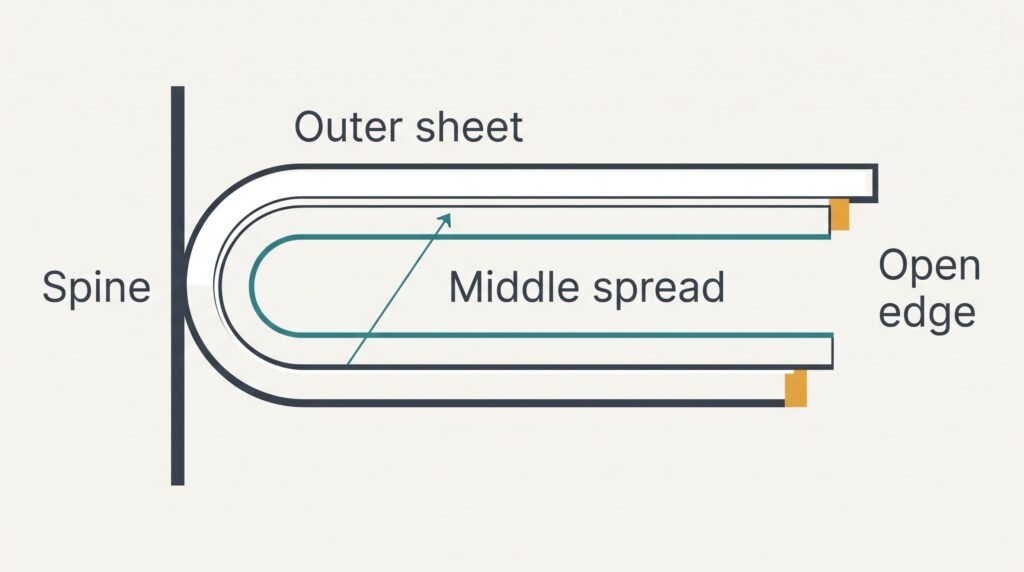
6. Print the whole job, then gather the sheets with sheet 1 outermost and fold the stack along its centre. Look for pages 6 and 7 in the middle spread. The printer delivers the sheets in order, and nesting them lets each fold carry its own pair. Press the crease flat with the side of a ruler. Allow 2 minutes.
Test the Finished Booklet Before You Hand It Over
A neat stack can still hide a mistake. Flip through from the front cover to the back and read each page number. The numbers must run 1 to 12 in order, every page upright, with no line cut off by the fold. This test takes about 30 seconds.
Check the pages that sit across the centre next. Open the booklet in the middle and see that pages 6 and 7 meet as one spread, with the text of both reaching into the gutter by the same amount. When you print a folded booklet on a home printer, uneven gutters point back to an inner margin set too small.
Last, hold the closed booklet by its spine and look at the open edge. A step of under half a millimetre between sheets is normal. It won’t bother anyone.
A failed test wastes a single sheet and costs about a minute of your time.
Where a Folded Booklet Gets Stuck
Three things tend to go wrong when you print a folded booklet on a home printer. The back of the sheet comes out upside down, because the turn went along the long edge. Switch the setting to the short edge, then reprint the test sheet alone. The wasted sheet is the whole cost.
A printer without automatic turning prints one face first. Reload that stack as the printer’s own guide shows, since models differ. Mark the top sheet with a small pencil dot on the corner so you don’t lose the orientation. Do one sheet at a time for the first booklet, and allow about 5 extra minutes.
The inner pages stick out at the edge. A sheet of office paper measures roughly 0.1 mm, and three sheets push the middle pages out by roughly 0.2 mm, which nobody sees. At around ten sheets the shift grows to about 1 mm, and a trim along the open edge then makes the booklet neat.
One Step Not Worth Taking
Don’t reorder the pages by hand in the document. Doing it yourself means typing out a page list for 12 pages and getting every sheet’s pair right, which can take around 25 minutes and fails if one number is wrong. The booklet layout does it in seconds and shows the result in the preview before any paper is used.
Stapling a long stack at the spine is a second detour. Three sheets hold their shape once you fold and press along the crease. Another detour is a separate layout program; it adds an install plus another screen to figure out for a job the print window already does. Gluing single sheets back to back is a fourth, which leaves an uneven spine and uses twice the paper.
Nothing beyond the print window and one test sheet is needed for a folded booklet on a home printer, apart from a careful look at the first fold.
Keep the original copy of the document, and put a note of the page count inside the file name so the next run starts correctly. For eight pages the route is the same with two sheets, and for ten it’s a pair of blank pages first. A habit of rounding up before anything else saves more paper than any setting. Write down the page total you expect before you print, because a mismatch is the earliest warning you’ll get.
Questions and Answers
How long does it take?
Expect roughly 8 minutes for 12 pages, and closer to 15 on a first attempt; the type-size change and the test sheet take longest. A printer without automatic turning adds about 5 minutes, because each sheet must be reloaded by hand.
Will printing a booklet change my document?
The layout setting affects only the print job and leaves your pages as written. The type-size change in step 2 does alter the file, which is why a copy comes first. If you’ve worked on the copy, keep the original untouched until the booklet is finished.
What if my document has 10 pages?
Add two blank pages to reach 12, because the layout needs a multiple of four. Put them at the end, or leave one at the very back as an inside cover. The route is otherwise identical, and the printer still uses three sheets of A4.