Check what the clamp bites into before you check how far the arm reaches. For a monitor arm for a small desk, grip decides whether the arm stays put, and it rules out half the listings before swivel or colour even come up. Reach comes second and the spring third. The screw pattern closes the list.
Our desk sits in a British flat and measures 120 cm by 60 cm, with an 18 mm chipboard top and one 27-inch monitor. Treat the figures as worked examples with round numbers, so weigh your own screen and measure your own desk. We name no brands and quote no prices, as both age quickly.
What decides a monitor arm for a small desk
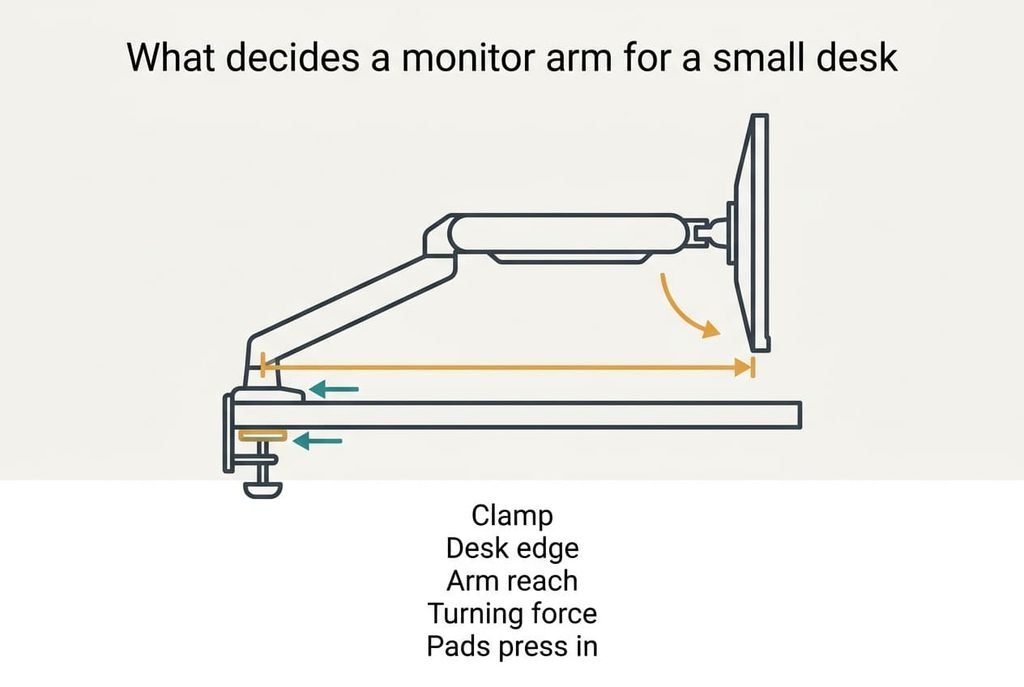
An arm is a lever, so the grip of its clamp on your desk edge decides everything else. Our monitor weighs 5.8 kg without its stand, and the arm carries it 45 cm beyond the clamp. That’s a turning force of 5.8 × 9.81 × 0.45 = 25.6 N·m. A clamp whose pads sit 5 cm apart turns that into 512 N pressing on each pad, the weight of about 52 kg.
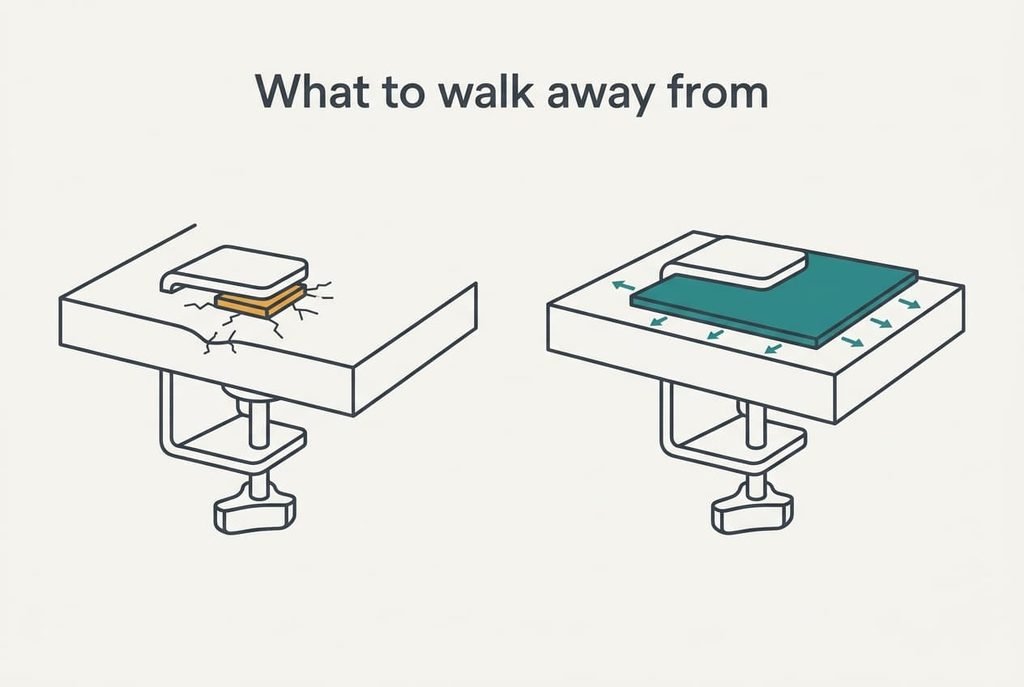
A pad of 4 by 4 cm is smaller than a credit card. Those 512 N land on 16 cm², and chipboard crushes under a load like that. A backing plate of 10 by 10 cm spreads the same force over 100 cm², which is 6 times the area. When the grip is wrong, the top dents. The clamp then tilts and the screen sinks a little each week.
A small desk makes the lever harder to ease. The clamp has to sit less than 3 cm from the back edge, so the arm can’t be moved inward to shorten its lever. And an 18 mm top gives each pad only 18 mm of edge to grip, so thin tops need the larger plate.
Every criterion below hangs off that lever.
What to look for in an arm, in order
1. Grip on the desk edge. This is the clamp, or the fixing through a hole, that holds the arm to the desk. It settles whether the screen stays level or sinks slowly until you re-tighten it. Read the listing’s thickness range and check that your 18 mm top sits well inside it. Look for a steel backing plate of at least 8 by 8 cm. Then slide a hand under your desk edge. A drawer rail or a lip under the top blocks the lower pad, and few buyers ever look at this. If it’s wrong, the top dents. The arm then tilts.
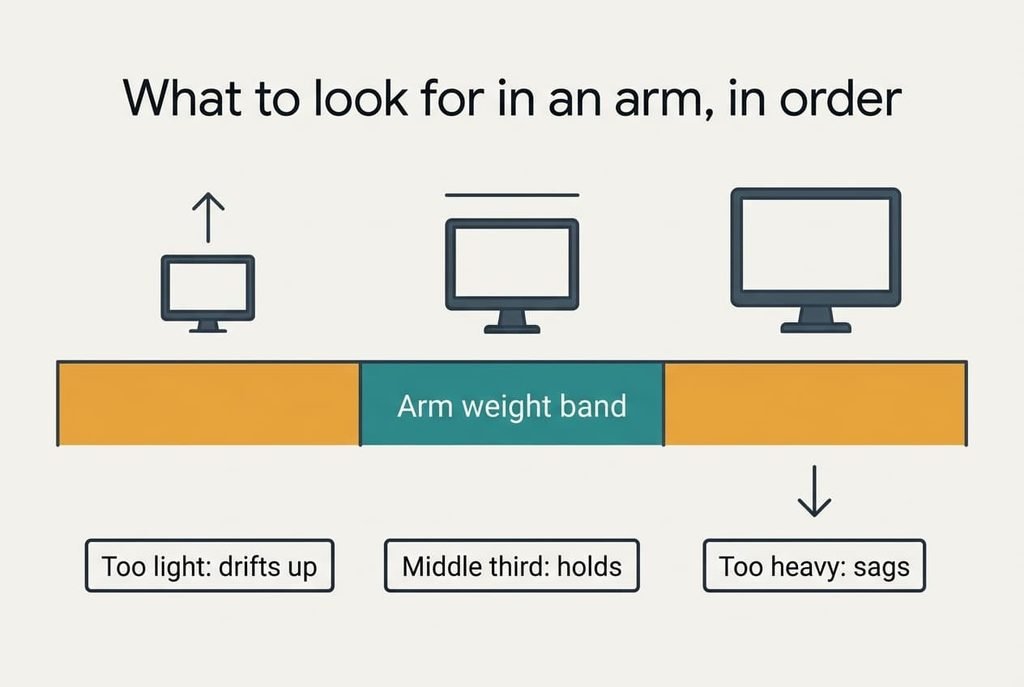
2. The weight window, and where your monitor sits in it. A gas spring balances one band of weights, say 2 to 9 kg in our example. With the spring matched, the screen stays wherever you leave it. Weigh the monitor without its stand, then aim for the middle third of the band, which is 4.3 to 6.7 kg here, so our 5.8 kg sits at 54%. A 3.1 kg screen sits at 16% and drifts up, while 8.4 kg sits at 91% and sags.
3. Reach against desk depth. Reach measures the gap between the clamp and the screen’s centre at full stretch. It decides whether the screen comes forward to where you sit and tucks back against the wall. With the clamp at the rear edge of a 60 cm desk, a 45 cm reach leaves the centre 15 cm behind the front edge. Past 55 cm, the screen swings over that edge and into the lamp.
4. Mounting pattern and back shape. The monitor’s back carries four screw holes arranged as a square, 75 mm on small screens and 100 mm on larger ones. Lay a ruler across them and read the spacing. A curved or recessed back needs spacers, or the plate sits crooked. If the pattern doesn’t match, you need an adaptor plate, which adds a joint.
What the box oversells
Full 360-degree rotation and endless swivel angles top the headline specifications, and they change very little on a monitor arm for a small desk. They’re promoted because each extra joint is cheap to add and makes a product page look capable. You’ll use two positions in practice: forward, and tucked back. Every joint also adds a place for the arm to sag. Portrait mode is the usual selling point, yet a 27-inch panel turned on its side stands about 60 cm tall, and a shelf 15 cm above the rear edge stops it turning at all.
I’d pay for grip before rotation, which will annoy anyone who loves a flexible arm. The printed maximum screen size is oversold too. Weight and screw pattern limit what an arm carries, and screen size says nothing about either. A built-in cable channel is the third item. It’s a plastic clip that costs pennies to mould, and a pair of cables needs two clips on the arm and none of the rest.
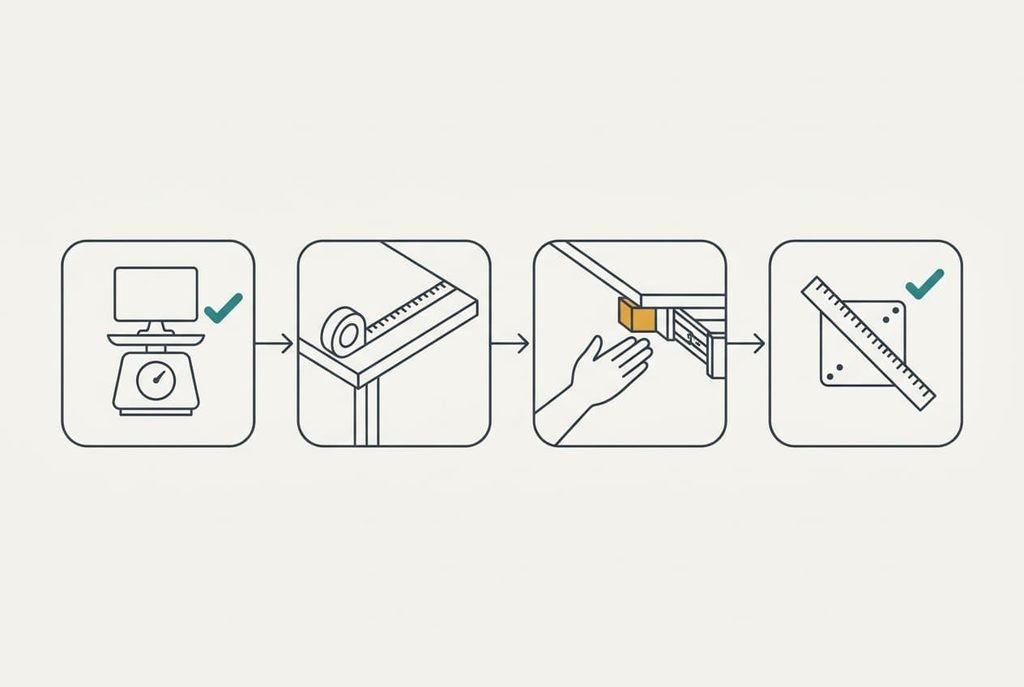
Matching an arm to a small desk and its monitor
Three different readers shift the ranking while the criteria stay the same. A renter with a thin 18 mm top puts grip even further ahead and treats the backing plate as required. Someone with a light 3.1 kg monitor puts the weight window first, because a strong spring in a light arm drifts upward. A desk with a shelf 15 cm above its rear edge shrinks the usable reach, which moves criterion three up, because the screen must slide out from under the shelf before it can tilt. A third reader alternates between a small 24-inch panel and a wide ultrawide of about 8 kg. That reader needs the widest weight band on offer, and both screens must land inside it, ideally with the heavier one below 85% of the top limit.
Check the clearance above the clamp before you order anything
What to walk away from
On a monitor arm for a small desk, a clamp that states no thickness range and offers no backing plate should end your interest at once, because the lever sum can’t be satisfied on a thin top. An arm with no stated weight band belongs on the same list. You can’t place your monitor in a window that nobody printed. A fixing that needs a hole drilled through the desk is a poor match for a rented flat too, as it can’t be undone cleanly.
Skip an arm whose joints rely on plastic parts. They creep under load, and the arm slowly lowers the screen over a few months. Look for a seller that accepts returns after a week of use, because an arm that sags only shows its fault under real weight, and the pad marks on your desk appear in the same week. No later purchase repairs a spring that can’t hold your screen.
The two-minute check before you commit
Weigh the monitor without its stand, then read the arm’s weight band and see whether your figure falls in the middle third. Next, check the clamp’s thickness range against your desk. Slide a hand under the edge to see if anything blocks the lower pad. Then subtract the arm’s reach from your desk depth. That shows where the screen’s centre lands. Finally, lay a ruler across your screen’s four holes and compare them with the listing’s pattern, since a mismatch there stops the arm from fitting at all. Any wrong answer sends you elsewhere, and the whole check needs only a measuring tape and kitchen scales.
Grip decides a monitor arm for a small desk, and one hand under the edge tests it. Measure your thickness and weigh your screen today, because those two numbers settle most of the choice. Any listing that hides its clamp range or its weight band gets rejected, whatever else it offers.
Questions readers keep asking
How much weight can an arm hold?
Check the band printed on the listing, since each arm has a lower and an upper limit. Aim for the middle third. In our example 5.8 kg sits comfortably in a 2 to 9 kg band, while 3.1 kg drifts up and 8.4 kg sags.
How much should I spend on a monitor arm?
Spend mid-range and put the difference into a firm clamp and a wide backing plate. The cheapest arms often print no thickness range, and the dearest add rotation you won’t use. Read the clamp specification before the price, and compare arms of similar clamp quality first.
Will an arm still suit me if I change my screen?
Often, if the weight band is wide and the screw pattern is standard. Screens change size faster than desks change thickness. A new monitor that sits in the middle third will still work, while one outside the band needs a different spring.