The contrast figure on a monitor’s box was measured in a dark room, and you don’t work in one. By three in the afternoon the light around your desk has eaten most of it. So which monitor suits long working days best? The one whose brightness has headroom over the light at your desk. Three further checks follow that one.
The sums assume a home office in the UK with a desk near a window and a day of about eleven hours. Nothing here names a model or a cost, since the physics outlasts both. The room-light figures are assumptions, so swap in your own.
What decides which monitor suits long working days
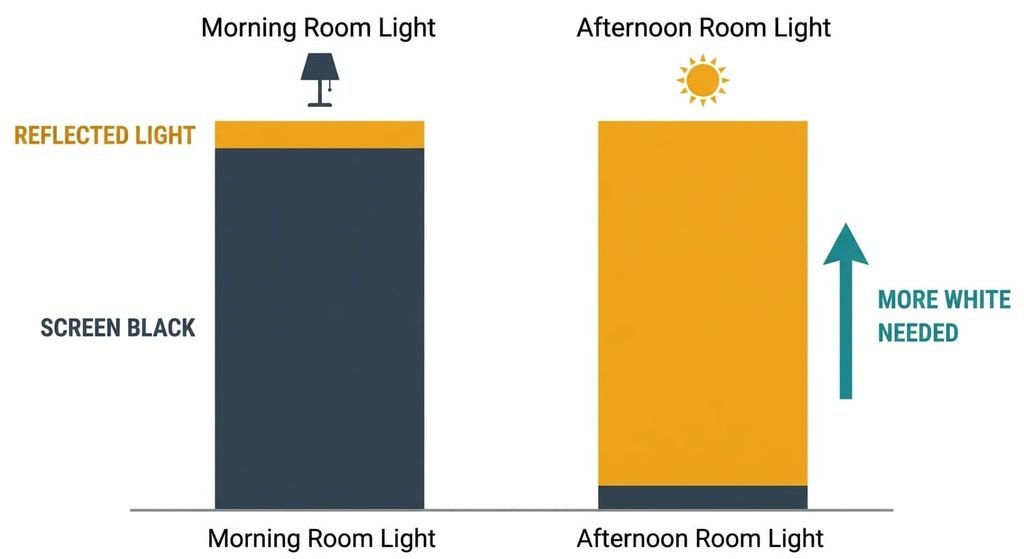
Brightness headroom at your brightest hour is the answer. A screen shows black as the glow of its own darkest pixels plus whatever the room bounces off the glass. The room’s share depends only on the light falling on the surface. Deciding which monitor suits long working days starts there. More room light fills in more of the black, and only a brighter screen wins the contrast back.
Say a screen shows white at 250 cd/m² (candelas per square metre, the unit of screen brightness) with a boxed 1,000:1, so its black is 0.25 cd/m². A matte surface returns about 2% of incoming light, scattered evenly. Reflected luminance equals that share times the lux, divided by π. At 300 lux, a dull morning with the lights on, the room adds 1.9 cd/m² and contrast falls to about 117:1. At 1,000 lux, a bright afternoon beside a window, it adds 6.4 and contrast falls to about 39:1.
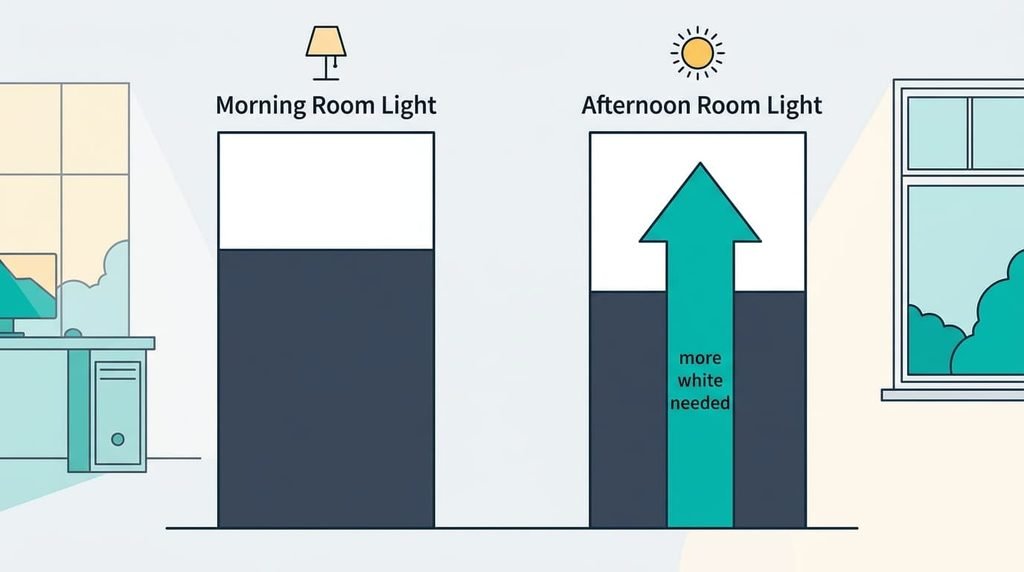
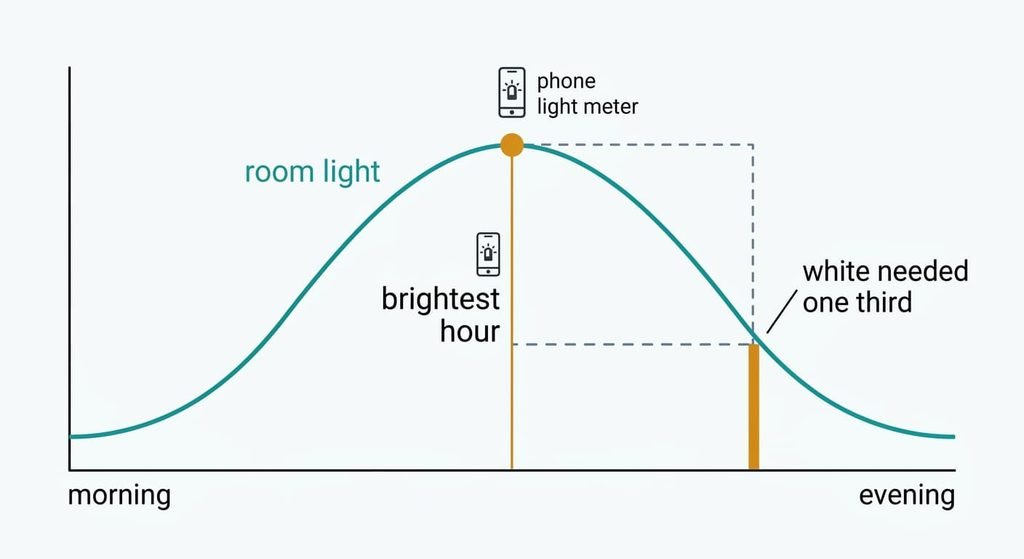
To hold 50:1, a working figure, the screen needs white at roughly a third of the lux. That’s 100 cd/m² at 300 lux and 330 at 1,000.
The same screen loses 96% of its boxed contrast between nine and three.
Four checks for a monitor that suits long working days, in order
1. Sustained brightness against your brightest hour. This is the white level a screen can hold for hours, which differs from a peak figure that lasts seconds on a small patch. In daily use, it settles whether black text still looks black at three o’clock. Measure the lux at your desk in the brightest hour with a phone light-meter app, then divide by three. Look for a typical or sustained figure at or above the answer. If you get it wrong, you’ll push the setting to its top by the afternoon and still see grey text.
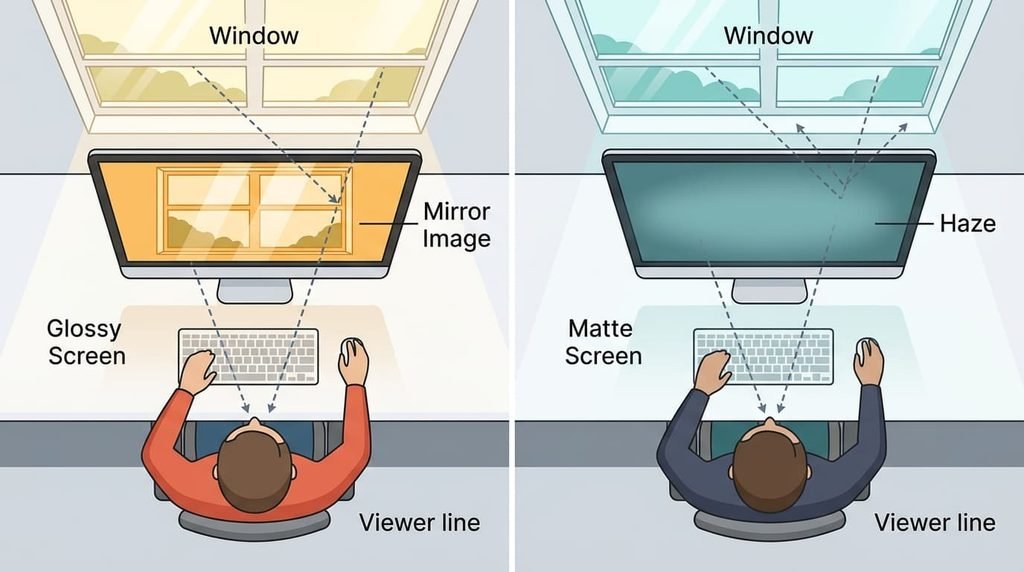
2. The reflections. Finish is the surface treatment: matte scatters reflections into a haze, while glossy keeps a sharp mirror image. In daily use, a window behind you becomes a lit rectangle sliding across your text. Switch the screen off, sit where you’ll sit in the brightest hour and count the lit shapes in the black panel. A window at 2,000 cd/m² reflected at 4% by a glossy surface puts 80 cd/m² on a screen whose white is 250. If you get it wrong, the only cure is turning the desk.
3. The hours rating and the warranty, which few buyers ever look up. A backlight dims with running time, and makers quote a life to half brightness, in hours, at a stated level. An eleven-hour day over 240 working days is 2,640 hours a year, so a three-year cover spans 7,920 hours. Read the support page for the rating and the setting it was measured at. Then check the warranty length. Self-lit pixel panels add a second ageing, since pixels under a fixed taskbar wear faster than their neighbours. Look for a written statement on uneven wear.
4. How automatic brightness behaves. A light sensor reads the room and the screen follows it, with smoothing so a passing cloud doesn’t make the picture pulse. In daily use, it settles whether the screen tracks the sun without a hand on the controls. Look for one you can switch off. A manual floor and ceiling help too. If the pages are silent, assume it stays on. If you get it wrong, brightness drifts mid-sentence. You then stop trusting the sensor.
What the box oversells
Sheets open with the contrast ratio, and it counts only the screen’s own black. It’s measured with the room dark, so it ignores everything in the sums above. A dynamic ratio is worse, since it compares a full-white frame with a different dark one and the two never share the screen. It sells because one big number is easy to rank, and a larger figure looks like a better screen. A shop shows that number under bright lamps, which fill in the black the sheet promised.
A peak brightness badge comes second. It holds on a small patch for a few seconds, while a page of text is mostly white across the whole screen, where only the sustained figure applies.
Wide colour coverage comes third. It matters to photographers who print their work, while black text on white gains nothing from it. I’d ignore every contrast number unless the sheet states the lux it was measured at.
Which of the four move for which desk
For deciding which monitor suits long working days at a west-facing desk, the low afternoon sun makes the first two the whole job. Take your reading at four o’clock. Turn the screen side-on to the glass if you can, since that single move costs nothing and removes most mirror images.
A box room lit by one ceiling lamp sits near 300 lux, so the screen needs only about 100 cd/m², and nearly any monitor clears it. Put the hours rating first there. A room without daylight tends to hold a long day that starts early and ends late.
A dining table that doubles as a desk changes spots daily, which raises check four. Sensor-led brightness saves resetting the screen each time you move.
What to walk away from
Walk away from a glossy panel facing a window you can’t move or cover. Raising the brightness lifts the white but leaves the reflection in place, and a blind that cuts the glass also cuts the light you work by.
A mirror can’t be adjusted away.
Skip any sheet that quotes only a peak brightness, since the sustained figure is the one your day uses. Skip a self-lit panel with no written terms on uneven wear if your toolbars never move, since every hour of a fixed taskbar adds to the same patch of pixels. A screen with a fine contrast figure and no stated hours rating gives you nothing to plan a replacement around. A warranty that counts years but says nothing of daily hours is no better, because a year of eleven-hour days wears a panel faster than a year of two-hour ones. Set each of these beside the cost of swapping a screen in year two.
The two-minute check before you commit
Measure the lux at your desk in the brightest hour of the day, holding a phone light-meter app against the screen and facing the room. Divide by three. That’s the sustained white you need, so 330 cd/m² at 1,000 lux. Then switch the screen off and count the lit shapes in the glass. A clean black panel with only one or two soft shapes passes. Next, find the hours rating, the level it was rated at and the warranty. Write the three answers on separate lines before you compare two screens, and keep that page with the receipt. With the product page open, it’s done in two minutes.
Brightness headroom comes first. The mirror test is second, and the hours rating is third. A monitor suits long working days when its sustained white beats a third of your afternoon lux and the glass shows few bright shapes. Do the measuring this week, because it swaps a boxed contrast number for a reading taken at your own desk.
Questions readers keep asking
What brightness does a monitor need for office work?
Enough to beat the light at your desk at its brightest. Divide the lux there by three: about 100 cd/m² at 300 lux and about 330 at 1,000. Read the sustained or typical figure on the specification page, because a peak figure holds for seconds. If your room differs, use your own lux in the same sum.
Is it worth paying more for a brighter monitor?
Only if your desk needs it. A dim room that needs 100 cd/m² gains nothing from a screen that holds 400. A desk beside a west window needs around 330, so pay for steady brightness there and ignore the contrast number. Take the lux reading first, then compare screens by their sustained figure.
How long will a monitor last if I use it all day?
The backlight is rated in hours to half brightness. An eleven-hour day over 240 days is 2,640 hours a year, so a rating of 30,000 hours lasts about 11 years at that level. Warranties count years and not hours, so check the level behind the figure before you trust it.