Why does a faster screen feel smoother? It redraws the picture more often, so every step of movement is smaller and the image waits less time before it changes. A 60 Hz screen replaces its picture every 16.7 ms and a 120 Hz screen every 8.3 ms. Refresh rate is that count of replacements per second, measured in hertz. The case below follows one flick of a page on an invented UK phone, and every timing is a round assumption that your own device will change. A higher figure helps in some situations and does nothing in others, and the sections below sort out which is which.
Why does a faster screen feel smoother? The short answer, and what it leaves out
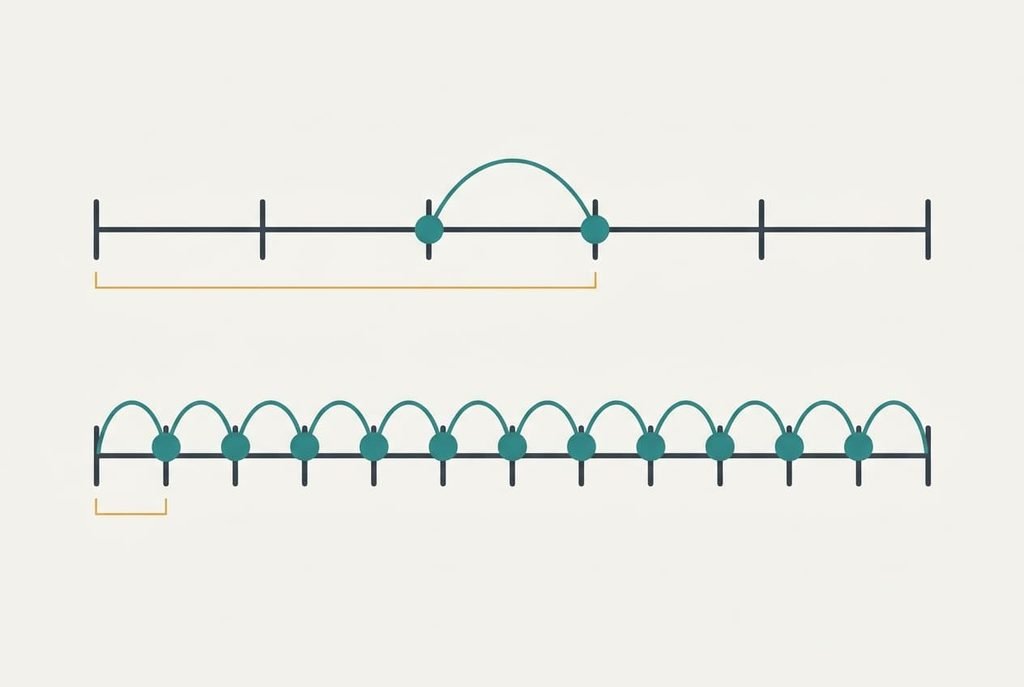
A faster screen feels smoother because it shows smaller steps of movement more often, and that sums up the short answer. Each refresh is one chance to move things on. Twice as many chances mean half the distance per step. Hertz means cycles per second, so dividing 1 by the figure gives the period: 1 ÷ 60 is 16.7 ms and 1 ÷ 120 is 8.3 ms. Your eye can’t pick out single redraws. It sees a series of jumps, and the series reads as flowing movement when each jump is small and the next arrives quickly. When the jumps are large or slow, you notice them as stutter.
Three things are missing from that answer. A screen holds each picture still until the next arrives, and your eye keeps moving across that held picture, which smears it. Something also has to supply the pictures. A phone that draws only 60 new frames a second can’t use a screen built for 120. Last comes the pixels themselves, which need time to change colour, and a slow pixel blurs the picture whatever the refresh rate says.
Why a faster screen feels smoother, step by step
Take a page of text with letters 16 px tall, flicked so it moves at 1,200 px per second. We’ll compare the same phone set to 60 Hz and then to 120 Hz.
Your finger lands at a random moment in the refresh cycle, and the touch waits for the next redraw. On average that wait is half a period, which is 8.3 ms at 60 Hz and 4.2 ms at 120 Hz. We’ll assume the rest of the chain, from sensing the touch to finishing the frame, takes 30 ms. The totals come to 38.3 ms and 34.2 ms, so the faster screen trims about 11 percent of the delay.
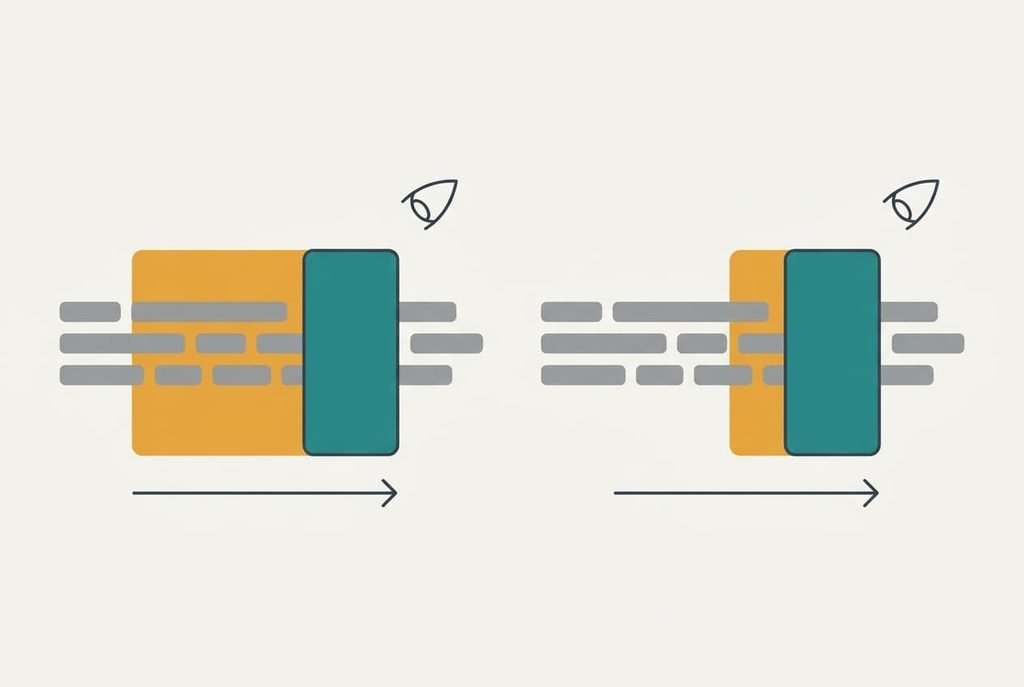
Now the movement. The page travels 1,200 ÷ 60 = 20 px between frames at 60 Hz, and 1,200 ÷ 120 = 10 px at 120 Hz. Your eye follows the text as it slides. The screen holds each frame for the whole period while your eye keeps moving, so every letter smears by the distance travelled during the hold. That smear measures 20 px at 60 Hz, which is wider than a 16 px letter is tall. At 120 Hz it measures 10 px, which is shorter than the letter.
The assumptions matter here. We’ve taken each frame to stay lit for the whole period, as most phone screens do. A screen that lights each frame for only part of the period shortens the smear, at the cost of brightness.
Repeat the test at 600 px per second, the pace of a relaxed scroll. The steps are 10 px at 60 Hz and 5 px at 120 Hz, and the smears match them. Both stay below a letter’s height, so a reader sees clean text on either screen.
The gap closes as the flick slows. At 300 px per second the steps shrink to 5 px and 2.5 px, and both screens look fine.
Fast motion is where 120 Hz earns its place.
So why does a faster screen feel smoother? It cuts the step and the smear, and it shortens the wait.
A flipbook, and where it breaks
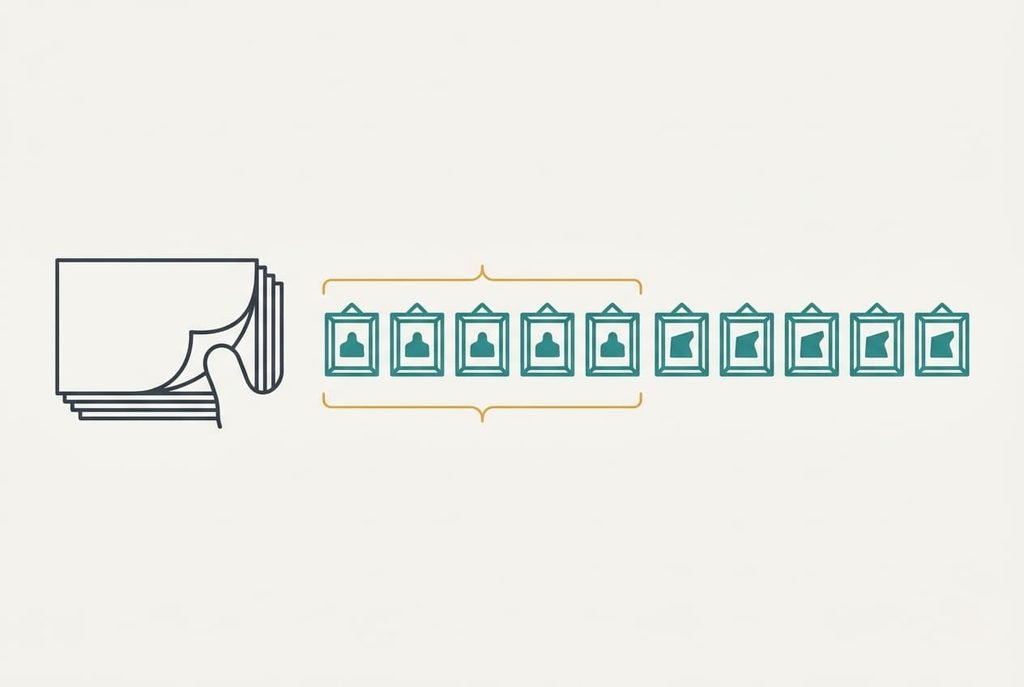
A flipbook is the analogy that lasts longest. Flick the pages faster and the figure moves more fluidly, because each drawing differs from the last by less.
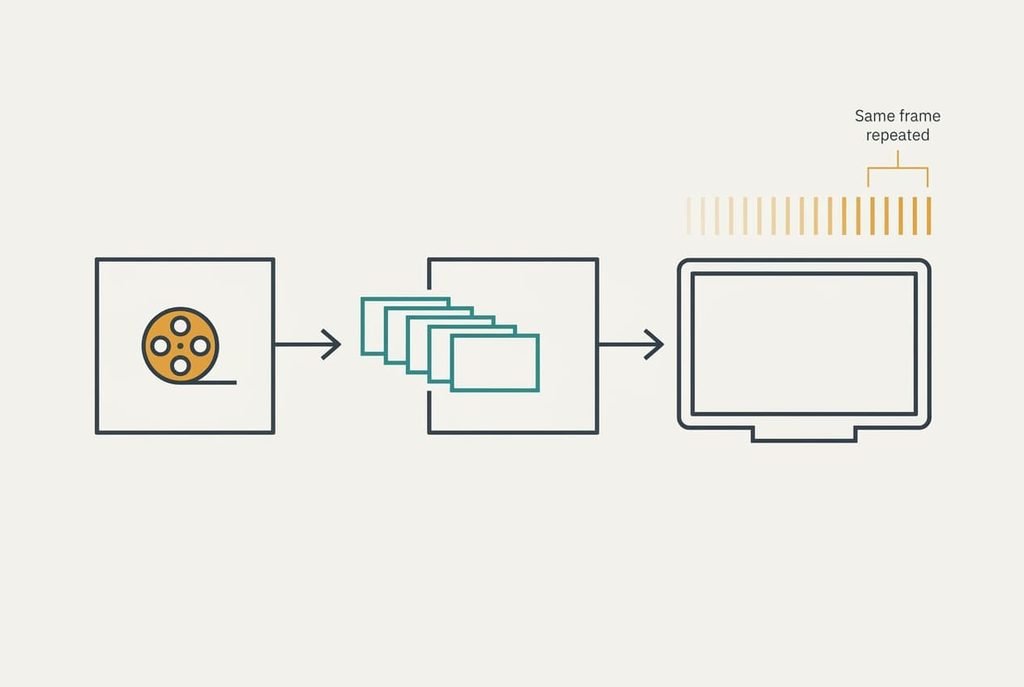
The flipbook breaks on the artist. Every page in a flipbook has its own drawing, but a screen can turn pages faster than the source supplies drawings. A film shot at 24 frames per second has 24 drawings a second, and a 120 Hz screen simply shows each of them five times. The thumb moves faster and the story doesn’t gain a single new picture.
Turn it round and the picture is the same. If the artist draws 120 pages a second and your thumb manages only 60, half the drawings never reach your eye. A 60 Hz screen fed 120 frames a second simply throws half of them away.
What refresh rate cannot do
A faster screen can only show pictures that something has already drawn, and that is the limit most buyers overlook. Content made at 30 frames each second looks identical on 60 Hz and on 240 Hz. Only an app or a game that produces more frames can use the speed. Why does a faster screen feel smoother in a game and not in a film? The game supplies the extra frames.
Divisibility matters too. A 24 fps film on a 60 Hz screen needs 2.5 refreshes per frame, so frames alternate between three and two refreshes, and steady pans judder. At 120 Hz every frame lasts exactly five refreshes. The 144 Hz option fits 24 fps with six, yet it can’t divide 25 or 30 evenly. Pixel response is separate again, because a pixel that takes 8 ms to change can’t finish within a 4.2 ms period. Power is the last limit, since redrawing twice as often costs energy, so many devices step the rate down for still pages and back up when you scroll.
Three beliefs about refresh rate that don’t hold
The belief that the eye stops noticing anything above 60 frames per second came from cinema settling on 24 and television on 50 or 60. The numbers describe what broadcasters chose for their equipment. Nothing in the eye stops at 60, and the smear arithmetic above shows a 10 px difference you can see on any phone that offers both settings.
Another belief says refresh rate and frame rate are the same number. Both are counted per second, so the names blur together. One is what the screen can do, and the other is what the source supplies. A screen can offer 120 refreshes while a video supplies 24 pictures.
A third says a higher number means a sharper picture. Sharpness comes from the number of pixels. Refresh rate changes how movement looks.
A still page looks identical at either setting.
Do you need a faster screen? A decision rule
Pay for a faster screen only when you often move things quickly, and the threshold is easy to calculate. A step reaches letter height when speed times the period exceeds 16 px. At 60 Hz that happens at 960 px per second, and at 120 Hz at 1,920 px per second. If you scroll long documents at a quick flick or draw with a pen, you’ll feel it. Watching films or reading slowly, you won’t. Try the test on your own device: flick a page of text at your quickest, then at a gentle pace, and note where the smear stops bothering you. That speed is your personal threshold.
I’d defend that rule against buying the biggest number. Why does a faster screen feel smoother? Because steps shrink where motion is fast. Most people never ask whether their own motion is fast enough to benefit, and the answer decides the purchase. Measure your habits first and the figure on the pack becomes a tool instead of a promise. Spend the difference on anything else if your motion stays below the line.
Questions readers keep asking
Does a faster screen use more battery?
Usually, yes. The screen redraws twice as often at 120 Hz, so the display works harder, as does the chip that feeds it. Many devices lower the rate when nothing moves. If battery matters more than smoothness, run the slower setting for reading and keep the faster one for scrolling.
Do I need more than 60 Hz for office work?
Rarely. Typing and email move slowly, and so do spreadsheets, so the steps at 60 Hz stay under a letter’s height. A pen or fast scrolling through long documents is the exception. If you do neither for hours each day, the extra cost buys you very little.
Is refresh rate the same as frame rate?
No. Refresh rate belongs to the screen and counts redraws per second. Frame rate belongs to the source and counts new pictures per second. A 24 fps film on a 120 Hz screen has a refresh rate of 120 and a frame rate of 24, which is why it looks no smoother.