Where HTTPS hides what you read, a VPN hides where you went, and it hides that only from the network you’re on. So what does a VPN hide? Your real address and the sites you visit stay hidden from the café or hotel network that carries your traffic. Your logins and your browser’s details stay as they were, and so does the provider’s own view of you.
The rest of this guide follows one page request from a phone to a shop’s website and back. It uses addresses from the ranges reserved for examples, so no real address appears. It assumes a connection in the United Kingdom.
What does a VPN hide in short, and what does it leave out?
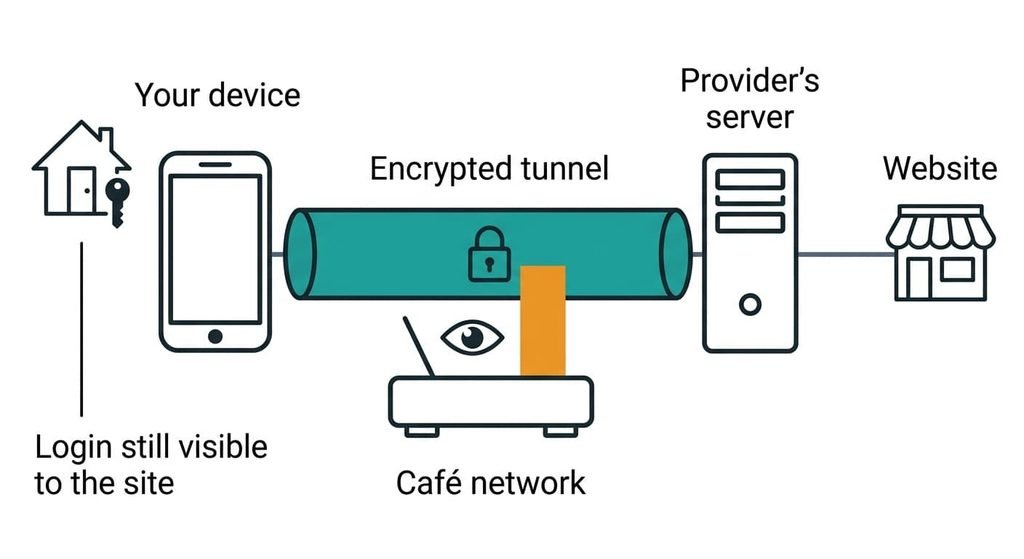
A VPN hides your address and the sites you visit from the network you’re connected to, by wrapping your traffic in a private tunnel that ends at one of the provider’s servers. The tunnel starts on your device and ends at that server. Everyone between the two ends, from the café’s router to the carriers beyond it, sees a scrambled stream going to one address. Two things change as a result. The network can no longer read which site you asked for, and the site no longer sees the café’s address.
The short answer leaves out three things. First, most pages are already sealed by HTTPS, the standard that encrypts a page between your browser and the site, so the tunnel adds the destination and adds nothing for the content. Second, the provider’s server sits at the tunnel’s end, so it sees what the café network stopped seeing. Third, the site still receives whatever you hand it, including a login and cookies, plus details about your browser.
What a VPN hides from the network, step by step
Trace one request from a phone in a café to a shop’s website. The café connection appears to the internet as 198.51.100.24. The provider’s server is 203.0.113.9, and the shop is 192.0.2.80.
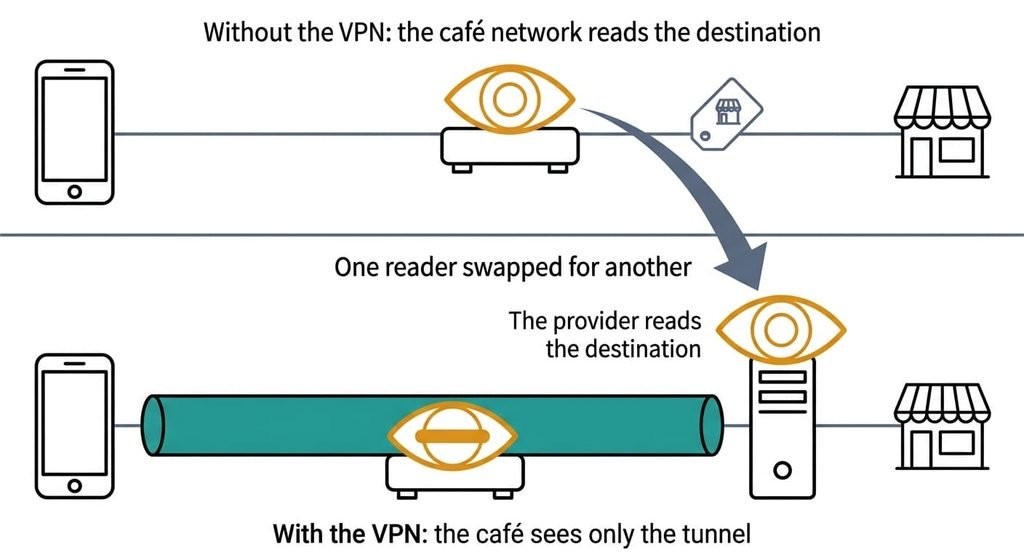
Start without a VPN. The phone asks a name server, which translates site names to addresses, for the shop’s address. It then opens a connection to 192.0.2.80. On most connections the shop’s name travels in readable form during that setup, while the page itself is sealed. The café’s router therefore reads the destination and the time, and it can’t read the page.
Now switch the VPN on. The phone seals the request as before, then wraps the whole packet in a second one addressed to 203.0.113.9. The router sees a packet of, say, 1,240 bytes going to that address at 10:02:07. It can’t see the shop’s address or name, and the page stays sealed.
The provider’s server removes the wrapper. It now sees a sealed request for 192.0.2.80 and the shop’s name, and it sends the request on under its own address. The shop sees a visitor from 203.0.113.9. If you sign in, it sees your account too, because the login travels inside the sealed request. The reply returns the same way, and the router sees only bytes arriving from the provider.
One step can undo the rest, and it’s the name lookup. If the app sends lookups through the tunnel, the provider answers them. If a lookup goes out through the café instead, the router reads the shop’s name while the tunnel stays up. That failure is the first thing to check when a VPN seems to hide nothing.
Count who can read the shop’s name. Without the VPN it’s the café’s network and the carrier behind it, and with the VPN it’s the provider and the carrier behind the provider.
One reader has been swapped for another.
A courier depot, and where it breaks
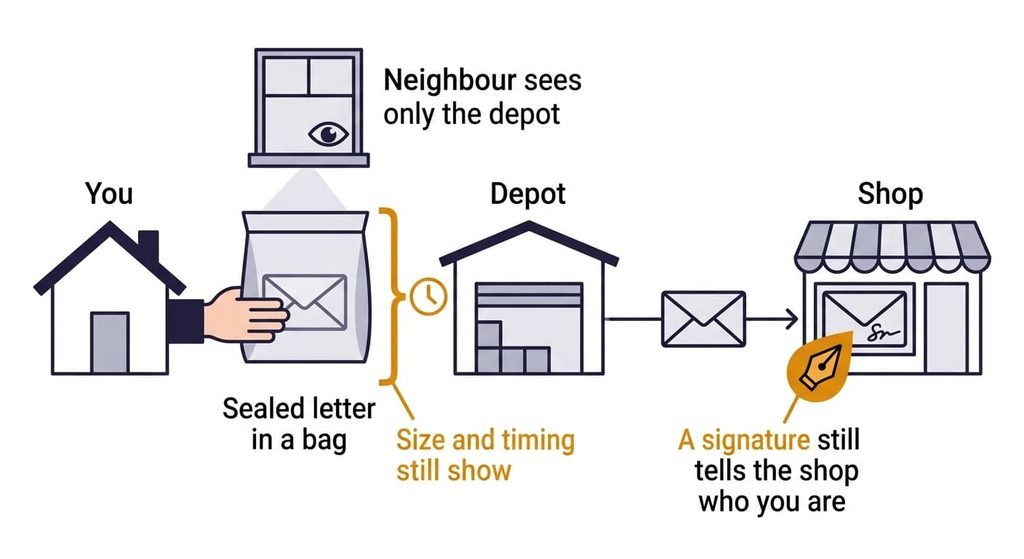
What does a VPN hide in this picture? Only the shop’s address, and only from the neighbour. Say you seal a letter addressed to the shop and put it in a bag addressed to a courier depot. A neighbour watching you hand over the bag sees only the depot. The depot opens the bag and reads the shop’s address. Then it posts the letter under its own return address.
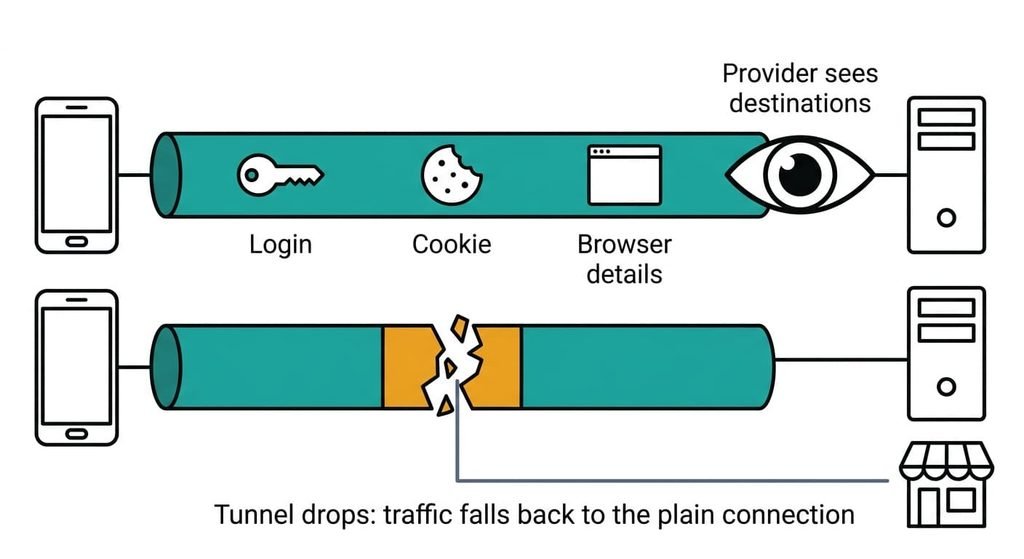
The picture breaks in two places. The neighbour still sees how thick the bag is and when you handed it over. Those are the size and timing that the router saw above. And a letter signed with your name tells the shop who you are, however the letter arrived. A login does the same job.
What a VPN doesn’t do
A VPN moves trust from the network you’re on to the provider, and it removes none of it. What does a VPN hide from the provider that runs it? Very little, because its server sees every destination the café’s router would have seen. It sees the times and amounts too. What it records isn’t visible from your side, and how long it keeps records is the provider’s decision. Those limits make the provider matter as much as the tunnel.
The tunnel can also drop without a warning. Apps then fall back to the plain connection, so a setting that blocks traffic while the tunnel is down matters. A VPN doesn’t check pages either, so a fake shop stays fake. Sign-ins and cookies travel inside the tunnel unchanged, and so do browser details. The network still sees that you use a VPN, because the stream goes to one address that belongs to a provider. Packet sizes and timing stay visible too, and sometimes they hint at the kind of activity, such as a long video stream.
Where the usual beliefs about VPNs go wrong
One belief says a VPN makes you anonymous. It formed because an address is the identifier most people know about. A site you sign in to still knows your account, and its cookies recognise your browser on the next visit, whatever address you arrive from.
Another says a VPN protects the page you read on every site. It formed in the years when many sites sent pages unsealed, and a tunnel did protect them. HTTPS already seals the content on most pages today, so the tunnel’s real addition is the destination. I’d drop the word anonymous from VPN talk altogether. A third says private browsing hides you from the café, which formed because the word private sits in the menu.
Private browsing changes what your browser keeps on your device, and the network never notices.
How to tell whether a VPN fits your case
Ask who you want to hide from. A VPN helps against the network you’re on, and it does nothing against the site you sign in to or the provider you chose. If the party you least want reading your destinations is the café or hotel network, and you trust the provider more than that network, run the VPN. If the party is the site you sign in to, or the provider itself, the tunnel changes nothing you care about. Whether your café network watches anything at all, I can’t see from here, and the rule doesn’t need to know.
What does a VPN hide? It hides your real address and your destinations from the network you’re on, and it hands those destinations to the provider instead. HTTPS already seals most content, and the site still knows any account you sign in to. The test is a single question: which party do you want to hide from? Answer that before you pick a tunnel, because the answer decides everything else that follows.
Questions readers keep asking
How much of my browsing can a VPN see?
The provider sees every destination and the times you connect, because the tunnel ends at its server. It can’t read the content of pages that HTTPS already seals. Traffic that isn’t sealed is readable to it, so what it sees depends on the sites you use.
Do I need a VPN on my home Wi-Fi?
Your home network is your own, so the party that sees your destinations there is your broadband provider. A VPN swaps that provider for the VPN’s. Whether you gain anything depends on which of the two you trust more, and on whether anyone else shares your connection.
Is a VPN the same as private browsing?
Private browsing stops your browser saving history and cookies on your device. A VPN changes which network sees your traffic. Neither hides a login from the site you sign in to. They solve different problems, so the two can be used together.