Pages that open in a blink without the VPN take seconds once it’s on, and a speed test insists nothing is wrong. Your VPN makes every website load slowly because a page needs many back-and-forth trips and the tunnel lengthens each one. Picking the exit server in your own city or the nearest one usually resolves it.
A VPN (virtual private network) is an encrypted tunnel to a server that fetches pages on your behalf. Four separate delays stretch that trip: distance, the way the tunnel carries its packets, the size of those packets and a crowded server. The tests below tell them apart, and the fixes then climb from free to paid.
What is actually going wrong when a VPN makes every website load slowly
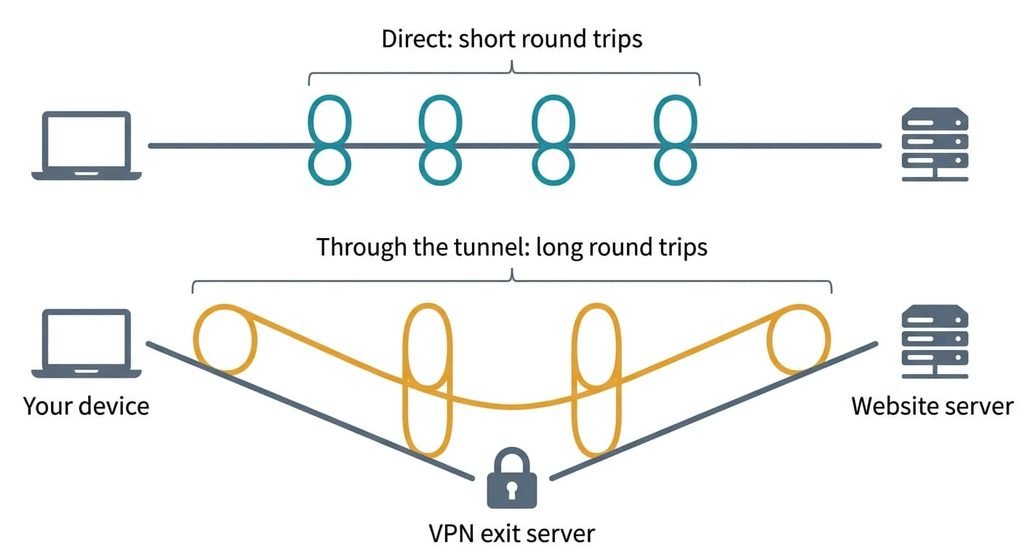
A page doesn’t arrive whole. Your device asks a name server, which turns the site’s name into an address, and opens a connection. It then agrees encryption keys and requests the page. Each step waits for a reply, so each costs a round trip, the time a message takes to reach the far end and return. That’s four round trips before the first byte from a new site, and each extra domain repeats them. A page load is a chain of round trips, and a VPN lengthens every link.
Say a page touches three domains in turn, for twelve round trips. At 20 ms each, that’s 240 ms of waiting. Through an exit server on another continent each takes 190 ms, and the chain takes 2.28 seconds. The figures are illustrative, yet the multiplication is real.
A speed test moves one large file over one open connection. It measures capacity and hides round trips, which is why it passes.
Three more mechanisms add to distance. A tunnel over TCP wraps one reliable connection inside another, and after a lost packet both layers resend and stall each other. The tunnel header also takes bytes from every packet, so a full-size packet can be split or dropped. A provider’s server shares its capacity, so replies queue at busy hours.
Narrow it down in two minutes
Work through them top to bottom. None changes your data or needs a purchase, and each shows why your VPN makes every website load slowly on your line.
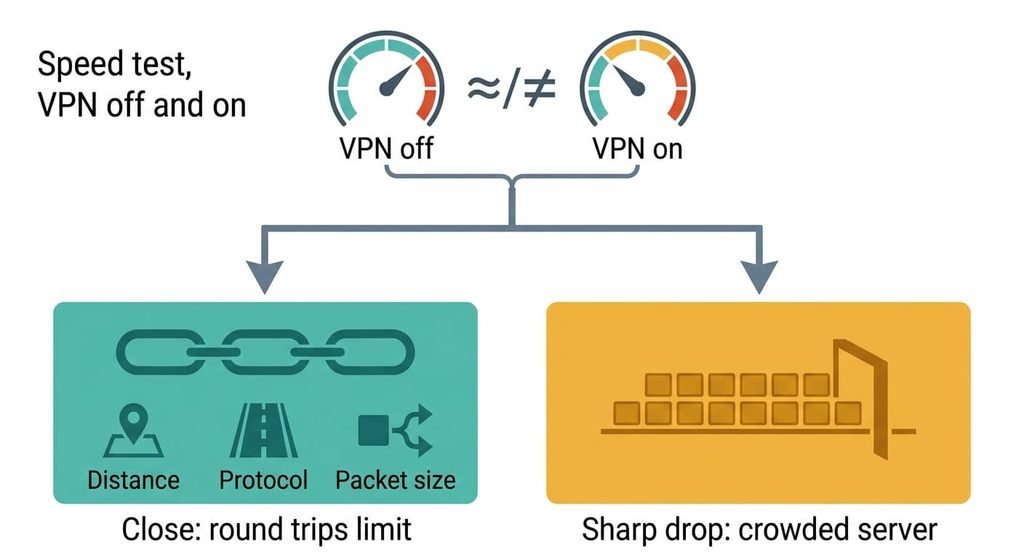
First, run a speed test with the VPN off and then on. If the two results are close, the limit is round trips, so the cause is distance, the protocol or packet size. If the second result drops sharply, the limit is capacity, which points to a crowded server.
Second, open one familiar site through the nearest exit server, then through a distant one. If the nearer one is clearly quicker, distance is the cause.
Third, compare a plain text page with an image-heavy page. If the text page opens normally while the heavy one stalls partway, packet size is the cause.
Fourth, load a site beside the router, then from a far room on weak Wi-Fi. If the slowdown appears in bursts and mostly on the weak signal, the stacked resends of a TCP tunnel are the likely cause.
Fifth, repeat the first test morning and evening. If only the evening run is slow, the server is crowded.
Write each result down before you change anything.
How to fix a VPN that makes every website load slowly, in order
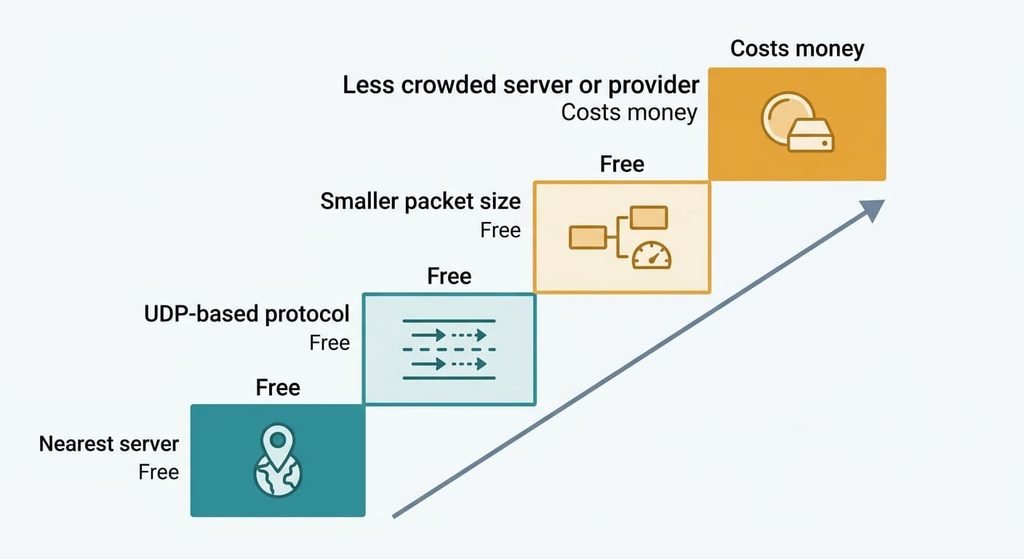
Switch to the exit server nearest to you. This targets distance, because every round trip now covers a shorter path and twelve of them add up. The app’s location list often shows a latency figure beside each entry, and lower is better. Retest after the move, because a nearby server in another country can still route the long way round. It costs a reconnect, and the reconnect drops open downloads and live calls. Sites that tailor content by country treat you as living wherever the new server is. A streaming library or a shop’s prices may change.
Change the tunnel protocol to a UDP-based option. This targets the stacked resends. UDP is a transport that never resends lost packets itself, so only the inner connection recovers them. It costs a setting change and a reconnect, and the fourth test should then show smaller bursts. A lossy path becomes a small glitch instead of a long freeze. Some hotel and office networks block UDP, and the tunnel then fails to connect until you switch back.
Lower the tunnel’s packet size in small steps. This targets the splitting and silent drops. It costs about twenty minutes, because you reload the same image-heavy page after each step and keep the first value that loads cleanly. Change one value at a time, so you know which step fixed it. The app’s recommended value is [VERIFY: recommended tunnel packet size]. A value set too low makes every packet carry less, so large downloads run a little slower. Many apps hide this control, so skip to the next fix if yours does.
Move to a less crowded server, or to another provider. This targets queueing. Try a second server in the same country at the busy hour first, since that costs nothing. If every server on your plan slows at the same hours, the provider is the limit, and changing provider costs money. Cancelling mid-term may forfeit the unused months [VERIFY: refund terms]. Your saved logins in the old app go with it, so keep the old plan running for a week. Rerun the evening test on the new server before you cancel anything.
If none of that worked
If your VPN makes every website load slowly even after all four fixes, either your broadband line treats tunnel traffic differently or the app itself is at fault. Open the same sites with the VPN on, using mobile data instead of your home line. If they load quickly there, the home line is involved. Write down the exit server’s location and the protocol. Add the times of day and both speed-test results from earlier.
Then ask the VPN provider three questions. Is this server oversubscribed at peak, is a UDP-based protocol available, and what packet size do you recommend? Reinstalling the app is your final move, and it erases the saved settings and login, so write them down first. Resetting the router erases its Wi-Fi name and password, so photograph its settings page before you start.
The fix that isn’t worth doing
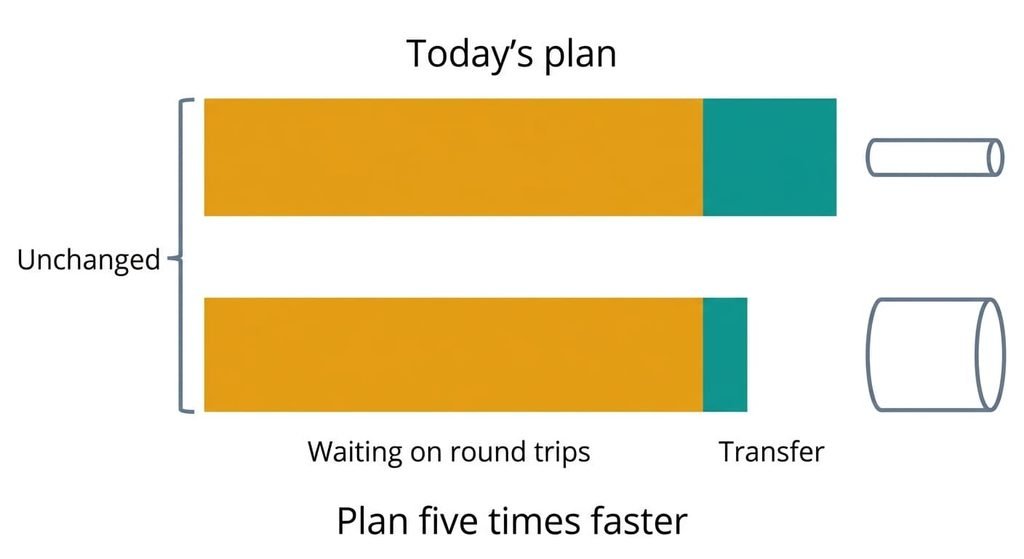
Paying for a faster broadband plan is the popular remedy, and it targets the wrong delay. Take a 2 MB page, which is 16 megabits. At 100 megabits a second the transfer takes 0.16 seconds, and at five times that speed it takes 0.032. You save 0.13 seconds from a total of about 2.4, roughly 5%, because the 2.28 seconds of round trips stay put.
A faster plan widens the pipe and leaves every round trip as long as before.
I’d refuse any upgrade until the on-and-off speed test has been run. If the two results match, the plan isn’t the limit, and the money buys a shorter download that nobody was waiting for. Capacity matters when the VPN result falls to a fraction of the plain one. Even then the cap may sit on the provider’s side, which you can’t see from here, so the test decides whether your own plan is worth changing.
A VPN makes every website load slowly because a page is a chain of round trips and the tunnel lengthens each link. The fastest test is the speed test with the VPN off, then on. Close results mean round trips, while a sharp drop means capacity. Start with the nearest exit server, since it costs one reconnect and fixes the most cases. Then work down the list.
Questions readers keep asking
How do I speed up a slow VPN connection at home?
Yes, in most cases. Choosing a nearer exit server and switching the tunnel protocol are free settings that take a minute each. Packet size takes longer, and only a crowded server needs money. Run the speed test with the VPN off and on first, so you change the right setting.
Why is my internet fast but websites slow on a VPN?
A speed test measures capacity on one open connection, while a page load measures round trips. The tunnel adds distance to every round trip, and a page needs a dozen or more of them. The test reads fine while pages crawl. Capacity only matters for large downloads.
Does a slow VPN mean my router or phone is failing?
Rarely. A failing device slows everything, with the VPN off as well. If pages load normally without the VPN and slowly with it, the tunnel is the cause. A slowdown that stays with the VPN off points at the line or the router, and then your broadband provider is the right call.