A tablet you barely use is closer to a window than a warehouse: almost everything you see on it lives somewhere else. That makes leaving cheap, and the realistic alternatives to a tablet you barely use are the phone and television you own, plus a single-purpose reader for long text. What decides whether leaving is worth it is the small share that exists only on the tablet.
The guide assumes a UK home with an idle tablet that holds books and downloaded video, plus a few files. It names no products, because the choice is about routes and not about brands.
What has to survive the move
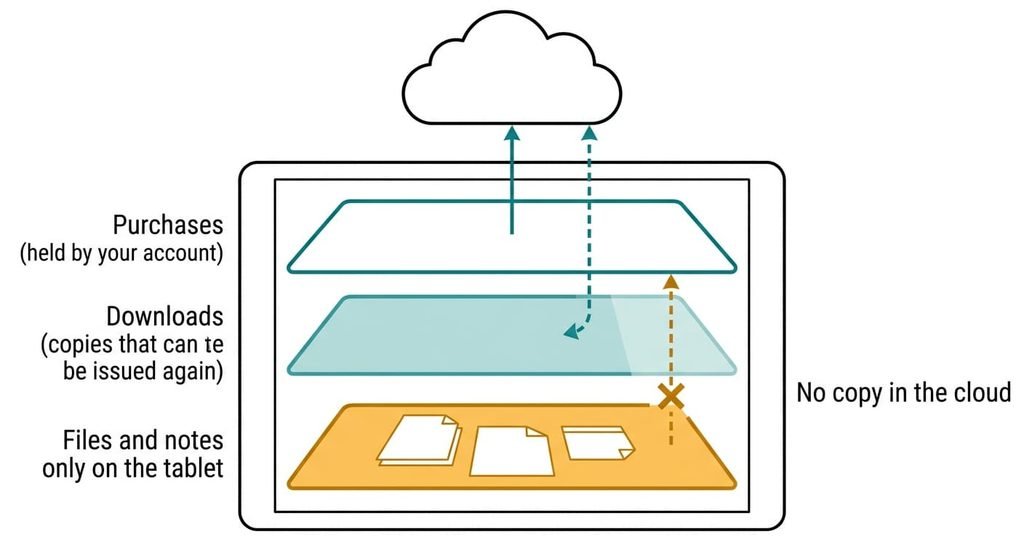
Three layers sit on the tablet, and they leave in three different ways. Your purchases (books, films, subscriptions) live in your accounts, so they survive without any effort. Your downloads are temporary copies that the service can issue again to another device, within whatever limit the account sets on devices. The third layer is the one that goes missing: the files and notes that exist only on the tablet.
A purchase is a licence held by your account, and the tablet is only one of the places that plays it.
Those local items include documents you copied across by hand and highlights made in a reading app. Screenshots count too, along with anything saved for offline use that has no online twin. Files copy out cleanly if they’re in a common format. Notes export badly when the app writes plain text without page positions. Some don’t export at all. Reading position is the odd one out. It lives with the service if the app syncs, and on the tablet if it doesn’t, so open the same book on your phone to find out which. Check one of each before you decide anything.
Alternatives to a tablet you barely use, and what each one costs you
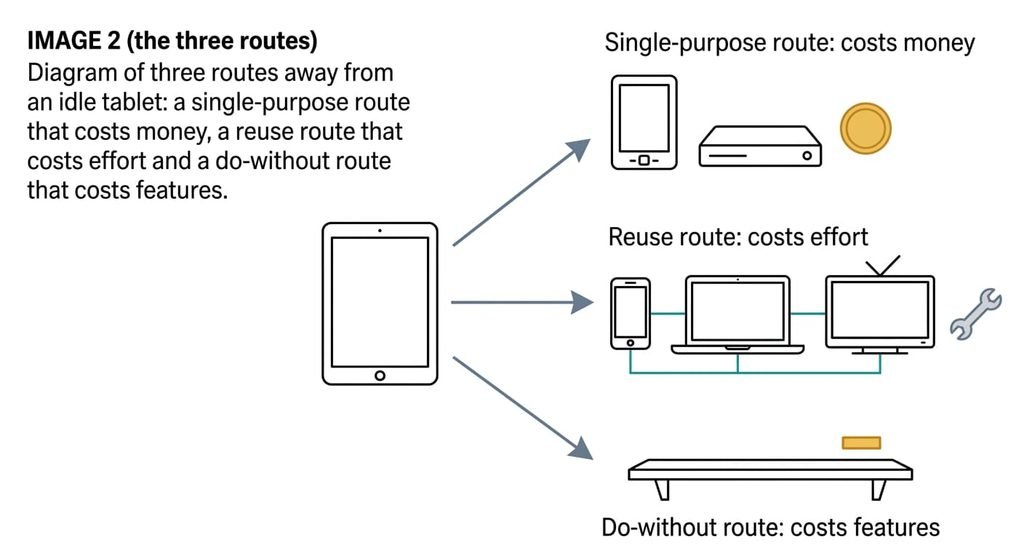
1. The single-purpose route. A dedicated reader for long text and a streaming device for the television, which means two machines, each with one job, bought with money. It suits someone who reads in long sessions or watches on a big screen. The trade-off is cost and two more things to charge or plug in. Purchases open only if the store behind them supports the new device. Your own book and PDF files copy across when the reader accepts the format. Format is the test here: a plain book file or PDF opens in any reader, while a file wrapped in a store’s protection opens only in that store’s apps. It typically ends in the drawer, because the habit that left the tablet idle moves to the new device.
2. The reuse route. The phone and laptop you already own, plus the television, with the accounts signed in on each. It suits anyone whose accounts already work on a phone. The trade-off is effort and screen size: casting to the television takes a few taps, and a phone is small for long text. Sign-in comes first, then a check that each service allows another device on the account. Purchases follow the account and reading positions follow wherever the app syncs. Downloaded video downloads again. Notes stay behind unless the app exports them. It typically ends when one place has no device that fits, and the tablet comes back out.
3. The do-without route. Sell the tablet or give it away, and use only what’s left. It suits someone whose last month shows no use at all. The trade-off is feature loss: no large portable screen and no offline library on it. Everything in your accounts lands, while anything stored only on the tablet goes with it unless you copied it out first, because a factory reset erases every local file. It’s the only route that gives back the shelf space. It typically ends in a rebuy when a long journey arrives.
The trade-off nobody warns you about
The cost of alternatives to a tablet you barely use shows up in month three, and it’s the slot the tablet quietly filled. A tablet that’s barely used is often used in exactly one place, such as propped on the kitchen counter or held in bed. Devices fit places by size, by whether they stand up and by whether your hands are free. A phone fits a pocket, a television fits the sofa, and neither fits the counter. In week one nothing seems to be missing. By month three you’re watching a recipe on a phone leaning on a jar, or you’ve stopped watching at all. Each route also punishes a habit. A single-purpose reader punishes switching between a book and a quick search, and a phone punishes long reading with interruptions from everything else on it. Name the slot and the habit before you choose a route.
How to leave a tablet you barely use without losing anything
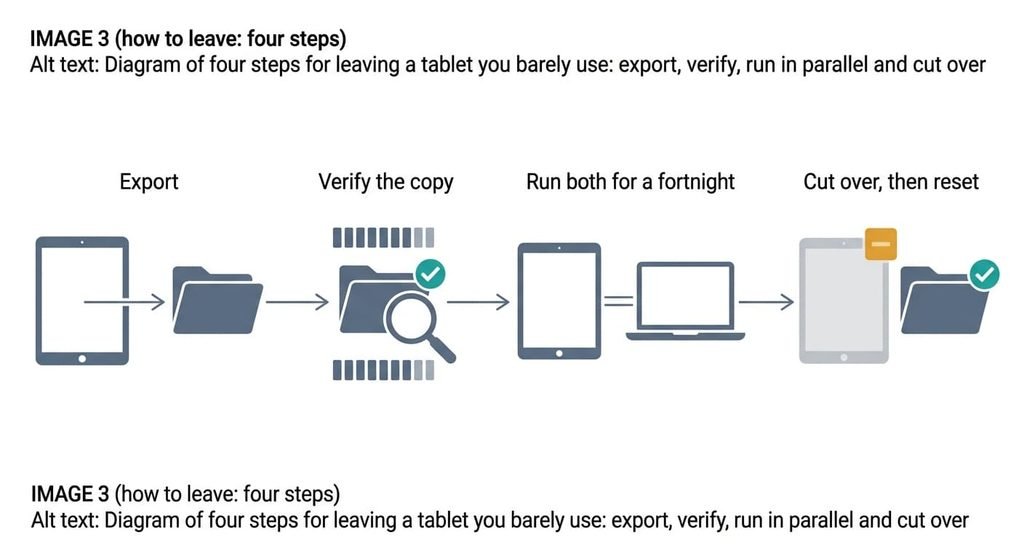
Export first, then verify, then run both in parallel, then cut over. Verifying means more than opening the copied files, since an export that opens can still be incomplete. Compare the count of items before and after. Open the oldest and the newest, because a stopped copy often stops at the end. Open one note and one highlight on a different device, and check that the pages or positions are there. Then use the new route for every slot for a fortnight, with the tablet switched off in a drawer. Write down each time the new route fails you, because two failures in the same place name the slot. Only after that, reset the tablet to factory settings, which erases everything stored only on it, so the copy must have opened elsewhere first.
When to stay
Staying put is one of the alternatives to a tablet you barely use, and it wins when the log shows a slot no other device fills. The tablet also earns its place when it’s the only device that opens something you need, such as an annotated document or an app with no version for your phone or laptop. A tablet shared by two people for different jobs is a shared arrangement, and leaving it means two migrations. Another case is an export that loses the part that mattered, such as page positions. An idle tablet costs shelf space and an occasional charge, so a rebuy costs more than a month of waiting. For a household with one such slot, the honest answer to the title is to keep it and stop calling it unused. I’d keep it for a full month and note each time you reach for another device instead.
A month of notes beats any comparison chart.
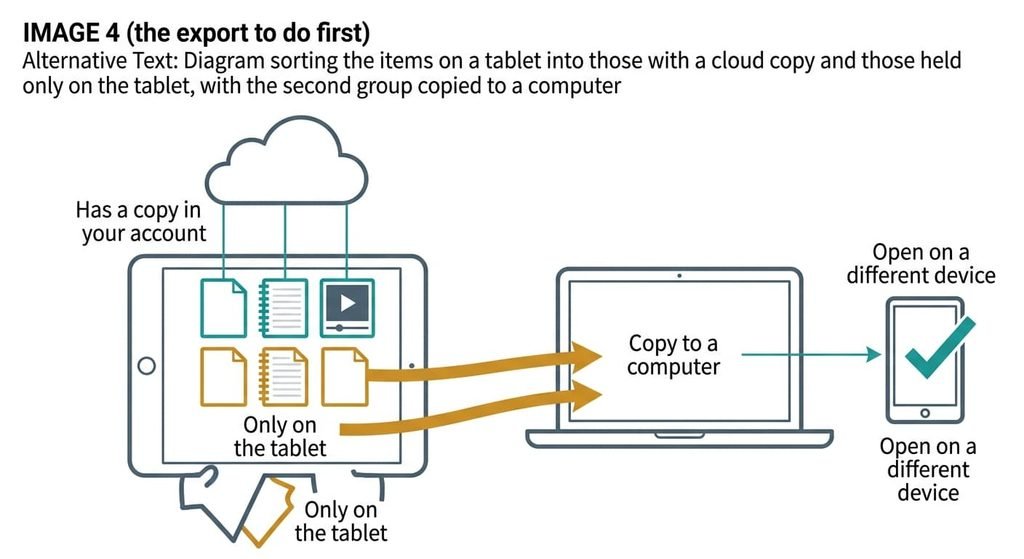
The export to do before you decide anything
Make a list of what exists only on the tablet, and copy it to a computer today. Look in the file storage for anything outside the standard folders, then in each reading app for items stored on the device with no online copy. Ask for open formats: plain book files or PDF for text. Notes suit PDF or plain text. When the copies arrive, open them on a different device and check the count. Then confirm that your downloaded video is offered again in the service. A file that opens isn’t proof, so check that a note still shows its date and a document its pages. Whatever you decide later, you can now leave.
Alternatives to a tablet you barely use cost little because almost everything sits in your accounts. The files and notes held only on the tablet are the part that needs saving. Make the export today, and note the slots over a month first. If a month shows a slot, stay.
Questions readers keep asking
Do my books and downloads move if I replace my tablet?
Purchases live in your account, so they open on any supported device you sign in to. Downloaded video is a temporary copy and downloads again, within the account’s limit on devices. Files and notes held only on the tablet don’t move on their own, so copy them out first.
Is replacing a tablet I barely use cheaper than keeping it?
Keeping it is the cheaper default, since an idle tablet costs only shelf space and an occasional charge. Your phone and television cover most reading and video for nothing. Spend only on a gap that a month of notes shows, matched to that one gap.
Is it worth getting rid of a tablet I barely use?
Only if a month of notes shows no slot that nothing else fills. An idle tablet costs shelf space and an occasional charge, so there’s no hurry. If you reach for it weekly for a job your phone can’t do, keep it.