A video call freezing or lagging repeatedly usually isn’t a single mysterious glitch – it’s typically one of a small number of specific, checkable causes, each requiring a genuinely different fix. Understanding which category applies to your specific situation determines whether the fix takes seconds or requires a more involved change to your actual setup.
What is actually happening
Video calls require genuinely continuous, real-time transmission of both audio and video data simultaneously, which makes them considerably more sensitive to connection and processing limitations than many other everyday online activities. This specific combination of requirements means a video call can freeze or lag from causes distinct from general internet slowness alone – your device’s own processing load, the specific call platform’s server conditions, or genuine bandwidth competition from other devices sharing your connection at that moment.
Distinguishing between these categories matters because “my video calls keep freezing” caused by your own device struggling with processing load requires an entirely different response than the same symptom caused by genuine internet bandwidth limitations, which no device-side change can actually resolve.
Confirm which pattern you have
Check whether freezing or lagging happens consistently across every video call platform you use, or seems specific to one particular service, since this distinguishes a broader connection or device issue from a problem specific to that one platform’s current server conditions.
Check whether other internet activity on your device or network – browsing, streaming – also seems affected during the same period freezing occurs, since this helps distinguish a genuine bandwidth limitation from an issue specific to the video call software or your device’s processing capacity alone.

The causes, diagnosed
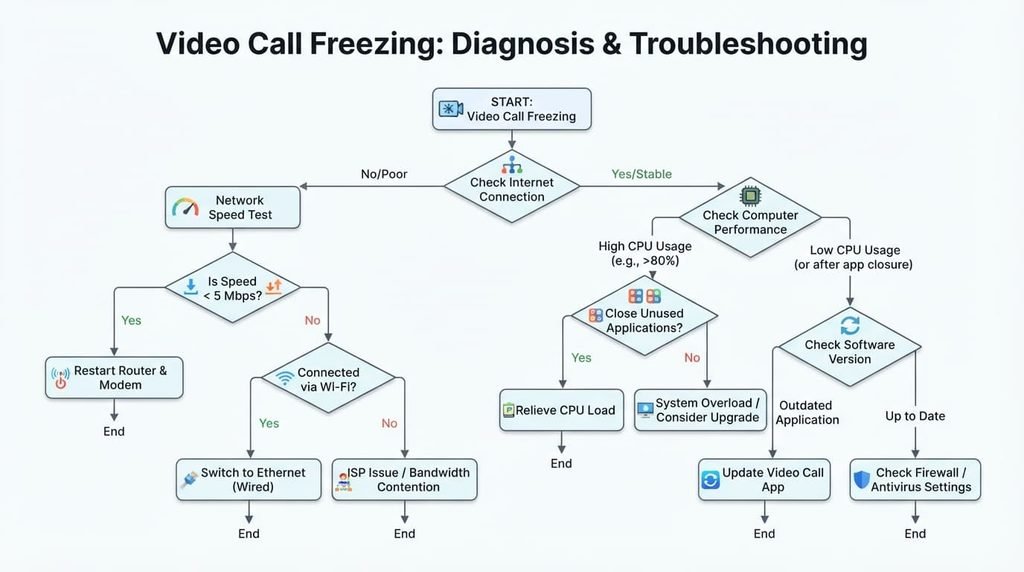
“My video calls freeze specifically when I have several other applications or browser tabs open simultaneously.” This points to your device’s own processing capacity being genuinely stretched across too many simultaneous demands, since video calls require meaningful, continuous processing power that competes directly with other actively running applications. The fix: close unnecessary applications and browser tabs specifically before or during important calls, freeing up processing capacity for the call itself.
“Freezing happens specifically when someone else on my network is also streaming or downloading something large.” This points to genuine bandwidth competition within your own household network, since video calls require consistent, real-time bandwidth that degrades noticeably when competing with other bandwidth-heavy activity happening simultaneously on the same connection. The fix: coordinate timing with others on your network during important calls, or check whether your router offers a way to prioritise video call traffic specifically over other activity.
“Lagging happens consistently on one particular platform, while other video call services work fine for me.” This points to that specific platform’s current server conditions or your specific device’s compatibility with that particular service, rather than a general connection or device issue. The fix: check that specific platform’s own status page for reported issues, and ensure you’re using its most current version, since this pattern often resolves once platform-specific issues are addressed on their end.
“My video calls freeze specifically toward the end of longer meetings, even though they start out fine.” This points to genuine device heat buildup or memory accumulation over an extended session, since sustained processing demand over time can cause some devices to throttle performance or accumulate temporary memory issues that weren’t present at the call’s start. The fix: restart your device before genuinely long or important calls specifically, rather than only when problems have already begun, since starting from a fresh state reduces the accumulated load contributing to this specific pattern.
What people get wrong about video call quality
The most common misconception is assuming all call quality issues stem from your internet connection specifically, when a genuinely significant portion of freezing and lagging traces back to device processing load or household bandwidth competition instead, factors entirely separate from your actual internet plan’s fundamental capacity.
A second common misconception is assuming a video call platform’s own app is always fully optimised and therefore never the source of the problem. Different platforms genuinely vary in how efficiently they use your device’s resources, meaning switching platforms for a specific important call can sometimes resolve an issue that persists across your usual choice specifically.

What isn’t worth doing
Immediately assuming you need a completely new internet plan or device upgrade, without first identifying which specific cause above actually applies to your situation, isn’t worth the expense this assumption leads to.
Many common causes of call freezing – device processing load, temporary household bandwidth competition, platform-specific issues – don’t actually require any upgrade to resolve, meaning a significant purchase often doesn’t address an issue that was never genuinely about your internet plan’s overall capacity or your device’s fundamental capability in the first place.
When this points to something more serious
If video calls freeze or lag persistently even when you’ve confirmed no other applications are running, no other household bandwidth competition exists, and the issue occurs consistently across multiple different platforms, this points toward a genuine underlying connection quality issue worth investigating directly with your internet provider.
This genuinely matters because this specific combination of ruling out the more common, addressable causes suggests something more fundamental about your actual connection quality itself, which situational fixes like closing applications or coordinating household timing simply won’t meaningfully resolve if the underlying connection itself is genuinely the actual limiting factor.

How to prevent this from recurring during future calls
Close unnecessary applications and browser tabs as a genuine habit before starting any important call, rather than only addressing this reactively once freezing has already begun, since this proactive step prevents a meaningful portion of processing-related freezing before it actually occurs.
Consider your household’s typical bandwidth-heavy activity patterns when scheduling genuinely important calls, if possible, since avoiding known peak competition times for your specific household can meaningfully reduce the likelihood of bandwidth-related freezing during calls that matter most.
Questions readers keep asking
Does my device’s age or specifications genuinely affect video call quality?
Yes, meaningfully – older devices or those with more limited processing capacity can genuinely struggle with the continuous, real-time demands video calls place on a device, particularly when other applications are also running simultaneously during the same call.
Is it normal for video call quality to vary throughout the day?
Yes, this is a genuinely common pattern, since overall network congestion – both within your own household and more broadly from your internet provider’s perspective – tends to vary by time of day, with busier periods sometimes producing more noticeable quality impact than quieter ones.
Does turning off my own video feed genuinely help if I’m experiencing freezing?
Yes, often meaningfully – transmitting your own video requires genuine additional processing and bandwidth beyond receiving others’ video and audio, so temporarily disabling your camera during a call experiencing freezing can noticeably reduce the demand on both your device and connection specifically.
Should I be concerned if video calls work fine on my phone but freeze on my computer?
Not necessarily concerning, but worth investigating specifically – this pattern often points toward your computer’s own processing load or a setting specific to that device, since your phone and computer likely handle the same call differently depending on what else is running on each device at that time.