The complaint is always the same. You lift the lid and lay the page down. The carriage crawls across, and then you rename the file, so one letter has cost forty seconds. That is why people hunt for alternatives to a flatbed scanner, and you will probably land on a phone camera or a feeder that pulls pages through. What decides whether leaving pays is how many pages you scan and how many are fragile or oversized.
The figures are made up for a UK household with a drawer of 600 loose pages and about 150 new ones a year. Timings and error rates are my assumptions, so use your own.
What has to survive when you look for alternatives to a flatbed scanner
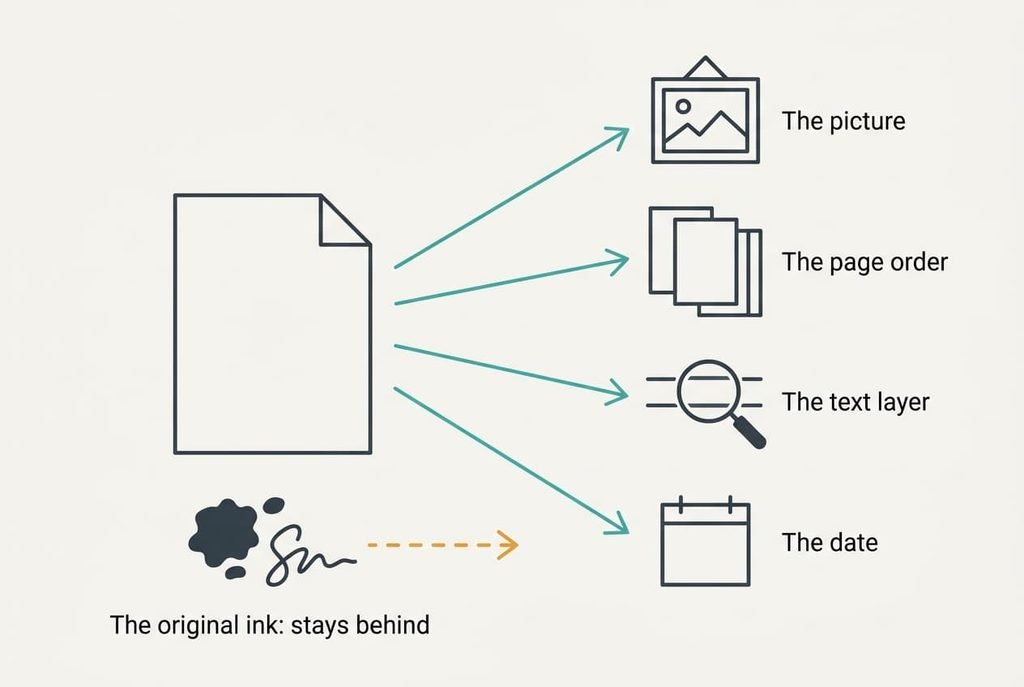
Before you compare machines, list what a scan has to carry. A paper page holds four things worth keeping. One is the picture of the page, and another is the order of its sheets, since a six-page contract that arrives shuffled is useless. A third is a text layer, which lets you search by a word. The last is the date, meaning which month a letter belongs to.
The picture moves anywhere, as an image always does. Page order and dates survive only if the file names carry them. The text layer is the fragile one: it appears only if recognition software can read the picture, and that depends on sharpness. The part to protect is a page you can read at the size of its smallest print, because a blurred account number is the detail you will need later.
One thing never moves at all, and that’s the paper itself. A signature in ink and an embossed seal can’t be reproduced by any scan.
Without a text layer, finding one letter among 600 images at five seconds a page takes 50 minutes, while a search of searchable pages takes seconds.
The kinds of replacement, and what each costs you
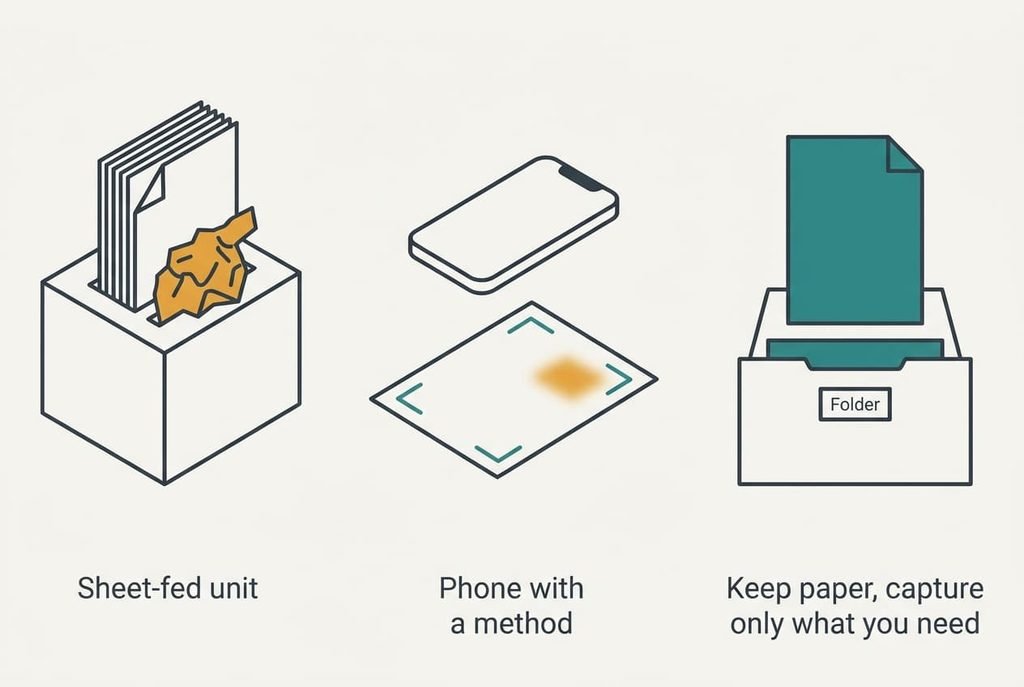
1. A sheet-fed unit. Call this the money route. It suits a household holding a backlog of loose pages that all need doing once. The trade-off is a purchase and a permanent desk spot, because a feeder that gets packed away after each use soon goes unused. Your pages land in order, in one file per bundle, and a recognition step can add the text layer. Assume 8 seconds a page plus 30 bundles at a minute each to remove staples. That gives 4,800 seconds plus 1,800 seconds, or 110 minutes for the 600 pages. It ends in a jam on thin or curled paper, and the page that jams is often the old one you couldn’t replace.
2. The phone camera with a method. Call this the effort route. It suits occasional scanning by someone who will check their own work. The cost is your attention. Each page needs flat light and a square angle. Then it needs a check, because a phone photographs at whatever sharpness your hand allows. At an assumed 20 seconds a page, the backlog takes 12,000 seconds, or 3.3 hours. Pages land as images, and the phone’s own recognition adds a text layer to most of them. Dates and order survive only if you name each file as you go, which is the step that people skip when they’re tired. It ends when blurred pages pile up, because nobody re-checks a finished batch.
3. Photograph only what you will need, and keep the rest as paper in labelled folders. Call this the do-without route. It suits households that rarely look anything up. You lose search across the whole pile, but you gain the hours. A typed label on each folder stands in for the text layer, and the few pages you do capture arrive in the same quality as route two. Dates survive when the folder label carries the year, and order survives because the paper never moves. It ends when you need a letter from a folder with no label.
The cost that turns up in month three
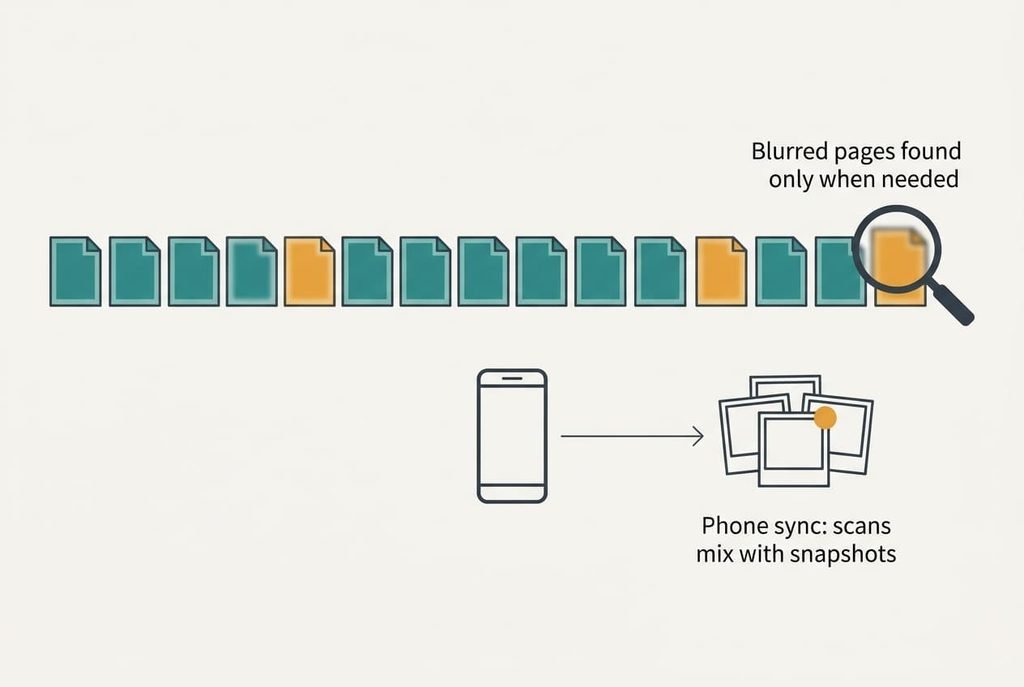
The surprise is a quiet one. The pages that were blurred on the day show up only when you need them. At an assumed 5% blur rate, 30 of the 600 pages are unusable, and nobody notices until one of them is wanted. Over 20 lookups a year you’d expect one failure. By then the paper may be shredded.
A second cost sits in the phone. Pictures of letters land in the photo library, which may sync to a shared album. A bank statement can end up in the same stream as holiday snaps. I’d argue that’s the larger risk of the phone route, because nothing warns you when it happens.
Among the alternatives to a flatbed scanner, the phone route needs checking most, and checking is the fix. A pass at 2 seconds a page costs 20 minutes for 600 pages, which is cheaper than finding out later.
How to leave without losing anything
Start with ten typical pages from the drawer. Make sure a stapled bundle is among them, along with a thin sheet. Capture them the new way, then compare each with the flatbed version at full size. The page that fails is the test of the method.
Next, decide the naming rule before you scan anything. Put the date first in the file name to keep the order, and add the sender to say what the file is. Run both routes for a month.
Verifying a scan means three checks. The page count matches the paper. The smallest print is readable at full size. A search finds a word you know is on the page. No alternatives to a flatbed scanner have earned their place until all three pass on a sample.
Nothing goes in the shredder until six months after the last page is captured.
When to stay with the flatbed scanner
Stay put when your originals are fragile or oversized, or bound into a book. A feeder tears thin paper, and a phone distorts the curve of a bound page. A flatbed lays the page flat and square every time, and that matters most for the one document you can’t replace.
Stay as well when the volume is small. At 150 new pages a year and 40 seconds a page, the flatbed costs 100 minutes a year. A phone method would save 50 of them and bring a checking habit with it. That’s a small prize for a new routine, and the first month of a new routine is when mistakes creep in.
The payoff of leaving turns on what you scan, and you can’t tell that without looking at the drawer. If most pages are loose and modern, the annoyance is real but small. If there are few of them, a flatbed scanner may be the better place to stay.
The export to do before you decide anything
Pull out your old scans and look at them, since they show how your current method really performs. Open five at full size, then search each one for a word you know is on the page. Count how many are readable and how many answer the search.
If all five do, your current files are in good shape and you can move on with confidence. A method that matches that standard is a fair replacement, and one that falls short of it is a step backwards. If some fail, the weakness lies in how the pages were captured. Also check whether the folder holds dates in the file names. The new method has to fix whatever is missing there.
Carry the same five checks into whichever alternatives to a flatbed scanner you try. The payload to protect is readable pages in order with their dates, and the export to do today reveals how much of that you already have. Do it before spending anything, since the result may settle the question.
Questions readers keep asking
Can a phone replace a flatbed scanner for paperwork?
For loose, flat pages, yes. Use even light and a square angle, then check each page at full size. Phones struggle with bound books and curled or thin sheets. If most of your paperwork is a handful of single pages a month, a phone is enough.
Is a sheet-fed scanner worth it for a drawer of old letters?
Only if the drawer holds hundreds of loose pages. A feeder saves hours on a backlog but jams on thin or curled paper. For under about a hundred pages, a phone method is free and takes about as long overall.
Will scanned documents still be searchable if I switch?
Only if the new method adds a text layer. Most phone apps and feeders can, but not by default. Test it on ten pages and search for a word. If nothing turns up, add a recognition step before you scan the rest.