Can you stop a television’s software from running your evening without replacing the television? Usually yes. The screen and the software are separable parts. If you don’t trust your smart TV’s software, the realistic destination is a screen you keep and another device that runs the viewing.
Whether that move is worth making turns on what your accounts carry with them. Logins and watchlists live with each streaming service, so they travel freely. The set’s own settings and downloads do not, and that split decides how much leaving costs. Part of the answer is also what keeps running after you leave.
What survives when you don’t trust your smart TV’s software
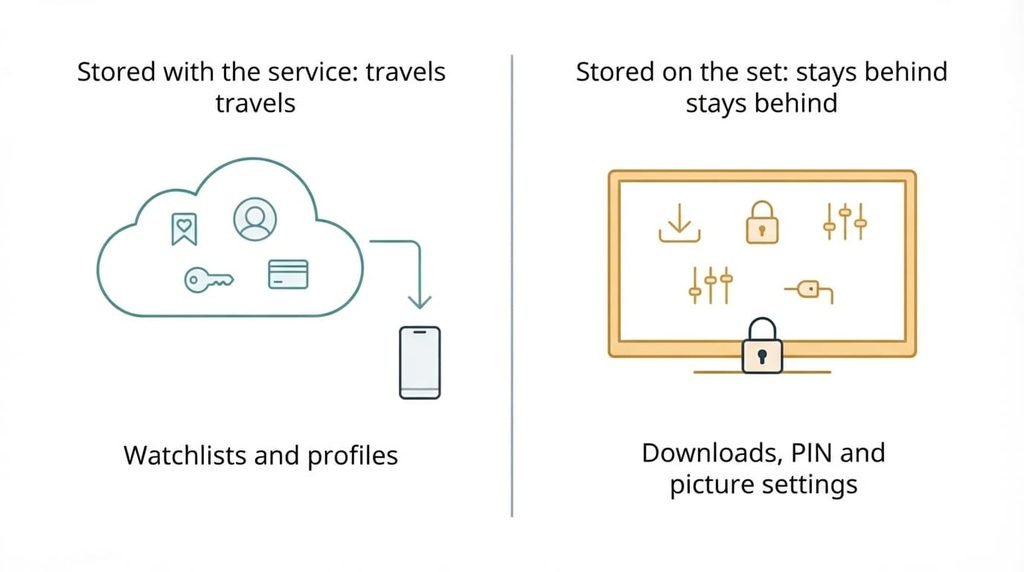
Before choosing a replacement, list what you’d be carrying. Accounts and watchlists live with the service rather than the television. A new device that signs in to the same service finds them waiting. Profiles inside each app and your subscriptions travel the same way, because the service stores them against your login. That is why you check the account side first: anything missing there is missing everywhere.
Some things stay behind. Titles downloaded for offline viewing are usually tied to the device that fetched them, so they vanish from the new one. The TV’s own picture presets belong to the set. So do its parental PIN and the names you gave each input, and nothing exports them. Its viewing history and recommendations stay behind as well, which some people count as a gain.
A final item is the oddest. Whatever the television records about the pictures on its inputs does not move with you, and it can carry on after you leave. That makes the second half of the question what keeps running once you’ve stopped using the software.
When you don’t trust your smart TV software: what to use instead
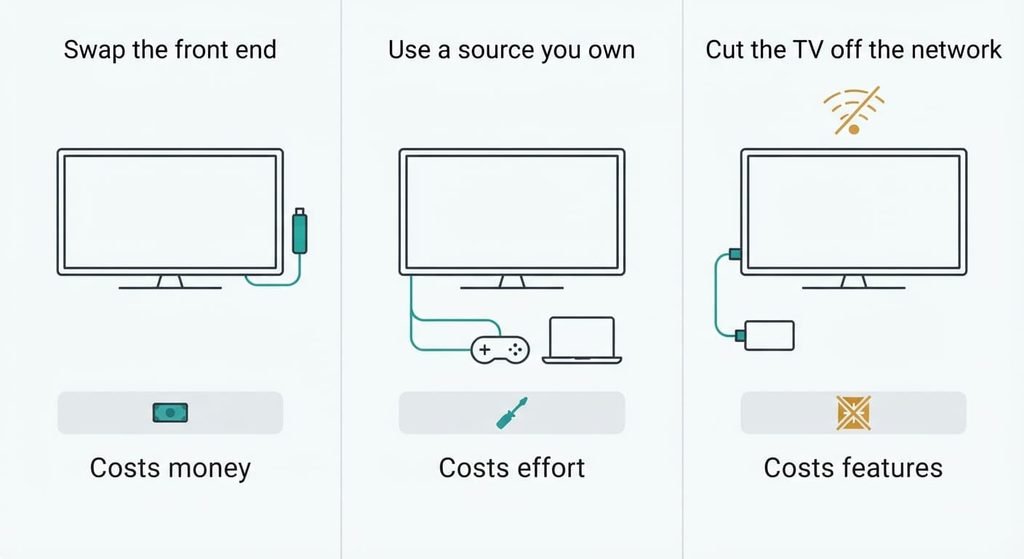
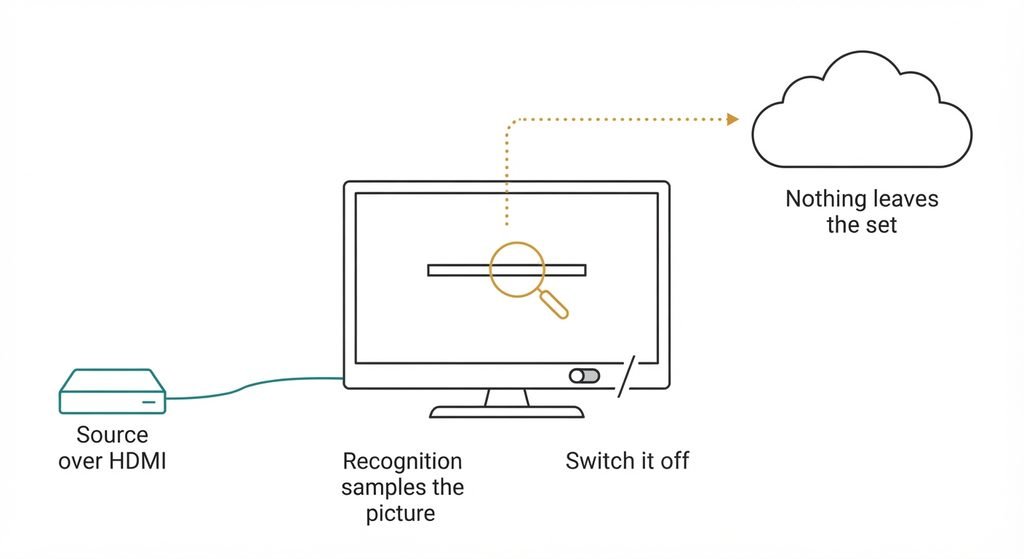
1. Swap the front end with a plug-in streaming device. It suits households that mainly want the same apps with less friction, and it fits any television with a free HDMI socket. It costs money. The trade-off is that you exchange one commercial home screen for another. The new platform brings its own placements and its own recommendations. Your accounts land well because you only sign in again. Downloads and TV settings stay behind. The failure mode is that the television’s automatic content recognition can still sample the picture arriving over HDMI when it’s switched on. The distrust is only partly answered.
2. Use a source from your own shelf. A games console or a computer can already play the main services through an HDMI socket. A provider’s set-top box often does the same. This route suits a household where one of these already sits under the television. This route costs effort rather than money: another remote and an input to select. Accounts land cleanly because you sign in again. The failure mode is age. Older consoles and boxes lose app support over time, and the arrangement quietly stops working.
3. Cut the television off the network. A set that can’t reach the internet can’t send anything out and can’t install updates. It suits people who distrust the software more than they miss its apps. The cost is features: no built-in apps and no updates, so the viewing must happen on route one or two. Nothing is carried over because nothing is used. The panel’s picture is untouched, since it doesn’t depend on the network, and a set that never updates behaves the same in five years. The failure mode is reconnecting. One guest or one update on the home Wi-Fi puts the set back online, and I can’t see what your set stores in the meantime.
The trade-off nobody warns you about
The bill arrives in month three, and other people pay it. Everyone in the household inherits the new routine. A relative who could press one button on one remote now needs a second remote and the right input. A child’s profile that was set up on the television alone has to be rebuilt elsewhere.
A sleep timer and a parental lock belong to the set, so each has to be rebuilt on the new device or given up. A visiting parent who could once find a programme with one press may now be lost at the second remote. The television also used to wake on a single press, while the new arrangement needs two devices switched on. I’d weigh this household cost above any privacy gain, because a system that annoys the people using it gets abandoned.
The household is the real customer of this move.
How to leave without losing anything
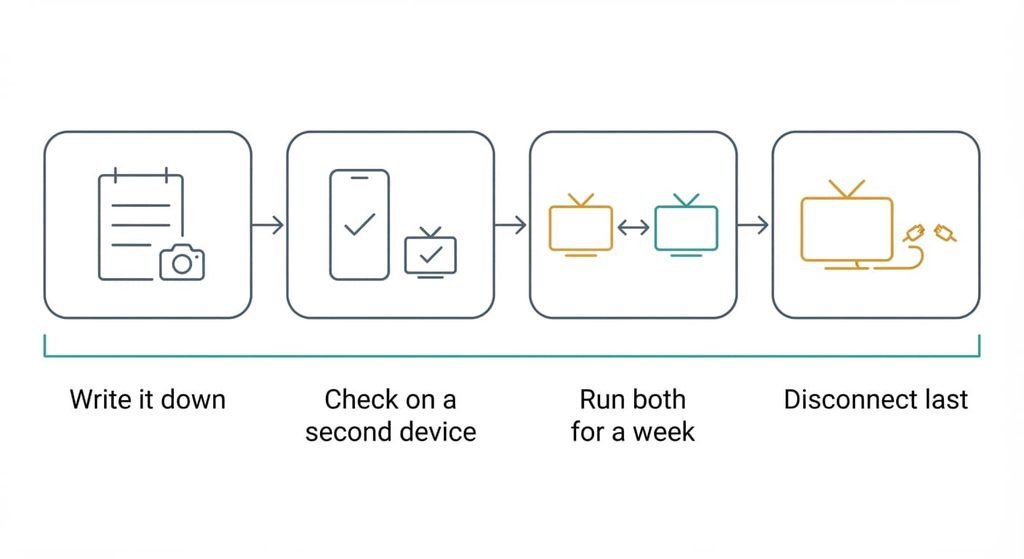
If you don’t trust your smart TV’s software, the order of work still matters. Export first. Write down which apps are installed and which profiles exist. Note any downloaded titles and the parental PIN, then photograph the picture settings screens. Verify next. A list that exists is not necessarily a complete one, so sign in to each service on a phone or computer and confirm that the watchlist and every profile appear there. Verification means checking what is missing as well as what is present: the PIN and any subscription shared with another household.
Then run both setups in parallel for a week with the old one still connected. Watch what the household actually uses and who gets stuck. Cut over only when nobody reaches for the old path. Disconnect the network last, and keep the settings photographs until the new routine holds.
When to stay
If you don’t trust your smart TV’s software, check what exactly you distrust before replacing anything. Switching off the television’s recognition feature may cover your actual worry. The controls usually sit in the privacy area of the settings. If your concern is viewing data then that change costs nothing and leaves everything else working.
Staying wins elsewhere too. A set in a spare room that gets an hour of use a week isn’t worth a second remote. Built-in apps that still run smoothly give you little to fix. A lone viewer who already controls the set’s privacy settings has the simplest case for staying put. A household that relies on one remote loses more from the move than it gains. An export that drops the TV’s saved settings buys little when nobody is unhappy with the picture.
Fix the worry you can name before you rebuild the room.
The export to do before you decide anything
Do one thing today: confirm each watchlist exists on a second device. Sign in to each service on a phone or computer and look. If the watchlist and the profiles appear there, the account side is safe and leaving is possible whenever you choose.
While you’re there, open the page that lists which devices are signed in to each account and sign out any you don’t recognise. Then list what lives on the television alone: the downloaded titles and the saved settings. That list is the real size of the move, and it’s usually shorter than people expect. A reader who does only this has gained the ability to leave later.
Accounts and watchlists travel with the service. Downloads and settings stay on the set. Confirm that on a second device today. One check tells you whether leaving is possible, and the recognition feature may be the only thing that needs switching off. Decide after that, not before. The rest is routine work.
Questions readers keep asking
Will my watchlists and logins move if I stop using my smart TV’s apps?
Yes. They’re stored with each streaming service, so a new device signs in and finds them. What doesn’t move is anything stored on the television itself. Downloaded titles and the parental PIN are examples. Check the watchlist on a phone first to confirm the account side is complete.
How much does it cost to avoid your smart TV’s software?
The route sets the cost, and the variable is what you already own. A console you have costs only effort, while a plug-in device costs money. Cutting the set off the network costs nothing but removes the built-in apps. Weigh each route against what your household watches every week.
Is it worth the effort if you don’t trust your smart TV’s software?
Often yes when the distrust is specific. Tracking and stalled updates are typical cases. First check the privacy controls, since switching off recognition may be enough. If it isn’t, the cheapest route is a source you already own. The disruption lands on the household, so judge it by who uses the set.