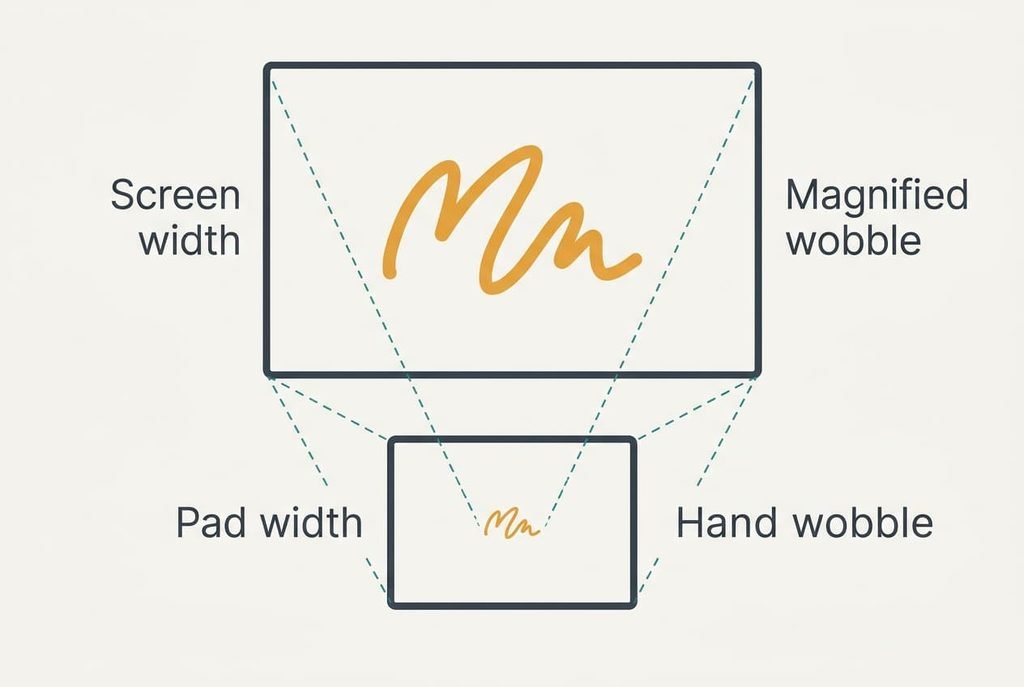
Which printed figure says most about buying a drawing tablet? Most shoppers read the pressure count first, whereas I’d read the mapping ratio first. That ratio is how far your cursor travels for each centimetre your pen moves, and a small pad under a big screen magnifies every wobble of your hand. A pad can look generous on the shelf and still fall short on your screen. Pen power and software support come after it. The worked figures that follow assume an imaginary laptop screen 34 cm wide and 19 cm tall, with round numbers, so redo them with your own tape and your own screen.
What decides buying a drawing tablet: the mapping ratio
The mapping ratio is the screen width divided by the active width of the pad. When the pen sweeps the entire active area, the cursor sweeps the entire screen, so the ratio is also the magnification of your hand. Take the sample screen, 34 cm wide. A pad with a 16 cm active width gives 34 ÷ 16, or 2.1. A bigger pad at 25.6 cm gives 34 ÷ 25.6, or 1.3.
Now add your hand. Say it wobbles by 0.5 mm, an assumed figure. On the small pad that grows to 0.5 × 2.1, or 1.1 mm on screen, which is plenty to spoil a fine line. On the bigger pad it grows to 0.5 × 1.3, or 0.7 mm. The bigger pad also asks for a longer sweep, 25.6 cm in place of 16 cm, so a stroke across the screen moves your forearm as well as your wrist.
Neither figure is good or bad alone. Together they show the trade: finer control against a larger footprint on the desk.
Choosing a drawing tablet in priority order
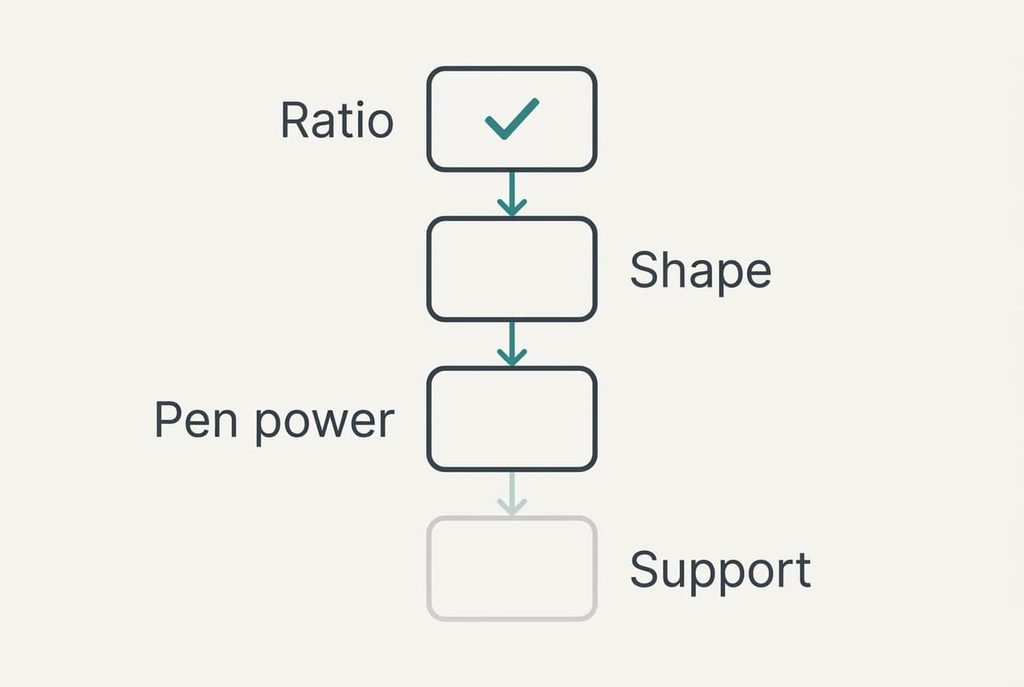
Go down this list and drop any pad that fails an item.
1. Mapping ratio. This is the screen width divided by the active width, and it sets how steady your lines look every day. Use the active width from the listing, since the outer width includes a border that the pen can’t reach. For detailed line work I’d accept a ratio up to about 1.7. Above 2, look for something larger, because two pads on the same screen generally give the lower figure the steadier line. If you ignore it, you’ll fix wobbly curves by zooming in on every detail.
2. Shape of the active area. A 16 × 10 cm area is 1.6 times wider than tall, while the 34 × 19 cm screen is 1.8 times wider. Stretch one to fit the other and horizontal travel scales by 34 ÷ 16, or 2.1, whereas vertical scales by 19 ÷ 10, or 1.9, so a circle comes out 12% too wide. Keeping proportions fixes it but uses only 9 cm of the 10 cm height. Many drivers offer that switch, yet confirm it exists in the maker’s manual before you pay.
3. Pen power. Some pens need no cell at all. Others need charging. Assume a charged pen lasts 10 hours and you sketch for 1.5 hours a day. Then it needs a charge every 6.7 days, which is one more chore. The listing usually says whether the pen is battery-free or rechargeable, so look for those words. A dead pen halfway through a sketch is the cost of skipping this.
4. Software and system support. The pad must work with your drawing app and your computer’s system. Use the maker’s support page in place of a seller’s description, then look for your system version by name. Should the page say nothing, test within the return window, and expect a pad that moves the cursor but ignores pressure.
What matters less than the listings suggest
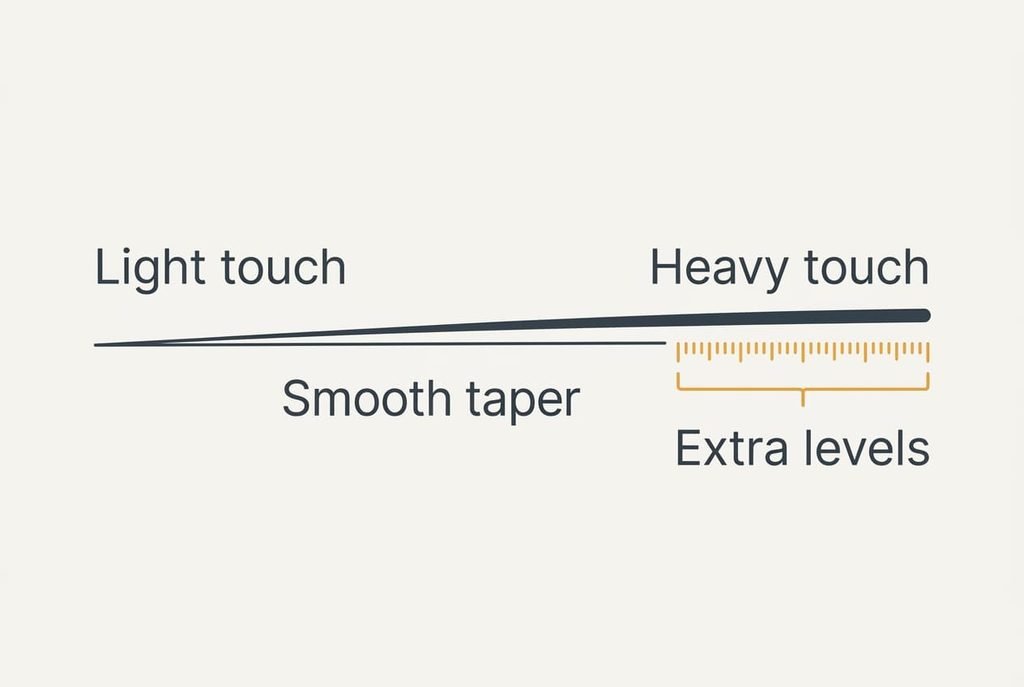
When buying a drawing tablet, the pressure-level count gets the biggest type on the packaging. It says how many steps the sensor divides the pen’s force into, and it looks like precision. Your hand sets the limit in practice. Suppose you can tell 20 steps of force apart, an assumed figure. A pad with 20 steps and a pad with thousands would then give you identical strokes.
Test it yourself. Draw one line, pressing from the lightest touch to the heaviest, and look at the taper.
If the width changes smoothly, extra levels add nothing you can see.
Shortcut keys and tilt sensing sit in the same group. Some styles use them daily, yet neither alters the mapping ratio, so they come after it. Pad weight gets airtime too. The pad lies flat on the desk almost all day, so a few hundred grams of difference changes nothing in use.
Matching the pad to your desk and your screen
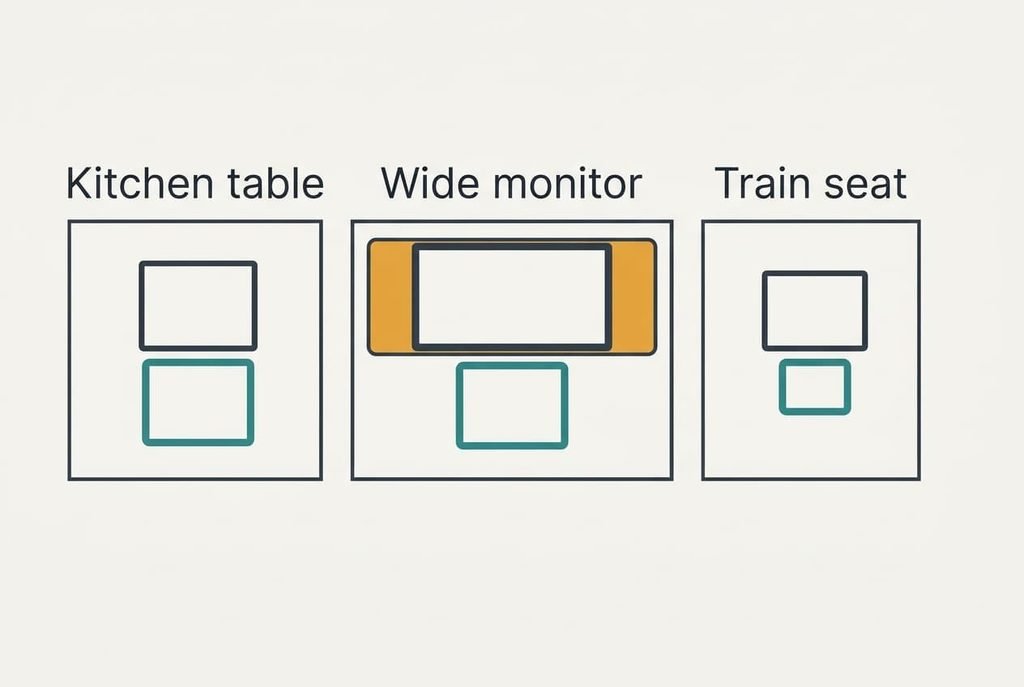
Three readers show how the criteria move. A student at a kitchen table with the sample laptop wants the ratio near 1.3, which means the 25.6 cm pad and a table with room for it beside the laptop.
Someone drawing on a monitor 60 cm wide meets a harder sum. Even the 25.6 cm pad gives 60 ÷ 25.6, or 2.3. Many drivers let you map the pad to part of the screen. Map it to a 30 cm slice and the ratio falls to 30 ÷ 25.6, or 1.2, though you now reach only half the width at once.
A commuter sketching on a train accepts a ratio near 2.1, because a 16 cm pad fits a bag. For that reader, pen power jumps to the head of the list, since there’s no socket on the seat.
What to walk away from
Walk away from a pad whose active width measures less than a quarter of your screen width. On the sample screen that is 8.5 cm, and the ratio passes 4, so a 0.5 mm wobble becomes 2 mm. Even a steady hand can’t help, because the magnification multiplies whatever it does. No driver setting brings that back.
Also leave any listing that hides the active width and shows only the outer size. Without the number you can’t divide, and buying a drawing tablet from that listing is a guess. A seller who hides the figure usually has a reason.
Be wary too of a pad sold as made for beginners with no size given. That label reflects the seller’s guess, and your own screen is what sets the ratio.
Lastly, avoid a pad with no support page for your system. Without updates it can stop working with the next system release, and you’ll own a flat slab that moves nothing.
The two-minute check before you commit
Measure your screen width and note it on an index card. Then divide the width of your screen by the active width in the listing, and keep the answer below 1.7 for line work. Compare the shape of the active area with your screen’s. Read the pen’s description for a cell or a charge. Last, find your system version on the maker’s support page, and note the return window. If the ratio comes out above 2, look one size up. If the shape differs, look for the keep-proportions setting in the manual. A pad that passes all four items earns a trial, and a pad that misses item one is out.
Before buying a drawing tablet, put the ratio on that card, which lets you compare the next pad on equal terms. The pressure count and the shortcut keys come afterwards. Reject any pad that magnifies your hand too much, then spend on what’s left. Treat the number as a floor you set for yourself, and revisit it later.
Questions readers keep asking
What active size is enough for sketching?
Enough means a ratio you can live with. On a 34 cm screen, an active width of 20 cm gives 1.7, which suits line work. A 16 cm pad suits quick notes, and anything under 8.5 cm will frustrate you. Measure your own screen first, then divide.
How much should I spend compared with a basic pad?
Spend on the active area and the pen before anything else. I’d put most of the extra into a wider area, which cuts the ratio for good, and little into shortcut keys. A pad twice as wide halves your magnified wobble. Extra buttons change nothing about how steady your lines look.
Will I regret a small pad later?
Possibly, once your lines get finer. A ratio of 2.1 feels fine for rough shapes but magnifies 0.5 mm to 1.1 mm, and detail work soon exposes that. If you expect to progress, choose a ratio near 1.3 now, since a bigger pad stays useful for years.