A smart TV app freezes when it waits on something that answers too late, and it crashes when the system ends it. When smart TV apps keep freezing, clearing the failing app’s cached data resolves most cases.
Four different delays produce the same stalled screen. The app can’t read its cache, or the system has run out of memory. A network reply never arrives, or the software no longer matches the app. The tests below separate them in two minutes. The fixes then run from free to irreversible, so a reader who solves it early never meets the risky ones.
What goes wrong when smart TV apps keep freezing
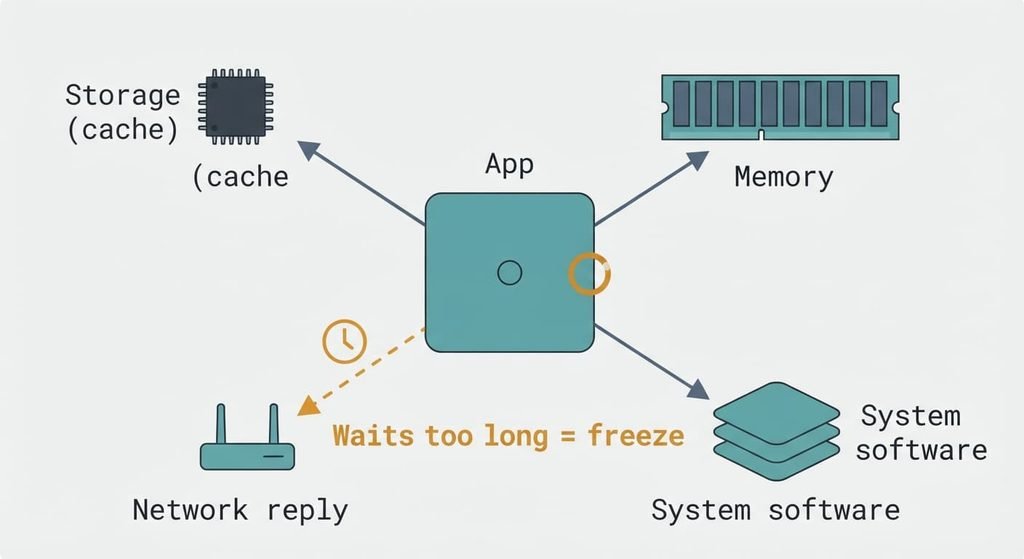
Every app on a TV shares one small pool of resources, and a freeze is the moment an app waits on a resource that answers too late. Storage and memory are shared between the picture pipeline and every app.
Storage comes first. Apps keep a cache, a local copy of data fetched earlier, on a small flash chip. A full or corrupted cache makes the app stall while it reads it.
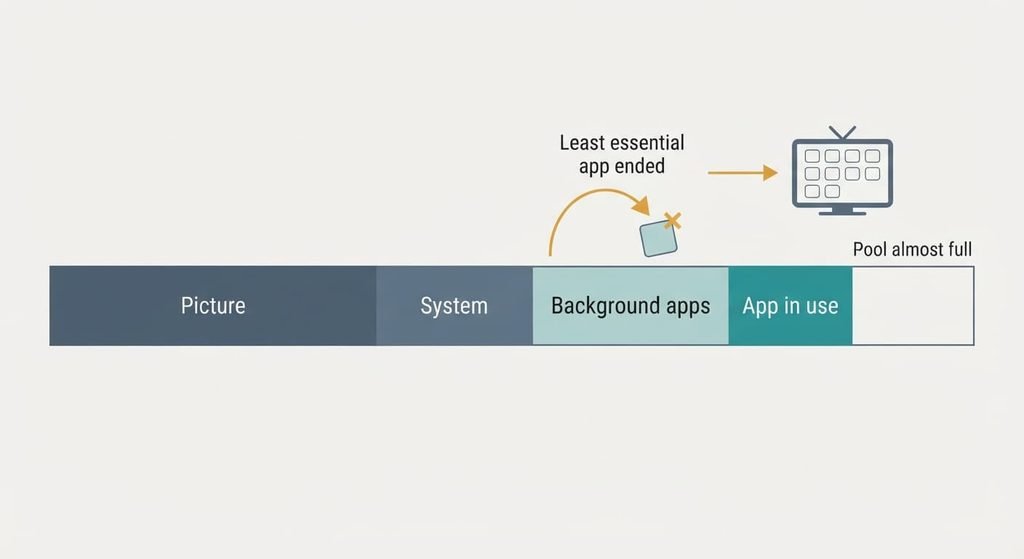
Memory comes second. When the pool runs low, the operating system’s low-memory killer ends the least essential process to reclaim space. To you that looks like a crash, because the app exits with no warning. A quick-start mode that keeps the system resident overnight adds pressure.
The network is third. An app asks a server for data and waits for the reply. A weak signal or a failed DNS lookup (DNS is the service that turns a server’s name into its address) can hold that reply back for many seconds, and many apps hold the next screen until it arrives.
Software is fourth. An app built for newer system libraries calls a function the older TV software lacks, and it terminates at launch. These four resources explain why smart TV apps keep freezing on one set and not on another.
Narrow it down in two minutes
Run these in order. None changes a setting or needs a purchase.
First, open a second app that streams video. If only one app misbehaves, the cause is that app’s cache or its version. If every app stalls, the cause is shared: memory or the network.
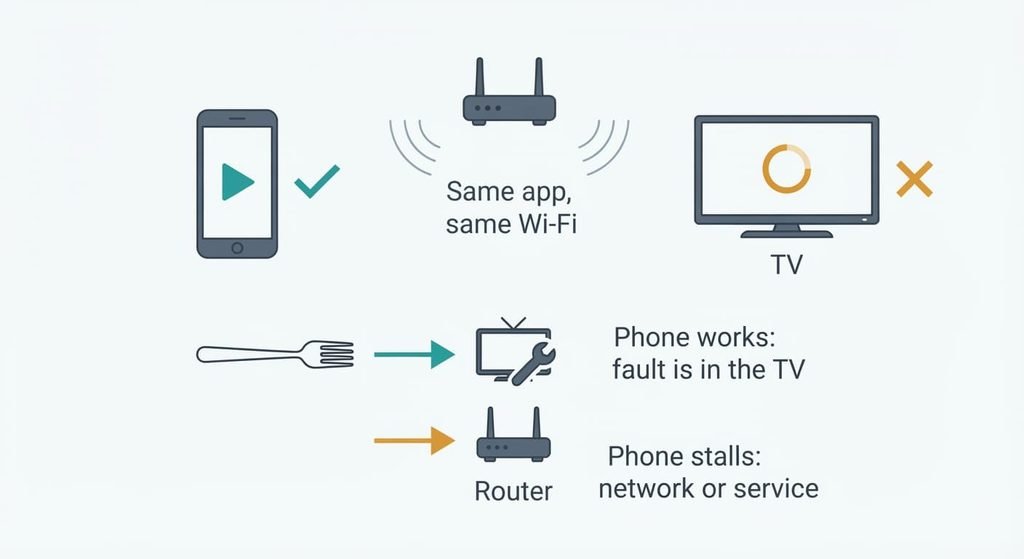
Second, run the same app on a phone using the same Wi-Fi. If the phone stalls too, the cause is the network or the service. If the phone works while the TV fails, the cause sits inside the TV.
Third, look at the TV’s date and time. A wrong clock makes the TV reject the server’s security certificate, which is valid only between two dates, so the app hangs while it connects. A correct clock rules this out.
Fourth, note when the freeze happens. A freeze within seconds of opening the app points to the cache or the software version. A freeze after an hour or two of viewing points to memory, because pressure builds as the session runs.
Two matching answers settle the cause.
How to fix smart TV apps freezing, in order
Clear the failing app’s cached data. This targets the storage cause: a full cache or a corrupted one stalls the app. It costs a minute. It signs you out of that app and removes any titles downloaded for offline viewing, so keep your password to hand. Look in the TV’s application settings for the control that clears an app’s cache; some sets list cache and saved data as separate steps. Without the control, a fresh install removes the cache the same way: delete the app and add it again. An app that can’t be deleted needs the later fixes.
Free memory by removing unused apps and switching off quick-start mode. This targets the memory cause, since fewer resident apps leave a larger pool at launch. It costs a settings change. Nothing is lost, although the TV takes longer to wake because it starts cold each time. That cold start is what clears the pool. Check the list of installed apps first and remove those you haven’t opened this year.
Give the app a faster reply. This targets the network cause. Set the date and time to automatic first. Next, use the 5 GHz band when the router is in the same room, since 5 GHz carries more data but crosses walls worse than 2.4 GHz. Distance explains why smart TV apps keep freezing in a back bedroom and not beside the router. A public DNS resolver in the TV’s network settings can shorten slow lookups. It sends your lookups to another company instead of your provider, and you can switch back to automatic at any time. A cable is the surest option, because Ethernet runs to 100 m and removes the signal from the equation. It costs the price of a lead.
Install the pending system and app updates together. This targets the software cause, where an app expects functions your TV lacks. It costs up to an hour and a reboot. An update can’t be undone and can move or remove features, so photograph your picture settings first. If no update is offered for your TV, the vendor has stopped supporting that software, and the app will keep crashing.
If none of that worked
When smart TV apps keep freezing after every local fix, either the app vendor no longer supports your TV or the storage chip is failing. Collect four things before you contact support: the model number from the label on the back, the software version from the information screen, the name of each failing app and whether the fault appears at launch or after an hour. Add the results of the phone test and the wired test.
Then ask two questions: does the app still support this TV’s software generation, and does the repair cover a storage fault? A factory reset is the last step on your side. It erases every account and every installed app, and it can’t be undone, so write down your picture settings and passwords first. A fault that returns within a week means the app and the TV no longer match. A separate streaming device takes over the app’s job.
The fix that isn’t worth doing
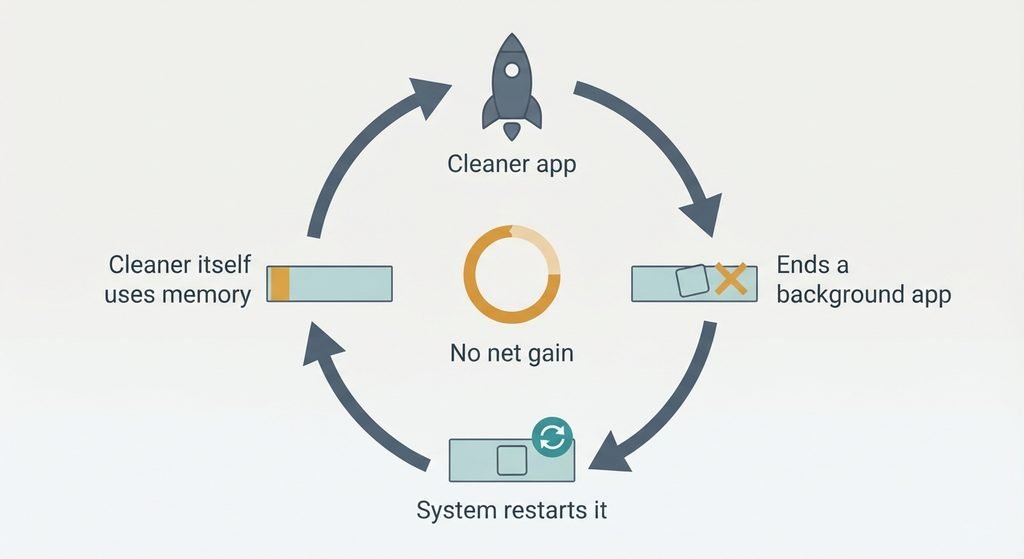
A memory cleaner or booster app promises to free memory and does the opposite. The operating system already ends background processes under pressure. The system restarts whatever a cleaner ends once it’s needed again. That burns processor time and uses the same memory again. The cleaner also occupies memory itself, so a TV that was short of memory ends up shorter. Its on-screen figure shows only what it ended and can’t show whether the app now runs better. I’d hold a stricter line than most guides: a factory reset belongs at the end of the list, never the start. It clears the cache for an hour and then erases every account, while the real cause comes back untouched. Each reset also costs an evening of signing in and tuning the picture again.
A cleaner moves the memory around and frees none.
The mechanism is a wait: the app needs a cache it can read, free memory, a prompt network reply and software that matches the TV. The fastest test is the phone test on the same Wi-Fi: a phone that works points to the TV and a phone that stalls points to the network. Clear the failing app’s cache first, since it costs a minute and solves the most cases.
Questions readers keep asking
Can I fix smart TV apps that keep freezing myself?
Usually yes. The cache clear and the memory fix are free, and the network check needs no tools. Updates cost time rather than money. If the app still fails after those steps, the TV no longer matches the app, and a separate streaming device is the practical fix.
Why do apps crash on my smart TV but work on my phone?
A phone usually has more memory and gets software updates for longer. A TV’s memory is a fixed pool shared with the picture, so the system ends apps sooner, and an app built for newer software can fail at launch on an older set. Network faults hit both devices, which is why the phone test matters.
Does a smart TV that keeps freezing mean the hardware is failing?
Rarely. Most freezes come from a bad cache or low memory. Slow network replies or outdated software cause nearly all the rest. Hardware is the likely cause when every app stalls within seconds even on a wired connection, and a factory reset changes nothing. Then collect the details above and ask the seller or maker about a repair.