A computer talks to a printer’s address and not its name, and addresses move. That’s why a printer will say offline when it is switched on, and the quickest cure is copying its current address into the computer. Four separate faults produce the same message, and the remedies go from nothing to one cable. Most homes need only the first two.
The figures assume a UK home where the router hands out addresses for 24 hours at a time. Treat every rate as a round example and replace it with what your own router shows. The percentages illustrate a pattern and don’t forecast anything.
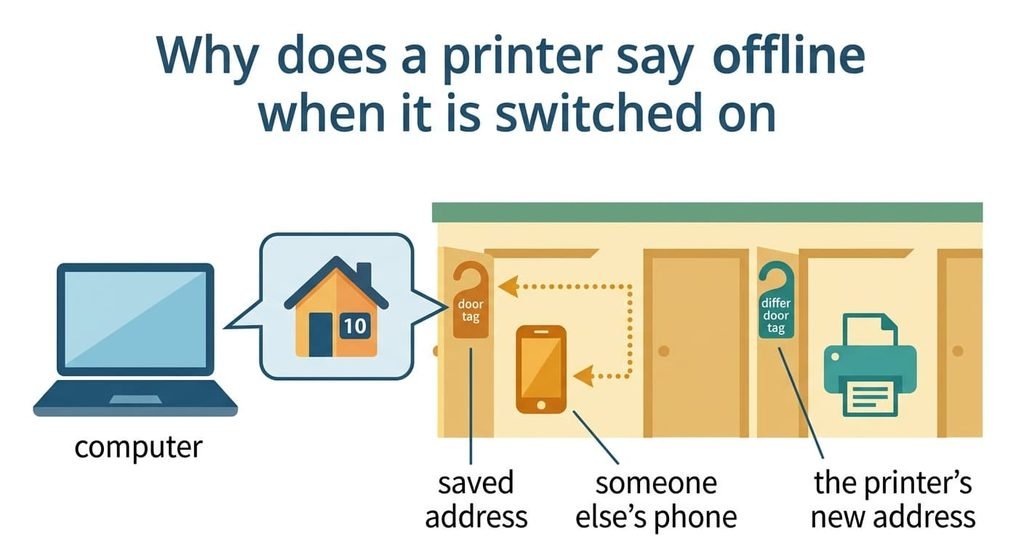
Why does a printer say offline when it is switched on
A router lends each device an address. That loan is called a lease, and the router takes the address back if the device stays silent past it. Your computer stores the printer’s address in a saved connection, which behaves like a phone number written on paper. If the printer comes back with a different address, the computer keeps dialling the old one, and the old one now belongs to someone else or to nobody.
A machine in power-saving mode doesn’t renew its lease, so one used every 3 days has lapsed for 48 of the 72 hours. During that gap a visitor’s phone may join the network. Many routers give the lowest free number first, and the printer, being one of the oldest devices, holds one of the lowest. The visitor’s phone then takes the printer’s old number. When the printer wakes, it receives the next free one.
Say a new device joins on average every other day. The chance that at least one joins in 48 hours is 1 − e⁻¹, or 63%. For a weekly printer lapsed for 144 hours it’s 1 − e⁻³, or 95%. That’s why the message appears after a quiet week and not after a busy day.
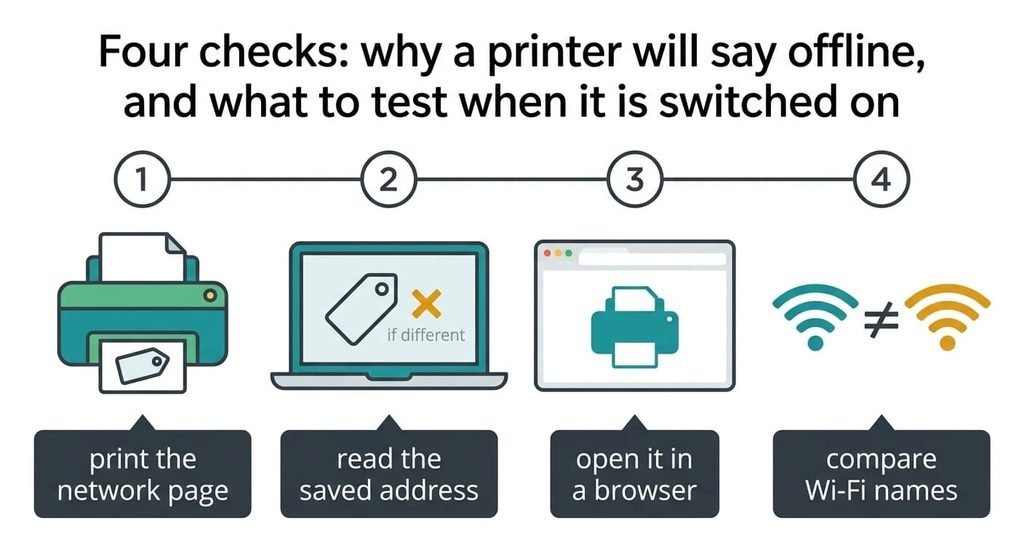
Four checks: why a printer will say offline, and what to test when it is switched on
Each check gives you a result to record, and all of them are free. Run them in sequence after the printer has sat on and idle for a minute.
First, print the printer’s network page from its own panel and note the address printed on it. A page that won’t print points at the printer’s own connection, so skip ahead to the last check.
Second, open the computer’s saved connection for that printer and read the address stored there. A different number means the lease moved, which is the commonest cause.
Third, type the printer’s current address into a web browser. A page from the printer means it’s reachable and the computer is looking in the wrong place. No page means the two devices sit on different networks, such as a guest network.
Last, compare the Wi-Fi name on the printer with the one on the computer. Two different names settle the matter. Keep a short list of results, because the pattern across all four points to the fix. A printer that passes every check but still shows offline belongs with the support line.
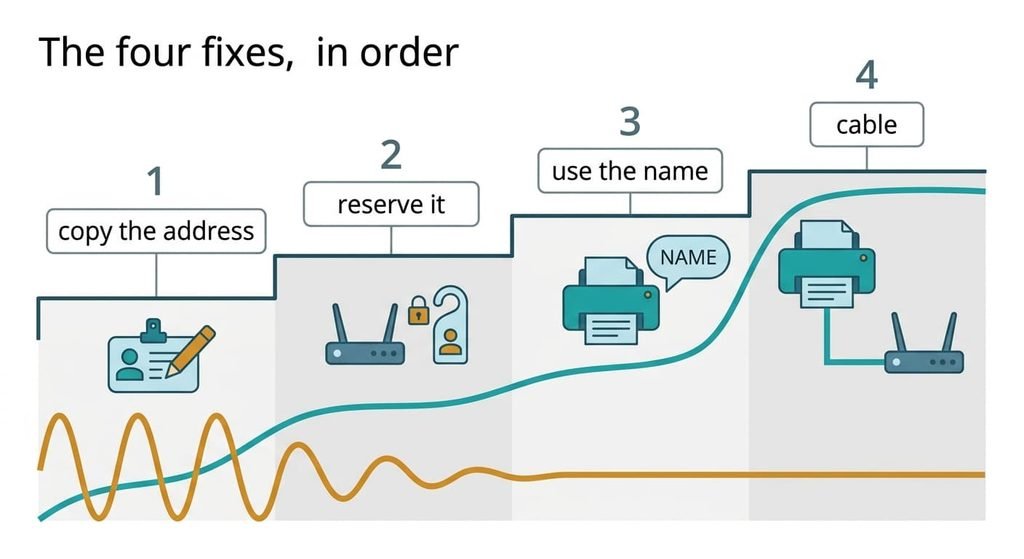
The four fixes, in order
The next time a printer will say offline when it is switched on, work down this list. Each remedy answers one fault, so alter a single item per attempt and send a test page after it. Record what the page does before moving on.
Copying the current address into the saved connection answers a stale entry, the first fault. It’s free and needs five minutes. The test page prints at once. You lose permanence, because the same fault returns the next time the lease lapses, which on our figures is within a week for a printer used weekly. Find the saved address in the printer’s properties, where it appears as a port, and type the new number exactly.
Reserving the printer’s address in the router answers the drifting lease, the second fault. It’s a setting that takes ten minutes. The router then hands the same number to the printer every time, so the 95% chance falls to zero. You need to find the printer’s hardware label first. The reservation also must sit outside the range the router gives to visitors, or it can clash. If the pool starts at number 40, pick a number such as 20. Match it to the long string of letters and digits on the network page, which is the printer’s hardware label.
Re-adding it by its network name answers the saved-address fault where the router offers no reservation. The job runs to roughly 20 minutes, including the driver step. The name follows the printer wherever it lands. You lose some reliability when a guest network splits the devices, because names don’t always cross between networks. Pick the printer from the discovered list and use the manual option only when the list is empty. Delete the old entry afterwards, or jobs may still head for the dead one.
Joining the printer to the router by cable answers a Wi-Fi radio that goes to sleep and misses its renewals. A cable is the only purchase here. The printer then holds its lease at all times. You give up placing it freely, because the cable has to reach the router, and the printer must have a socket for it. Run the cable along the skirting, not across the floor. When the printer sits far from the router, a powerline pair does the same job at a higher price and a lower speed.
If none of that worked
If your printer will still say offline when it is switched on after all four, the fault is no longer an address. Write down what the network page says and which light on the printer is blinking. Then note the date and the time the message first appeared.
Ask the maker’s support line whether the printer’s firmware is current. A firmware update can repair a radio that forgets its network. Note the printer’s model number before you call. Ask whether the model supports a fixed address and a name-based connection, since some budget models don’t. Ask a friend with the same model whether theirs behaves the same, because a shared fault points at the model and not at your network. Resetting the printer’s network settings wipes its saved Wi-Fi details, so keep the password to hand before you start.
Photograph the status lights before you start.
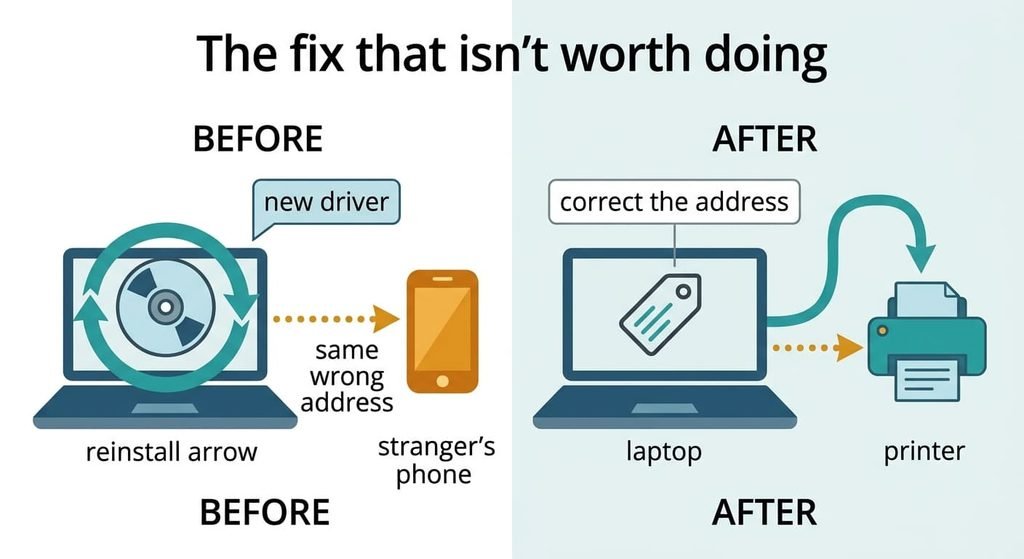
The fix that isn’t worth doing
Reinstalling the printer driver is the standard advice, and it feels productive. The driver tells the computer how to format a page, and it has no say over where the page is sent. Our fault sits in the address, so a new driver leaves the computer dialling the old number. The advice survives because it sometimes appears to work: a fresh install often re-detects the printer at its current address, which fixes the entry by coincidence.
It also takes 20 minutes, and it can break scanning. A new driver resets your default paper size and quality too, so the next print may come out in the wrong format, which looks like a second fault.
A fix that works by accident teaches you nothing, and the message returns the next time the lease lapses.
That’s why the network page comes before anything else. A printer will say offline when it is switched on whenever the saved address and the real address disagree, so compare them first. Fix the entry, then the lease, then the connection. Leave the cable until last, and stop once a test page prints after a week of silence. One idle week is the test that settles it.
Questions readers keep asking
Can an offline printer be fixed at home with no spending?
In most homes, yes. Copying the current address into the saved connection takes five minutes, and reserving the address in the router makes it last. The cable is the sole expense, and it pays off just when the printer’s Wi-Fi radio sleeps and misses its renewals.
Why does the printer work for days and then go offline?
The lease lapses while the printer is sitting idle, so another device can take its number. In the example a weekly printer had a 95% chance of losing its address. A printer used daily renews in time and keeps it.
What signals a printer fault rather than a network one?
If the printer can’t print its own network page, or the status light blinks an error, the fault is inside the machine. The same goes for a printer that won’t join any network. Ask the maker’s support line before you spend money.
A computer talks to a printer’s address