Do you type more than you read? That one question settles the choice between a tablet or laptop for everyday work. If most of your week is typed text, take the laptop, because its keys sit beside the screen and leave all of it free. If it is mostly reading and marking up, with short replies, take the tablet.
The sums below assume a tablet screen 24 cm wide and 15 cm tall, and a laptop screen 30 cm by 19 cm. They are round figures for the two categories, so measure your own before trusting a verdict that lands close to the line.
The one property that decides tablet or laptop for everyday work
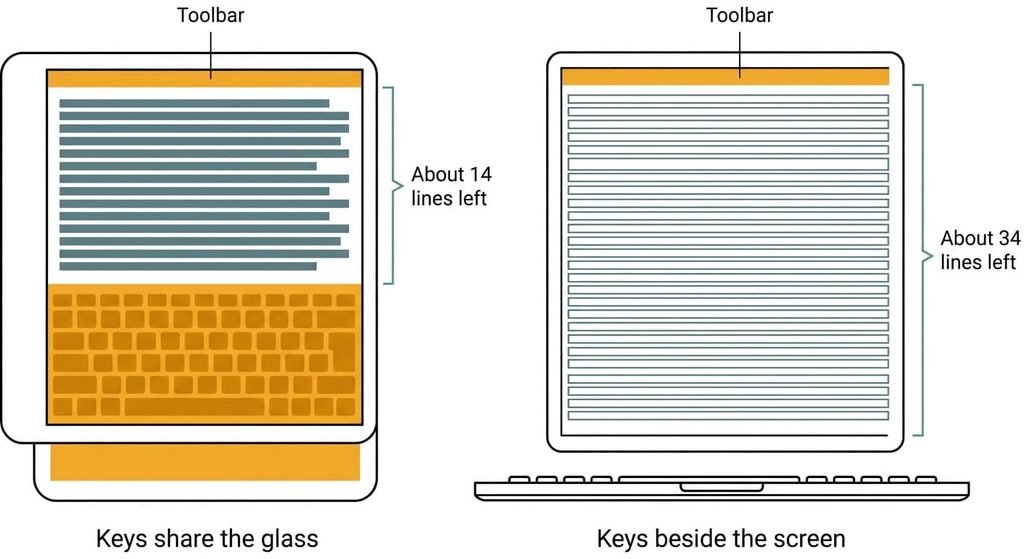
The deciding property is whether the keys sit on the screen or beside it. A tablet puts its keyboard on the glass. Typing and reading then compete for the same area. A laptop puts the keys on a separate plane and leaves the whole screen for the page. Everything later follows from that: how much page you see and how many sources fit.
Put numbers on it. Say the on-screen keyboard covers 40% of a screen 15 cm tall, which is 6 cm. A toolbar and title bar take another 2 cm, leaving 7 cm for the page. At 12-point text that’s about 0.5 cm a line, so 14 lines. A laptop screen 19 cm tall with the same 2 cm of toolbar leaves 17 cm, or 34 lines. You see roughly two and a half times as much page while you type.
Those are round figures. To measure yours, raise the keyboard in any notes app and hold a ruler to the glass. The share it covers varies between tablets and between orientations. A keyboard case moves the keys beside the screen, which is why typing-heavy weeks end with one in the bag.
It also turns the tablet into a small laptop with a detachable screen.
Head to head
| Question | Tablet | Laptop |
|---|---|---|
| Where the keys live | On the glass, sharing the screen with the page | Beside the screen, which stays whole |
| Screen left while typing | About 60% in landscape, so about 14 lines of text | All of it, so about 34 lines of text |
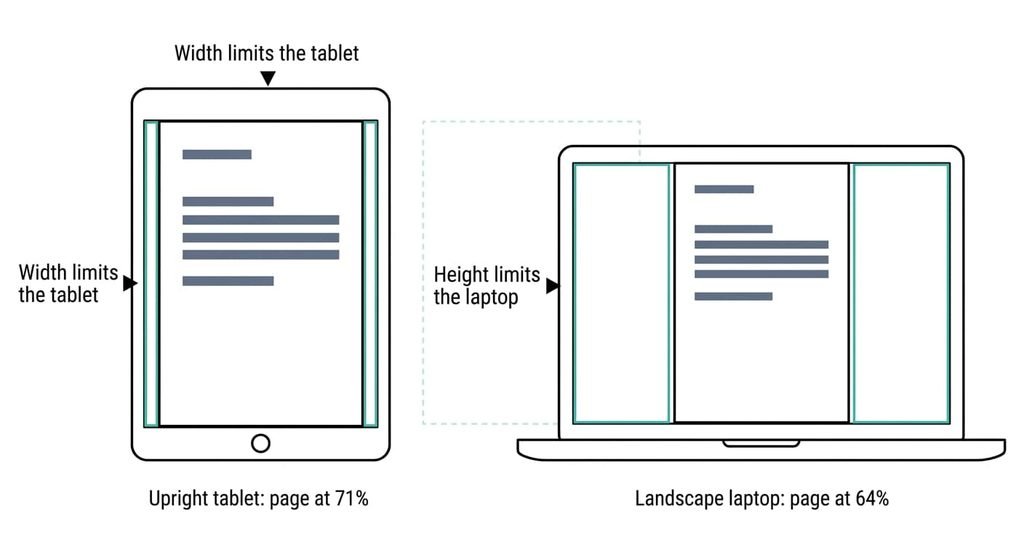
| One A4 page in view | Held upright, shown at 71% of its size | Landscape, shown at 64% of its size |
| Sources side by side | Usually two panes, set by the system | As many windows as fit, about three at 10 cm each |
| Software you can install | Apps and web pages only | Most programs, including desktop-only ones |
| What fails first | Long typing sessions on flat glass | Use in one hand while standing up |
| Writing on the page | Directly, with a pen | Rare, and only on a screen that folds back |
The page row surprises people most. Held upright, a screen 15 cm wide and 24 cm tall shows a whole A4 sheet at 71% of its size. A laptop in landscape manages 64%, because its screen is wide but only 19 cm tall. Width limits the tablet and height limits the laptop. Zoom in and the gap closes, but then you scroll.
Where the tablet wins
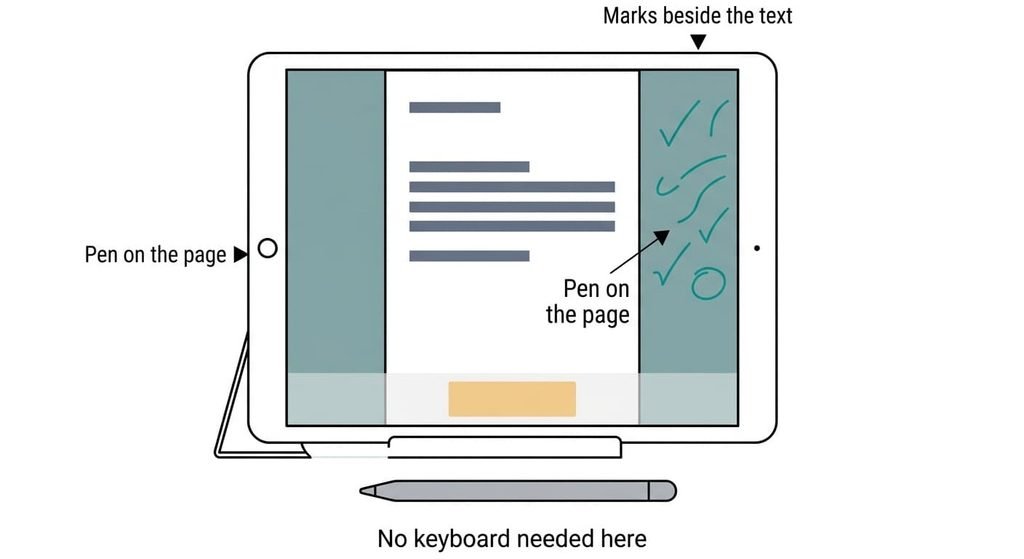
The tablet wins on pages and pens, and on portability. A whole A4 sheet is larger on it than on a laptop, as the table shows. The pen writes beside the text it comments on, so marking up a reading or a form happens on the page itself. Handwritten notes cost it nothing, since no keyboard rises over the page.
It also wins wherever you hold it. A tablet works in one hand on a train. A laptop needs a surface to sit on. Passing it across a table to show a page takes no setup either. Short replies suit it too. A message of two lines costs you the keyboard’s 6 cm for a few seconds, so you never miss the page.
The quiet advantage is parts. A tablet has no hinge to loosen and no keys to fail, and it wakes to exactly where you left off. For a week of reading and annotating with quick answers, fewer things stand between you and the work.
Where the laptop wins
The laptop wins on text and sources, and on software. The 34 lines in view while you type are the visible gain. Keys with travel also let your fingers find the row without looking. Three sources fit side by side on a screen 30 cm wide, at about 10 cm each. Most tablets’ two-pane split can’t match that.
It wins on installed software too. A program that exists only as a desktop installer can’t run on a tablet at all, and no setting changes that. Check the list from your course or employer first, before you look at any device. Printers and scanners follow the same logic. A laptop can usually install the driver a device needs, while a tablet relies on what is built in.
The plain advantage is the lap. A laptop keeps its weight in the base, so it rests steadily on your knees. A tablet in a keyboard case usually keeps the weight at the screen end. Rest either one on your knees and press the top edge to see which way it tips.
When neither a tablet nor a laptop fits
Neither suits wide work that stays on one desk. Choosing a tablet or laptop for everyday work is the wrong question there. Wide work means a spreadsheet, a timeline or a drawing that needs more than 30 cm across. Take a spreadsheet with columns 2.5 cm wide. A tablet screen of 24 cm shows 9 of them. A laptop at 30 cm shows 12, while a desktop with a screen 60 cm across shows 24. Portability buys nothing when the machine never moves, and a desktop adds a battery-free design and a screen you can replace on its own.
Light use is the other case. If you need a screen for a few hours a week of reading and replies, a phone may cover it. A library or campus computer helps if your institution offers one.
My firm view is that portability is the most overpaid-for property here: a machine on one desk five days out of seven is bought for the other two.
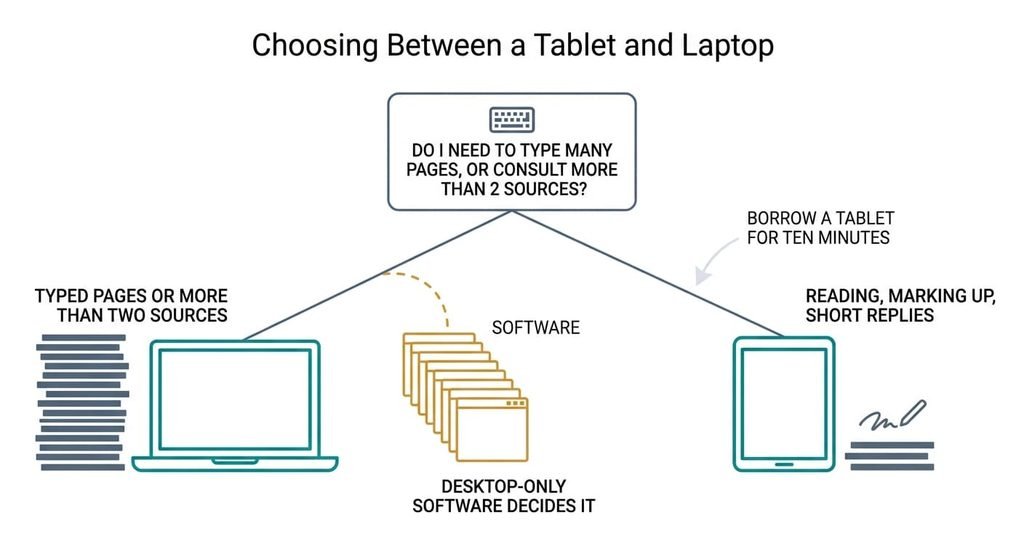
How to decide on a laptop or tablet for everyday work in thirty seconds
If your week holds typed passages of a page or more at a stretch, (about 400 words by my reckoning) or you need more than two sources in view, take the laptop. If it is mostly reading and marking up, with short replies, take the tablet.
Borrow a tablet for ten minutes before you commit. Write a page on its on-screen keyboard and count the lines you can see. Then list the programs your course or employer requires, since one desktop-only program settles it for the laptop. How you type is the one thing nobody can judge for you. Touch-typists lose more on a flat keyboard than thumb-typists do.
The keys decide. A laptop suits typed weeks and a tablet suits reading weeks. Count what you type and what you must install before you buy anything. For a tablet or laptop for everyday work, the answer follows within a day. If the count is close, borrow a tablet for ten minutes and write a page, then see how many lines are left.
Questions readers keep asking
Is a tablet or a laptop better for university?
Neither wins outright for tablet or laptop for everyday work. A laptop suits courses with long essays and several sources, plus required desktop programs. A tablet suits courses built on reading and marked-up notes. Check your reading list and software list first, then count the typed pages in a typical week to see which side you fall on.
Can I do my work on a tablet without buying a keyboard?
Yes, if your typing comes in short bursts. On-screen keys cost you about 40% of the screen, so a reply of a few lines is fine and an essay is a struggle. If you write a page or more at a stretch, a keyboard becomes the real cost of the tablet.
What fails first on a tablet or a laptop?
On a tablet it’s usually the battery and the glass, since both are sealed in. On a laptop it’s the hinge and the keys, plus the battery. The maker’s software support period often ends a device’s useful life before the hardware does, so check the stated period before buying.