A Wi-Fi channel carries one transmission at a time, and every device in earshot waits its turn. So Wi-Fi drops every evening once enough devices want airtime together, and the quickest relief is to move the slowest one onto the 5 GHz band. That pattern explains a router that behaves at breakfast and stalls at dinner.
Four loads fill the channel, and the fixes climb from free to a length of cable. I’ve assumed a UK terraced house, one router, one shared 2.4 GHz channel and a real throughput of half the link rate. Put your own devices into the sums to see where your evening lands.
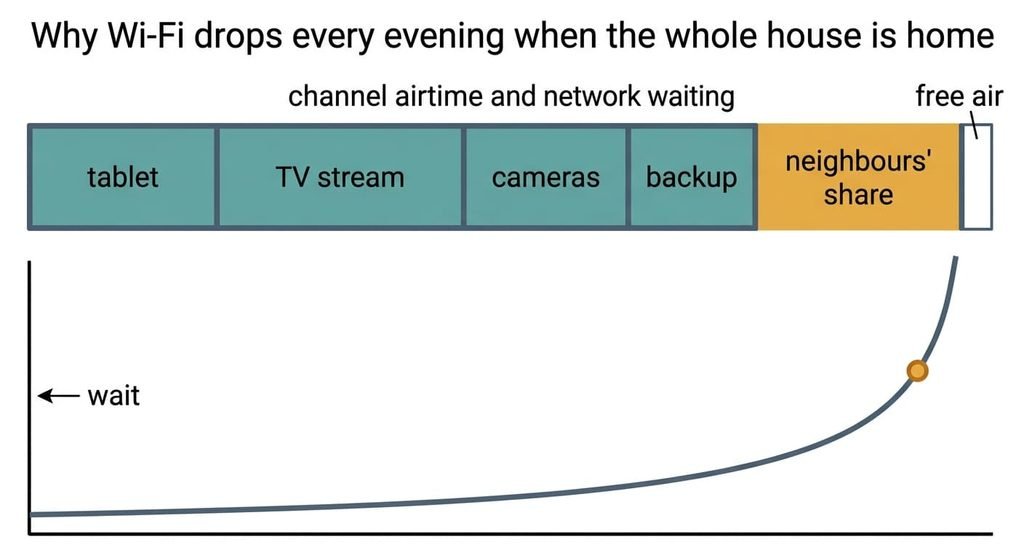
Why Wi-Fi drops every evening when the whole house is home
Each device spends a share of the channel’s time, and the evening fails when those shares add up to about 90% of the air. A share is demand divided by real rate. One tablet pulling 3 Mbps over a slow 24 Mbps link delivers about 12 Mbps in practice, so it takes 3 ÷ 12 = 25%. A TV stream of 4 Mbps on a 52 Mbps link takes 4 ÷ 26 = 15%. Two cameras at 1 Mbps each on a 40 Mbps link take 10%, and a nightly photo backup at 3 Mbps on a 65 Mbps link takes 9%.
Neighbouring networks on your channel claim another 30% at 8 pm, because their traffic occupies the same air. The total is 25 + 15 + 10 + 9 + 30 = 89%.
A frame’s wait grows as 1 ÷ (1 − load). At 3 pm the load is 15%, so a frame waits 1.2 times its bare minimum. At 89% it waits 9 times, about eight times worse than the afternoon. Past 95% the wait reaches 20 times, long enough for a video call to give up and reconnect.
The channel is simply full.
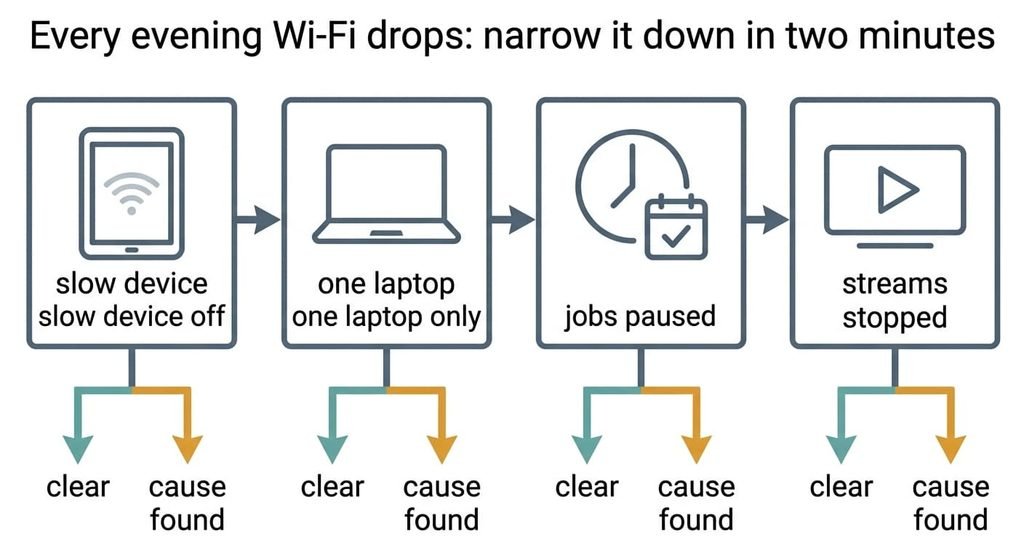
Every evening Wi-Fi drops: narrow it down in two minutes
Each test below ends in an outcome you can read off, and none needs a purchase. Run them at the hour Wi-Fi drops every evening, since a test at noon shows you an empty channel. Write down what each one does before moving to the next.
First, find the slowest device on the router’s list of connected devices and cut its Wi-Fi for ten minutes. If the drops stop, a slow link is eating the airtime. If they carry on, keep that device connected again and move on.
Second, switch Wi-Fi off on everything except one laptop. A laptop that still stutters at 8 pm points to neighbours’ networks on your channel, since your own house has gone silent.
Third, pause each scheduled job for one evening. A smooth evening afterwards puts the cause in your schedule.
Finally, stop every TV stream for ten minutes. If the laptop recovers, the sheer volume of video is the cause. When none of the four changes anything, the airtime budget isn’t your problem, and the next section applies.
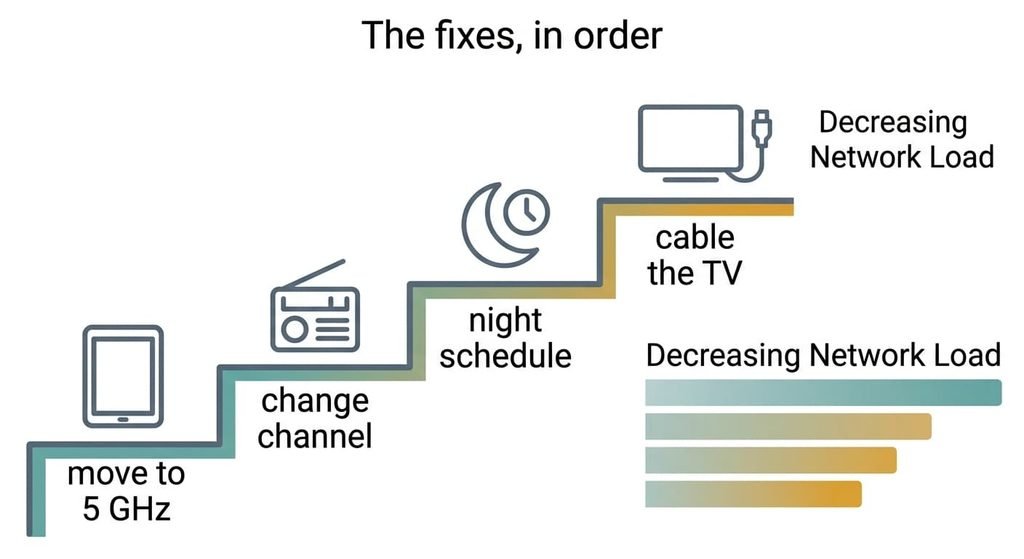
The fixes, in order
Moving the slow tablet onto the 5 GHz band addresses the slow link, the first cause. The effort is one minute. On 5 GHz the tablet’s link rises from 24 to 72 Mbps, so its share falls from 25% to 8%. The total drops to 73% and the wait from 9 times to 3.7. The price is range, because 5 GHz weakens faster through walls, so a tablet two rooms away may fade on the stairs. Smart plugs and other old gadgets speak only 2.4 GHz and stay where they are. Check the signal in the room where the tablet lives before you decide the move worked.
Changing the 2.4 GHz channel to a quiet one addresses the neighbours, the cause outside your home. It takes five minutes in the router’s settings. Choose a channel that doesn’t overlap with a busy neighbour’s, and their 30% can shrink to 15%. That brings the total to 58% and the wait to 2.4 times. A fixed channel won’t move when a new neighbour arrives, so look again every few months. Ask the router for a scan of nearby networks first, because the quietest channel differs from street to street.
Moving the nightly backup and updates to the small hours addresses the timing, the third cause. It needs a schedule setting on each device and some patience. The 9% leaves your evening and the total falls to 49%, a wait of 1.95 times. Photos upload later, and a phone has to stay on Wi-Fi overnight for the job to finish. Games and consoles usually hide their update window in a setting of their own, so check each one.
Running a cable to the TV addresses the volume of video, the fourth cause. The bill is a length of Ethernet cable and a route along a skirting board. The TV’s 15% leaves the air entirely, so the total reaches 33% and the wait 1.5 times. You give up a tidy hallway, and a TV in a room with no easy route may not be worth the effort. A console beside it can share the same cable through a small switch.
If none of that worked
If Wi-Fi drops every evening even after these four changes, the airtime budget has been spent somewhere you haven’t looked. Gather evidence before you ring anyone. Write down the minute each drop begins and ends for a week, and which device failed first. Note how many devices the router lists at those times. A drop that hits one device only points to that device, while a drop that hits everything at once points to the router or the line.
Ask the provider whether the line shows errors in the same hours. Then find out how their router behaves when it restarts itself overnight. Resetting the router to factory settings wipes the login and the provider details stored in the router, so copy them down first, and photograph the label on its underside. Share your log with the provider as well, since a pattern by the hour is stronger evidence than a single speed test.
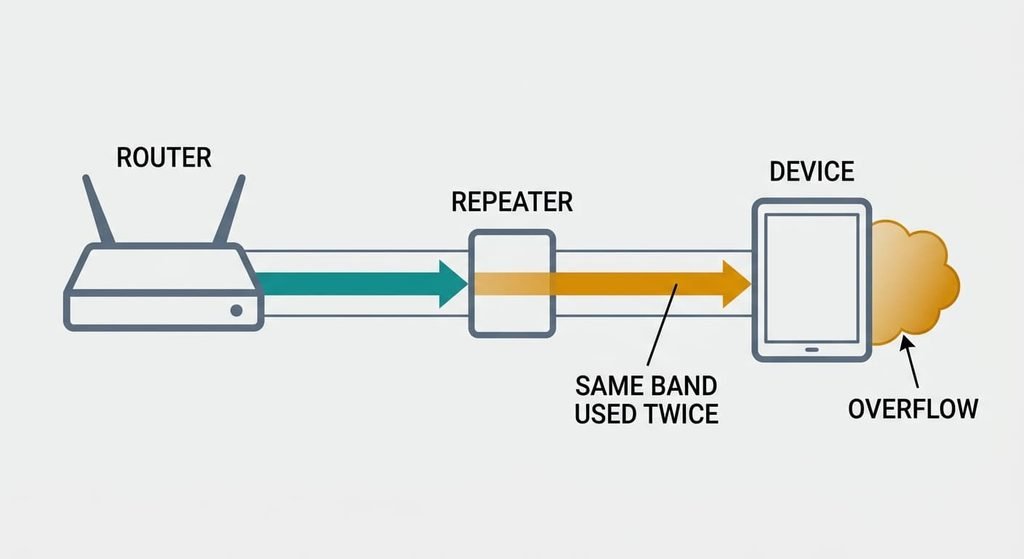
The fix that is not worth doing
A plug-in repeater on the same channel is the usual suggestion when Wi-Fi drops every evening, because it fills a dead corner with signal. It relays every frame by receiving it and sending it again on the same channel. A device behind it uses the air twice. The tablet’s 25% becomes about 50%, and the total climbs to 114%, which is beyond what the channel can carry. The corner gets a signal bar and loses speed, and every other device waits longer too. I’d spend on a cable before a repeater, because the cable takes load off the air and the repeater adds to it. A repeater also hides the problem for a week, which makes the true cause harder to find later.
A repeater adds to a full channel and leaves the shortage where it was.
When Wi-Fi drops every evening only when the whole house is home, the channel is out of airtime. Start with the slow-link test, since it takes ten minutes and costs nothing. Move the slow device, then change the channel, then shift the backups. Run the cable last, once the sums still show a total above 60%. Redo the arithmetic after each change, and stop as soon as the evening load sits near half.
Questions readers keep asking
Can I fix Wi-Fi that drops every evening myself?
Usually, yes. Most evening drops come from an overloaded channel, and the first three fixes cost nothing. Move slow devices to 5 GHz first. Then pick a quiet channel and schedule heavy jobs for the night. Only a cable for the TV costs anything, and it’s a small amount.
Why does Wi-Fi only fail when everyone is home?
Every extra device adds its own share of airtime, and the wait for a turn grows steeply as the total nears 100%. A house with two devices at 3 pm sits near 15%. The same house at 8 pm with eight devices and busy neighbours sits near 90%, so the channel stalls.
Could a failing router cause evening drops?
Rarely. A failing router drops out at any hour, including 4 am with a single device connected. If your drops follow the clock and the crowd, the cause is load. If they ignore both, record the times for a week and ask the provider to test the line and the router.