A keyboard that will type the same letter twice is rarely dying. Its contacts bounce a few milliseconds longer than the keyboard waits, and a software filter that ignores repeats inside 50 ms usually stops it. We model a British home desk where the typist enters 6,000 letters a day. Treat every timing below as a guess and substitute readings from your own keyboard. Nothing about the keys looks damaged, so people blame their own fingers first. The fault grows slowly, and most people spot it only when a password fails. The tests below show which cause is yours.
What makes a keyboard type the same letter twice
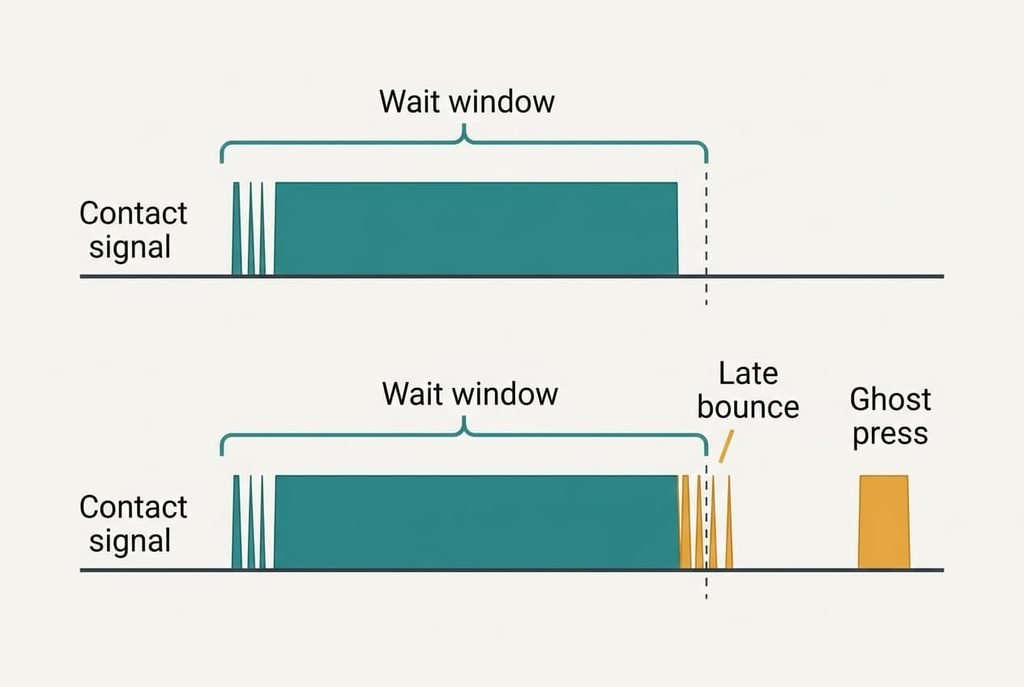
A key switch is two metal contacts that touch when you press. The touch isn’t clean. Contacts spring apart and meet again several times before they settle, which is called bounce. Firmware, the small program built into the keyboard, waits out a short window before it counts a press. Bounce can’t be seen or heard, since it lasts a few thousandths of a second and only the keyboard’s own timer notices it. That wait is the debounce time. Assume ours is 5 ms.
A new contact bounces for about 2 ms, so the margin is 3 ms. As the metal pits or films over, the bounce lengthens. Say it reaches 7 ms. That’s why a worn contact that bounces for longer than the debounce time registers as two presses, 7 ms apart.
The operating system adds its own repeat rules on top, and those matter later. Wear follows use. The letter e makes up 12.7% of English letters, so 6,000 letters include 762 presses of it. A ghost rate of 1.6% on a worn e key gives 12 doubles a day. That’s why the same few keys fail first, while the other keys look healthy.
Four tests for a key that types the same letter more than once
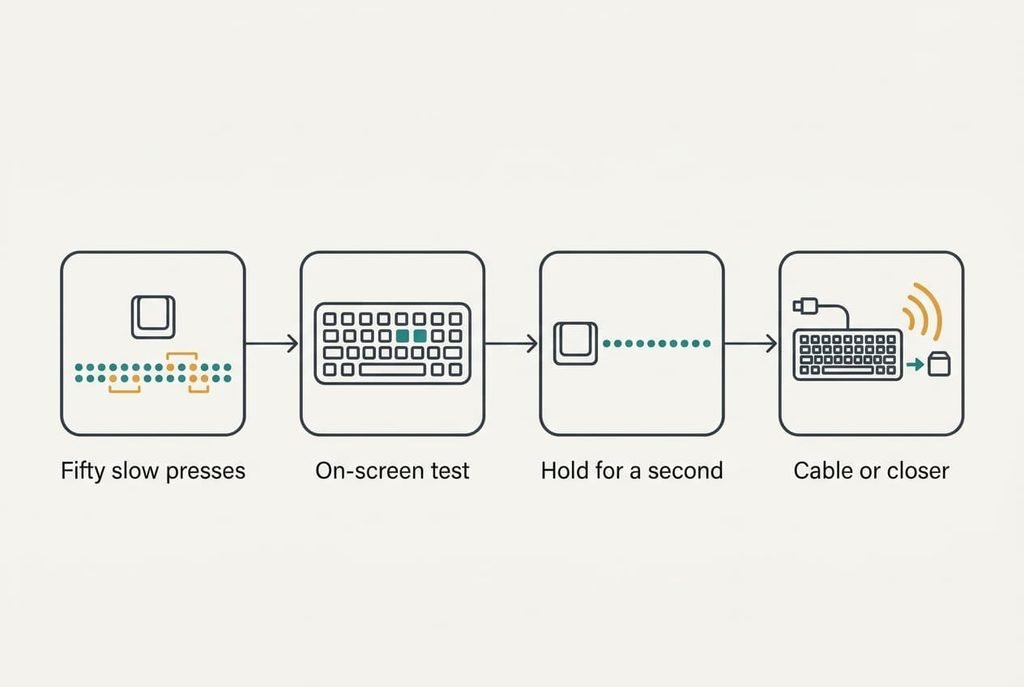
Run these before you change anything, and write down each result. First, press the suspect key 50 times in a plain text editor, with a one-second pause between presses. Use a slow, deliberate press so the result reflects the contact and not your rhythm. Count the doubles. Two or more points to bounce or to the radio link. None points to repeat settings.
Second, type the same letter using an on-screen keyboard. If doubles still appear, the fault sits in software. If none appear, the hardware is the cause.
Third, hold the key for a full second. A single letter, a short pause, then a steady stream is the normal auto-repeat. Doubles that arrive with no pause don’t come from repeat.
Fourth, if the keyboard is wireless, plug in a cable. Or sit 30 cm from the receiver and repeat the first test. Doubles that vanish point to the radio. Wired keyboards skip this test, and doubles on every key point to settings before hardware.
These tests cost nothing.
The four fixes, in order
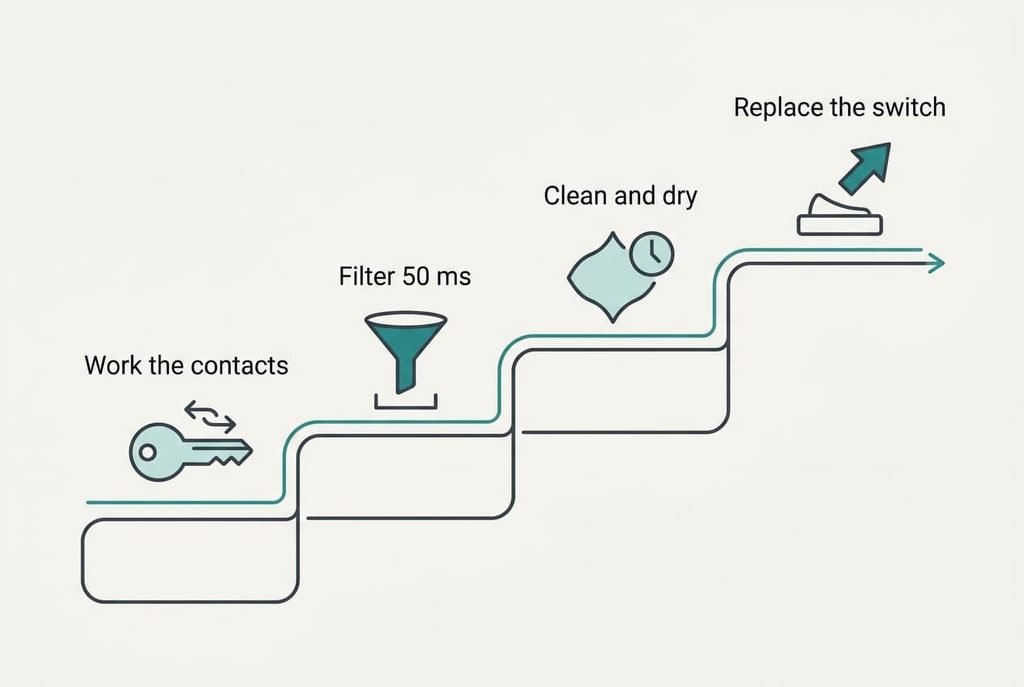
Move down the list, repeating the 50-press test after each step. Watch whether the count of doubles falls.
Work the contacts clean by pressing the key hard 30 times, which targets film on the metal. Each full press makes the contacts slide a fraction against each other, and that wipes the film away. Suppose it brings the bounce from 7 ms back to 4 ms, under the 5 ms window. It costs nothing and lasts days, and the film returns. Pitted metal doesn’t improve at all, so a fix that wears off within a week tells you the contact itself is going.
Turn on the setting that ignores quick repeat presses and set it to 50 ms, which targets the bounce directly. A ghost arrives 7 ms after the real press, so the filter drops it. A letter you type on purpose is at least 80 ms apart, even at 150 words per minute, since 60,000 ÷ (150 × 5) = 80 ms. The window of 50 ms sits between the two. It costs nothing, and its price is that every key now ignores presses closer than 50 ms. A game that reads rapid taps may feel slower. I’d choose this before replacing hardware, because a keyboard that will type the same letter twice usually yields to it in a minute.
Clean under the key and let it dry for a day, which targets residue. Lift the keycap if the keyboard allows it. Wipe the exposed area with a cloth that’s only lightly damp, and leave it for 24 hours before you press anything. That removes dried drink and skin oil that bridge the contacts. It costs a day, plus the risk of loosening a cap that won’t refit. If the ghost gap stays above 50 ms, this won’t fix it either.
Replace the switch or the keyboard, which is the answer when the bounce passes 50 ms and the filter can’t hide it. Borrow a keyboard first and type on it for a day, to prove the old one is at fault. Replacing one switch costs a small part and some soldering skill. A whole keyboard costs more, and resets any custom layout. It’s the only fix that removes a worn contact, so leave it until the end.
If none of that worked
Collect evidence before you buy anything when the keyboard still will type the same letter twice. Write down which keys double, whether the fault appears in every program, and whether the keyboard is wired or wireless. Plug the same keyboard into a second computer, and try a different keyboard on yours. A fault that moves with the keyboard points to the keyboard. Should it remain on the computer, the problem lies in the settings or the system. Note the date the fault began and the count of doubles in 50 presses, since support desks request both. A fault like this may fall under warranty, so find the receipt before you open the case.
A warning about resets. Resetting the keyboard settings clears layouts you’ve built, so photograph the screen first. Reinstalling the whole system for a doubled letter is far more than the fault needs.
The fix that is not worth doing
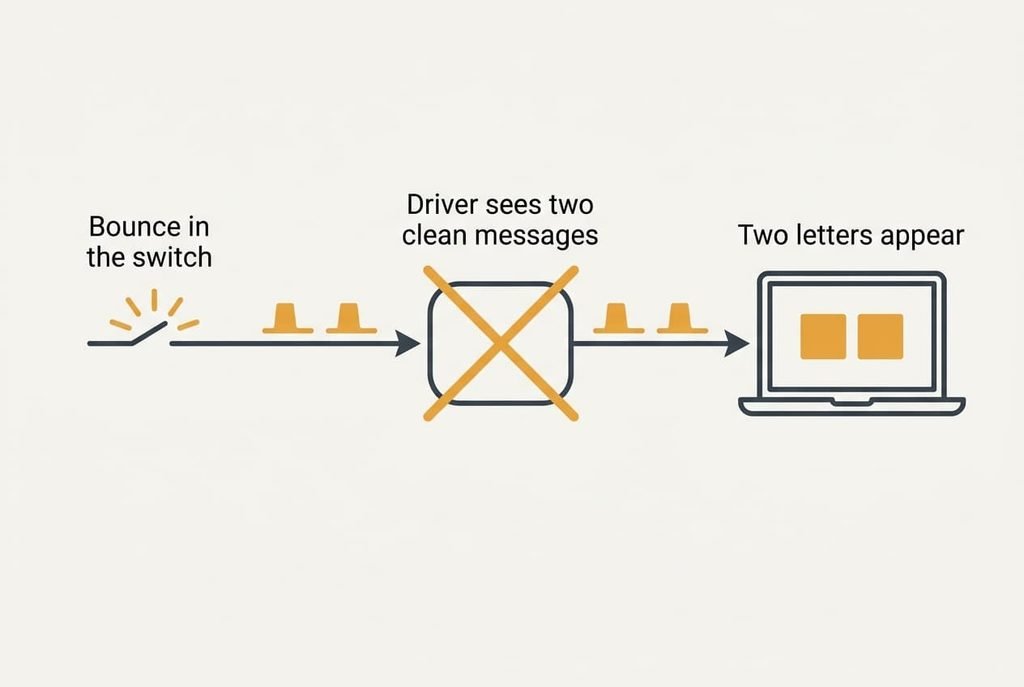
Reinstalling the keyboard driver is the first thing most guides suggest, and it fails here. The bounce lasts 7 ms inside the switch. By the time the driver sees anything, two clean key-down messages have arrived 7 ms apart. It obeys both. The count of doubles stays at 12 a day. Updating the operating system fails for identical reasons: the same two messages reach whichever version reads them. Nothing in software can see a bounce that happened before the message was sent.
A driver can’t un-press a key.
Pressing more gently looks logical and does little, since the contacts still bounce when they meet, and a lighter press can leave them touching for less time. Spraying cleaner into the keyboard risks a sticky residue that makes the bounce worse, because film between the contacts lengthens it. Swapping the keycap is pointless too, since the cap sits above the switch and never touches the contacts.
Fixing a keyboard that will type the same letter twice rests on one sum: bounce time against debounce time. Test first, then widen the window with the filter. Clean the contacts, and replace the switch only when the ghost gap passes 50 ms. A 50-press test takes a minute, so repeat it after every step. Keep the readings from before and after, since they tell you which fix earned its place.
Questions readers keep asking
Can I fix a keyboard that doubles letters at home?
Usually, yes. Pressing the key hard 30 times, a software filter set to 50 ms and a careful clean fix most cases in our sums. Each costs nothing or a day. Only a switch with a bounce beyond 50 ms needs replacing, and a borrowed keyboard proves that first.
Why does only one key double its letters?
The operating system adds its own repeat rules on top, and those matter later. Wear follows use. The letter e makes up 12.7% of English letters, so its contact takes about 762 presses of every 6,000 and ages first. A key you rarely press has little wear, so the faulty one is nearly always a frequent key.
How do I know the keyboard itself is failing?
Look for three signs: doubles that return within a week of cleaning, a second key starting to double, and a problem that travels with the keyboard to another computer. Any two together mean the contacts are wearing out. Keep the software filter on in the meantime.