Ads can be cut inside the browser or at the router, and each method misses what the other catches. Our sample is a Leeds household with six devices and about 1,700 ad and tracker requests a day. A browser blocker suits laptop browsing and a router filter suits everything else, and the deciding factor is where in the path the block happens. Choosing a browser ad blocker or a filter is therefore a question of which devices make most of your requests. Treat these as sample counts. Nothing here names a brand or mentions a cost. The answer shifts with the mix of devices. The sections below count requests by device before they pick a winner.
What Separates a Browser Ad Blocker or a Filter at the Source
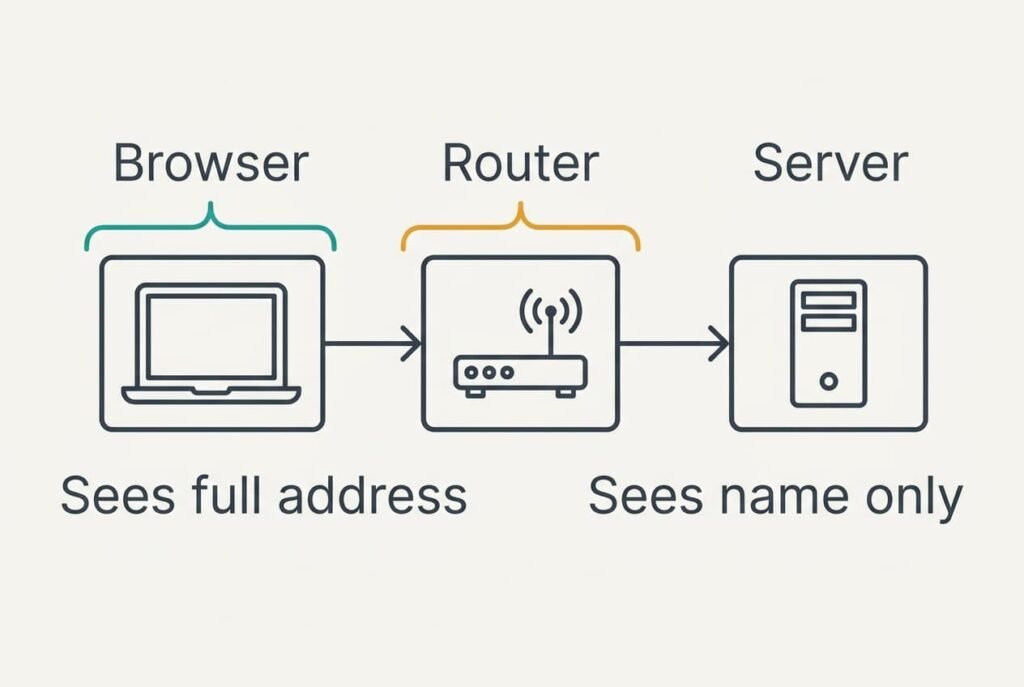
Every ad reaches you through a short journey.
The page asks for the ad by its full address. The device then looks up the name inside that address to find a server, and the server sends the ad back.
A browser blocker sits inside the page, where it can see the full address and the layout. It can refuse a request and also hide the empty frame left behind. A router filter sits at the name lookup, where it sees only the name. It can refuse a whole name for any machine on your network, and it can’t tell one address from another on the same name.
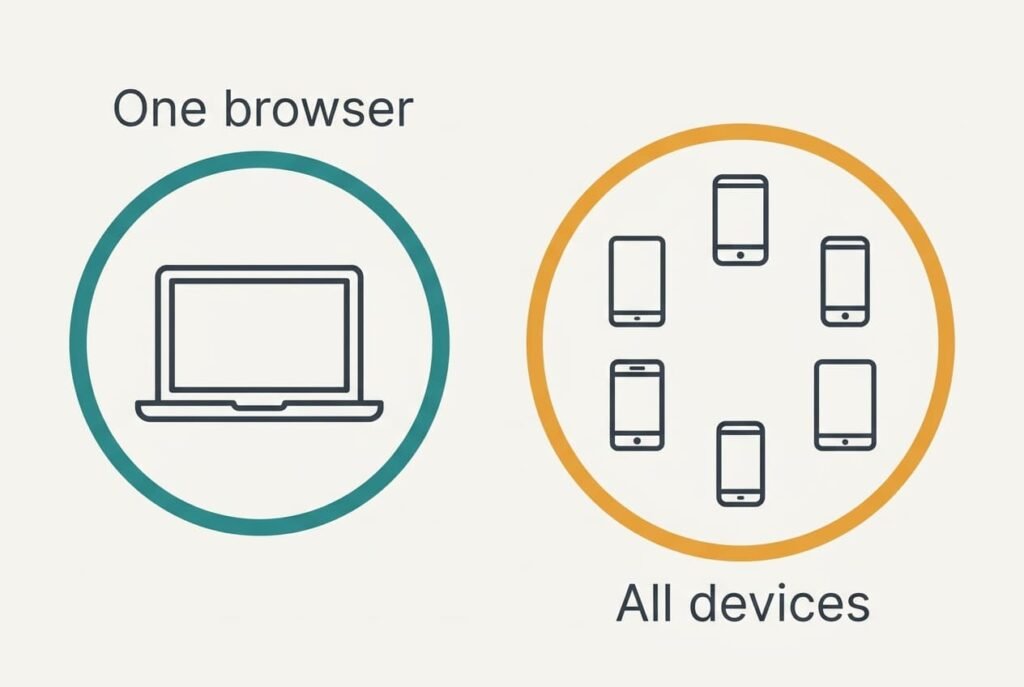
Everything turns on whether the block sees the whole address or only the name, because that sets both reach and precision. Inside the page you get precision on one browser. At the router you get reach across all devices, with less precision about what is blocked and what isn’t. The choice between a browser ad blocker or a filter is really a choice between those two strengths.
Take a page of 60 requests, 24 of which go to ad and tracker names. The browser blocker stops 22 of them, which is 92%. The router filter stops 18, which is 75%. Six of the 24 share a name with real content and must be left alone.
Browser Blocker and Router Filter Side by Side
Each row can be confirmed with one page load. Page figures use the 60-request page above. Household totals use 1,700 requests a day: two laptops make 800 of them and two phones make 600, while a tablet adds 200 and a television 100. Each count is an assumed sample. Your own router and browser will give slightly different numbers.
| Point | Browser blocker | Router filter |
|---|---|---|
| Where it acts | inside one browser | at the name lookup |
| Devices covered | the browsers where it’s installed | all devices on the home network |
| Ad requests stopped on that page | 22 of 24 | 18 of 24 |
| Empty gaps left on the page | hidden | often left as blank boxes |
| Apps and smart TV | not covered | covered |
| Allowing one site | one click in the browser | a change on the router |
| Away from home | still works | stops working |
One row catches most readers out: the one on gaps. A filter that stops 18 requests leaves 18 frames waiting for content that never arrives, and the page looks broken even though the ads are gone, because only a browser blocker can hide such a frame, which is why one page can look cleaner on a laptop than on a phone behind the filter.

Where a Browser Blocker Wins on a Laptop
Weigh a browser ad blocker or a filter for laptop browsing and the blocker wins when most of your pages load on one or two machines. It stops 22 of 24 requests, and it removes the blank boxes too. Pages look finished. In our household the two laptops make 800 of the 1,700 daily requests, and the blocker stops 92% of them, which is 736. That’s 43% of the whole.
It travels with you. Take the laptop to a café and the blocker keeps working, because it lives in the browser and not on the network at home. Allowing one site is a click, which matters when a shop or bank page needs its own scripts to work.
The limits are plain. A blocker sees only the browser it’s installed in. Phone apps and a smart TV load their ads through paths it never touches. Each browser you add needs its own copy, and each copy needs checking after an update.

Where a Router Filter Wins Across the Home
A router filter wins when the ads you meet come from phones and a television. One setting covers all six devices, a guest’s phone included. Nothing needs installing on any of them. It stops 75% of the 1,700 requests, which is 1,275, and the whole household sees fewer ads without effort.
It suits devices that can’t run extensions at all. A smart TV loads its home screen from the network and has no place to add a blocker. The router is the only point where you can reach it.
There are costs. The filter leaves blank frames. Some apps stop working when a name they rely on is blocked, and the fix means opening the router’s settings. A browser that sends its name lookups to another service skips the filter altogether, and so does a phone on mobile data. Adding a laptop blocker on top lifts the total to 83%: 736 from the laptops plus 75% of the other 900, which is 675, makes 1,411 of 1,700. The filter protects the home, and it stops there.
When Neither Is the Answer
Sometimes the answer to a browser ad blocker or a filter is neither. If you read a few sites a day, a reader view may do more than either tool. A reader view strips the ads from one page at a time and needs nothing installed or changed. Open it on the news sites you visit each morning and the ads vanish where you read.
The same holds for devices you rarely use. A tablet that loads 30 pages a week meets about 30 × 24 = 720 ad requests, which is roughly 100 a day, or 6% of the household’s 1,700. A laptop used only for a spreadsheet gains nothing from a blocker.
Count before you act. Spend the effort where the 1,700 requests actually come from. Note which device loads the most pages in a normal week. If it’s the one you already carry everywhere, a blocker on it is enough.
Which Ad Blocker Wins: a Browser Add-On or a Router Filter?
Two branches cover most homes, and only one applies to yours.
If most of your browsing sits on one or two laptops and you dislike blank gaps, choose the browser blocker. It stops 92% of ad requests there and hides the empty frames. It also follows you outside the home. Accept that phones and the television stay untouched.
If most of your ads arrive on phones and a television, choose the router filter. It covers all six devices at 75% and needs one change, though pages keep their blank boxes. Accept that it stops at your front door and doesn’t follow you onto mobile data.
Test your choice on one page. Load it and note the blank boxes. Note which ads remain. Switch the tool on, load the same page again and compare. If it looks better and nothing you need has broken, keep the setting. Review the setting after a month, since the lists of blocked names change as sites change their ads, and a tool left alone slowly stops catching new ones.
Questions Readers Keep Asking
Which one takes less effort to set up?
A browser blocker takes a minute per browser. A router filter takes one change on the router, but finding the setting takes longer the first time. Once done, the filter covers every device with no further work, while a blocker needs adding to each new browser.
Which one is more likely to break a page?
A router filter, since it blocks whole names and can’t tell a harmless address from an ad. A browser blocker is more precise and lets you allow one site with a click. If a page fails to load, try allowing it in the browser first.
Which suits a household with phones and a smart TV?
A router filter, because it’s the only tool that reaches the television and the apps. Add a browser blocker on the laptops if you want clean pages without blank boxes. Together they stop about 83% of requests in our sample.