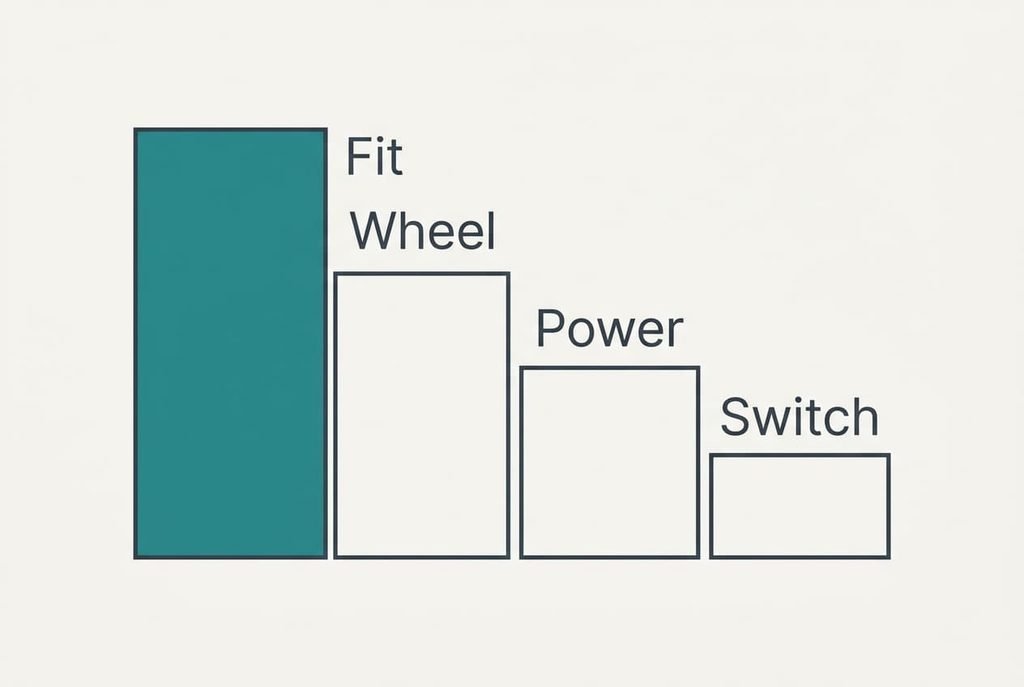
The check that decides everything when you’re choosing a mouse that suits your hand is how long the mouse is against how long your hand is. The other features rank below it. Amira, a bookkeeper in Leeds, spends six hours a day in spreadsheets and clicks about 8,000 times. Her old mouse leaves her fingertips short of the buttons by mid-afternoon, and she wants a replacement that won’t repeat the problem. Below are four checks ranked by what each one would cost you if you missed it, then the specs that sound clever and change little. All figures are assumed samples; names of makers and sums of money are left out.
What Matters Most When Choosing a Mouse
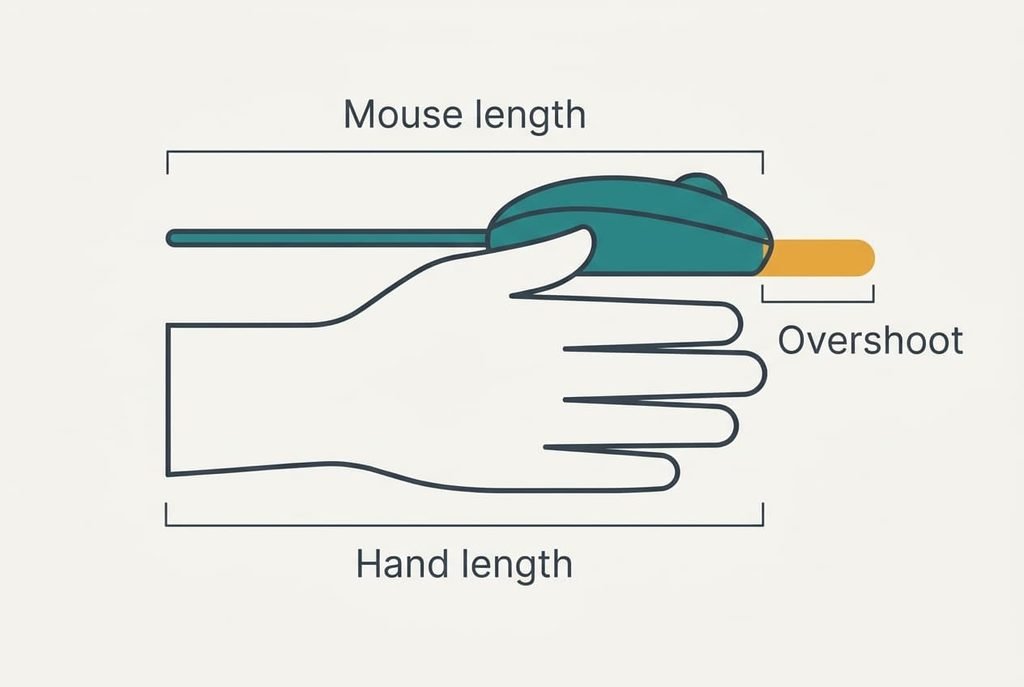
A hand rests on a mouse for hours, and the shell carries that resting weight. When the mouse outruns the hand, the fingertips can’t reach the buttons unless the palm lifts off the back. The hand then holds the mouse up with small muscles for every minute of the day. A mouse that’s too short fails the other way, because the fingers curl round the edges and grip hard to steer. That’s why choosing a mouse that suits your hand matters more than any claim on the packaging.
The mouse length set against your own hand length settles the first question. Measure from the wrist crease to the tip of the middle finger. Amira’s hand is 17.5 cm. A planning window for a palm grip runs from 55% to 65% of that, which is 9.6 to 11.4 cm. Her old mouse measures 12.5 cm, or 71%. It overshoots by 1.1 cm. A candidate at 10.8 cm is 62% and sits inside the window.
Take the window as a rough start, since grips vary.
Four Checks for a Mouse That Suits Your Hand, in Priority Order
1. Fit comes first for anyone after a mouse that suits your hand, and it’s rarely measured at all. It sets how the hand rests for six hours. With Amira’s 17.5 cm hand the window is 9.6 to 11.4 cm. Look for the length in the listing or measure the mouse in a shop, then lay your palm on the back and check that your fingertips land on the front third of the buttons. A miss means a stretch that tires the hand by mid-afternoon.
2. The wheel and buttons come second. They set how fast you travel through a sheet. A wheel that clicks at every step moves 3 rows a notch. A 2,000-row jump then takes 667 notches. At 6 notches a second that is 111 seconds, and six such jumps a day eat about 11 minutes. A free-spinning wheel covers the same jump in roughly 2 seconds. Spin the wheel in the shop and ask whether it offers both modes. A miss means a slow crawl down every long column.
3. Power comes third. It sets when the mouse goes flat. Assume an average draw of 2 mA. A replaceable AA cell rated at 2,500 mAh then lasts 1,250 hours, which is about 42 working weeks at six hours a day. A built-in 500 mAh cell lasts 250 hours. Amira would recharge about every eight weeks. Check whether the mouse works while it charges. A miss means a dead mouse at three o’clock with a deadline ahead.
4. The switch rating takes fourth place. It sets how long the buttons stay crisp. Take a rating of 10 million clicks. At 8,000 a day that lasts 1,250 days, or about 5.2 years of 240 working days. A switch rated at 3 million would wear out in under two years. Look for a stated click rating and for feet you can replace. A miss means double clicks that register by themselves.
Which Specs Are Oversold for Spreadsheet Work
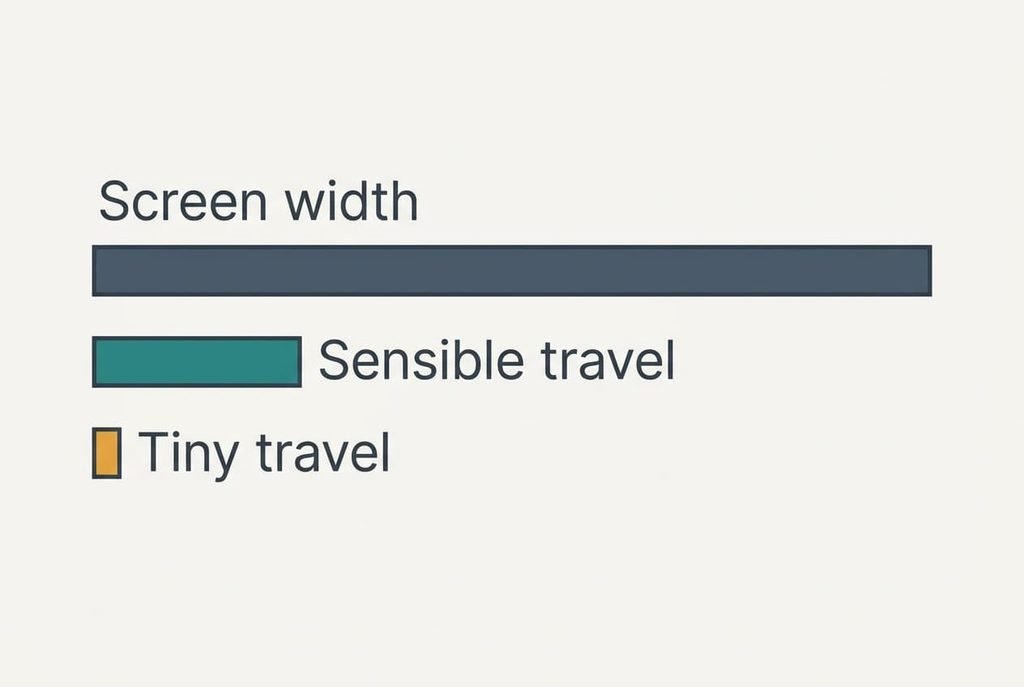
Several figures on the packaging get more attention than they earn. A maximum sensitivity of 16,000 DPI leads the list. A screen 1,920 pixels wide needs 2.4 inches of mouse travel at 800 DPI, which is 6.1 cm. At 1,600 DPI it needs 3.0 cm. At 16,000 DPI the same crossing takes 3 mm of travel, and no hand steers that. Nobody who works in cells runs above 1,600. The extra headroom goes unused. Pointer speed can also be slowed in settings, which makes a high ceiling pointless.
A polling rate of 1,000 Hz is promoted for speed. At 125 Hz the pointer position updates every 8 ms. A 60 Hz screen redraws every 16.7 ms. It already gets two updates per frame.
Lighting effects draw from the same cell as the sensor and shorten the 1,250 hours in the third check. A shape sold as ergonomic carries no standard behind the word. Without your hand length, the label tells you nothing.
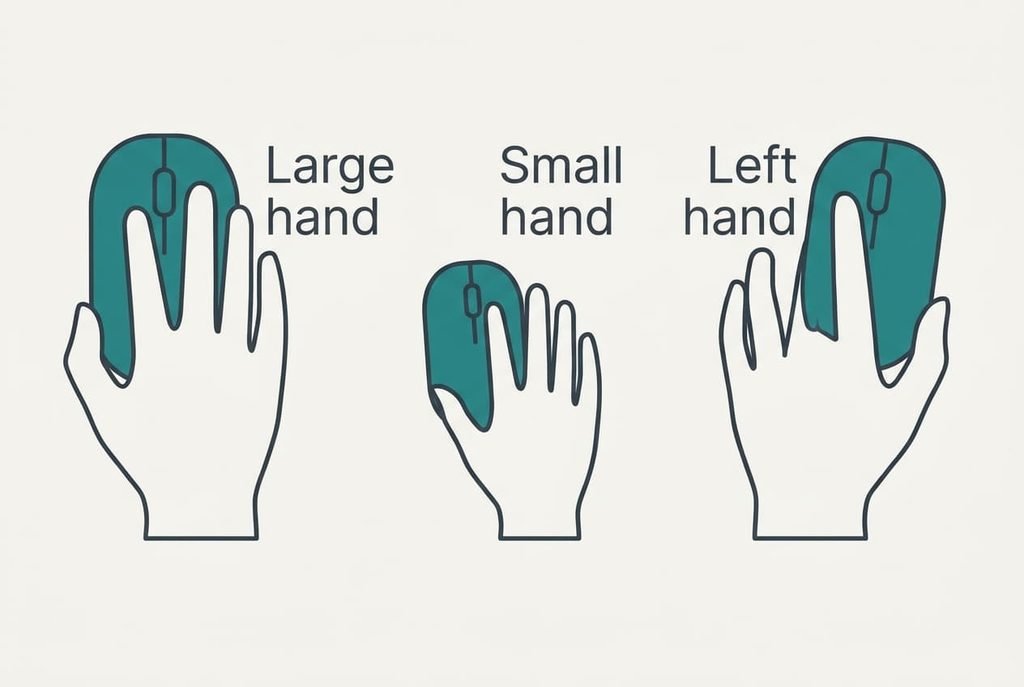
Which Mouse Suits Your Hand, and What Moves for Each Reader
A reader with a 15 cm hand has a window of 8.3 to 9.8 cm. Many full-size mice run 12 cm or more, which puts them at 80% or beyond. Fit rises from first place to the only place that counts, and a compact mouse becomes the starting list.
A left-handed reader finds that a shape sculpted for the right hand curves the wrong way. Side buttons sit under the wrong thumb, or vanish. A symmetrical shell or a mirrored model fixes that, and fit stays on top.
A reader who works at cafe tables carries the mouse in a bag. Power rises to second place, since a replaceable cell can be swapped on the go. Wheel mode matters less when the sheets stay short.
Reasons to Leave a Mouse on the Shelf
If the shop won’t let you hold it and the seller refuses returns, leave it. Fit isn’t something a spec sheet can show, and Amira’s 1.1 cm overshoot would have appeared within ten seconds of holding. Check how many days you have to send it back and whether the seller pays for the postage.
A decent returns window stands in for the shop counter when you buy online.
Leave a mouse with a built-in cell if you work through a full day and the listing doesn’t say it can run while charging. Eight weeks between charges sounds relaxed until the day it goes flat at four o’clock. A mouse with no stated click rating also stays on the shelf. The rating is the only evidence of how long the buttons will last, and a maker who omits it usually has no good figure to print.
The Two-Minute Test With a Ruler and a Pencil
Start by measuring, because a mouse that suits your hand can only be found against a number. Lay a ruler along your hand from the wrist crease to the tip of the middle finger, then multiply by 0.55 and 0.65 to get your window. Next, read the mouse length from the listing, or hold a pencil against the shell in a shop and measure the mark. Lay your palm on the back and see where your fingertips land. Spin the wheel to find out whether it clicks or glides, then read the listing for the power type and the click rating.
Four answers settle it in two minutes. Fit decides the shortlist, and the wheel narrows it further. The power type and the click rating then separate the survivors. Keep your window figures beside the listing as you compare, since your memory of the shelf fades long before you get home.
Questions Readers Keep Asking
Do I need a high DPI figure for spreadsheet work?
No. Cell work runs comfortably at 800 to 1,600 DPI, where a full screen width takes 3 to 6 cm of travel. A figure of 16,000 only matters if you set it, and at that setting a 3 mm slip moves the pointer across the whole screen.
How much should I spend compared with my keyboard?
Match your spending to the hours of contact. Your hand spends hours on the mouse every working day. Give it a share that reflects that. Put the money into fit and a stated click rating, and treat lighting as an afterthought.
How long will it last, and what will I regret?
A 10 million click switch lasts about 5.2 years at Amira’s pace. The shell and feet usually outlast the buttons. Regrets tend to come from a mouse that was 1 cm too long, or a built-in cell that went flat halfway through a deadline.