Log in to nothing on a network you don’t control unless the connection to that site is encrypted or the link is your own. A VPN on public Wi-Fi costs a subscription and one more switch to remember, which is why people look for a way out. The realistic destinations are your own mobile link or encryption you insist on. Whether leaving pays off turns on one question: must you hide site names from the network’s operator?
The reader here is in the United Kingdom. They own a phone and a laptop and work from cafés and hotels. No products are named and no prices quoted, since both change every few months.
What has to survive when you leave a VPN on public Wi-Fi
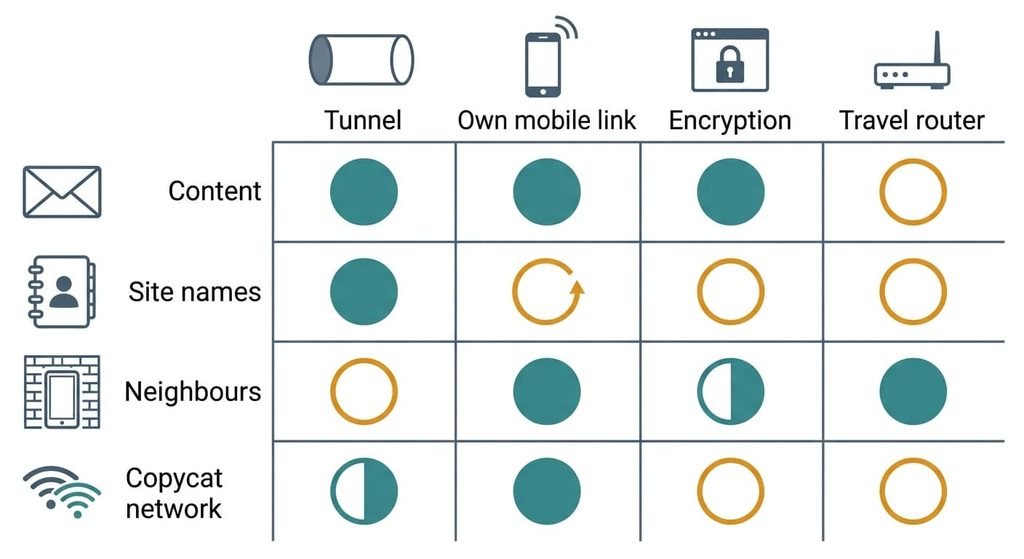
A VPN on public Wi-Fi does four jobs, and an alternative has to cover the ones you care about. One is hiding the content of your traffic from other people on the network. Another is hiding site names from whoever runs the link. Keeping your device out of reach of neighbours on that network is a third. The last is keeping a copycat network from reading what you send.
A tunnel does the first and second outright, because everything leaves your device wrapped before the venue’s network touches it. It does the fourth in part, since a fake network can still cut you off. It does little for the third by itself, because that depends on how your device treats the network. Alternatives cover the first job well, and the mobile link covers the third and fourth too. The second job is the one that does not move across: hiding site names from whoever runs the link happens only inside a tunnel, and every other route just changes who sees them. A mobile link gives them to your carrier, and encryption leaves them readable in the lookups your device makes.
That’s the loss to weigh before anything else.
Instead of a VPN on public networks: three routes and what each costs
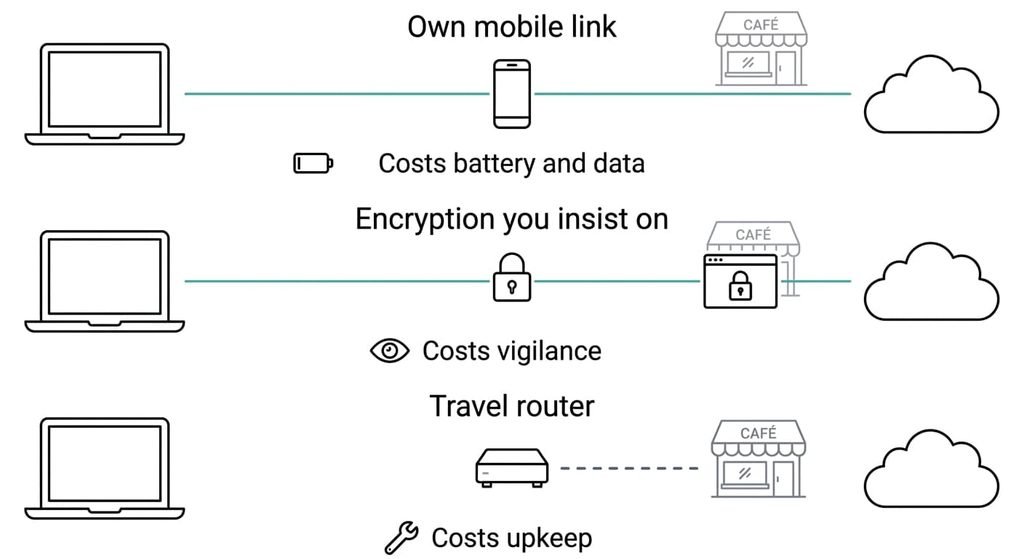
1. Your own mobile link. This means using your phone’s data, or sharing it to the laptop as a private network with its own password. It suits anyone who already pays for a data allowance. The trade-off is money and battery. Say a working day online moves 2 GB, and twenty such days make 40 GB, so check that figure against your allowance before relying on it. Jobs one and three land well, and so does job four, because strangers on the venue’s network never see your traffic. The second job moves to your mobile carrier, who can see site names. It fails where the signal is weak or the allowance runs out.
2. Encryption you insist on. This is the effort route. Set your browser to refuse sites that aren’t encrypted, turn on encrypted name lookups where your device offers them, and keep sign-ins to apps you know encrypt their own traffic. It suits someone who mostly uses web pages and mail. The cost is vigilance, since only what is encrypted is covered. The first job lands for the web. Site names stay visible, and the third job needs a device setting that marks the network as untrusted. It fails on a single app that sends something in plain form.
3. A small travel router. This is the pay-once route. It connects to the venue’s network and gives your devices a network of their own behind it. It suits someone who carries several devices. The trade-off is one more thing to carry and keep updated, because an old unit becomes the weak point. Neighbours on the venue’s network can’t reach what sits behind the router, so the third job lands well. The first and second jobs stay as they were, and the venue’s login page can be awkward to pass through it. It fails when its upkeep is forgotten.
What you only notice in month three
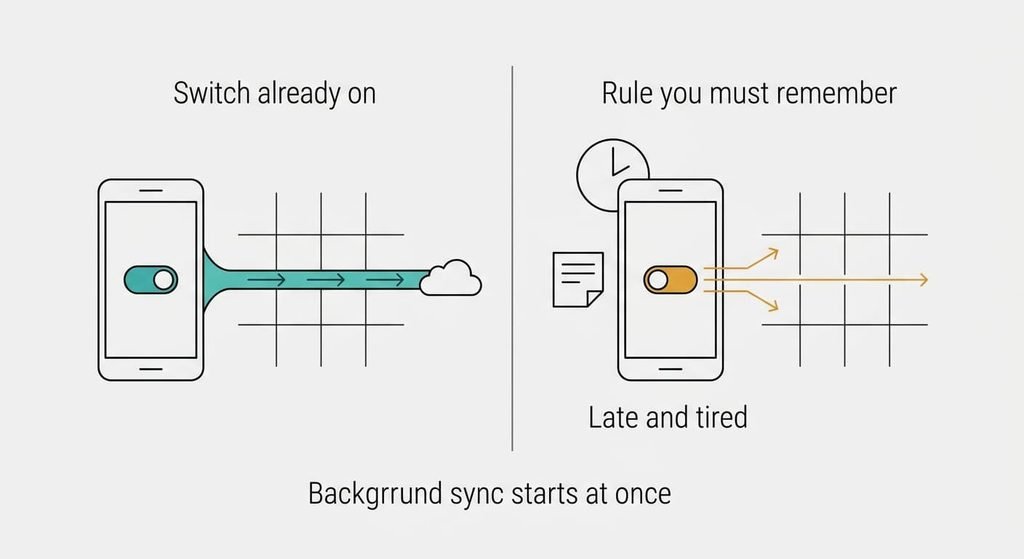
Leaving a VPN on public Wi-Fi swaps a state you switched on for a rule you must remember. A tunnel with auto-connect protects every app the moment you join a network. Without it, your phone starts background syncs on the venue’s network before you’ve opened a page. You’ve made no decision about it by then, and a mail app can have fetched messages in the open.
The rule also decays. In week one you keep sign-ins for your own link. By month three it’s late in a hotel, one urgent login is waiting, and the network is right there. A rule that depends on your mood at that hour fails more often than a switch that’s already on, since mood is the one input you can’t schedule. I’d write the rule down once, in a note on the phone, and read it the first time it irritates you.
How to leave a VPN without losing anything
Start by listing what you use the VPN for on public networks over one week. Write down the sites and apps, and mark which ones sign in. That list is your payload.
Next, turn on one replacement at a time while the VPN stays on. Verify the job each one should do. For the encryption route, open a page served without encryption and see whether your browser stops you. With the router or the mobile link, check from a second device on the same network whether yours appears among the nearby devices it lists. A setting that appears on is not the same as a job that is done.
Skip the verifying and you know only what you switched.
Then run both for a couple of weeks of real use. Cut over last, by turning off auto-connect on public networks only. Keep the app installed.
When to stay
Staying with a VPN on public Wi-Fi is a legitimate answer, and it turns on where you work. Stay with the VPN when a place where your own mobile link doesn’t reach is part of your week. A basement office or a rural hotel leaves the first route unavailable, and the router still needs the venue’s connection. Stay if you use apps you can’t inspect. Some may send mail or files unencrypted, and you have no way to tell. And stay if you know you’d take the urgent login anyway, since the switch protects you on the days your judgement doesn’t.
Leaving is a poor trade in those cases, because the VPN is the only route that still works in each of them. A subscription you resent still covers the second job, and nothing in the other routes does. If the sums only work with the VPN, keep the VPN.
The check to do before you decide anything
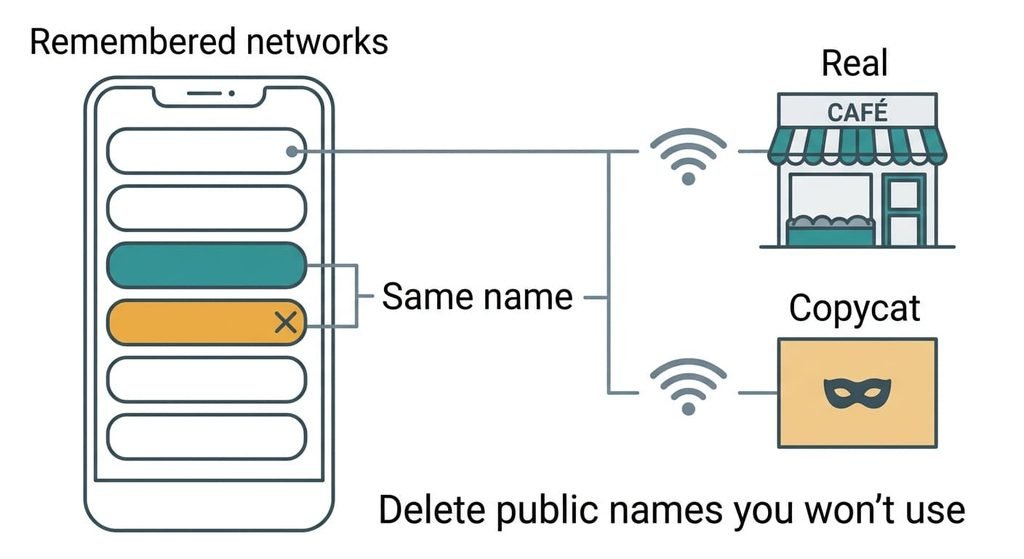
Take the list of public networks your devices remember and read it on the phone first, then on the laptop. Both keep every network name they’ve joined and reconnect on their own when they see the name again. A copycat network that reuses a remembered name can get joined without asking, and nothing on screen tells you.
Delete every public name you won’t use again, and turn off auto-join for the rest. Look for generic names such as a café’s or a hotel’s that appear twice. That leaves you free to switch routes whenever you like, which outweighs any single route. Reading takes two minutes and the cleanup five.
For a VPN on public Wi-Fi, the job to keep is hiding site names from the link’s operator, and no alternative carries it across. Everything else can be covered by your own link, by encryption you insist on or by a router of your own. Read the remembered-networks list today, whichever way you decide.
Questions readers keep asking
Does an alternative protect me as well as a VPN on public Wi-Fi?
For content, yes, if you use your own link or insist on encryption. For site names, no, because only a tunnel hides them from the network’s operator, and your own link moves them to your carrier. The right route depends on whether the names matter to you.
Is it cheaper to skip a VPN on public Wi-Fi?
Usually, though each route costs something else. Your own link uses your data allowance and battery. Insisting on encryption costs attention. A travel router costs once and then needs updating. Compare the cost of the route you’d actually use against the subscription, since the cheapest on paper may be the one you’d drop.
Is it worth dropping my VPN for public Wi-Fi?
Only if you can keep a rule without the switch. If your work happens where your own link is strong and you rarely need the sign-ins on public networks, it can be. If an urgent login at a bad hour is likely, the VPN earns its place.