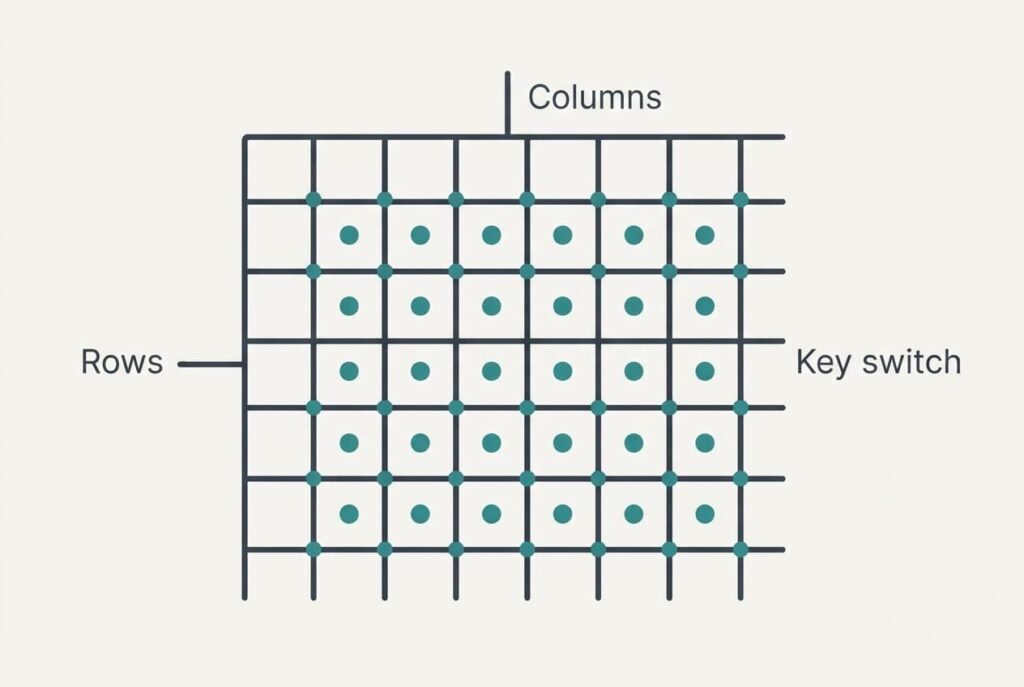
Sharing wires is what lets a keyboard read a hundred keys without a cable as thick as an arm. The keys sit in a grid of rows and columns, and the controller switches on one column at a time to see which rows respond. A press joins one column wire to one row wire, and that pair names the key. On our sample board 21 wires serve 104 keys, and the grid is scanned about 1,500 times a second. Below, one keystroke is followed through the scan, the weak spot of the trick is shown and a short test tells you if it affects you.
How Can a Keyboard Read a Hundred Keys Using a Few Wires
Giving each key its own wire would need 104 wires and a shared return. A grid of 8 rows and 13 columns needs 8 + 13 = 21 wires, because each key is a switch at one crossing and 8 × 13 = 104 crossings cover the whole layout. That is five times fewer wires. Every wire also needs a pad on the board and a pin on the controller. The saving therefore shrinks the whole circuit board.
In one sentence, a keyboard names each key by its column and its row together, and it finds the pair by switching columns on in turn while listening on every row. Nothing exotic is involved. Any board that has to let a keyboard read a hundred keys cheaply ends up with a grid of this kind.
The summary skips the flutter of a closing switch. How a press becomes a message the computer understands is missing too. So is the cost of sharing wires. The later sections deal with each in turn.
Tracing One Keystroke Through a Keyboard That Reads a Hundred Keys
Choose a key at column 2, row 3.
Follow it from touch to screen. Untouched, its switch is open. No row answers when column 2 is on.
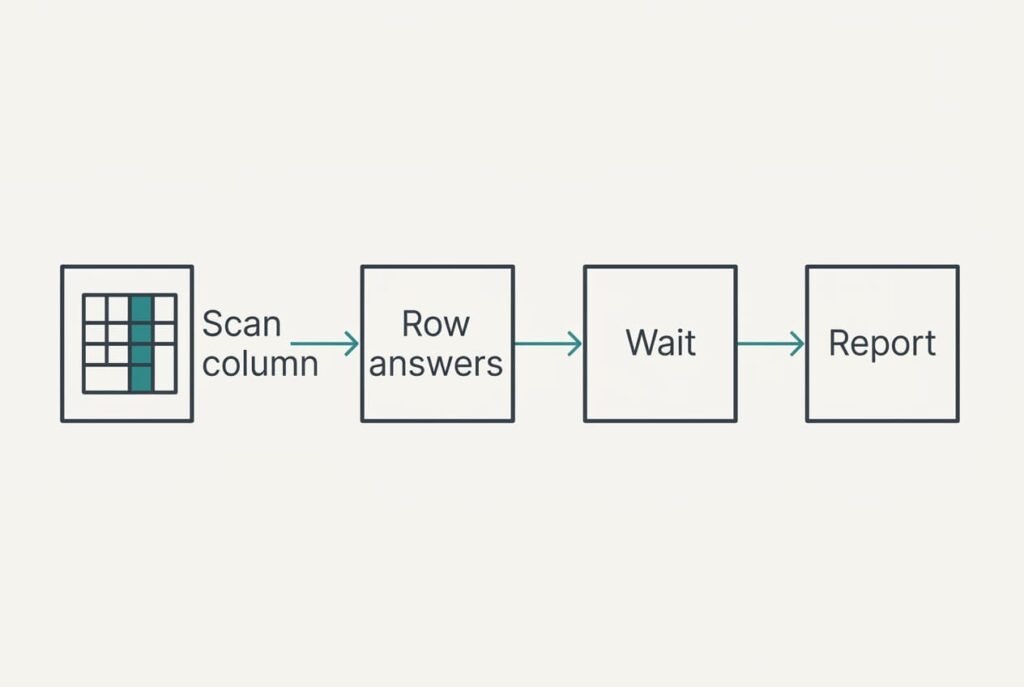
The controller works through the columns in order. It powers column 1 for 50 microseconds and reads all 8 rows, then cuts the power. It then moves to column 2 and reads again. The sweep carries on to column 13. One full pass takes 13 × 50 = 650 microseconds, which gives about 1,540 passes every second.
You press the key. The switch closes and a thin path joins column 2 to row 3. On the next pass, while column 2 is powered, current reaches row 3. The controller reads a high level there. Every other row reads low, because a resistor holds each row low when nothing drives it. The pair (2, 3) now names one key and no other.
The controller doesn’t accept it yet. A closing switch flutters, and for roughly 5 milliseconds the contact opens and closes many times. A single reading could therefore report three presses for one. So the controller waits for the same pair on eight passes in a row. That wait is 8 × 650 = 5.2 milliseconds, just beyond the flutter.
After the wait it looks up (2, 3) in a table and finds the code for that key. It adds the code to a short report and holds the report until the computer asks for news, which it does at regular intervals. The computer receives the report and types the letter.
Release works in reverse. The switch opens, the pair disappears from the scan, and eight passes in a row without it end the press. From finger to screen, the scan itself adds about 5 milliseconds.
All of this repeats for every key you press, even at the same moment, as each pass reads all 8 rows together. Two keys in different columns are both seen within a single 650-microsecond pass. A third key adds nothing to the delay.
One Analogy and Where It Breaks
Picture a classroom with 8 rows of desks and 13 columns. A teacher says “column 1, raise a hand if you’re here” and watches every row. Then column 2, then column 3. A raised hand names the pupil by column and row, and nobody needs a private telephone line to the teacher.
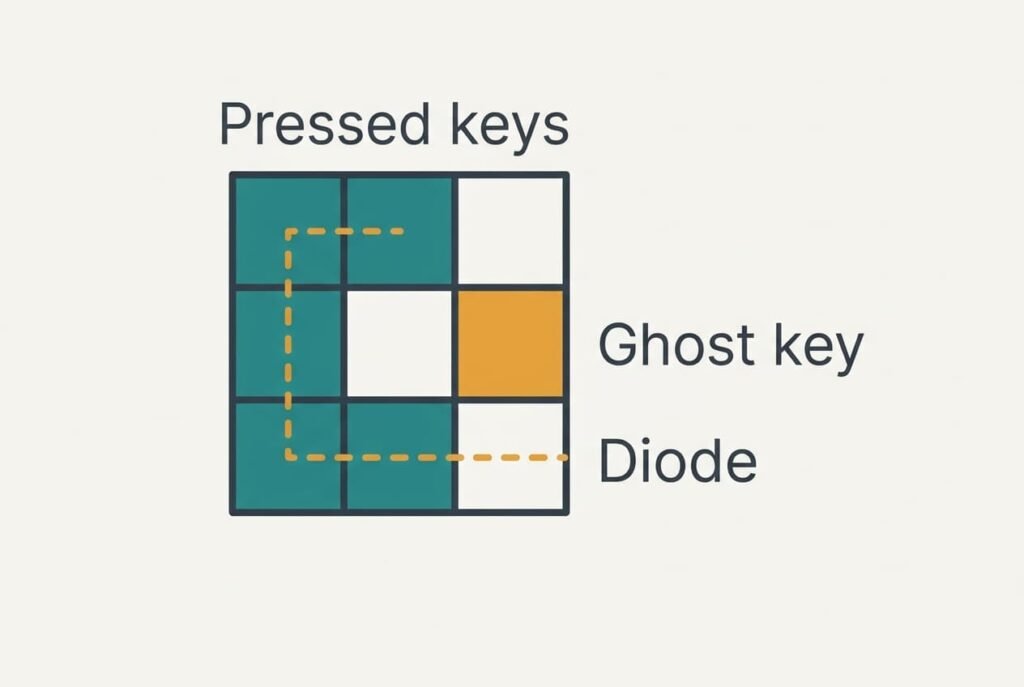
The picture holds because the teacher listens to one column at a time. It breaks where the wiring matters. In a classroom a raised hand is its own signal, and nobody else is affected. In a keyboard grid the wires are shared. A signal can leave a pressed key and travel sideways through other pressed keys. It then arrives at a row where nobody pressed anything. The teacher hears a hand from an empty desk.
What the Shared Wiring Costs
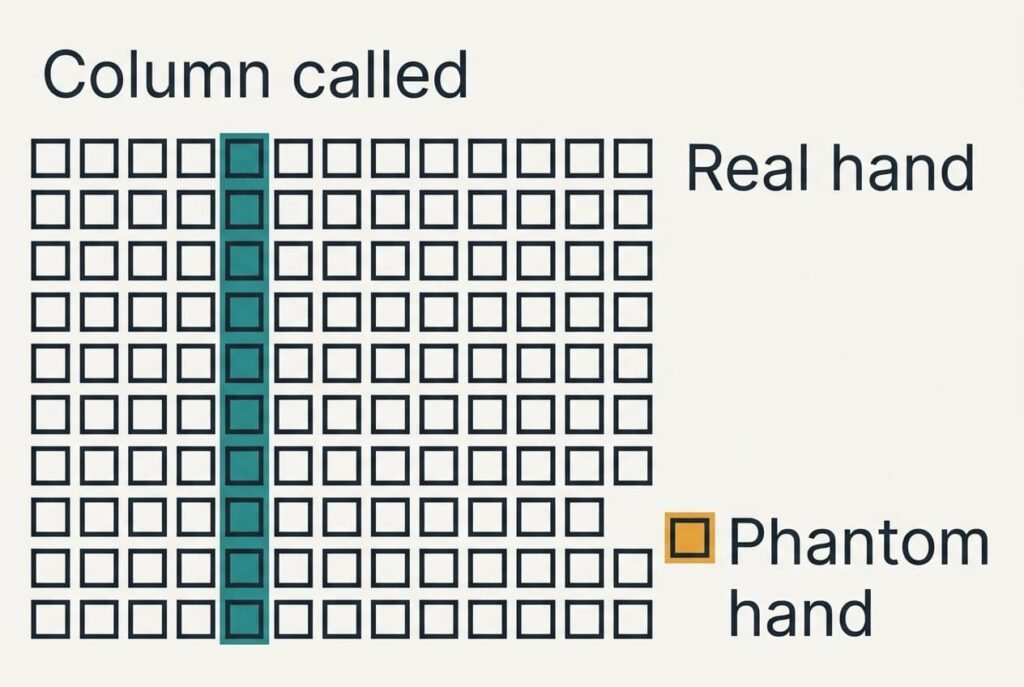
Take three keys pressed together at (2, 3), (3, 3) and (2, 4). When the controller powers column 3, current enters row 3 through the key at (3, 3). Row 3 is also joined to column 2 through the key at (2, 3), and column 2 is joined to row 4 through the key at (2, 4). Current therefore reaches row 4, and the controller hears an answer at (3, 4), a key you didn’t press.
That’s ghosting. Plenty of people file it under fast typing, yet ghosting comes from the wiring and is independent of speed.
The wiring that lets a keyboard read a hundred keys is also where the weakness comes from. A diode in series with each switch blocks the sideways path, and a board with 104 diodes can’t produce a ghost. Cheaper boards leave the diodes out and ignore any key that would complete a ghost. Many keyboards also report at most six ordinary keys at once.
Three Beliefs About Ignored Keys
Many people assume the keyboard missed the key because you typed too fast. The belief formed because dropped keys show up in bursts, when more keys are down together. The same combination fails at a crawl, and a fast typist who never holds three keys at once never meets the problem.
Another belief says a gaming keyboard registers everything. It formed from labels promising protection against ghosting. A label can cover only a block of keys around the movement keys, and the remaining keys keep the cheaper wiring. Read the claim as a promise about some keys and test the rest yourself.
A third belief says a dropped key means a broken switch. The switch is usually fine, since the same key works alone and fails only inside certain combinations. A broken switch fails every time, whatever else is down. That is how you tell the two cases apart.
A Decision Rule for Your Own Keyboard
Check rollover only if you press four or more keys together. Typing prose rarely keeps more than two or three keys down, and a plain board copes with that. Games and shortcut chords are another matter, since they hold several keys down for seconds on end, and that is exactly where a plain board runs out of room.
Test the exact combination you use.
Hold the keys in a text field and see whether every letter appears. If one is missing, change the combination. If that fails, change the board. The check needs a minute and no software, and the result is specific to your hands and your games.
For most readers the grid stays invisible. It’s a clever economy, a hundred keys on twenty-one wires. It stays out of the way until you press the unlucky pattern. Knowing the grid exists stops you blaming your fingers or a working switch, and stops you buying a board you don’t need. A keyboard read a hundred keys honestly for years before anyone noticed the one pattern that fooled it, and the fix is still just a diode.
Questions Readers Keep Asking
Can a keyboard ghost with only two keys pressed?
No. Two pressed keys can’t build a path that returns to a third crossing. A ghost needs at least three keys that form an L-shape in the grid, and those three conjure the fourth corner. With one or two keys down, every reading is honest.
Do I need a keyboard that registers every key at once?
Only if you routinely press many keys together, for example in some games. For ordinary typing, no. A board that handles three or four keys at a time is plenty, and a test with your own key combinations beats any label.
Is a diode in every switch the same as a faster keyboard?
No. Diodes block the sideways path that makes ghosts, and speed is something else. The scan rate and the debounce wait set the speed, and they work the same with or without diodes. A diode board is more accurate under a crowd of keys, not quicker for one.