Why does a doorbell alert arrive after the visitor has left? Most often the video clip is still creeping across a weak Wi-Fi link, and the alert queues behind it. The household followed here rents a Bristol flat, with a battery video doorbell mounted 11 m from the router and two walls between them. Timing tests find the slow step. Four remedies come after that, running from free to paid, and each one states what it takes away from your day. Nothing here needs a specialist. All figures are rough samples from that doorway. Measure your own doorbell before you compare.
Why Does a Doorbell Alert Arrive After the Visitor Leaves
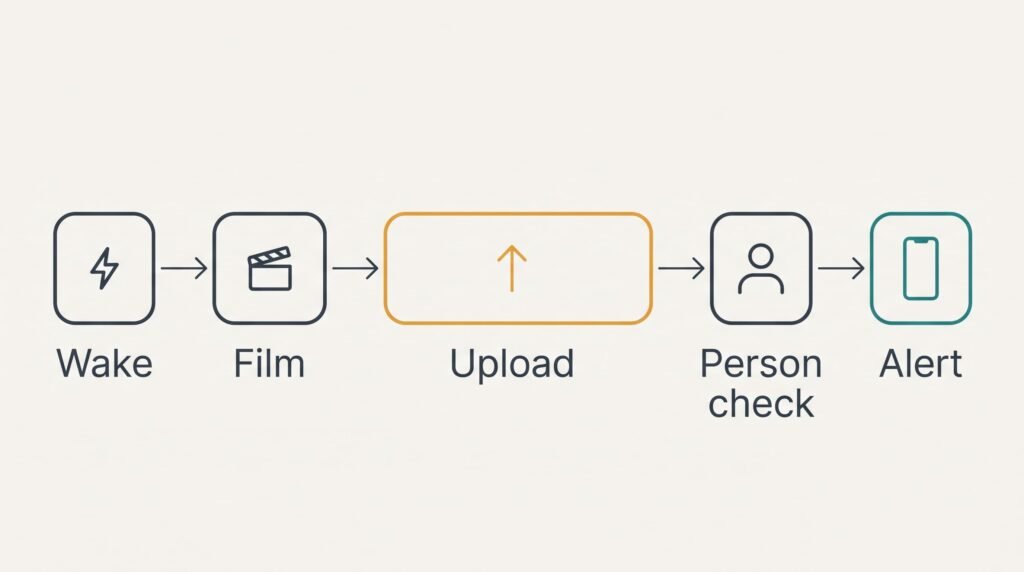
A video doorbell sits idle until its motion sensor or button fires. A battery model rests between events to protect its charge. First comes waking, which takes about 1.5 seconds. Next the unit films a clip of 10 seconds, about 6 MB in size, and uploads the clip to the maker’s servers. A person check then runs for around 3 seconds, and the push to your phone adds about 2 more. Some designs send the alert ahead of the clip, but many hold it behind, and yours may differ.
Uploading is the slow step. A 6 MB clip carries 48 megabits. Behind two walls the doorbell reaches about 2 Mbit/s, which makes that leg 48 ÷ 2 = 24 seconds and the full chain 1.5 + 24 + 3 + 2 = 30.5 seconds. A visitor who leaves after 20 seconds is gone for 10.5 seconds before your phone buzzes. Beside the router the link reaches 10 Mbit/s, and the upload shrinks to 4.8 seconds with the chain at 11.3.
People blame the phone or the app, yet the slowest hop sets the delay, and here that hop is the radio link at the door. Your phone can add a wait of its own: a battery saver that holds alerts for 45 seconds lifts the total to 75.5.
Four Tests When an Alert Can Arrive After the Visitor
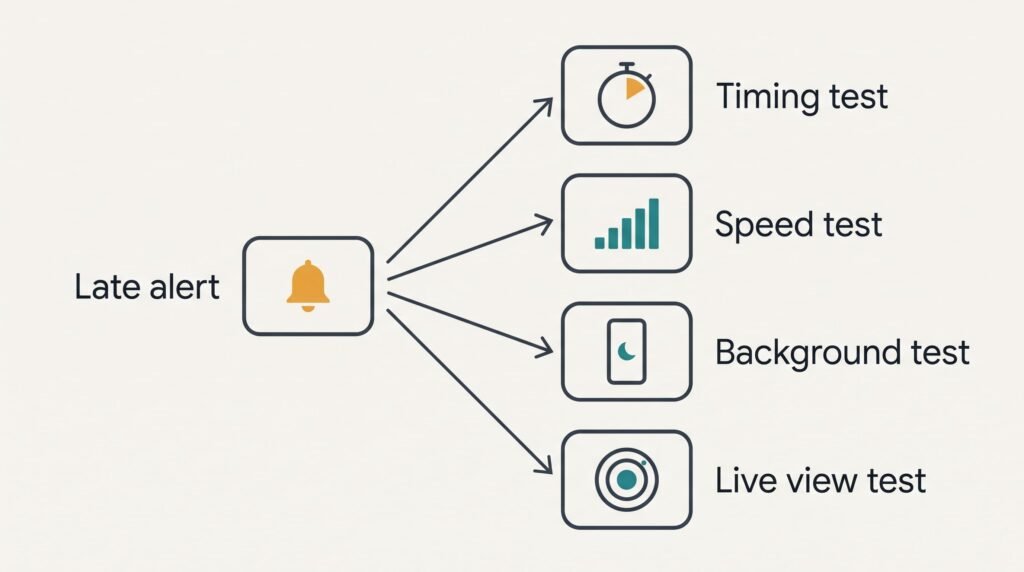
Each test answers one question about your own set-up: why does a doorbell alert arrive after the visitor has gone, and where does the time go? Keep a stopwatch and a notepad near the front door.
Timing test: press the button five times with the phone resting on a table and the app open, noting the gap from press to buzz. Ours gives 28 to 33 seconds. Under 12 seconds means the doorbell copes, and the cause is elsewhere.
Speed test: carry the phone to the doorstep and join your home network. Run a speed check there. The upload figure stands in for the doorbell’s. Ours reads 2 Mbit/s. Anything below 3 suggests a weak link.
Background test: repeat the timing run with the screen locked and the app closed. Ours rises to 75 seconds. No change at all means the phone isn’t holding anything back.
Live view test: open the live picture and time its arrival. Over 10 seconds blames the link. A quick picture with a slow alert points to the phone or the maker’s servers.
Four Fixes for a Late Doorbell Alert, in Order
Change one thing per round, then repeat the timing run. Ask the same question after each change: does a doorbell alert arrive after the visitor even now? Jot down every result, and the winning change will stand out.
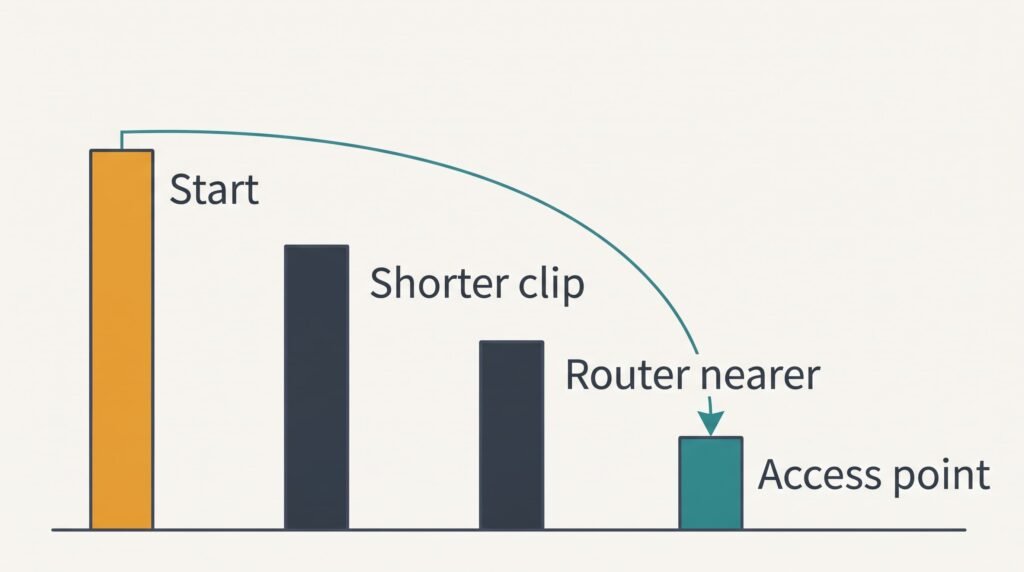
Let the app run in the background. This is a free change in the phone’s battery settings and needs two minutes. It answers the phone hold that the background test exposes, because alerts stop queueing behind a power-saving rule. You pay with a little extra charge used each day, since an app that was quietly parked now wakes more often. If the background test showed no change, skip this step. It also helps when your phone buzzes at once for other apps and late only for this one.
Shorten the clip in the app. Five minutes in the doorbell’s settings is enough. Pick the shortest length that still catches a face at the door. Halving the clip from 10 seconds to 5 cuts it to 3 MB. The upload then drops from 24 seconds to 12 and the chain from 30.5 to 18.5. You lose the footage after the visitor stops moving. A shorter clip also shows less of what led up to the ring, which matters if a parcel vanishes later.
Bring the router closer to the door. Plan an hour for moving the router and testing again. Removing one wall lifts the link to about 5 Mbit/s, the upload falls to 9.6 seconds and the total to 16.1. In a rented flat, check the tenancy before moving sockets or cables. The router’s old position loses its tidy cable run, and the television may lose its connection along with it. Test with the timing run once the router sits in its new place, because a spot that looks better can still sit behind a thick wall.
Add a second access point by the door. Expect a purchase and an afternoon. The unit joins the router with a cable rather than by radio, which gives the doorbell around 10 Mbit/s and lands the chain at 11.3 seconds. This is the dearest remedy and the hardest to reverse, since cable along a hallway is tough to hide. Fit the unit near the door with the cable run planned in advance, and repeat the timing test after fitting. You also lose a spare socket, and you spend the money for the unit.
If the Alert Is Still Late After All Four
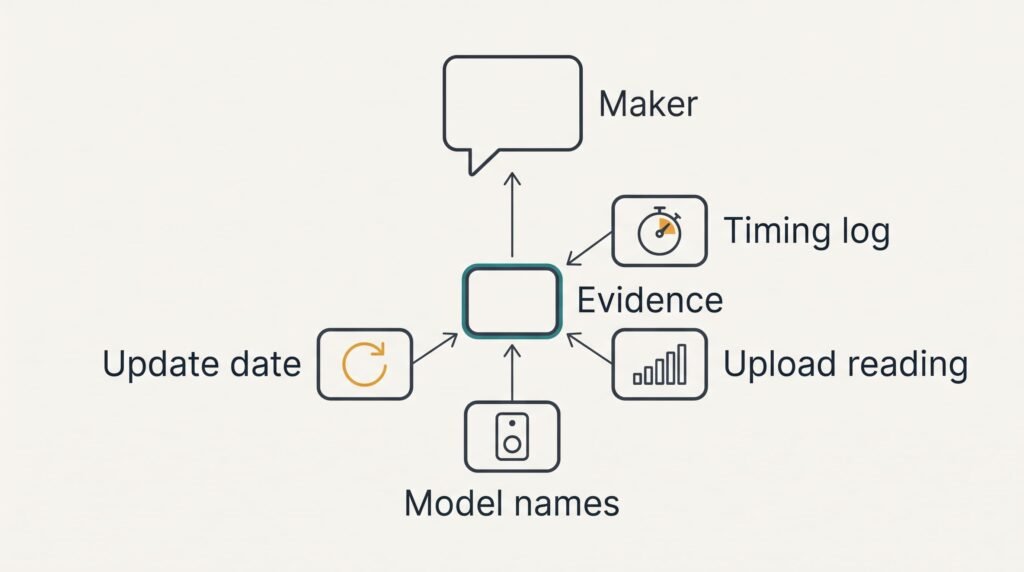
Collect evidence before you write to the maker. Log five rings with the press time and the buzz time, add the upload reading from the doorstep and note the app version and the model names. Mention whether the lateness began after an update. A tidy log gives the support staff a concrete case to examine.
Ask whether the alert waits for the clip to finish uploading and whether it could be sent first. Designs differ on this point, and nobody can test yours from a description. A written answer helps if you later claim under warranty. Ask too whether a fix is planned.
Leave the doorbell’s reset until last. It wipes the Wi-Fi details and stored settings, and linking again can take 20 minutes. Any clips held only on the doorbell go with it.
Photograph every settings screen before any reset.
A Fix That Wastes Money
Many households try paying for faster broadband, and it rarely helps. The bottleneck lies between the doorbell and the router, where walls weaken the signal, and not on the line from the street. Our doorbell still reached only 2 Mbit/s afterwards. The clip needed 24 seconds just as before. Does a doorbell alert arrive after the visitor even on the fastest line? It does whenever the link at the door stays weak.
A faster plan can’t speed a link that two walls slow.
Switching off the person check saves about 3 seconds out of 30. Raising the notification volume does nothing for timing. A new doorbell is a gamble too, because a replacement at the same spot meets the same two walls. None of these deserves an afternoon of your attention.
Time five rings tonight, change one thing, then time five more. The stopwatch settles the argument: an alert falling from 30 seconds to 18 shows the change worked, whereas no gain means trying the next remedy. Check the winning round again another day, because a busy evening network can hide a gain that shows clearly at noon. Keep the log; it gives the maker something concrete to read.
Questions and Answers
Can I fix a late doorbell alert at home?
Usually. Start with background permission for the app. Next shorten the clip, then bring the router nearer, then add an access point by the door. A stopwatch is the only equipment needed. Contact the maker only when five timed rings still take over 20 seconds after every fix has been tried.
What causes the delay?
A chain of five steps, from waking the camera to pushing the alert to your phone. The upload is normally the longest, because the doorbell sits at the far edge of your Wi-Fi. A phone that holds back background alerts can add a minute of its own.
When does a late alert point to hardware failure?
When timing stays bad even beside the router. Five rings there that still take over 20 seconds point to a faulty unit. So does a doorbell that shows offline every day. A battery that empties within days adds weight to the same conclusion. Photograph the evidence and ask the maker for a check.