Your taste is only one input to a smart TV’s recommendations, and the others are less personal. How does a smart TV decide what to recommend to you? It records what was watched and builds a short list of candidate titles. A model then scores that list, and placement rules can reorder the result.
That answer is a summary. The sections below give the precise version and what the plain one leaves out. They then trace one evening’s viewing through the system, test an analogy to breaking point and list what the system never knows. Each stage has its own goal.
How does a smart TV decide what to recommend: the short answer
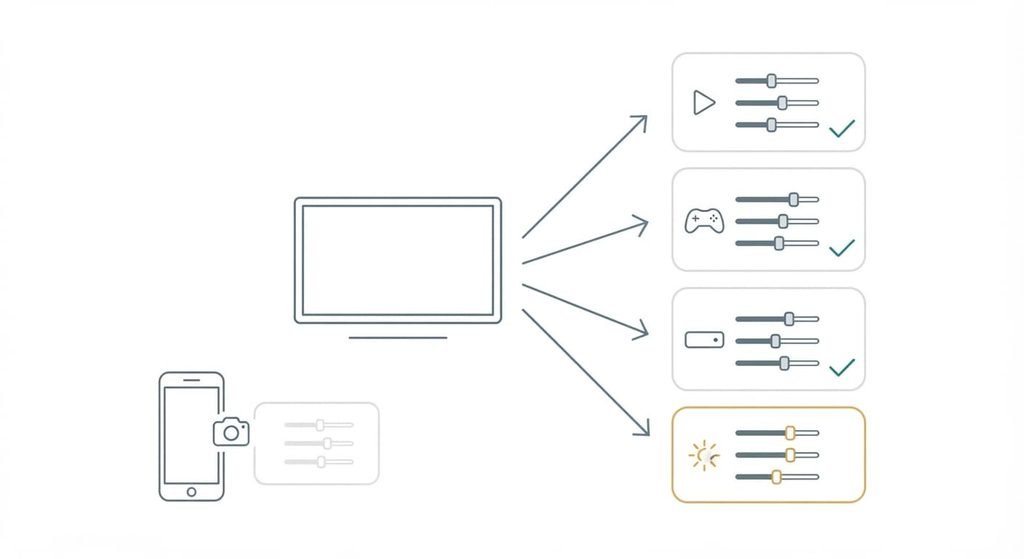
The short answer to the question “How does a smart TV decide what to recommend?” is a pipeline that predicts what a household will start and then lets commercial rules adjust the order. Four stages run in a fixed sequence. Signals are collected and candidates are selected. A model then scores them, and rules filter the result.
That summary omits where the work happens and who else shapes the list. Much of the scoring runs on servers belonging to the platform or the app, with only the display on the television itself. Each installed app also supplies rows of its own beside the platform’s. A fresh TV with no history starts from popularity alone, a state recommender engineers call cold start, and the lists improve as signals accumulate. The home screen is therefore an assembly of several systems with different goals. An app wants you to keep watching its catalogue. The platform wants you to stay on its home screen and may agree paid placements. The model in the middle only measures the likelihood of a click.
How a smart TV decides what to recommend, step by step
Follow one evening. You finish the last episode of a crime drama in a streaming app and return to the home screen.
1. Logging comes first. The app and the TV record the title and how far you got. They also note whether you finished and the time of day. In most systems a finished episode is a strong positive signal. An episode abandoned after five minutes counts against the title, and a pause counts for little.
2. Next, if automatic content recognition (ACR) is switched on, the TV adds what appeared on inputs the apps never see, such as a games console. ACR captures short samples of the picture or the sound, reduces each to a compact fingerprint and sends it to a server that matches it against a library of known programmes.
3. The third step narrows the field. A catalogue holds far too many titles to score one by one, so the system first selects a short list of candidates. Content matching finds titles that share the drama’s genre or cast. Collaborative filtering finds titles that people with similar histories watched next.
4. Fourth, a scoring model estimates how likely you are to start each candidate and how likely you are to finish it. Its inputs include your history and the time of day. The device and recent popularity are added too.
5. Rules run last. They remove titles you can’t play because the app is missing or the licence doesn’t cover your country. They also apply age ratings and insert promoted tiles, which are placements agreed in advance. Because the rules run after the model, a promoted tile can sit above a title the model scored higher.
6. Finally, the home screen assembles its rows from what survives. Your next click is logged, and so is a row you ignore. Both return to step one. You can only click what was shown, so the system learns mostly about options it chose to display. How soon tomorrow’s rows change depends on how often the platform recomputes, and I can’t see which schedule yours uses.
The analogy, and where it breaks
A shop window is the analogy. The shop fills the window with whatever sells to passers-by, which is the ranking stage, and it rents part of the display to suppliers, which is the promoted tile. Rented space is one reason a tile for a service you don’t subscribe to can sit in the top row. The analogy breaks in two places. A window looks the same to everyone walking past, while the TV rearranges its window for each household and each hour. And a shopper can see the whole shop through the glass, while a viewer sees only the rows the system chose, so nothing shows what was left out.
A window shows only what the shop wants seen.
What it does not do
The system’s best signal is behaviour, and it predicts what you will start and has no measure of what you enjoyed. Nothing in the pipeline knows why you stopped. Boredom and a phone call look identical in the log.
It doesn’t know who is holding the remote either, so one household profile blends an adult’s crime dramas with a child’s cartoons unless the viewers have separate profiles. It sees only what its own account and its recognition feature capture, which excludes viewing on a phone or a second TV outside that account. Recognition matches fingerprints against a library; it doesn’t understand dialogue or judge whether a programme is any good. Its picture of you is also dated. A new interest usually takes more than one finished programme to register, because a single view is weak evidence.
A popularity count reports volume and says nothing about fit.
What people get wrong about it
That “recommended for you” means chosen for your taste is the belief I’d call wrong. The label was borrowed from services where every row is personalised. Promoted tiles often share the same tile shape, so a placement and a personal pick can look identical on screen, and the viewer has no way to tell which one earned its position.
A second belief is that thumbs and star ratings drive the list. Earlier systems relied on explicit ratings because explicit ratings were the easiest signal to collect. Most current systems lean on behaviour such as finishing and abandoning, which they collect without asking.
A third is that switching off tracking switches off recommendations. The controls sit in the same privacy area, which suggests a single switch. With recognition off, the apps still build rows from their own histories and the platform falls back on popularity.
How to tell whether it applies to you
The rule is simple: if you start from an app and never from the home rows, the platform’s ranking barely touches what you watch. A shared television blends profiles unless each viewer has their own, and a household paying for several apps lets the home screen decide which app’s titles appear first.
Whether you let a smart TV decide what to recommend is a habit you can test in ten minutes. Scan the top row for a service you don’t pay for, since such a tile is almost certainly a placement. Where recognition is on, it logs what you watch whichever way you start, so check the privacy controls if that bothers you.
A smart TV recommends in four stages: it logs behaviour and narrows the catalogue to candidates, then scores them for likelihood of a start before placement rules reorder the list. Each stage serves a different goal, which is why a placement can outrank a better match. The fastest way to see the effect is to count the unfamiliar services in the top row. The limit worth remembering is that the system measures what you started and never what you enjoyed.
Questions readers keep asking
Is my smart TV tracking what I watch?
Usually yes, within limits. The TV and its apps log what you play, and automatic content recognition can also match what appears on connected inputs such as a games console. Whether it runs depends on a privacy choice, so look in the privacy settings for a recognition or viewing-information option and read what it covers.
Do I need to rate shows for a smart TV to recommend better?
No. Ratings are a small signal in most systems. What you finish counts for more than any rating. Ratings help on a shared profile with a mixed history, or when you want a disliked title gone from the rows. Otherwise your viewing behaviour already tells the system what it needs.
How does a smart TV decide what to recommend differently from a streaming app?
A streaming app ranks only its own catalogue using data from its own service. A smart TV’s home screen merges rows from several apps, can see inputs beyond them when recognition is on, and adds placement rules. The result is broader but shallower: less detail about each title, more about household habits.