Somewhere on the maker’s own site sits a date that the shop shelf never shows: the day updates for that model stop. When buying a tablet for children, the years left before that date matter more than any figure printed on the box, because a child’s tablet is kept longer than an adult’s and often handed down. Check it first and half the market drops out.
This guide assumes a household in the United Kingdom with one tablet for a child aged five to eleven. It’s used for videos and drawing. School apps and car journeys fill the rest. The guide names no models, because they date within a season.
What decides it when buying a tablet for children
A tablet holds two promises that expire at different times. The hardware can run for years. The software promise ends on a fixed date, when the maker stops sending updates. Updates carry two things: security fixes and the system version that app makers build for. App makers raise their minimum supported version as they release new versions. A tablet frozen on an old system keeps running what’s installed. New apps, and new versions of old ones, start to refuse it. That’s the failure a child meets in year three, often as a school app that won’t install.
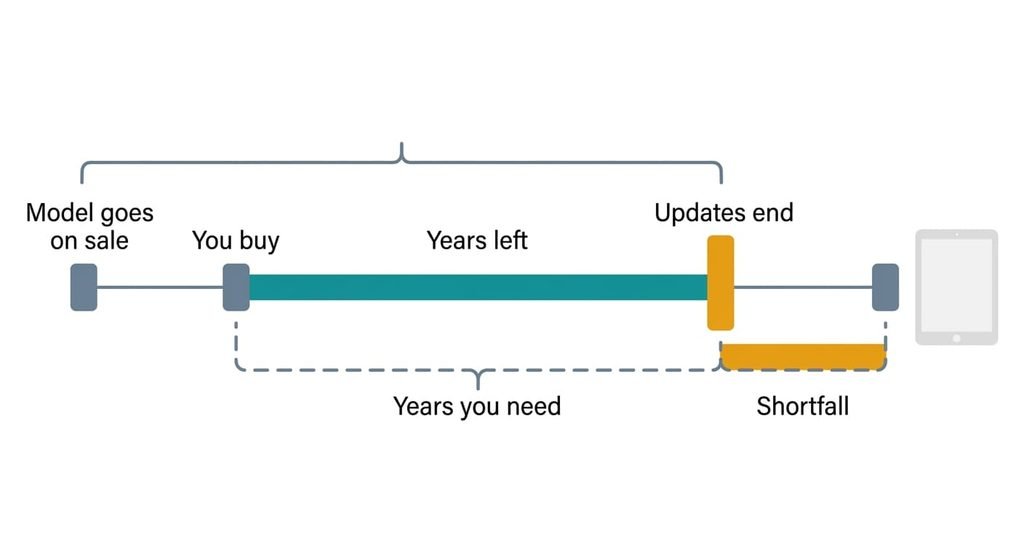
The clock starts on the day the model first goes on sale, which can be years before your purchase.
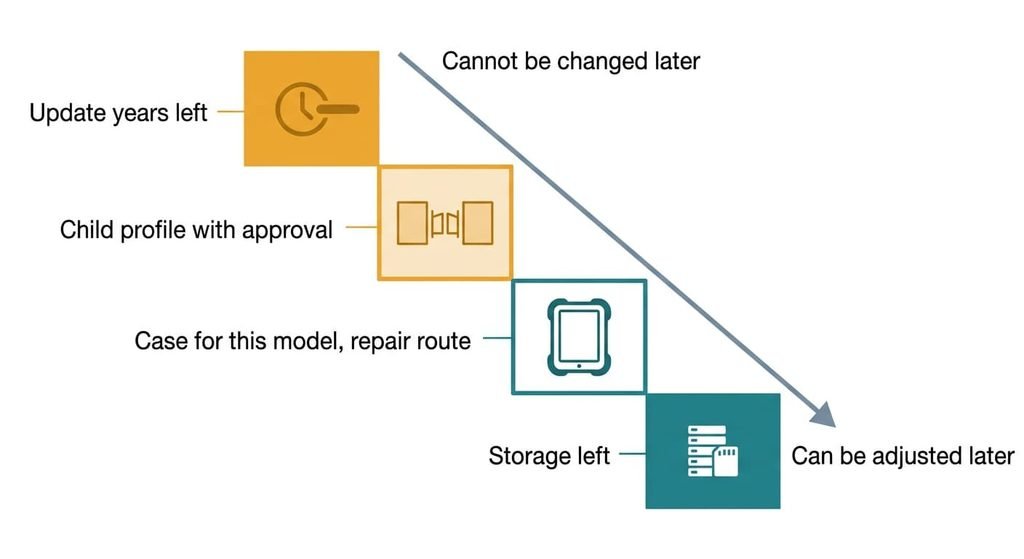
Say a maker states five years of updates from launch (an illustrative figure). Bought in the second year of sale, the tablet has three years left. With children aged seven and four, and the younger still using it at ten, you need six years, so the shortfall is three. What decides the choice is the update years left against the years you need, and every other criterion ranks below it by how late it can still be changed.
What to look for in a tablet for children, in order
1. The update years left. This is the stated end date for updates, minus today. In daily use it decides whether school and video apps keep installing in year three. Find the model’s launch date and the maker’s stated update period on its support page, then count forward. The answer you want is a printed end date that covers the years you need, with a year to spare. Older stock is the trap most buyers never check. A model that has sat on shelves has used part of its window before you open the box. Fall short and you own a video player that new apps refuse.
2. A child profile with its own app list and an approval gate. This is a separate space on the tablet where installs and purchases need your approval. In daily use it keeps your mail and saved payment details off the child’s screen. An accidental tap can’t spend money. Judge it from the product page. It should describe per-child profiles and approval for installs and purchases in plain terms. A vague phrase such as “parental controls” with no description counts as absent. Without it, the child either uses your account or you stand over every install.
3. A case made for this exact model, and a repair route. A child’s tablet gets dropped, and the case does the work the glass can’t. Generic cases rarely line up with the camera and port cut-outs. Search shops for cases that name the exact model before you buy. Then check that the maker states a repair route for the screen and the battery. Without both, the glass takes every fall bare, and a worn battery means a new tablet.
4. Storage left after the system takes its share. The listed figure includes the system’s own files, so the child gets less than the box says. In daily use it decides whether a car journey’s downloads fit before the tablet asks you to delete something the child chose. Ask a shop to show the available space on a display unit, and treat a card slot as a second chance. Skimp here and you spend evenings deleting.
What matters less than the box says
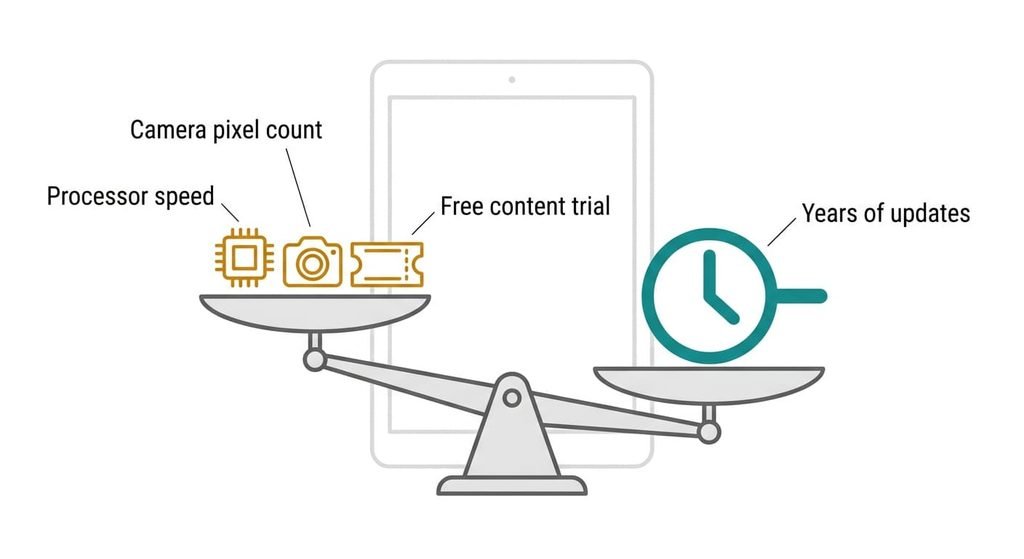
Three things sell the category and change little for anyone buying a tablet for children. The processor name and speed on the front of the box comes first. It’s promoted because one number is easy to print and compare. Video and drawing rarely stretch a modest tier. The child never sees the difference. The camera’s megapixel count comes second. It counts pixels, not the light each one collects, and a child’s photos are snapped at arm’s length and shared at small sizes, which hides whatever a bigger count adds. The bundled content trial comes third. It’s promoted because a free start makes the box look fuller, yet it ends in weeks or months and the tablet carries on for years. I’d give all three no weight. Each is printed because it’s cheap to print, and none of them can end the tablet’s useful life before the update date does.
Matching the order to your household
The order moves with the household. For a five-year-old watching and drawing at home, the case rises to second place and storage falls to last. The daily risk is a drop, and the content is streamed. For a tablet that will pass to a younger sibling, the update years left stay first. The repair route climbs above the profile, because the battery will carry a second child’s years of charging. For a ten-year-old who also does homework on it, the profile usually drops, because approvals matter less as a child grows. Storage moves up to second. School files and offline reading both want space. In every case the first criterion keeps its place, and only the middle of the list shuffles. If the tablet won’t be handed down, count only the first child’s years.
What to walk away from
When you’re buying a tablet for children, walk away from a listing that states no end date for updates. Without it you can’t count the years left. A maker who doesn’t print the date has handed you the shortest answer to assume. Walk away from a model whose remaining window is under half the years you need, however low the price. The saving is spent by year two, when the first app refuses to install. Walk away from a tablet whose child profile can only exist inside your own full account. Your mail and saved card then sit one swipe from the child’s screen, and the design leaves you no way to separate them. Walk away, too, from a sealed model with no stated route for replacing the battery. The battery wears with every charge, so a tablet charged daily for years holds less each year.
Cheap doesn’t rescue any of these.
The two-minute check before you commit
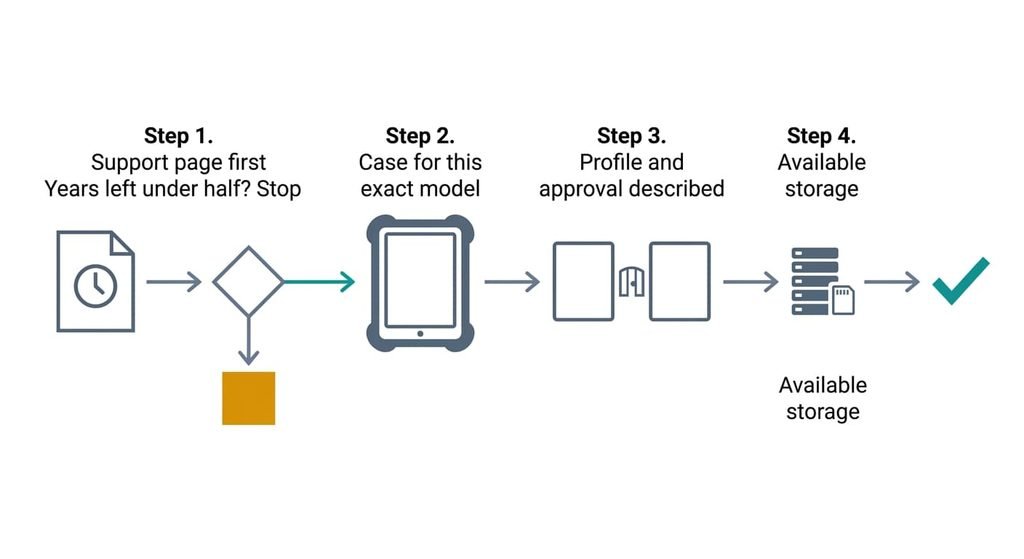
Before buying a tablet for children, start with the support page, before the specification page. Find the first-on-sale date and the stated end of updates, then subtract today from the end. If the years left fall under half of what you need, stop there. Next, search shops for a case that names the exact model. After that, look for a plain description of child profiles with approval for installs and purchases. Last, ask to see available storage on a display unit. A tablet that clears the first step and fails the others can often be patched with a case or a card, while one that fails the first can’t be patched at all.
When buying a tablet for children, the first criterion is the update years left, counted from launch. It outranks everything printed on the box. One finding ends a candidate on the spot: no stated end date, or fewer years left than half of what the child will need. Everything else can be bought or adjusted later. The clock can’t.
Questions readers keep asking
How much storage does a child’s tablet need?
Enough for the downloads of your longest journey plus the system’s share. Download one trip’s worth on a device you already own and read its size. Double it for spare room. The listed figure includes the system’s own files, so ask a shop to show available space on a display unit. A card slot adds cheap room later.
Is it worth paying more for a child’s tablet?
Pay for years of updates and a case that exists, then stop. The cheapest tier that prints an end date covering your span, with a case made for it, is the right band. Paying roughly double the entry price for speed and cameras buys what a child rarely tests. Budget for a replacement case as part of the price.
How long should a tablet for a child last?
As long as the youngest child who will use it needs it, counted in years from today. Updates usually end before the hardware wears out, so compare the years left with the years needed. If the window is shorter, expect a closed box for new apps and plan a replacement date.