A pair of earbuds plays happily on the walk to the station, then goes silent the moment the phone slides into a back pocket. Bluetooth keeps disconnecting from your phone in that pattern more often than in any other. It usually stops once the phone rides in a front pocket on the same side as the earbud.
Everyone else has a different pattern. The link is a timed exchange of small radio packets. Four things can break it: a body in the way, a crowded radio band, a power saver that closes it on purpose and a damaged pairing record. Tests come first below, then fixes, cheapest at the top.
What is going on when Bluetooth keeps disconnecting from your phone
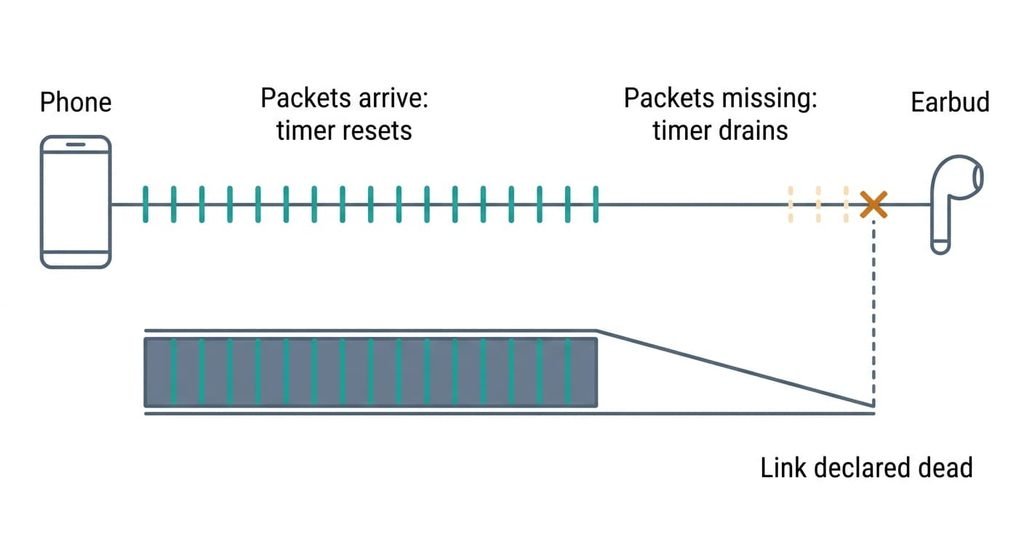
Bluetooth isn’t a held-open line. The phone and the accessory trade short packets on a fixed schedule, hopping across the 2.4 GHz band, which audio links split into 79 channels of 1 MHz each. Each side runs a timer called the supervision timeout. Every valid packet resets it. A disconnect is that timer running out, and the signal never has to vanish for it to happen. Enough packets in a row go missing, and both sides declare the link dead.
The devices agree the timer’s length when the link forms, and it differs from one accessory to the next. While it runs, the sender keeps resending lost packets. Once the audio buffer runs dry, you hear the stutter.
Four things starve the timer. Your body absorbs 2.4 GHz energy because it’s mostly water. A phone in a back pocket and an earbud in the right ear put a torso between them. A Wi-Fi channel 20 MHz wide covers about a quarter of the hopping channels. Microwave ovens and unshielded USB 3 ports add noise in the same band. Power management can end the link on purpose when the system puts the companion app to sleep. And a pairing key kept by one side but lost by the other makes every reconnect fail at the handshake.
Narrow down why Bluetooth keeps disconnecting on your phone
Each test costs nothing and changes nothing. Run them in this order, and note each result before you move to the next.
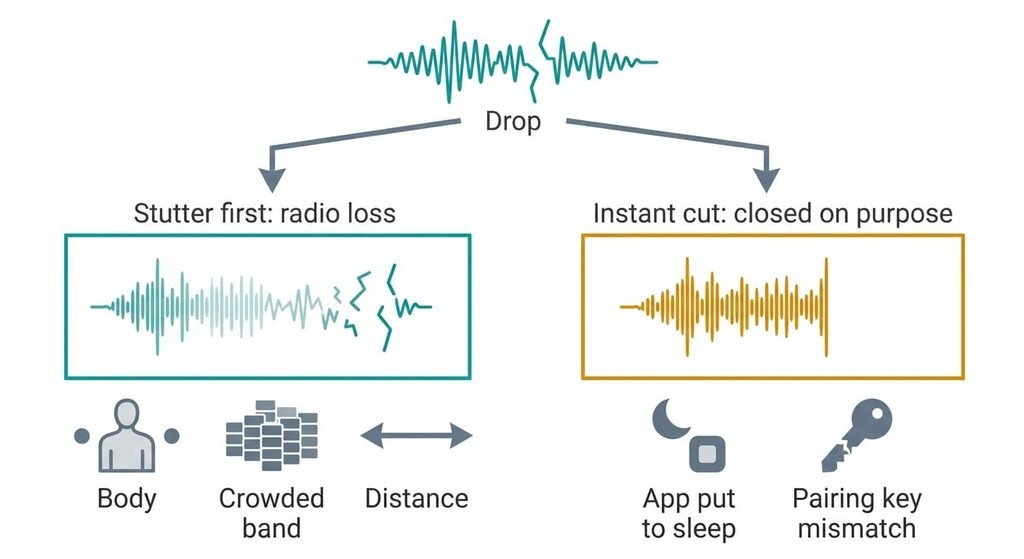
Listen at the moment of the drop. A stutter lasting a few seconds before the silence means packets went missing until the timer expired, so the cause is radio. Your body, the band or the distance is blocking packets. An instant cut with no stutter means one side closed the link deliberately, which points at power saving or the pairing record.
Next, connect the same accessory to a second phone or a laptop for a day. If it drops there as well, the accessory is at fault. If it holds, your phone is.
Then switch the phone’s Wi-Fi off for ten minutes while the accessory plays. If the drops stop, the two radios are competing for airtime, and the crowded band is your cause. If they continue, the band is cleared of suspicion.
Last, hold the phone at arm’s length with a clear line to the accessory. If the drops vanish there and return in your pocket, the body is the obstacle. If they follow you into the open, it isn’t.
The fixes, in order
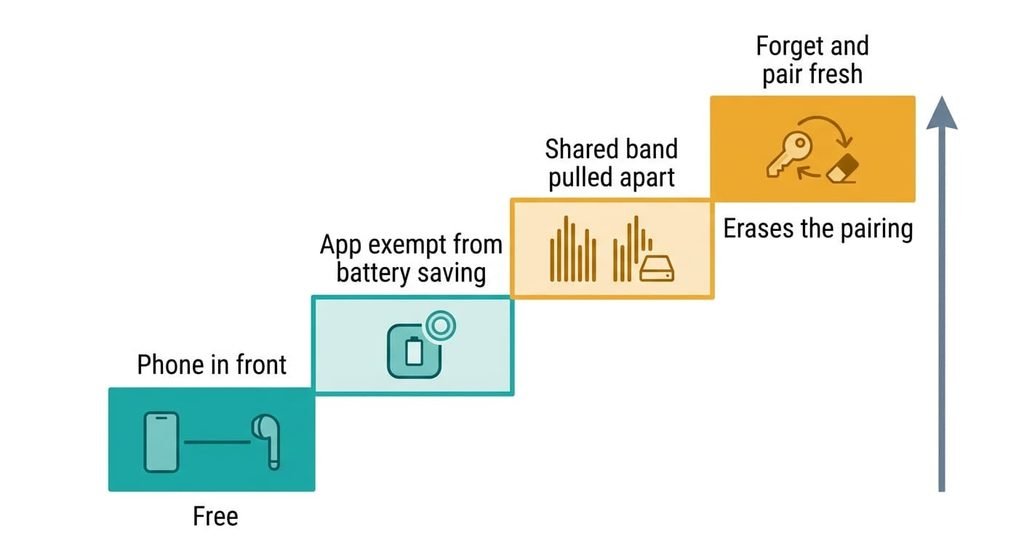
Carry the phone in front of you, on the same side as the accessory. This targets the body shadow and costs nothing. The signal then crosses air instead of tissue, and Bluetooth keeps disconnecting from your phone far less at the edge of its range. Nothing is lost beyond a pocketing habit. With a speaker or a watch, keep the phone clear of walls and metal shelves. Advertised range comes from clear conditions, and a wall isn’t one.
Exempt the accessory’s app from battery saving. This targets the deliberate closes. Find the control that lets the system put idle background apps to sleep. Apply it to the app that came with the accessory. It takes two minutes. In return the phone spends more energy on that app, so battery life shortens by an amount you’d need a day or two to judge. Undo it if the gain doesn’t show.
Pull the shared band apart. This targets the crowded band and takes about an hour. Move the phone’s Wi-Fi to the router’s 5 GHz network, which takes it out of the band the accessory uses. Then shift USB 3 drives and docks about a metre away from the accessory. Keep the kitchen’s microwave out of the line between them. A phone that shares one antenna between its two radios may still take turns, so the gain varies. The cost is reach, since 5 GHz loses more strength through brick and plaster than 2.4 GHz, so a far room may get a weaker signal. Leave the router’s 2.4 GHz network switched on, because turning it off would cut off any older gadget with no 5 GHz radio.
Forget the accessory on both devices, then pair it fresh. This targets a mismatched pairing record and takes about ten minutes. Most guides open with this step. I’d put it last, because it wipes the evidence the earlier tests give you. Forgetting erases the stored key on the phone and any saved link tied to it, such as the car’s profile. You’ll set those up again. If the accessory also needs its own reset to clear its side, that erases the devices it remembers and the settings stored on it, so note them first.
If none of that worked
Drops that survive all four fixes and also appear on a second phone point at the accessory. Either its hardware is failing or its firmware, the software inside it, is faulty. Before you contact the maker or the shop, write down the times of day. Note whether a stutter came before each cut and where the phone sat. Add the second-phone result. Include the accessory’s model and its firmware version.
Then ask two things. Does a firmware update change connection stability on your model, and can they reproduce the fault on their own phone? Check the return window first, because a fault that follows the accessory from phone to phone is a refund case [VERIFY: return window]. If Bluetooth keeps disconnecting from your phone only, send that phone’s maker the same notes. Photograph the accessory’s label and any serial number before you post it anywhere.
Keep every note until the case is closed.
The fix that isn’t worth doing
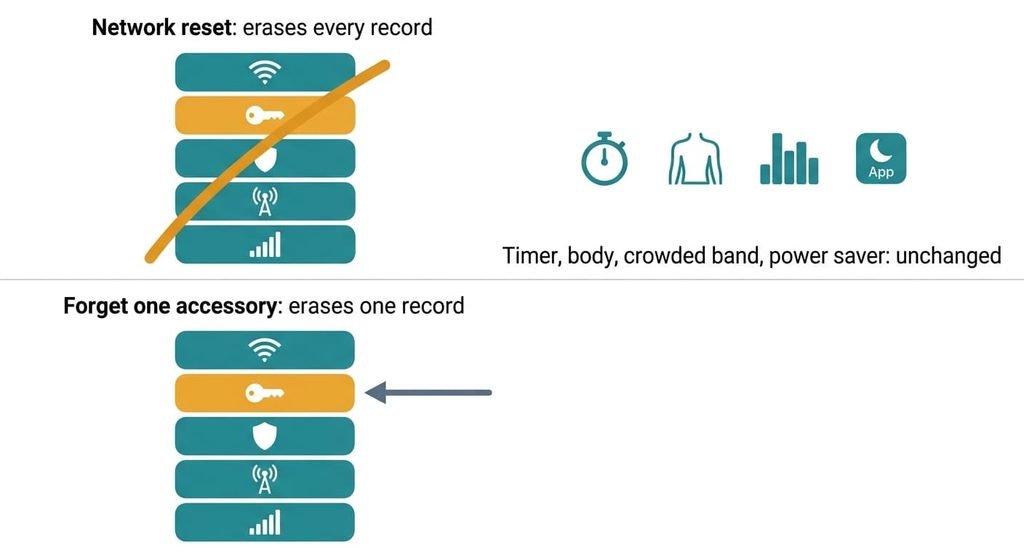
Resetting the phone’s network settings is the remedy suggested first in most threads. It wipes every saved Wi-Fi password and every Bluetooth pairing in one action, along with the VPN profiles and mobile-data settings, so you’d be re-entering all of them. It leaves the supervision timer, your body, the 2.4 GHz crowd and the power saver exactly where they were. Any drop caused by those returns the same afternoon.
The reset helps only when the phone’s own records are corrupted, and the second-phone test would have shown that already. Even then the targeted step, forgetting one accessory, removes a single record instead of all of them. Turning Bluetooth off and on does less still. It restarts the link and leaves the cause in place, so it buys minutes rather than a repair.
The reset costs an evening, and the tests cost ten minutes.
I’d run the tests before touching any reset. Bluetooth keeps disconnecting from your phone because a timer starves, and the stutter test tells you in one drop whether radio or a deliberate close starved it. Repeat that test whenever the pattern changes. A new phone or a new router can shift the cause. Start by moving the phone to the front of your body, which is free.
Questions readers keep asking
Is a Bluetooth that keeps disconnecting something you can repair yourself?
Mostly. Carrying the phone in front of you, exempting the app from battery saving and moving the phone onto 5 GHz Wi-Fi are free or cost minutes. Only a faulty accessory needs the maker or the shop, and the second-phone test tells you which case you’re in.
What causes Bluetooth to disconnect randomly?
The supervision timer runs out. Missing packets cause that when your body, a busy 2.4 GHz band or distance blocks them. A deliberate close causes it when power management or a bad pairing record ends the link. A stutter before the cut points at radio, and a sudden cut points at the phone’s software.
How can you tell a faulty accessory from a faulty phone?
Pair the accessory with a second device for a day. If it drops there as well, the accessory is faulty. A refund or repair is the sensible route. If it holds, the phone is the suspect, so work through the battery-saving and band fixes. A damaged pairing record shows up as instant cuts with no stutter before them.