Sleep should cost watts, not a morning’s worth of battery. Waking to find 40% gone is a typical complaint. When a laptop battery drains even when it is asleep, the fix that works first is to pull every plug and dongle from the ports before the lid closes.
Four different mechanisms can produce that lost percentage, and one night’s test tells them apart. The fixes after it climb from free to costly, and each one names the cause it addresses. Every sum assumes a 50 Wh battery and eight hours of sleep, which are example sizes you can swap for yours.
What actually draws power when a laptop battery drains even when it is asleep
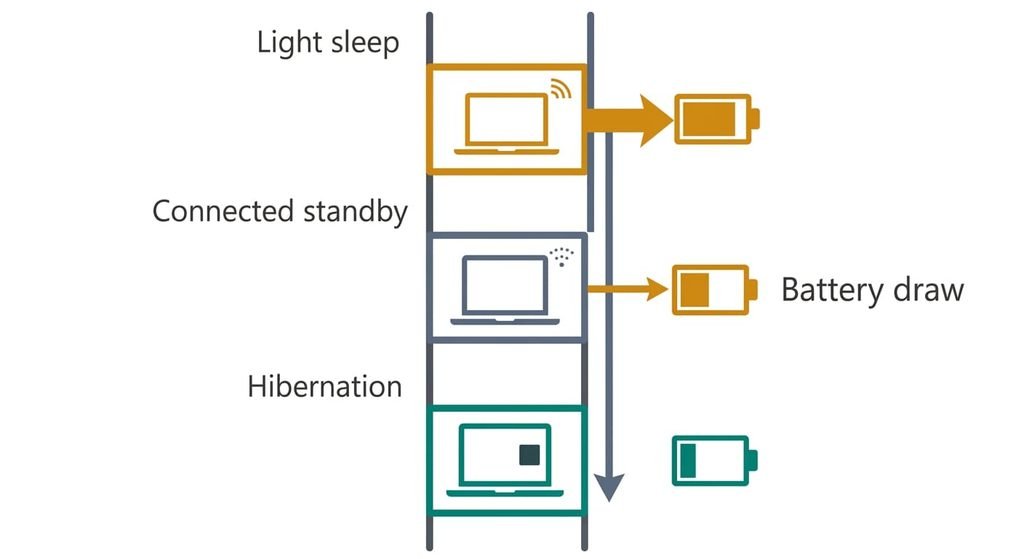
A watt-hour (Wh) is one watt drawn for an hour, the unit batteries are rated in. Sleep is a ladder with three rungs. In light sleep the processor stops and only the memory stays powered, which draws well under a watt. Connected low-power idle, which many newer laptops use instead, makes the machine look asleep while its radios stay alive and background tasks run in short bursts. Hibernation copies everything held in RAM to storage, and the draw falls to zero. The model and a firmware choice you can’t always change decide which rung you land on.
A sleeping laptop loses charge when something keeps it off the lowest rung or pulls power out through a port. Four things do that. Powered ports feed a phone or a drive, and a phone charging at 5 W takes 40 Wh in eight hours. Shallow sleep holds the machine at 2.5 W. Over eight hours that is 20 Wh, or 40% of the battery. Wake timers rouse it for updates and backups: six wakes of five minutes at 15 W cost 7.5 Wh, or 15%. Wear shrinks the battery, so the same 20 Wh loss takes 57% of a 35 Wh cell.
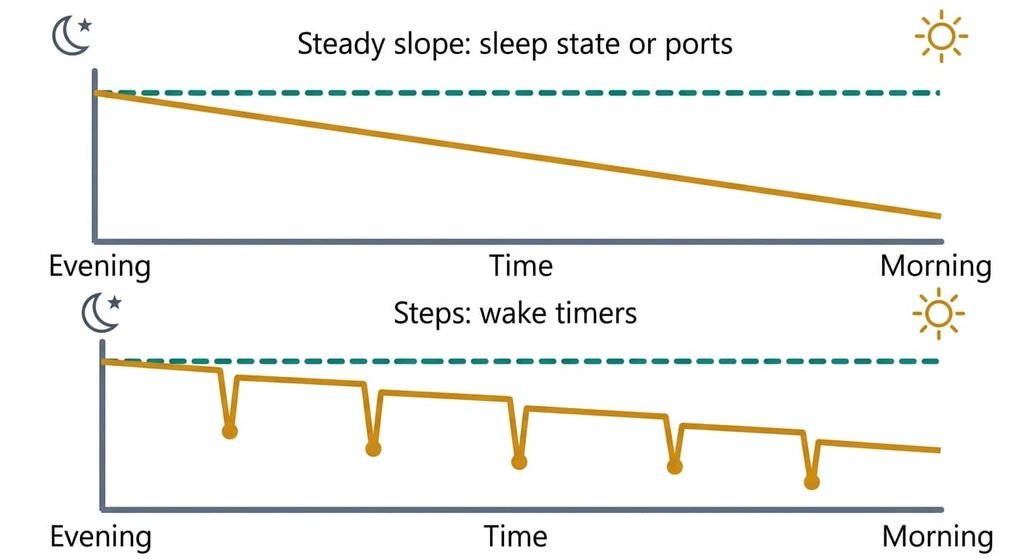
The overnight graph shows which one is yours.
Narrow it down with one night’s test
To see why a laptop battery drains even when it is asleep, close the lid at a known percentage and leave the laptop alone for eight hours. Read the loss in the morning without opening it during the night, then divide by the hours. Take 1% an hour as ordinary and 5% an hour as a fault; both are rough guides. At 50 Wh those rates are 0.5 W and 2.5 W. Write the numbers on paper, because you won’t trust your memory at 7 a.m.
Port power: repeat the night with everything unplugged, dongles included. If the rate falls sharply, ports are the cause.
Shallow sleep: run it again with wireless switched off before the lid closes. If the rate falls, the machine is sitting in connected idle, or something on the network wakes it.
Wake timers: read the battery history that most systems keep. Steps at the same hour each night point at timers, while a smooth slope points at a steady draw.
Wear: if the rate is ordinary yet the gauge jumps on waking, suspect the cell or its gauge. A reading of 40% that dies minutes later says the same.
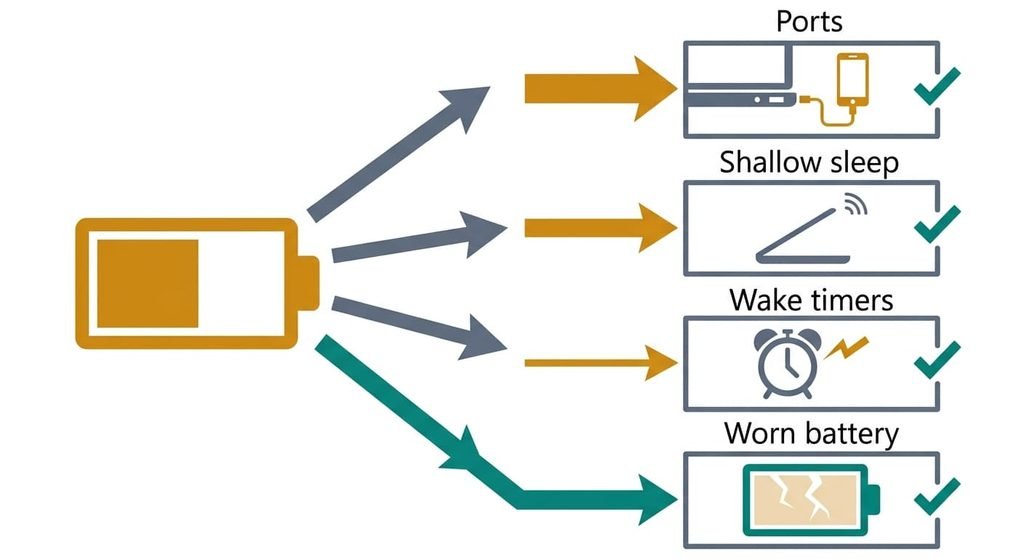
Four fixes for a laptop battery that drains even while it is asleep
Unplug everything from the ports before closing the lid. This addresses port power, the draw that leaves through a port instead of through the processor. Many ports stay powered in sleep. A phone or a drive then keeps drawing from the battery. Dongles do the same. Charging a phone at 5 W takes 40 Wh in eight hours, which is 80% of a 50 Wh battery. The fix is free and changes no setting. It loses the overnight top-up for whatever you unplugged, and a wireless mouse can no longer wake the laptop through its dongle.
Set sleep to hand over to hibernation after a short delay. This addresses shallow sleep. Look for the power setting that makes the laptop hibernate after a set time spent asleep, and start at 30 to 60 minutes. Hibernation writes the memory to storage, up to the size of the RAM, and then draws nothing, so the long part of the night costs 0 W. Light sleep still covers short breaks with a quick wake. It costs a minute in settings. It loses a slower wake of some seconds and several gigabytes of disk, so save open documents the first time you test it.
Find what wakes the machine, and change one trigger per night. This addresses wake timers. Most systems record what woke them last and which timers are armed. Look for entries naming an update or a backup. Sync tasks and network devices show up the same way. Switch off one trigger per night, so the graph shows which one mattered. It costs three or four nights. It loses punctuality. Updates and backups then wait until you open the lid, so run them before you leave.
Have the battery tested, and replace it if it fails. This addresses wear. A worn cell holds less, so a loss measured in watts takes a larger share of it, and the percentage worsens while the watts stay put. It means a purchase and a service visit. Opening the case can affect the warranty, and a repair can lose the drive, so back up first.
If none of that worked
If your laptop battery drains even when it is asleep after every step above, the cause may be a firmware fault or a failing cell. Write down the start percentage and the end percentage for each test. Add the hours. Add the last-wake record and the battery health report your system produces. Note when the drain began, because a start right after an update points at software and a slow creep over months points at the cell.
Ask support whether this model uses connected idle and whether firmware can change the sleep type. Ask also for the cell’s measured capacity against its design. Photograph the battery health report so the agent sees the numbers you see. Reinstalling the system comes last, and it erases the drive, so copy your files elsewhere first.
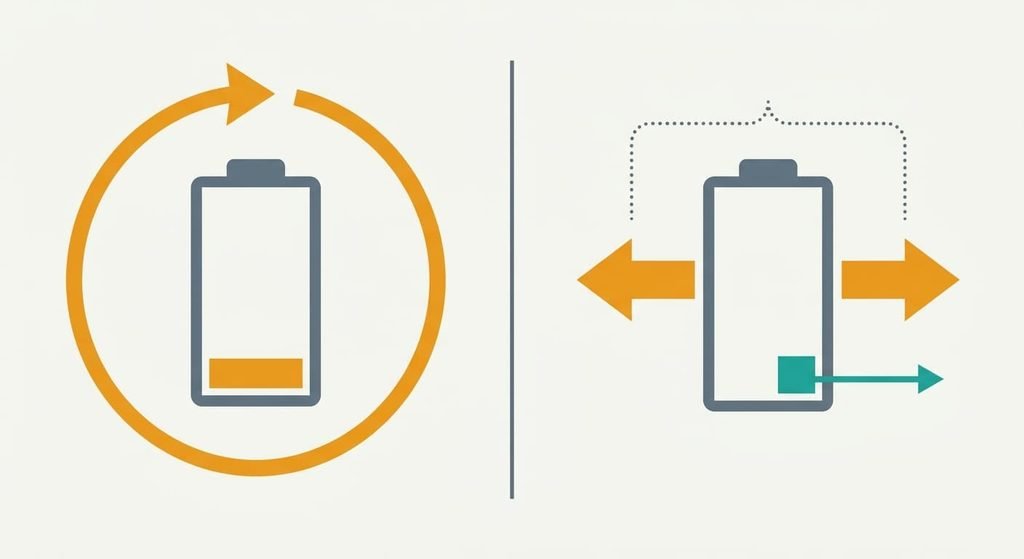
The fix that is not worth doing
A remedy that gets repeated when a laptop battery drains even when it is asleep is draining the battery to zero to recalibrate it. The gauge estimates the level from voltage and counted current, and a full cycle can nudge that estimate. It can’t change the watts a sleeping machine draws, and a deep discharge stresses lithium cells. Each one also uses up some of the battery’s finite charge cycles, and that’s the life you’re trying to protect.
Calibration corrects the reading and leaves the draw where it was.
Switching on a battery-saver mode before sleep fails the same way, because sleep already sits below anything that mode trims. I’d choose hibernation over recalibrating every time, since it takes the draw to zero and brings the session back where you left it.
A sleeping laptop should draw watts, and four things push it higher. Powered ports and shallow sleep come first. Wake timers and a worn cell follow. The fastest test is one night with everything unplugged, then one with wireless off. Measure once, change one thing per night and keep the change that moves the number. Hibernate after an hour if the rate stays high.
Questions readers keep asking
Can sleep battery drain be fixed at home?
Largely, yes. Unplugging ports costs nothing, and switching sleep to hibernate takes a minute in settings. Finding a wake timer takes a few nights. Only a worn battery needs a purchase. Measure one night first, because the rate tells you which fix to try.
Why does a closed laptop lose battery overnight?
Something keeps it from the lowest sleep state or pulls power through a port. A phone charging from the laptop takes about 40 Wh in eight hours, and background tasks can wake it repeatedly. The battery history shows whether the loss is a smooth slope or a series of steps.
Does overnight battery loss mean the battery is dying?
Not necessarily. A worn cell makes the same loss look larger. Ports and timers are the usual first suspects. If the rate is ordinary and the percentage jumps on waking, or the battery dies at 40%, the cell or its gauge is the likelier fault.