Passing data along costs a phone little, while reaching the mobile mast costs it most of what it spends. That’s what makes a phone run hot when you use it as a hotspot, and the quickest remedy is carrying the phone to a window. Four separate jobs pile heat into a small body, and the options run from nothing at all to one purchase.
The figures assume a UK flat where a laptop and two other devices share one connection. Phones differ, so expect your own numbers to move. Treat each wattage as a round example and check your own phone before changing anything.
Why does a phone get hot when you use it as a hotspot
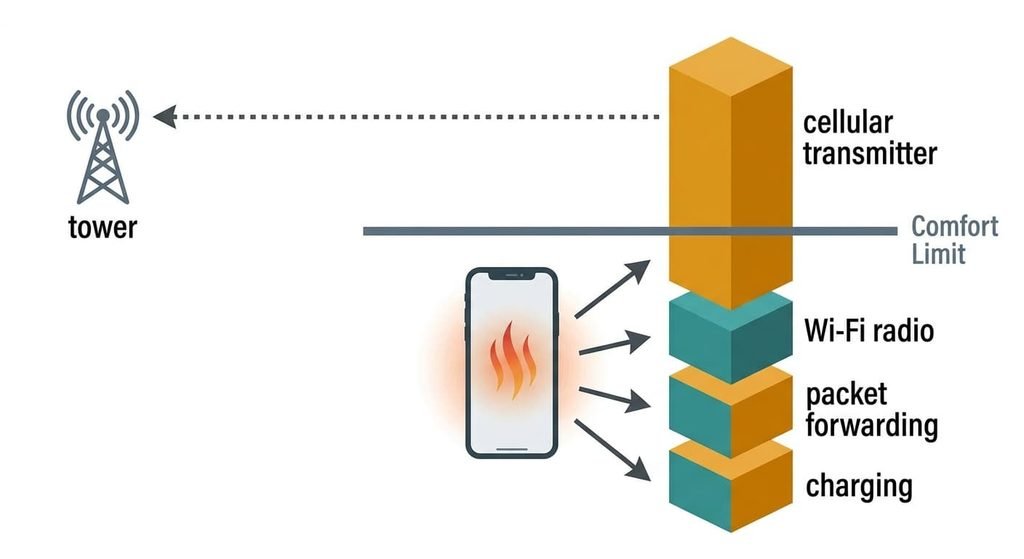
A phone has a heat budget. Its metal and glass back can shed only about 3 W before the software slows the radio down to protect it. A hotspot spends that budget on four jobs at once, and the biggest line is the cellular transmitter, which works harder the weaker the signal gets. It works like shouting across a field: the further the mast, the louder you must shout. A phone in a coat pocket at the back of a room shouts loudest of all. Walls and bodies cut the signal.
At full signal the cellular radio costs about 0.5 W. On one bar it costs about 2.5 W. The Wi-Fi radio, which acts as a small router for your devices, takes about 1.1 W on the crowded 2.4 GHz band with three devices attached. Passing each packet from one radio to the other takes about 1.0 W of processing. A phone charging at speed adds about 1.0 W of heat.
Put it all on one bar and the sum is 2.5 + 1.1 + 1.0 + 1.0 = 5.6 W against a 3 W comfort line. The phone then throttles your connection. Heat and sluggish pages arrive together.
Four checks for the phone you use as a hotspot, and why it heats up
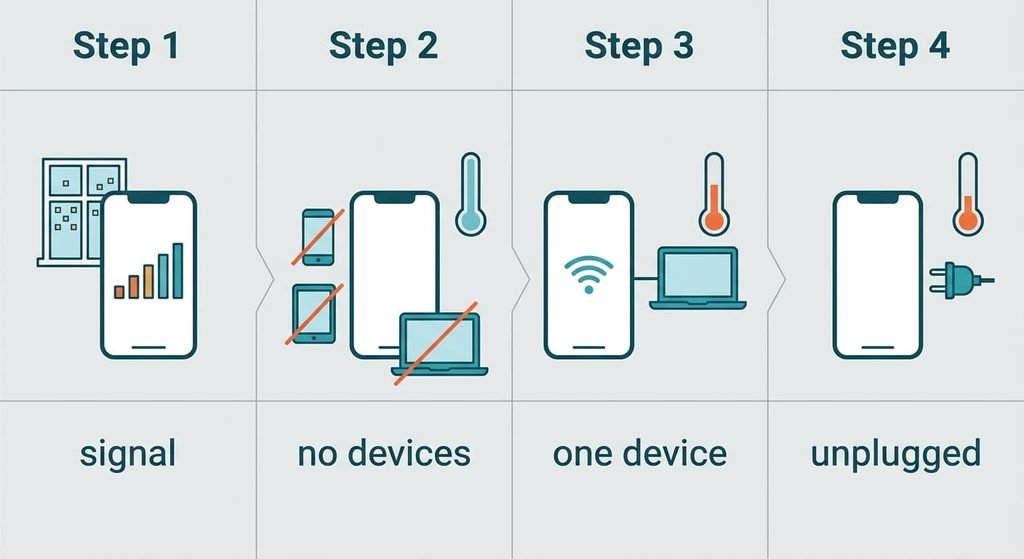
Each check below produces a result you can note down, and none needs spending. Run them in sequence while the phone is still warm.
First, look at the signal. With the hotspot running, compare the bars in your usual spot with the bars beside a window. Two bars or fewer in the usual spot point at the transmitter. Full bars there rule it out.
Second, disconnect every device for ten minutes while the hotspot stays on. A phone that cools by itself shows that the load is traffic rather than the connection alone.
Third, reconnect one laptop. Watch the phone for ten minutes. A clear drop in warmth means the number of devices matters, along with their background updates.
Last, unplug the charger for ten minutes. A cooler phone on battery means charging is part of the total. A phone that passes none of them points to its hardware.
Write each result down as you go, because the pattern shows which remedy to try first.
The four fixes, in order
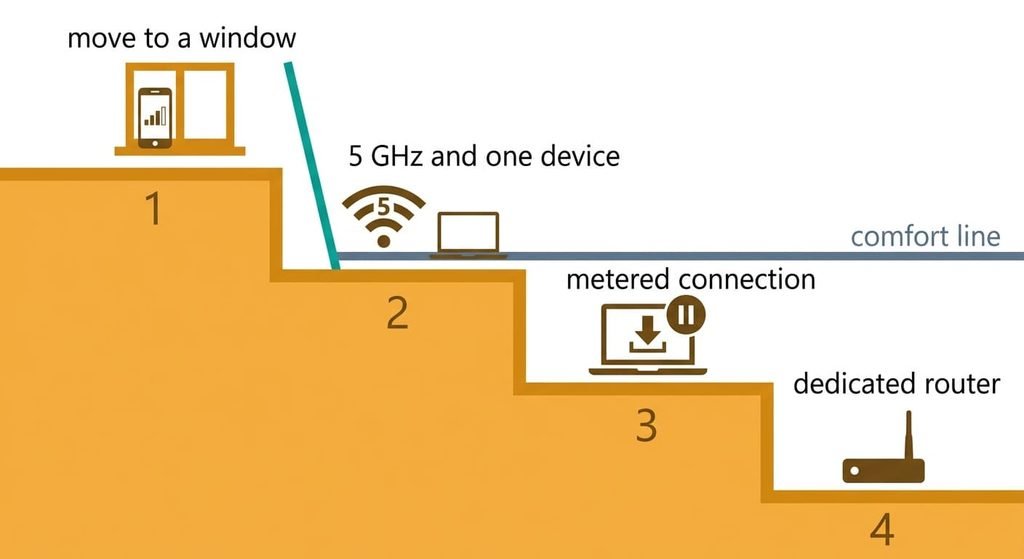
Each fix removes one line of the ledger when you use it as a hotspot, so feel the phone after every step. The goal is a combined figure below 3 W.
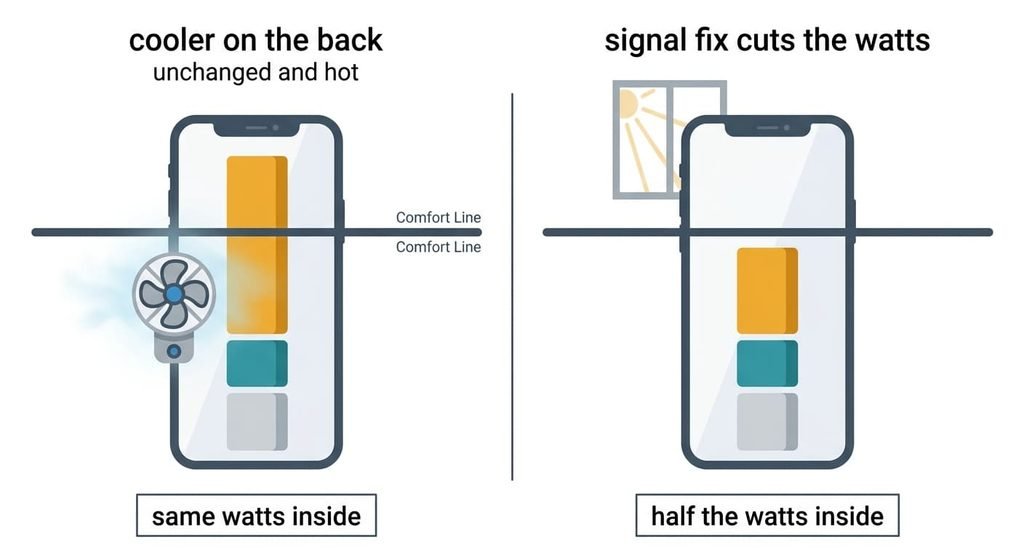
Moving the phone to a window or a higher spot answers the transmitter, the biggest line. It costs nothing. Full signal cuts the radio from 2.5 W to 0.5 W, which brings the total down from 5.6 W to 3.6 W. You give up leaving the phone in a bag, and the laptop must stay near the window with it. In a basement or deep inside a block of flats it may not help at all, since no spot has better signal. Prop the phone upright on the sill rather than lying it flat on the glass, so air can reach its back.
Switching the hotspot to the 5 GHz band and allowing one device is a setting that takes a minute. The Wi-Fi radio falls to roughly 0.5 W and packet passing to 0.6 W. That leaves a total of 2.6 W, under the line. Range is the price: the laptop must sit in the same room, and older devices can’t see a 5 GHz network. One connection also means the tablet and the second phone must wait their turn, which suits a working session but not a family evening.
Marking the laptop’s connection as metered tells it to hold large updates and cloud syncs. Finding the option on each device takes about ten minutes. Packet passing eases from 0.6 W to 0.4 W, which leaves 2.4 W. Automatic updates stop while you’re tethered and wait until you’re back on home Wi-Fi. A large download you start by hand still goes through, so check its size before you click.
Buying a dedicated mobile router moves the whole job off the phone. It’s the only purchase here, and the least reversible. The router has its own antenna and a larger body for shedding heat. It’s another device to charge, and it usually needs a data plan of its own. Check how many hours its battery lasts before you commit, because a router that dies at lunchtime solves nothing.
If none of that worked
If the phone still runs hot when you use it as a hotspot on full bars with one device, the signal isn’t the problem. Note how many minutes pass before it feels warm, and capture the battery page that shows which app is drawing power.
Find out if the shop tests the battery separately and can read the temperature log the phone keeps when it slows. A battery worn by years of charging overheats earlier than its workload implies, so the phone’s age matters to the verdict. Write down the date you bought it. Ring your network provider too, since a fault on their side can force the phone to shout at full power.
Resetting the network settings clears saved Wi-Fi passwords and the hotspot name, so note them elsewhere beforehand. Back up your photos before any repair, since a shop may need to wipe the phone.
The fix that isn’t worth doing
A clip-on phone cooler looks like the obvious answer, and the back of the phone does feel cooler. It does nothing about the transmitter’s 2.5 W, because the heat is made inside the radio chip and the case is only where it leaves. The cooler lowers the surface temperature by a few degrees and delays the slowdown by a few minutes. After that the phone behaves as before, and you’ve paid for a gadget that moves heat around. The idea persists because a cool back feels like proof, even though the chip inside works exactly as hard as before.
The total stays at 5.6 W.
Taking the case off gains a degree at best, because the radio chip is nowhere near the case. Neither trick touches the real causes, which sit in the signal and the number of devices.
What makes a phone get hot when you use it as a hotspot is a running total of watts, so cut the largest line first. Move the phone, change the band, then hold the updates. Treat the extra router as the final step, and stop once the phone feels comfortable through a whole call. One afternoon of testing is enough to settle the order.
Questions readers keep asking
Can I stop my phone getting hot as a hotspot without buying anything?
Yes, in most cases. Moving the phone to a window and switching to the 5 GHz band with a single device removed 3 W in the example, taking the total from 5.6 W to 2.6 W. A dedicated router is the only paid step, and it earns its place only when those first steps still leave the phone warm.
Why is the phone hotter when the signal is weak?
The radio has to transmit with more power to reach a distant mast. In the example, a single bar cost 2.5 W instead of 0.5 W. Nothing else on the phone changes that much, which is why a spot by a window often beats every setting.
What signals a fault rather than a busy hotspot?
A phone that heats inside two or three minutes on full bars points at the phone itself. That holds even with one device connected and no charger. A battery that loses charge fast says the same. If the numbers stay low while the warmth stays high, have a technician examine it.