What is bitrate? It’s the number of bits a video may use each second, a fixed budget that the whole picture has to be squeezed into. Why does video quality change with it? The same budget spreads thinly across a busy scene or a bigger screen, so one number looks sharp in one clip and smeared in another. The rest of the article follows one second of two clips through that budget.
Every figure is a rounded example from a simplified model of 1080p video at 30 frames a second and 5 Mbit/s, so real encoders will land somewhat differently. The rule of thumb near the end is mine and isn’t a standard.
Why does video quality change with it? The short answer, and what it leaves out
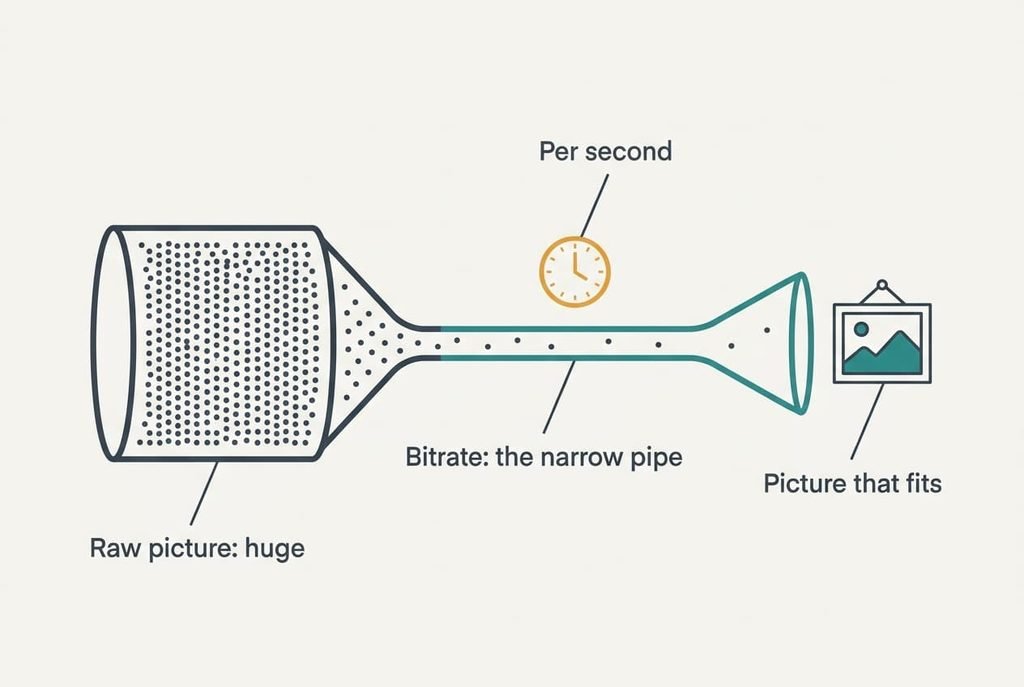
Bitrate is the number of bits one second of video is allowed to use, and quality is what that allowance buys. A raw 1080p picture at 30 frames a second needs 1,920 × 1,080 × 24 bits × 30 = 1.49 billion bits a second. Streaming it at 5 million squeezes it about 300 times. Say that to a colleague and it holds up. So, why does video quality change with it? Because the allowance buys different amounts of picture in different scenes.
The omission is that the allowance alone says little. A calm clip and a chaotic one need very different numbers to look the same, and a newer compression method gets more picture from the same bits. Bitrate is a cost. Quality depends on what the encoder buys with it.
The number is also an average. Most services let a busy second borrow bits from a calm one, so a 5 Mbit/s stream may spend 8 Mbit/s on a chase and 3 on a still conversation. The label tells you the budget over a stretch of time and promises nothing about any single second.
How does video quality change with bitrate, step by step
Take one second of video. At 5 Mbit/s and 30 frames, each frame gets an average of 166,667 bits, or about 20.8 kB. Real encoders place a complete frame every couple of seconds and give it a bigger share, so the figure is a simplification. If a complete frame took 400,000 bits, the other 29 would share 4,600,000, or 158,621 each. We’ll keep the round figure for clarity.
The encoder doesn’t store every frame whole. It stores one complete frame, then for each following frame it stores only what changed. Where something moved, it first looks for a block that matches in the previous frame and records only the shift.
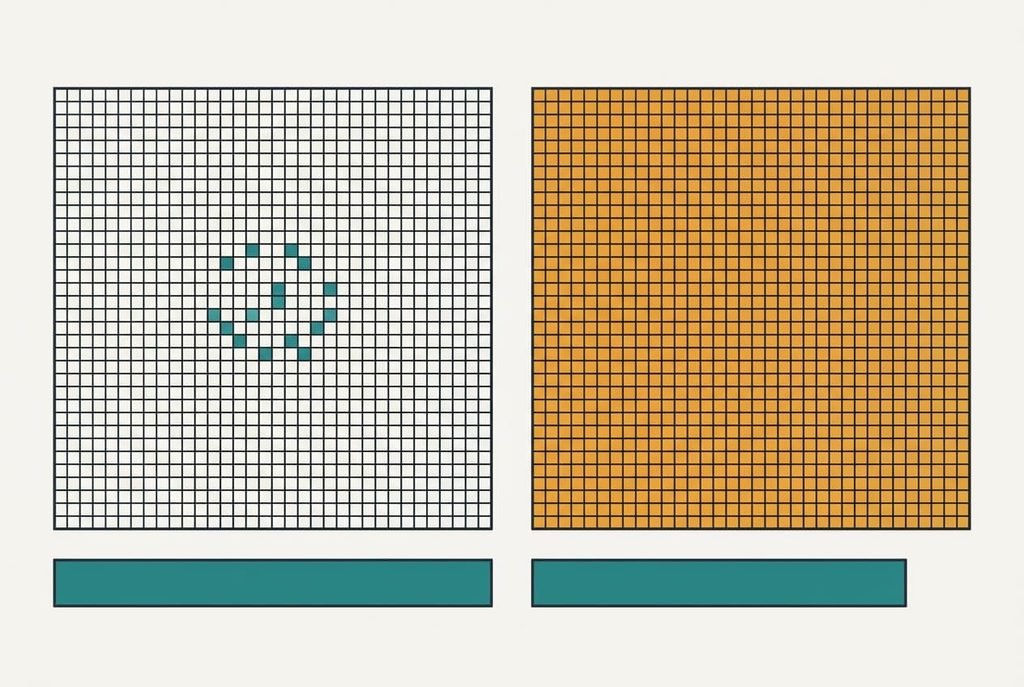
Clip one is a person talking against a plain wall. About 3% of the 2,073,600 pixels change from frame to frame, which is 62,208 pixels. The budget gives each changed pixel 2.7 bits, so the encoder can record the movement carefully and has bits to spare.
Clip two is a pitch panned across at speed. About 80% of the pixels change, which is 1,658,880. The same budget gives each changed pixel 0.10 bits, 27 times less. The encoder must now round values off harder, a step called quantisation. Smooth areas turn blocky, and fine texture such as grass smears into a flat green. Rain or confetti is the worst case, because tiny specks moving at random match no block in the last frame. The encoder must store them as new pixels, and every one of those costs bits.
Change the screen and the sums shift again. Spread over 1280 × 720 pixels, 5 Mbit/s gives 0.18 bits per pixel. At 1080p it gives 0.08, and at 3840 × 2160 only 0.02. A bigger picture on the same budget looks worse. One hour at 5 Mbit/s uses 2,250 MB of data.
A suitcase of fixed size, and where it breaks
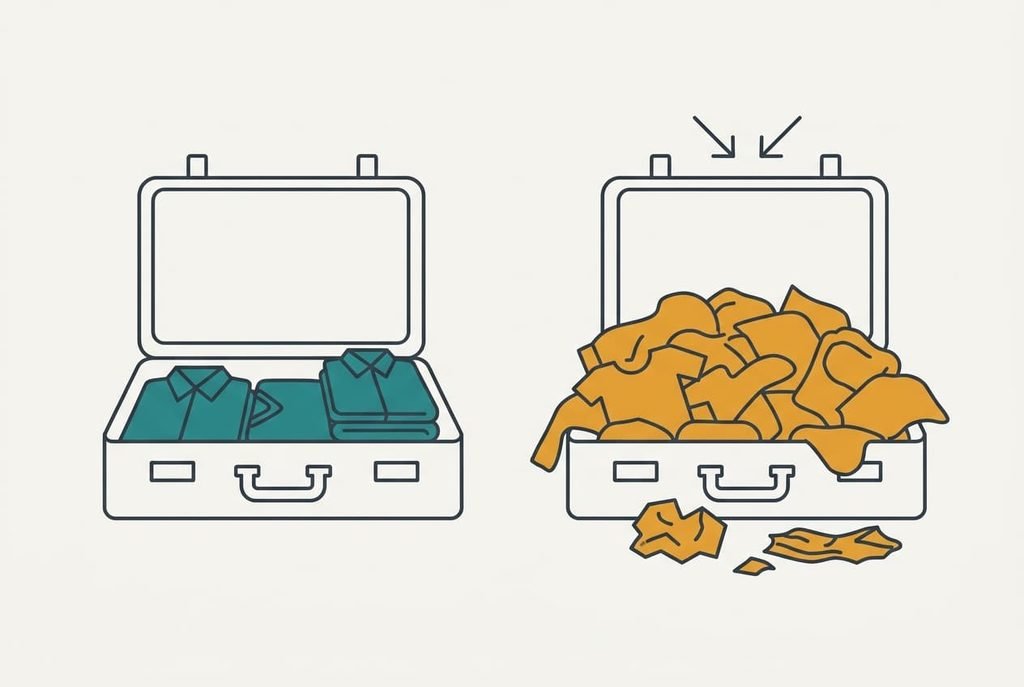
Think of a suitcase that holds 20.8 kB, repacked 30 times a second. A calm scene is a few folded shirts, and a busy scene is a heap of loose objects that won’t fit. That matches why motion costs more than stillness.
The suitcase breaks in two places. Real clothes can be unpacked and unfolded, but quantisation squashes detail for good, so the lost texture can’t be recovered later. And the suitcase isn’t repacked from scratch each time. Each frame mostly reuses the last one, so a bad packing in one frame carries into the next and a poor repair in one place lingers for several frames. So why does video quality change with it from one clip to the next? Blocky patches seem to follow moving objects because each frame inherits the last.

What bitrate does not do
A higher bitrate can’t add detail the camera never captured, because the bits only decide how much of the recording survives. Blurred or noisy footage stays blurred, and a high bitrate may even spend bits preserving the noise. Bitrate also doesn’t tell you the picture will play smoothly on your connection.
Your line has to carry that bitrate with room to spare. A 5 Mbit/s stream on a 5 Mbit/s line stalls the first time speed dips. A stream with a line of 8 Mbit/s keeps 3 Mbit/s of headroom, and that gap decides whether a busy scene plays through. Audio is a separate stream with its own bitrate, usually a tiny share of the video’s.
Headroom is what separates a stream that plays from one that stalls.
Nor does bitrate say which compression method made the picture. Two files at the same number can look quite different if one was made with an older method that needs more bits for the same result.
What people get wrong about bitrate
Many people believe more bitrate is always better. The belief formed because file size and bitrate rise together, and bigger files feel like premium goods. But past a point the extra bits only preserve noise. Doubling the bitrate doesn’t double the quality, and the gain shrinks with each doubling.
A second belief says 4K is sharper than 1080p whatever else is true. That idea comes from resolution being printed on every box. At a fixed 5 Mbit/s the 4K picture gets a quarter of the bits per pixel, so it can look worse than a 1080p picture on the same budget.
A third says the speed of your line sets the quality. Your line is only a ceiling, because the service chooses the bitrate and switches it as your speed changes. A faster plan won’t lift a stream above the top rate the service offers.
The line only sets a ceiling.
How to tell whether bitrate applies to you
If you record your own video or upload it, it applies. Try a rule of thumb: multiply width by height by frame rate, then by 0.1. For 1080p at 30 frames that gives 6.2 Mbit/s for busy footage, or 3.1 at 0.05 for calm footage. Lower the figure and watch for blocks in the busiest scene. Export the busiest ten seconds first, then view them at full size on your largest screen.
It also applies if you watch under a data cap, since 5 Mbit/s eats 2,250 MB an hour. If you only stream on broadband, you can ignore it, because the service picks the bitrate for you.
Bitrate is a budget of bits per second, and quality depends on how far that budget stretches over a scene. Why does video quality change with it? Because busy motion and large screens thin the budget. Remember one limit: a high bitrate keeps what the camera saw and adds nothing to it. When a video looks smeared, check the bits per pixel first, and only then blame the connection or the camera.
Questions readers keep asking
Can a higher bitrate make a video worse?
Only indirectly, by wasting your data. Past a point the extra bits keep noise and don’t improve what you see. A very high bitrate can also exceed your line’s speed, causing stalls, which feels worse than a lower quality that plays smoothly.
Do I need to think about bitrate when I record on my phone?
Usually not, because the phone chooses a sensible setting. It matters if you edit the video or upload it and the platform recompresses it. In that case, export at a bitrate close to the rule of thumb and avoid compressing twice.
What is the difference between bitrate and resolution?
Resolution is how many pixels each frame has, and bitrate is how many bits per second describe them. They’re separate dials. More pixels on the same bitrate leave fewer bits for each pixel, so a higher resolution can look worse unless the bitrate rises with it.