Phone compasses collect complaints. The arrow swings when the phone sits beside a speaker, or it disagrees with a printed map by a few degrees. Nothing spins inside, so it’s fair to ask what lets a phone compass find north. A small chip measures the Earth’s magnetic field along three directions, and gravity tells the phone which way is down, so software can pick out the horizontal part that points to magnetic north. This page follows one tilted phone through that sum, then shows where it breaks. Treat every figure here as a sample that your own readings can replace.
How Does a Phone Compass Find North? The Short Answer
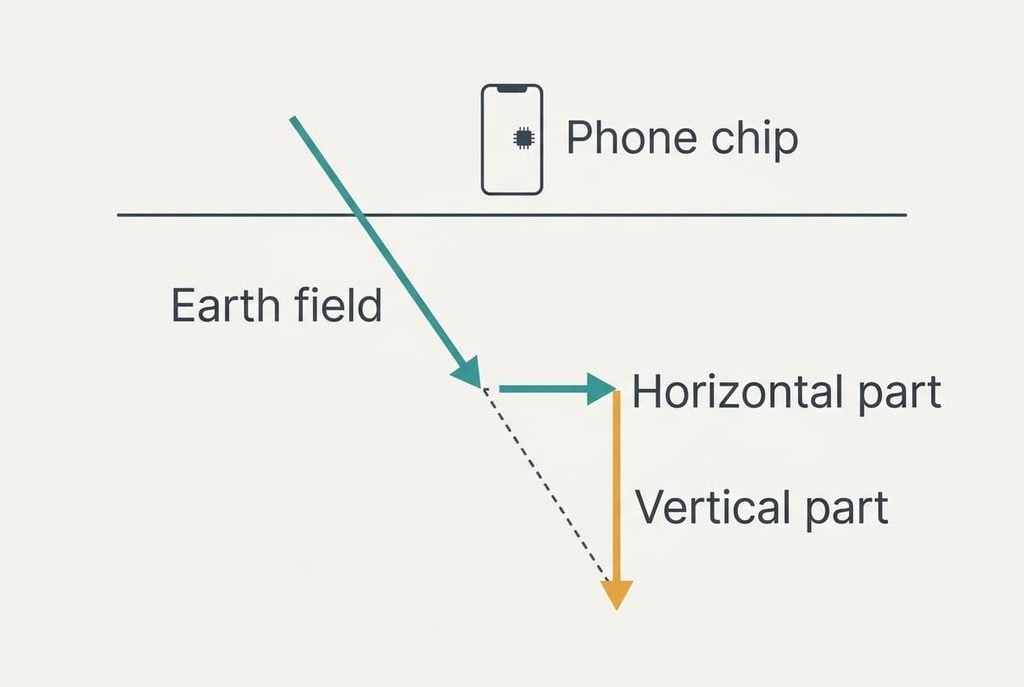
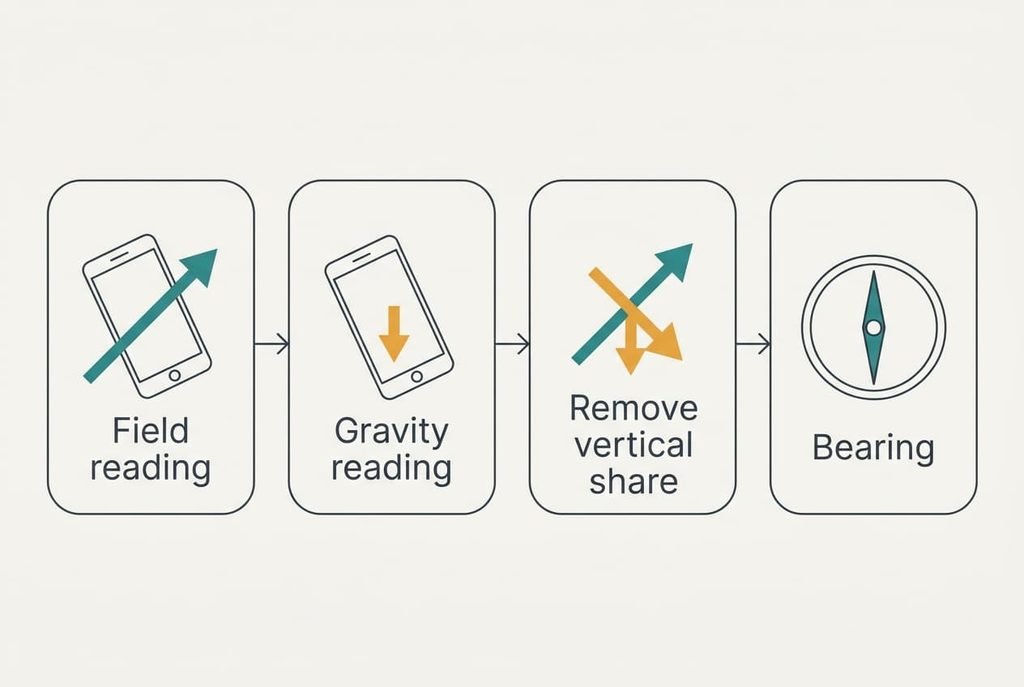
In one line, a chip senses the Earth’s magnetic field in three directions while gravity tells it which way is down, and the software removes the vertical share of the field to leave a bearing.
The field doesn’t lie flat. Across the UK it dips steeply into the ground, at about 67 degrees in our sample, so only cos 67° = 39% of it runs along the horizontal. Of a 49 µT total, 19 µT points towards magnetic north. The other 45 µT points straight down, where a compass can’t use it. Both sensors are read together many times a second, so the two sets of numbers share the same moment. That pairing makes a phone compass find north even though most of the field points at the ground.
The one-line answer leaves out the gap between magnetic and true north, which the software closes from a stored table. In our sample it’s 2 degrees. It also skips interference from nearby metal and magnets, and the calibration routine that tries to cancel part of it. Later sections take those in turn.
One Tilted Phone at a Bus Stop, Step by Step
Hold a phone tilted 30 degrees, with its top edge raised and pointing 60 degrees clockwise from magnetic north. Call the axes x along the right edge, y along the top edge and z out of the screen.
The magnetometer reports −16.6, −14.3 and −43.8 µT on those axes. Their combined length is 49.0 µT, which matches the field, so the chip is reading it faithfully. Yet the numbers look nothing like 60 degrees, because the tilt has spread the field across every axis.
The accelerometer comes next. At rest it reports 1 g pointing upwards, shared out as 0, 0.50 and 0.87 g on the three axes. That split says the phone is tilted 30 degrees, since the sine of 30° is 0.50. Down is the opposite direction.
Now the software asks how much of the field points down. Multiplying the readings by the down direction gives 45.1 µT, the vertical share. Taking that away leaves a horizontal field of 19.1 µT, and its direction is magnetic north.
The last step compares the phone’s top edge, flattened onto the horizontal, with that direction. The angle is 60.0 degrees. A flat-phone formula that uses only the x and y readings gives 130.8 degrees from the same data, which is 71 degrees out. Tilt alone can cause that error.
The vertical share is far larger than the horizontal one, 45.1 µT against 19.1 µT. A 2 degree error in the tilt estimate would therefore leak 45.1 × sin 2° = 1.6 µT into the horizontal part, enough to move the bearing by up to 4.7 degrees. That’s why the software smooths the accelerometer readings before it trusts them as gravity.
It then adds the 2 degree offset, so the map beam points along 62 degrees true. The chip delivers 50 readings every second, and the software averages the latest 10, a span of 0.2 s, so the beam stops twitching.
The Windsock Picture and Where It Breaks
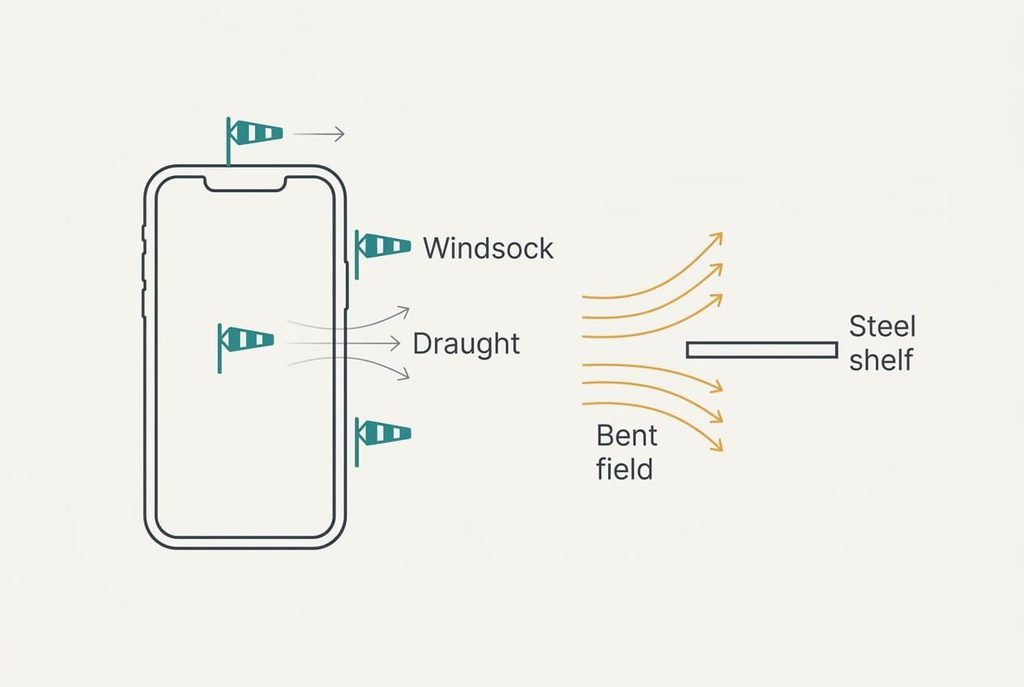
Picture the Earth’s field as a steady draught across a room, and the chip as three small windsocks fixed along the edges of the phone. Each windsock reports how hard the draught blows along its own edge. Tilt the phone and the three reports change, though the draught hasn’t moved.
The picture fails at two points. A draught pushes, but the field never pushes the chip. The chip notices it through a tiny shift in an electrical property, such as resistance. A wall blocks a draught. A steel shelf bends the field towards itself, and a magnet adds a field of its own. So the reading can be wrong while the phone stays perfectly still.
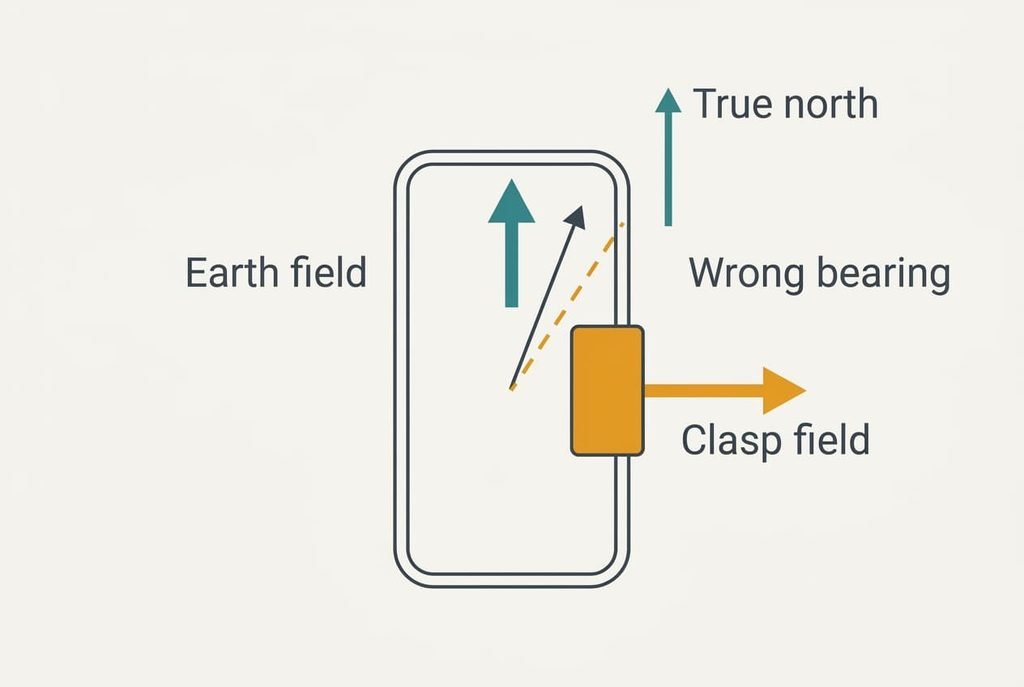
Where a Phone Compass Fails to Find True North
What the chip reads is the field at the phone itself, and that field includes everything magnetic within a few centimetres. Only 19 µT of the Earth’s field is horizontal, so a small magnet wins easily. A clasp on a case that adds 30 µT sideways drags the bearing by atan(30 ÷ 19.1) = 57 degrees.
Calibration helps a phone compass find north despite one kind of error. A clasp that travels with the phone adds the same offset in every orientation, so the readings from a full turn lie on a sphere centred on that offset instead of on zero. The software finds the centre and subtracts it. Metal that stays behind, like a steel desk, varies with position. The software can’t remove it this way.
Even a clean reading carries a margin. Outdoors, away from metal, the bearing lands within 5 to 10 degrees of the true one, as a rule of thumb.
Nothing in the chip can tell an Earth field from a magnet’s.
Three Beliefs About the Compass That Don’t Hold
Many people assume the compass uses GPS. The two appear together on a map, so it feels natural. GPS has no sense of direction when you stand still, and it infers one from the line between two successive positions. Walk 10 m, and a 3 m error in the second fix alone can tilt that line by about 17 degrees.
Another assumption is that a figure-of-eight wave repairs the chip, since the prompt says calibrate. The wave resets nothing at all, because it only hands the software readings from many orientations so it can locate the sphere’s centre.
Finally, many expect the arrow to point at the North Pole, because school compasses taught that. The chip follows the local field instead, which sits 2 degrees away from true north in our sample and differs from place to place.
A Rule for Deciding When to Trust the Reading
Stand 1 m from any metal. Hold the phone level and draw a figure of eight in the air. Then turn to face a landmark whose direction you know, such as a street on a printed map. If the arrow settles within 10 degrees of that landmark, trust it for walking directions. Run the test again after changing cases or entering a new building.
An error of 20 degrees or more points to interference. Move a few paces and try again. When the arrow keeps changing as you carry the phone around the same spot, the cause is nearby metal and the chip is fine.
Ten seconds in the open is enough to let a phone compass find north without surprises. The chip reads the field and gravity corrects for tilt, while a landmark check shows whether anything nearby has bent the result. When a map beam points the wrong way, run that check first. Judge the phone afterwards. Many wrong arrows come from the surroundings, and the check separates that cause from a fault in seconds.
Questions Readers Keep Asking
Can a phone case with a magnet ruin the compass?
Yes, and by a lot. A clasp adding 30 µT sideways swings the bearing about 57 degrees, because the Earth’s horizontal field is only 19 µT. Calibration can cancel an offset that moves with the phone, so a fixed clasp is manageable, but a loose magnet beside the phone can’t be removed that way.
Do I need the compass for walking directions?
Not while you’re moving, because GPS can infer your direction from a line between positions. The compass matters when you stand still, such as at a junction where you need the map beam to point along the road. Without it, you’d have to take a few steps before the beam turned.
Is a phone compass as accurate as a hiking compass?
Usually it isn’t. A good hiking compass has a magnetised needle that settles to within a couple of degrees of the field. A phone averages a noisy chip and often lands within 5 to 10 degrees outdoors. That’s enough for walking, though rough for anything that needs a precise bearing.