A name your resolver already remembers costs about 12 ms to look up, and a name nobody has asked about recently costs about 112 ms. DNS, the Domain Name System, is the lookup system that converts a site’s name into the numeric address of its server. Why does the first click feel slower? The first lookup travels a whole chain of servers, and the connection setup adds more on top.
The timings are round numbers for an invented UK home line, and yours will differ. Below, one click is followed from the first question to the first byte.
Why does the first click feel slower? The short answer, and what it leaves out
DNS turns a website’s name into the numeric address of the server that hosts it, and it does so by asking a chain of servers whenever nobody nearby remembers the answer. That is the whole definition. What it leaves out is memory, and memory comes in layers. The browser and the operating system each hold a private list, and the resolver holds a shared one. Everyone who uses that resolver benefits from it, which is why a popular site is often warm before you ask. Every server in the chain keeps each answer for a period the site’s owner sets, called the time to live. Your browser and your resolver each keep their own copy. Those layers decide whether a lookup costs anywhere between 0 and 112 ms. The plain version in the opening also skips a second cost. After the address arrives, your device still has to open a connection, and that happens on every first visit as well. An unanswered question adds a further wait, because the resolver waits out a timeout before it retries. A second or more of silence reads as a frozen page.
Why the first click feels slower, step by step
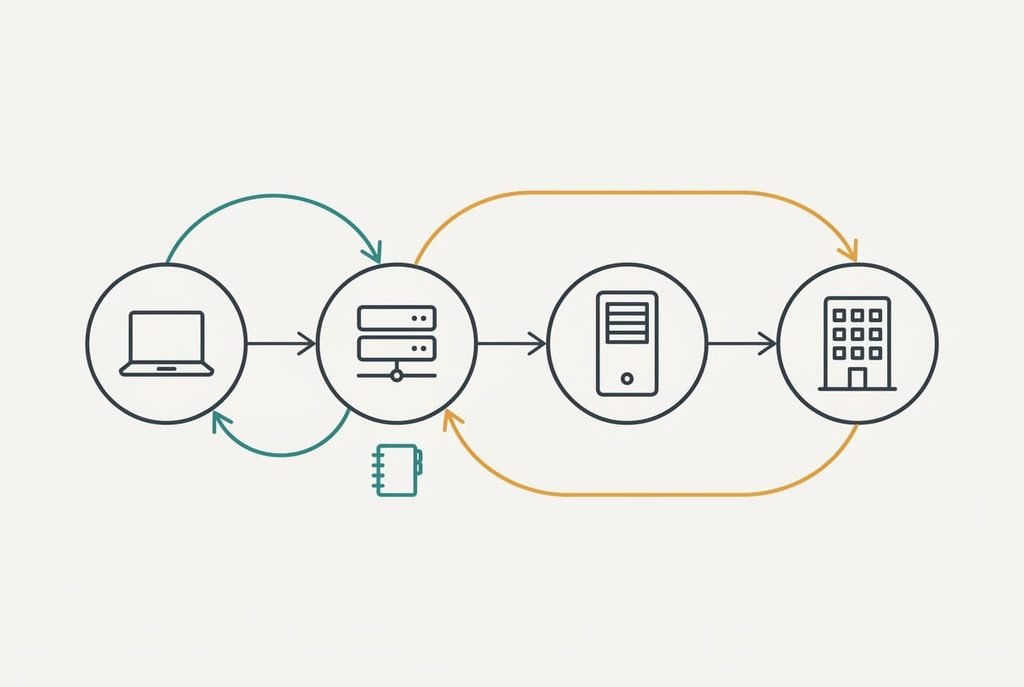
Take one click on a link to shop.example.com, typed into a browser that has never loaded it. The browser has no entry for the name in its own list, so it asks the operating system, whose list is empty too.
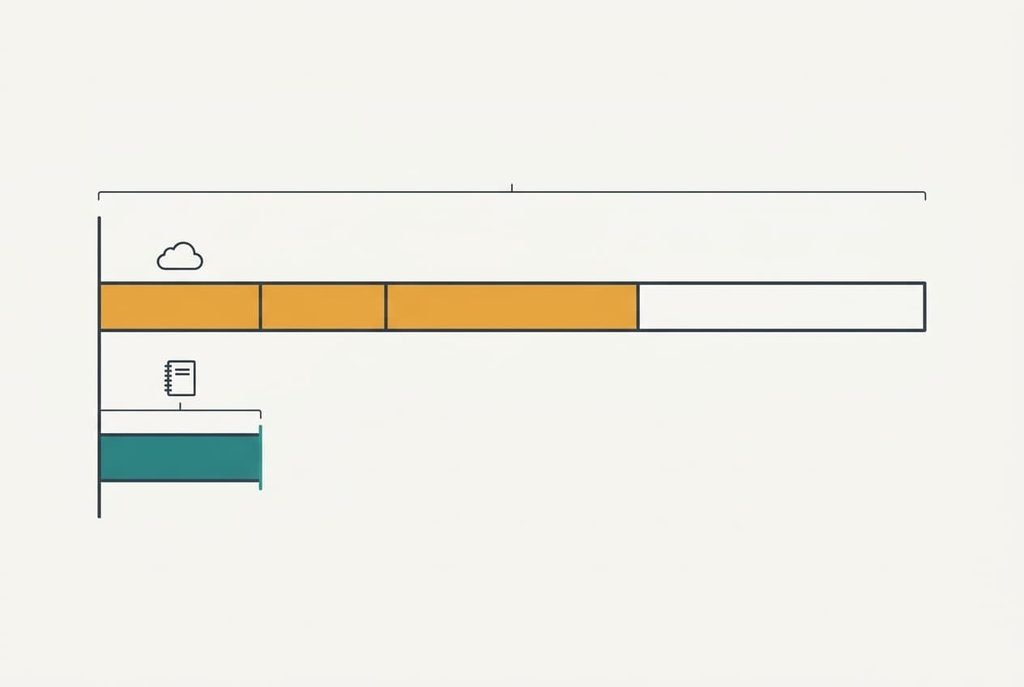
The system then sends one small question to the configured resolver, the server that does the searching on your behalf, often run by your provider. That round trip takes 12 ms. This resolver has never been asked about the name, so it starts at the top. A root server answers with a referral to the servers for `.com`, and that round trip takes 25 ms. One of those servers refers the resolver to the servers that own example.com, which costs another 30 ms. The last of them is the authoritative server. It holds the real address, and that exchange takes 45 ms.
Every answer in the chain arrives with a time to live. Here the address carries 300 s, so the resolver keeps it for five minutes and hands it to your device in the same 12 ms trip. The lookup totals 12 + 25 + 30 + 45 = 112 ms, and the two private checks cost nothing.
An address alone doesn’t load a page. The browser now opens a connection, which costs one round trip of 40 ms, negotiates encryption in another 40 ms and sends the request in a third. The first byte of the page arrives at 232 ms. Click a second page on the same site within five minutes and the lookup costs 0 ms while the open connection is reused, so the first byte arrives after about 40 ms. The first click took 5.8 times as long.
Two shortcuts shrink the chain in real life. The resolver usually remembers where the `.com` servers are for a day or more, so it skips the root and top-level steps and the cold lookup falls to 12 + 45 = 57 ms. A popular name may already sit in the resolver’s memory from someone else’s visit, which leaves 12 ms.
So why does the first click feel slower? It pays for the chain and the connection together.

A receptionist with a notebook, and where it breaks
A receptionist with a notebook is the analogy that holds longest. You ask her for a department’s extension. If it’s in her notebook, she reads it out at once, and if it isn’t, she rings head office, which points her to a regional office, which points her to the department. Next time, the notebook answers.
The notebook belongs to the resolver, but the expiry date belongs to the owner.
A receptionist crosses out entries whenever she likes, while every DNS entry carries a lifetime written by the site’s owner. A site that sets 30 s forces a fresh round of asking on almost every visit, however good your resolver is, and a site that sets a day lets one lookup last until tomorrow.
What DNS leaves undone
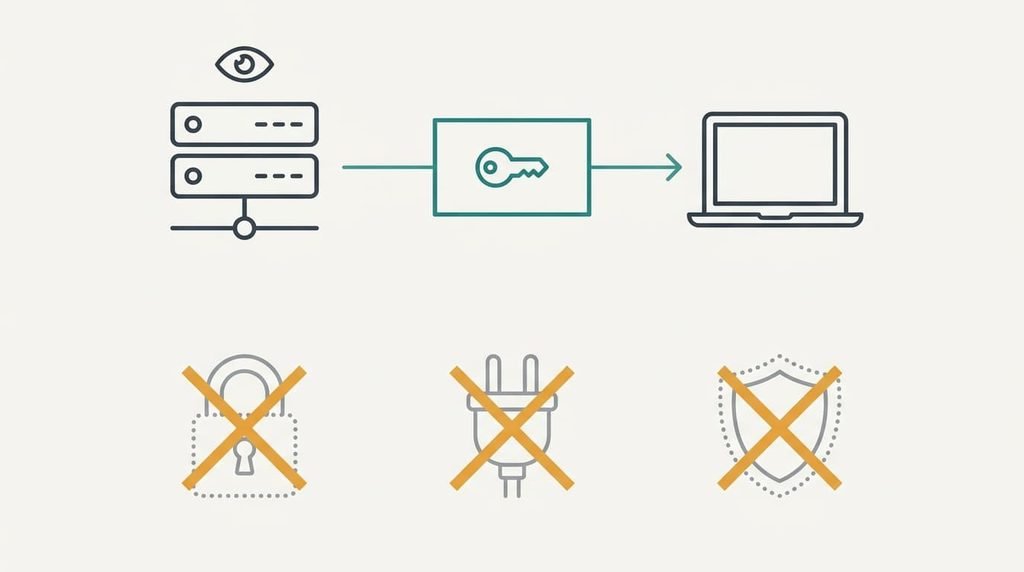
DNS returns an address and nothing more. It doesn’t open a connection or encrypt the page. Checking that the server at the address is the site you meant belongs to the certificate exchange that follows, a separate step.
The limit people misunderstand is privacy: whoever runs your resolver sees every name you ask for, even when every page you load is encrypted. Encrypting the lookups themselves hides them from the network between you and the resolver, and the resolver still reads them. DNS also can’t shorten the connection that follows, since distance to the server sets those 40 ms round trips.
A remembered answer can also be out of date. If the owner moves the site to a new server, your device keeps the old address until the time to live runs out. That is why a freshly moved site can fail for you and work for a neighbour. Resolvers remember failed lookups too, for a shorter period.
What people get wrong about DNS
Three beliefs travel with DNS. The first says that flushing the DNS cache speeds up browsing. It formed because a flush cures a site that moved to a new address. Emptying the cache makes the next click slower, because every name goes back to the 112 ms or 57 ms case. Why does the first click feel slower after a flush? Every click is a first click again.
After a flush, everything is a first click again.
The second belief says a faster plan shortens lookups, and it formed because plans are sold on speed. A lookup is a question of under 200 bytes, so its 12 to 112 ms is round trips that a bigger plan can’t shorten.
The third says a public resolver is always quicker. It formed from reviews measured at one location. The answer depends on how far away the resolver sits and how often other people ask for your names.
How to tell whether DNS matters to you
Time two visits to a site you’ve never opened. Read the lookup phase in your browser’s network timing view, the portion named for name lookup. If that phase stays under about 100 ms across several fresh sites, DNS adds little to your first click. If it regularly passes 300 ms, try another resolver on the same sites and keep the steadier one. I’d leave the setting alone otherwise, against the common advice to switch first and measure later. The thresholds depend on the distance to your resolver, which you can’t see from here. Treat 100 and 300 ms as starting points.
DNS answers by asking up a chain, and every answer is remembered for a time the site’s owner chooses. Why does the first click feel slower? The chain is the cost, and the memory decides whether you pay it. Keep one limit in mind above the rest: the resolver sees each name, whatever the page itself hides. A fast lookup is nearly always a remembered one. The next time a click lags, check the lookup phase before anything else.
Questions readers keep asking
Does DNS show which websites I visit?
Yes, to whoever runs your resolver. Each lookup carries the site’s name. Your provider or a public resolver sees the list even when the pages are encrypted. Encrypting the lookups hides them from the network in between, and the resolver still reads them, so choose an operator you trust.
Do I need to change my DNS server to browse faster?
Usually not. A lookup costs 12 to 112 ms in our example, and a cached one costs less, so the resolver rarely dominates a page that takes seconds to load. Test first. If lookups regularly pass 300 ms, try another resolver on the same sites and keep the steadier one.
What is the difference between DNS and an IP address?
An IP address is the numeric location of a server, and DNS is the lookup service that finds it from a name. The name stays stable while the address can change, which is why the system exists. Typing the address directly skips the lookup and loses the name.