What is a captive portal? It’s the sign-in page that a public network places in front of the internet, and it stops your browsing because the network passes no traffic until your device has been marked as allowed. The page you see is only the front door to that mark. Imran, who waits for a train in a Manchester station café carrying a phone plus a laptop, will serve as our test case. Below, one phone is followed from joining to browsing. A car park barrier then stands in for the idea. Then come the limits and the mix-ups, plus a rule for the times when no page shows up.
What Is a Captive Portal, and What Does the Short Answer Leave Out?
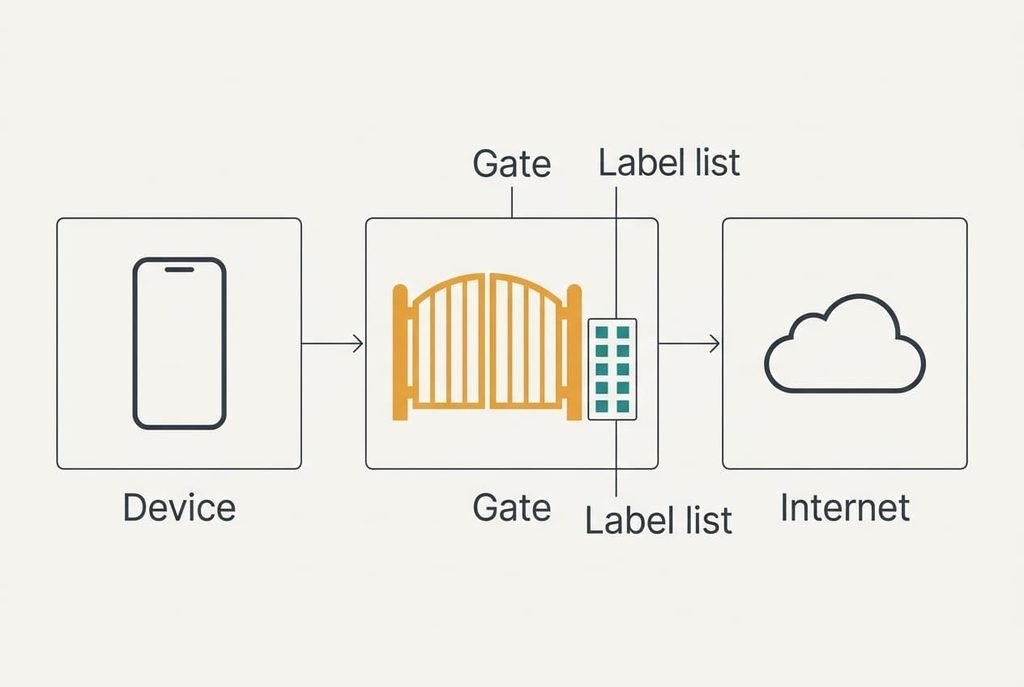
In one line, a captive portal is a gate that keeps your device off the internet until the network marks it as allowed, and the sign-in page is the way to earn that mark. The gate lives on the café’s router, and the same gate can sit in a café or on a train, wherever many strangers share one connection. It keeps a short list of device labels and a status beside each one, and it forwards traffic only for labels marked as allowed.
Three gaps remain in that answer. It skips how your phone discovers that a gate exists, because the phone checks without being asked. It skips what the form really verifies, which is usually less than people expect. And it says nothing about why the page sometimes never appears, even though the network is working perfectly well.
The sections below cover each gap in turn. Every number is invented for one café, so measure your own.
The gate checks a label on your device, and it never looks at you.
One Phone Followed From Joining to the Sign-In Page
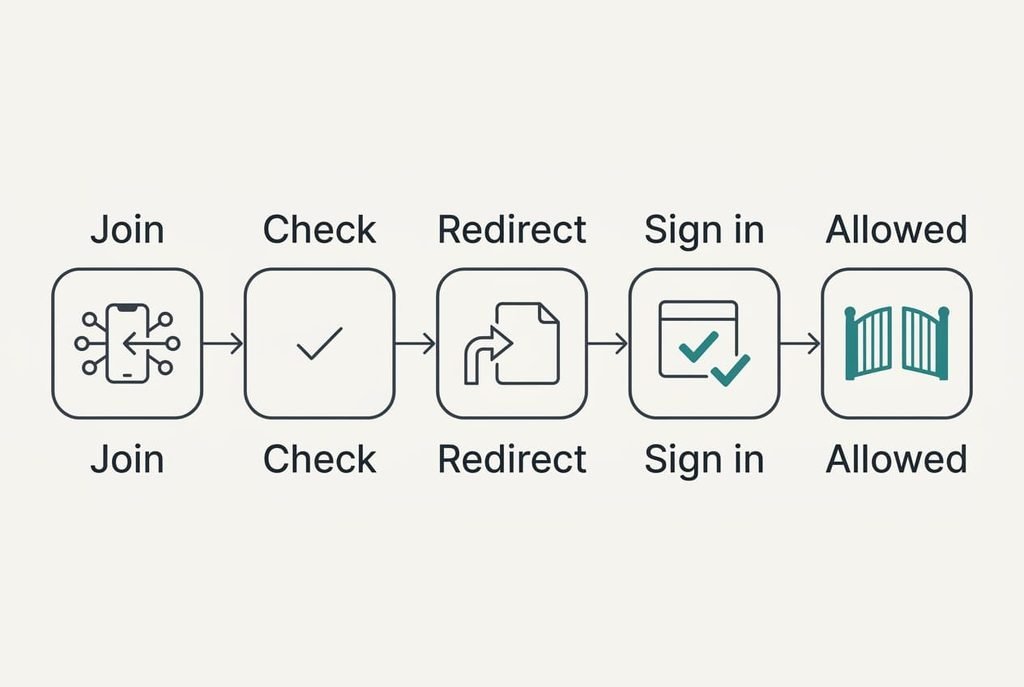
Imran taps the café’s open network at 10:42. His phone and the router agree a private address, 192.168.4.37, within about a second. The router’s list now holds one new row. It shows the phone’s hardware label and the status “unknown”. That status allows exactly two destinations: the café’s sign-in server, and the lookup service that turns names into addresses. Everything else is dropped.
Next the phone runs a tiny check on its own. It requests a short address that it knows should return an empty reply. The router, which treats the unknown row as shut out, answers with a redirect to a page on the café’s own server. The phone sees a reply that doesn’t match its expectation, concludes that a gate exists and raises the sign-in sheet within two seconds.
Suppose Imran ignores the sheet and types a news address into his laptop. The request travels as plain text, so the router can answer it with the same redirect, and the sign-in page opens in place of the news. Seen this way, what is a captive portal? A list with one column of labels and one column of statuses, plus a redirect for anyone marked unknown.
A site that uses an encrypted connection behaves differently. The browser demands a proof of identity from the real site, and the router can’t forge one. The page shows a security warning or spins, which is the first reason a portal sometimes appears to be missing.
Imran ticks the terms and types an email address. The café’s server tells the router to change the row to “allowed” until 12:42, which is 7,200 seconds. From then on the router forwards every packet carrying his phone’s label. The trip from joining to browsing takes about 40 seconds, mostly spent typing. The phone repeats its small check, gets the empty reply it wanted and closes the sheet.

The Car Park Barrier Picture and Where It Breaks
Think of a car park with a barrier at the exit. You take a ticket on arrival, and the barrier stays down until a machine marks the ticket as paid. Once it’s marked, the barrier lifts for any car that presents it. That’s the portal in miniature: a gate that waits for a mark, then a lifted barrier.
Here the picture breaks. The barrier reads a ticket you carry, whereas the router reads a label stamped on every packet your device sends. Nothing is carried, so the permission sits in the router’s list and not in your hand. A second device that copied your label would walk through on your mark. A barrier also checks you once, whereas the router checks every packet while the row stays allowed.
What a Captive Portal Cannot Do for You
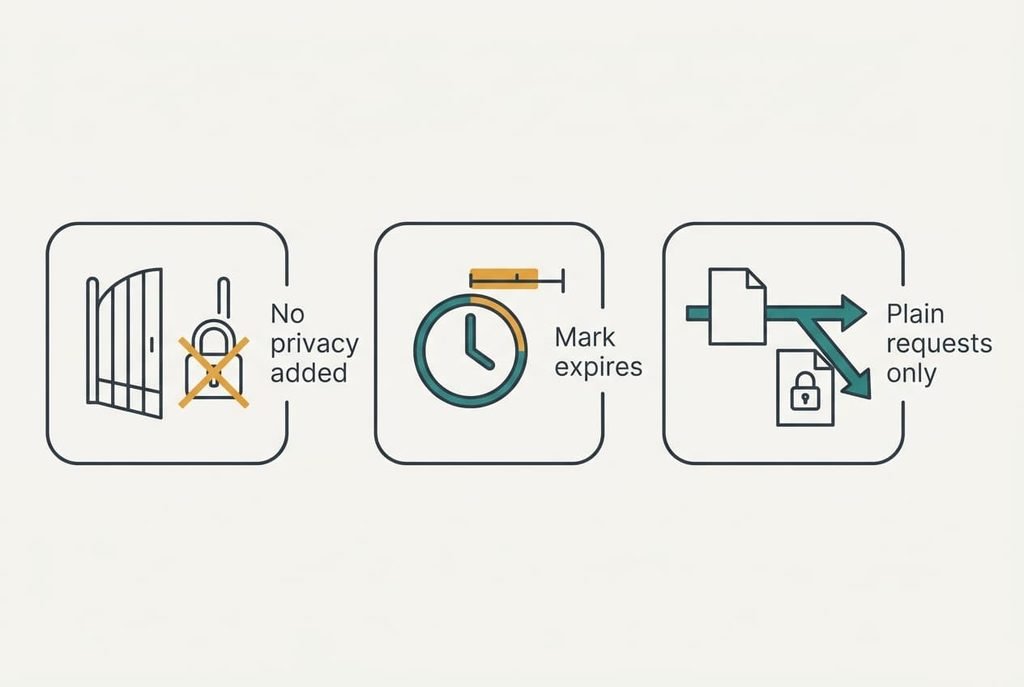
The limit people misread most is that the portal controls who may use the network and adds no privacy to what crosses it, because a sign-in page doesn’t encrypt anything. Whatever protects your traffic comes from the sites you visit and from the apps you use. The gate protects the café’s bandwidth.
The mark also expires. Your two hours end at 12:42, and the next request is redirected to the sign-in page again. Phones that change their label for each network, a habit called address randomisation, can look like a new visitor on every visit. That forces another sign-in on a day when nothing else has changed.
Finally, the portal can only rewrite plain requests. Encrypted ones slip past its redirect, so a phone with a private encrypted lookup service may never see the sheet. The portal can’t fix that from its side of the gate.
Mix-Ups About Sign-In Pages on Public Networks
Many people believe a sign-in page means the network is protected, and the belief forms because the page looks official and shows a logo plus terms. In truth the page is a form on a server the café controls. It says who runs the gate and says little about whether the traffic behind it is protected.
Belief two holds that the form checks who you are. It forms because forms usually do. Here the usual form records an email address and a tick, and the café can’t confirm either one. Most venues log consent so that the network’s owner has a record, and a made-up address passes as easily as a real one.
Belief three holds that the Wi-Fi is broken when no page appears. The answer to “what is a captive portal waiting for?” is often an ordinary plain request,.
A venue can run a network without any sheet and still stop strangers.
A Rule for When the Page Won’t Appear
If no sheet appears within about 10 seconds, type an old-style web address that loads without encryption, and let the router redirect you. Use an address that you know will load as plain text, which usually means a short, old-fashioned site. The redirect appears at once if the gate is working. If nothing happens, toggle the phone’s wireless connection and try the same address again.
Skip the form when it asks for more than an email address. A venue has no need of a phone number to forward your packets. If the page still won’t load, use your mobile data for the short job and leave the network alone.
Whenever a page stops your browsing, ask what is a captive portal waiting for. Usually it wants a single request from a device it has marked unknown, and the plain address supplies it. Once the row says allowed, the remainder of your stay goes smoothly until the mark runs out, and a second sign-in takes only seconds. Keep the form short and don’t reuse a password there. If the page shows an expiry time, set a phone reminder ten minutes before it.
Questions Readers Keep Asking
Is it risky to sign in on a public network?
Signing in is low risk, because the form only asks for consent. The risk lies in what you send afterwards, since the network doesn’t encrypt it for you. Stick to sites that encrypt their traffic, avoid reusing a password on the form and keep sensitive jobs for your own data connection.
Do I need a sign-in page on my own home network?
No. A home router already limits access with its password, so a second gate adds nothing. A sign-in page makes sense for a business that wants a record of visitors or a set of terms. At home you’d only be adding a step that guests find irritating.
How does it differ from a Wi-Fi password?
A password stops a stranger from joining the network at all. A captive portal lets anyone join and then holds them at a gate until they agree to terms. The password protects the radio link, whereas the portal only manages access. Many venues use the portal alone because it’s simple to run.