Most advice treats a number pad as a must for anyone who types figures. The claim is true of heavy workloads and false of light ones. Choose a number pad or the number row by how many figures you’ll type before your habits change. The pad repays its set-up only across repeated sessions. Our scenario is a monthly sheet of 400 figures, each with five digits, typed into a spreadsheet on a 14-inch laptop at a desk in Leeds. Every key sits 19 mm from its neighbour. All of these values are invented for easy sums, with no brand named.
The Property That Separates a Number Pad or the Number Row
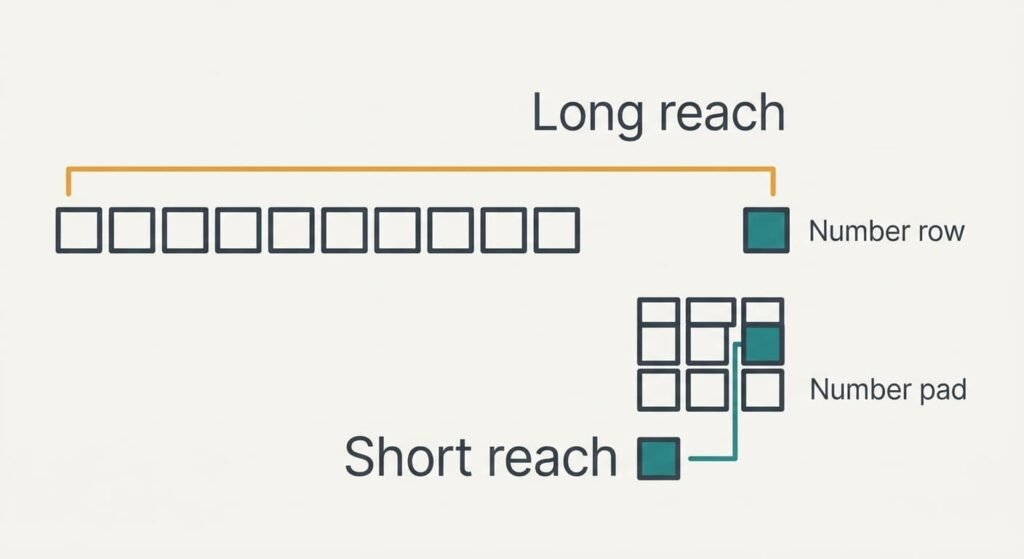
Every figure ends with a confirming key, and the reach to that key is the property that matters. Pressing a digit costs almost nothing. Moving the hand to Enter and back to the digits is where the effort goes.
On the number row, ten keys at 19 mm each run along a line 190 mm long. In our sample layout Enter sits 76 mm beyond the 0 key and two rows lower. Averaged over the ten digits a figure might end on, the hand must travel 166 mm to get there. The last digit could be anywhere along the line. A pad has three columns and four rows. That gives a block of 57 × 76 mm, with Enter just beyond its lower right corner. The same average falls to 55 mm.
Over 400 figures that’s 66 m of reach against 22 m, a gap of about 44 m per session. The choice between a number pad or the number row therefore reduces to a single figure: the pad cuts the reach to Enter by two thirds. Nothing else in the comparison gets close to that ratio.
Ask how far your hand travels per figure before you ask which keyboard is better.

Six Points of Difference, Side by Side
The table lists six places where the layouts truly differ. Money and pace are left out so they can’t hide the other differences. Each cell stays brief enough to scan at a glance.
| Question | Number pad | Number row |
|---|---|---|
| Desk footprint | about 11 × 13 cm if separate | none |
| Key arrangement | grid, 7-8-9 at the top | one line, 1 to 0 |
| Confirming key | inside the grid | at the far end of the keyboard |
| Effect of Shift | keys never become symbols | digits turn into symbols |
| Carrying | another item in the bag | nothing extra |
| Competition for the mouse | sits on one side of the laptop | no conflict |
Many people expect speed to set the layouts apart, yet it appears nowhere as a row. The surprise is the mouse. A separate pad usually lands on the right of the laptop, exactly where the mouse lives. The digit hand then takes on two jobs. Spreadsheets move down a column when you press Enter, which means a column of figures needs no mouse at all. The conflict only bites when you jump between cells. Moving the pad to the left side solves it. A built-in pad removes the footprint and carrying rows, though it’s found mostly on larger laptops and pushes the letter block off to the left of the screen’s centre.
Where a Number Pad Beats the Number Row
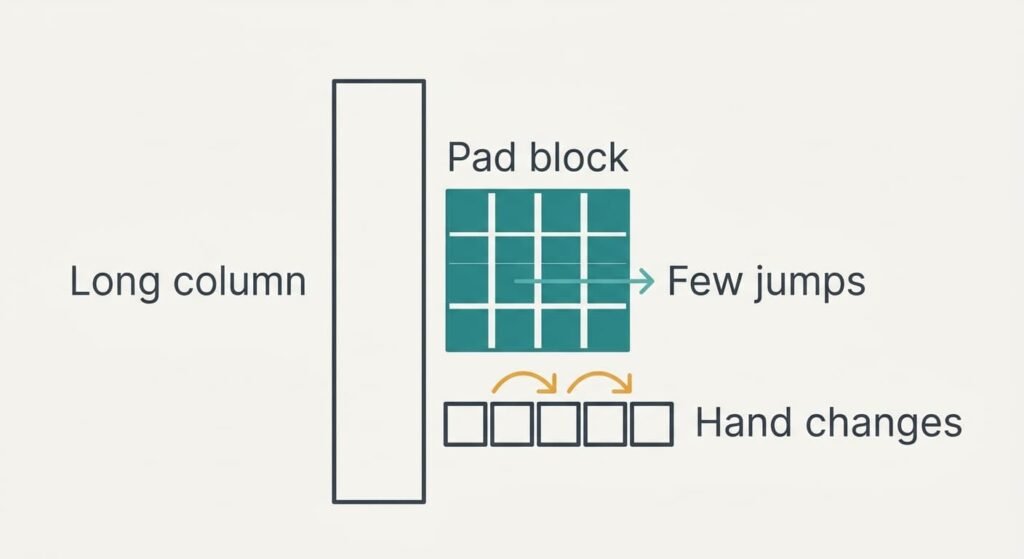
A long column of figures favours the pad. Each figure has four gaps between its five digits, and on the row, for random digits, about half of those gaps pass from one hand to the other. That’s two hand changes per figure, or 800 across the session. On the pad one hand keeps every digit within 76 mm of its starting point.
The pad also keeps digits as digits. Hold Shift by mistake on the row and a 5 turns into a symbol, which a cell may accept as text. Nobody notices until a total fails to add up. The pad’s keys never become symbols, so that slip can’t happen there.
Eleven keys in a grid are learnt by touch within a few short sessions, and the habit then lasts for years.
Now put a number on the payoff. If the pad saves an assumed 0.5 s per figure, 400 figures return 200 s, or 3.3 minutes, every session. Practice of 30 minutes, which is 1,800 s, pays back after 9 sessions.

Where the Number Row Is Enough
Light, occasional work belongs on the row. A weekly note of 20 figures saves only 10 s at 0.5 s each. Thirty minutes of practice would take 180 weeks to repay. Nobody enters figures for that long. The row also needs nothing to be bought or paired.
Portability counts too. A separate pad is one more object to forget at a library table. Its battery or cable decides whether it works on the day. The row is part of the laptop and never goes missing.
Mixed typing favours the row as well. A sheet that alternates figures with names and codes pulls the hand back to the letters every few seconds. The pad’s fixed position then offers no benefit. In that kind of work the hands live on the main block, and digits are simply part of it. Judge a number pad or the number row on the sheets you actually have. A mixed sheet can leave the pad idle for most of the hour.
When Neither Layout Is the Right Tool
Typing is the wrong method whenever the figures already exist on a screen. Each typed digit offers a fresh chance of a slip, and the slip rate belongs to people, not keyboards. Take an assumed rate of one slip per 500 keystrokes. A session of 400 figures has 2,400 keystrokes including Enter, which gives about 5 slips, and neither layout changes that count.
Copying the column across, or importing the file, produces zero typing slips. A statement that arrives as a spreadsheet or a text file should travel by import. Retyping it adds risk, and typing is best kept for figures that exist only on paper or in your head. Read the totals back against the source once, since a total can hide two errors that cancel each other. A second glance costs a minute and is worth far more than a faster layout. For a printed page, a phone photo run through text recognition may beat typing a long table. Every recognised digit still needs checking.
Which One to Pick
Weigh a number pad or the number row on volume first. Choose the pad when you type more than about 400 figures a month, or expect to keep doing so for 9 months. The pad cuts the reach to Enter from 166 mm to 55 mm, and that gap grows with every session. A built-in pad is simplest. A separate one belongs on the side that leaves your mouse hand free.
Choose the row when your figures come in small batches or when you work in several places. You won’t carry anything extra. The row stays attached to the laptop and costs nothing to set up. A weekly batch of 20 figures never repays a pad.
Whichever you pick, try it on a real sheet before committing. Enter 20 figures, tally the slips against the source and watch where the hand wanders. Run the same 20 on the other layout, then stay with whichever leaves fewer errors and less hunting for keys. Test again after a month. A layout that felt awkward on day one can feel natural by week four. You’ll have a first answer within minutes.
Questions Readers Keep Asking
Is a separate number pad worth the effort?
Only if you type figures in long sessions or every week. A pad adds one more item to charge and carry. Occasional users gain little, because the practice time outweighs the savings. Heavy users recover it within nine sessions in our sample.
What if the pad keys move the cursor instead of typing?
The number lock is off. On most keyboards the same keys act as arrows and page controls while the lock is off. Press the lock key once and watch its light. A glance at the light before each session stops a whole column landing in the wrong cells.
Which suits a person who types figures once a week?
The number row. Twenty figures a week saves almost nothing, and a separate pad would sit unused most of the month. Spend the effort on checking totals instead. Keep a pad in mind only if your weekly batch grows past a few hundred figures.