Open the recorder app and the list reads like a diary: a title and a date, with a length beside each clip. Only the sound inside is irreplaceable. The job needs only patience and a few checks. Getting your years of family recordings out of the app can follow one of three paths, and the first needs under an hour. Amira, a teacher in Cardiff, has 240 clips from four years. Most are birthdays and bedtime stories, and ten are long conversations with her grandfather. The figures here are assumptions chosen for the example. Replace them with counts from your own app.
What Survives of Your Years of Family Recordings
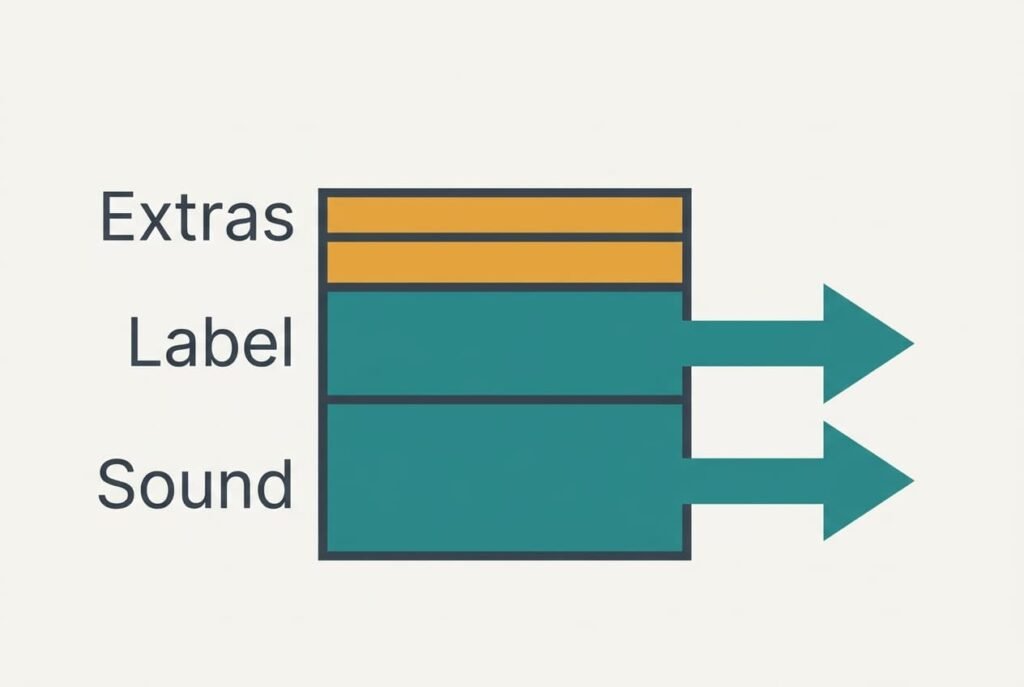
Think of every clip as three stacked things. At the bottom sits the sound the microphone caught. Above it sits the label, which is a title together with a recording date. On top are the conveniences the app added, such as bookmarks inside long clips. Tidy folders and typed-out transcripts belong here too.
Amira’s 240 clips split into 230 short ones of 3 minutes and 10 interviews of 75 minutes. Together they come to 1,440 minutes, which is 24 hours. Assuming 0.5 MB per minute, the sound alone takes about 720 MB. Each interview holds 14 bookmarks, giving 140 bookmarks in the top layer. Bookmarks may stay behind with the transcripts, yet sound and date leave as ordinary files, since both are part of each file.
Dates are the weak spot. A tool that copies files often stamps them with the copying day, and a 2022 birthday then appears to date from this week. Starting every file name with its date protects against that.
Pause and ask which layer of your years of family recordings your family would actually miss.
Three Routes Out and What Each One Costs You
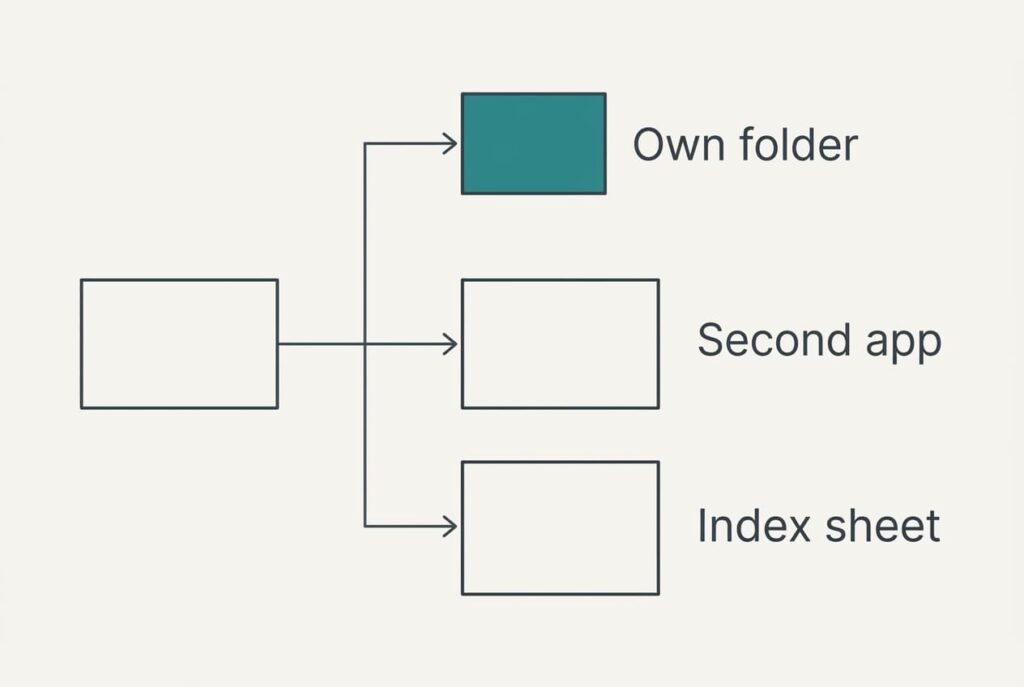
1. Save the files into folders of your own. A family that simply wants the voices secured, with no app involved, benefits most from this route, and it needs about twenty minutes of renaming and no spending. You give up search and the app’s tidy folders. Each clip lands as a single file. That turns 240 clips into 240 files, grouped by year. The usual breakdown is an export that offers only a web link, or one that renames every file with the saving day. Start each name with year and month, then add a short word for the event, and the folder sorts itself by date. Read the names on two files before relying on the batch.
2. Import them into a different recorder app. Households that keep recording and want to play clips on a phone are the audience here. Plan roughly an hour for one import. The old bookmarks and folders don’t come along, and the new app starts with empty labels. Sound and names arrive intact. Things go wrong when the import doubles some clips or lines them up by the day they were imported, which scrambles 230 short clips. Ask the new app which file types it accepts before starting. An import that skips unsupported files usually does so without a warning. Count the files afterwards.
3. Pair the folder with an index sheet. A relative who plans to look up one particular story in ten years will want this. Each of the 10 interviews gets a row naming the speaker and date, plus the minutes worth finding again, which replaces the lost bookmarks. At 14 minute marks per interview and about 10 minutes of writing per interview, the job takes 100 minutes in total. Automatic search is gone for good. The failure here is neglect, because a sheet left two years behind misleads more than having none. A spreadsheet works, and so does a notebook kept beside the drive.
Where Your Family Recordings Sit After Years of Use
By the third month the first impressions fade and the real trade shows. Folders feel light, but you’ll reach for spoken-word search most, because finding one bedtime story used to take a typed word. A second app swaps that gap for a new screen to learn, with labels that start empty and bookmarks nobody re-creates. Your regret follows how your family uses the clips. If grandchildren ask for the one with the cake by memory alone, search matters most. If they browse by year, plain folders do the job.
The index sheet costs the most effort and returns the most control, since every minute mark is yours to write, and no service can switch it off. No subscription has to stay alive for the sheet to work.
Remember that an old account doesn’t vanish when you stop using it. Whether the provider keeps your sound afterwards differs between services. Export before you close anything.
The Order to Move Things In, Step by Step
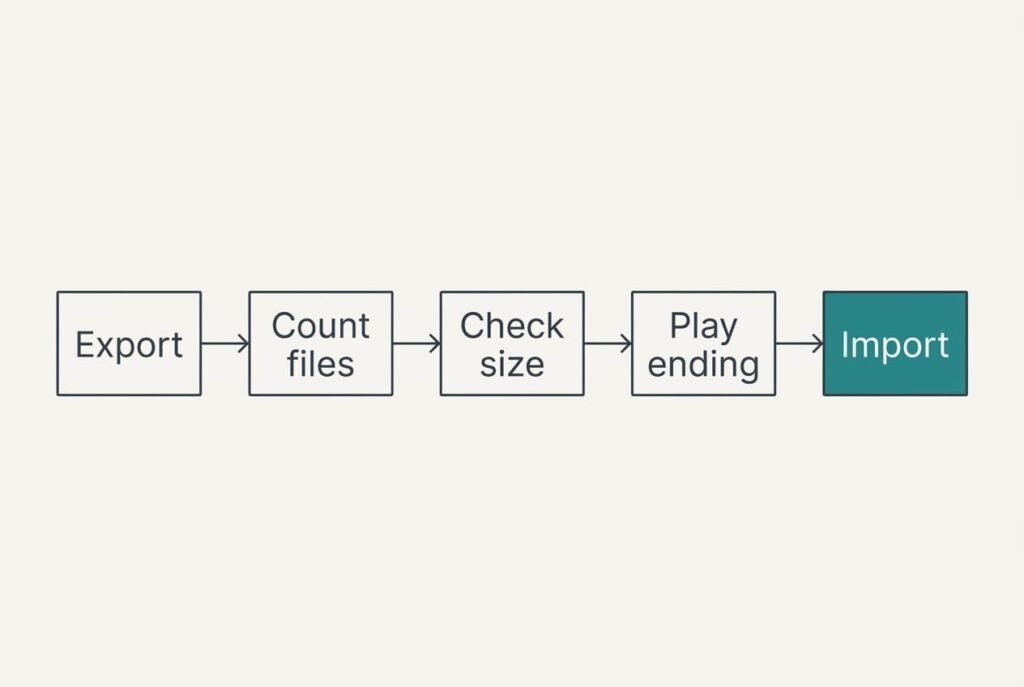
Leave the old app running until the final check passes. Request an export of everything instead of the newest year, then count what arrives. For 240 clips you should receive 240 files, a number worth writing on paper.
Compare the total size as well. Roughly 720 MB is expected, and a shortfall under 7 MB, which is 1%, is tolerable. Anything larger points at missing clips. Then play the final minute of the two longest interviews, because a cut-off export loses the ending first.
The import comes next, and the same count is repeated on whatever lands. Only after every check passes should the account be closed.
Done in this order, your years of family recordings sit in a place you control, and the app becomes a spare copy.
When Keeping the Recorder App Is the Right Call
If transcripts are how your family finds anything, stay. A plain folder of sound files can’t hold typed text, and no import brings it across. Rebuilding ten transcripts of 75 minutes each means 750 minutes, or 12.5 hours, of listening. Staying also wins when a grandparent records straight into the app and sees no reason to change.
Adding fewer than ten clips a year is a further reason to wait. At that pace a move costs more effort than the archive repays, and one set of exported files each year is enough insurance. Your years of family recordings face no risk while the account remains active.
An account shared with a sister or cousin leans the same way, since moving splits the collection across two places. A busy stretch, such as the weeks before a family gathering, makes a poor moment too.
A Last Listen Before You Cancel
Request the export, then listen to the final minute of the longest interview before you cancel anything. The voice should still be speaking at the very end, and the file name should begin with its date. Next, compare the file count with the app’s own figure, then the total size with its figure. When both agree, nothing has gone missing. If the last minute is silent or cuts off mid-word, repeat the export before doing anything else.
Make two copies of the set: one folder on your computer, plus another on an external drive or in some cloud storage you already use. A lone copy can disappear with a single mistaken deletion, and a second one costs only a few minutes to make.
Put the export date in the folder name so a future you knows how far the collection runs. Any basic player can open the files, which also tells you the export is not tied to the new app. A top-up once a year keeps the set current, and the job then takes only minutes.
Questions Readers Keep Asking
Will my recordings and their dates transfer?
The sound transfers as files, and the date goes along when the name begins with it. Bookmarks and transcripts may stay behind, and so may the app’s folders, because they live on the app’s side. Before you cancel, open one exported file. Its name and length should look right.
What does moving cost compared with staying?
The folder route costs about twenty minutes of your time and removes the app’s fee. A different app may bring its own charge, which you should weigh against the features you really use. The index sheet costs nothing in money, only hours.
Is it worth the disruption if I record a few clips a year?
Probably not. At that pace the archive grows by a handful of files, and a single export each year deals with them quickly. Staying put is sensible. Copy the files twice a year and switch only when the service changes its terms.