The common complaint about a family-room TV is that the picture looks washed out from the end of the sofa. What to look for in a smart TV for a shared living room starts with how the picture holds up away from the centre seat, since a family never sits dead centre. Judge the viewing angle first and every other specification second.
This guide assumes a living room in the United Kingdom with a sofa wider than the screen. Daylight comes through a window, and the viewers span several ages. It ranks criteria rather than products, so it stays useful after the current models are gone.
Why viewing angle decides what to look for in a smart TV
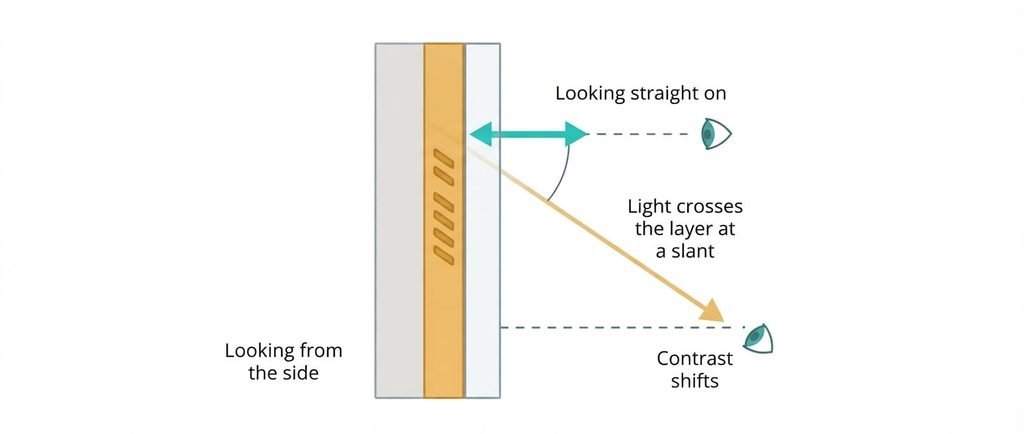
A liquid-crystal panel works by twisting light through a layer that sits slightly behind the glass front. Someone viewing from the side receives light that crossed that layer at a slant, so the contrast produced head-on no longer applies to that viewer. How much the picture changes from the side depends on how that layer is built, and the spec sheet rarely says.
Two common panel families sit at opposite ends. In-plane switching (IPS) panels keep colour steady across wide angles but show weaker black levels. Vertical alignment (VA) screens give deeper black head-on, then lose contrast as you move off-axis. Sets in which each pixel makes its own light generally hold up from the side as well.
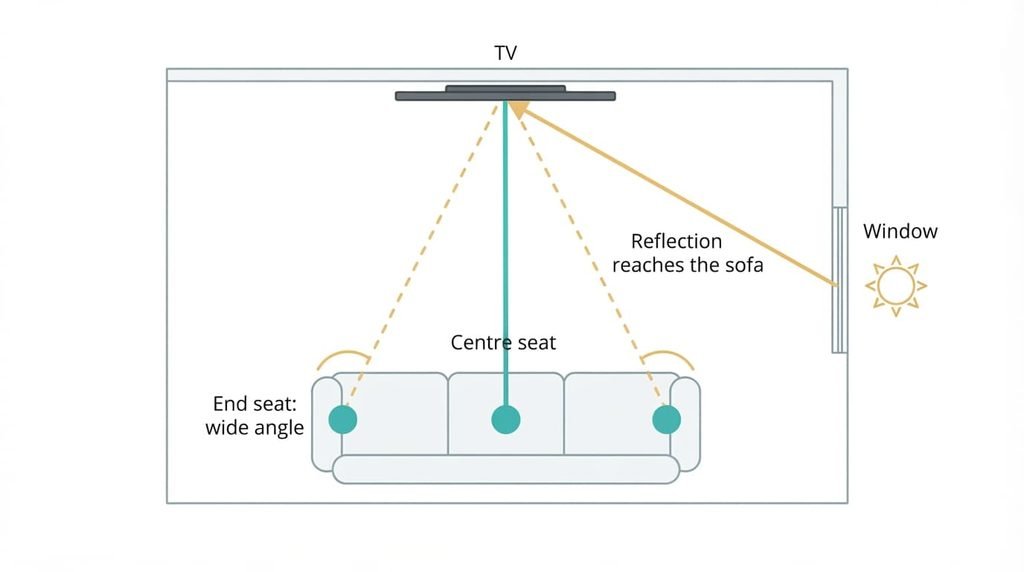
In a living room this decides more than anything else. The picture is judged by the child on the floor and the adult at the end of the sofa, and the owner in the centre seat is the only viewer who never notices. Settings can’t repair a loss that happens in the optics. Everything else on this list can be improved later, and this one is fixed on the day you pay.
What to look for in smart TVs, in order
1. Off-axis picture. This is how the image looks from the side of the room, and in daily use it separates a fine evening from grey blacks and pale skin for half the sofa. Judge it in the shop by playing a dark scene and stepping sideways until you stand where the sofa’s end seat will be. Ask for the same scene on two panel families if the shop has them. A good answer is that faces keep their colour and shadows stay dark. Get it wrong and you’ll see it every evening, because the loss never shows from the centre seat where the salesperson stands.
2. Glare handling. The coating on the glass decides whether a window turns the picture into a mirror at midday. A matte finish scatters incoming light into a dim haze, while a glossy one reflects it almost intact and keeps blacks deeper. Look at a paused dark scene and find the reflection of a lamp. A good answer is a dim, diffuse patch rather than a sharp image of the lamp. Get it wrong and you’ll close the curtains on sunny afternoons.
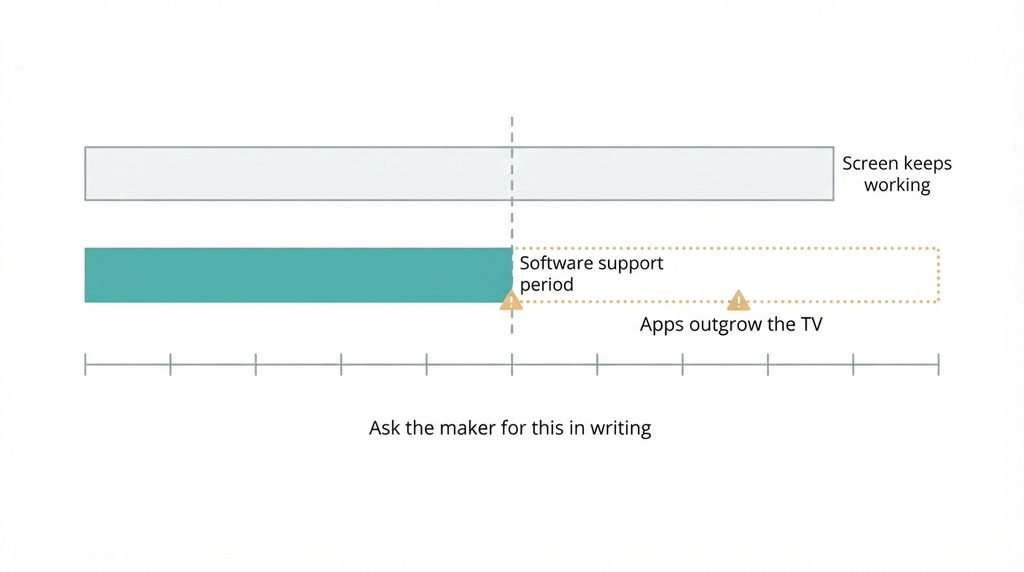
3. Update commitment. This is how long the maker promises to keep the TV’s software updated, and most buyers never check it. It decides whether apps still launch in a few years while the screen looks perfect, and whether security fixes keep arriving for a device that sits on your home network. Look for a written support period or policy on the maker’s product or support page. Silence is an answer. Get it wrong and apps stop working long before the panel fails.
4. Family controls. Look for separate viewer profiles with a PIN at TV level. They keep a child’s viewing out of an adult’s recommendations and stop the youngest opening any app. Ask whether the apps you use honour them, because a TV-level lock does nothing inside an app that ignores it. Get it wrong and you share one blended profile, with cartoons shaping the adults’ evening suggestions.
What does not matter as much as they tell you
The loudest number on the box is the pixel count. It’s promoted because it’s cheap to increase and easy to print, and it was decisive in an earlier generation, when screens were soft at sofa distance. Today the eye at that range can’t separate the extra pixels, and a lot of what you watch isn’t made at the top count anyway. I’d defend a lower pixel count with a better off-axis picture over the reverse, even though the shop sells the opposite.
Motion ratings are the second. Many are marketing figures that blend the panel’s refresh with image processing, so they can’t be compared between makers. Speaker wattage is the third. It states electrical power rather than sound quality, and thin cabinets limit bass whatever the figure says. It sells because a bigger number feels like a better speaker, and a living room that matters for film usually ends up with a separate sound bar regardless.
A pixel count describes the box, not the seat.
Matching the choice to your situation
The ranking holds for most homes, but three readers shift it. In a south-facing room with big windows, glare handling rises to first place and viewing angle drops to second. In a room used only after dark, glare falls to the bottom and blacks matter more, which is where the deeper-black panel family gains ground if the sofa is narrow. Where young children share the set, family controls climb to second, ahead of glare, because a locked profile prevents problems that no picture setting can.
None of these changes the overall approach to what to look for in a smart TV. The update commitment stays third, because it protects the purchase whatever the room looks like. I can’t see your room, so judge the glare for yourself with the lamp test.
What to walk away from
Part of knowing what to look for in a smart TV is knowing which flaws can’t be fixed once you’ve bought the set. A maker that states no software support period should end your interest, because nothing you do later can extend it and apps will eventually outgrow the hardware. A narrow-angle panel in front of a sofa wider than the screen also ends it, since the loss is optical and no setting recovers it. A family on a long sofa needs the picture to hold at the ends.
The third is a model sold on features promised for a future update. Such a feature costs the maker nothing until it ships, and some never do. Buy what’s on the box today and treat anything extra as a bonus. A claim the shop can’t demonstrate on the set in front of you should count as absent.
A promised feature is not a shipped one.
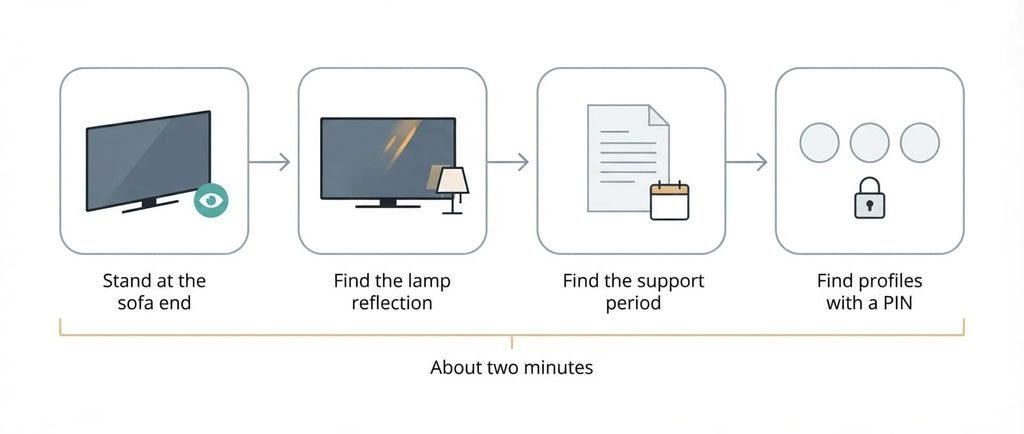
The two-minute check before you commit
Start with the picture itself. Stand where the end of your sofa will be and watch a dark scene for ten seconds. Pale faces or grey shadows send you to another model, and the salesperson’s reassurance doesn’t change that. Next, find a lamp reflection on a paused picture. A sharp mirror image is the same warning for a bright room.
Then read the maker’s product page for a support period. If you can’t find one in a minute, treat that as the answer. Finish by looking for separate profiles with a PIN. Four quick looks cover the criteria, and the whole check takes about two minutes.
Rank the angle first and the support period third, and walk away from any set that states none. A shop display that looks excellent from the centre has told you nothing about the rest of the sofa, so never judge it from the spot the display invites you to stand on.
Questions readers keep asking
Does resolution matter when choosing a smart TV for a family living room?
Rarely beyond a point. From sofa distance the eye can’t separate very small pixels, so extra pixel count shows up on the box before it shows up on the screen. Spend on off-axis picture quality and a stated support period first. Resolution only matters if you sit unusually close.
How much should I spend on a smart TV for the family room?
Spend where the ranking sits. The cheapest tier often trades away off-axis picture quality, so test it from the side before paying for extra features. Mid-range sets tend to keep the angle and the support period. I can’t see current lineups, so check each tier with the shop test.
What to look for in a smart TV that you won’t regret in five years?
A stated software support period and a panel that suits your seating. The screen can outlast the software, so a maker that commits in writing protects the purchase. Choose the angle you’ll live with, because it can’t be changed afterwards. A plug-in streaming device can refresh the apps later.