Beside each cover on an e-reader’s shelf sits a small mark showing whether the book is on the device or out in the cloud. That mark hints at the real question behind alternatives to your e-reader’s own book store, because a bought book is either a file you hold or a licence the shop holds for you. The deciding factor is a single count: how many of your purchased books you can copy off the reader.
This guide assumes a UK reader with a dedicated e-reader who gets through about thirty books a year. Neither shops nor prices get named, since both change often. The library sizes below come from a worked example.
Which of your books survive the move
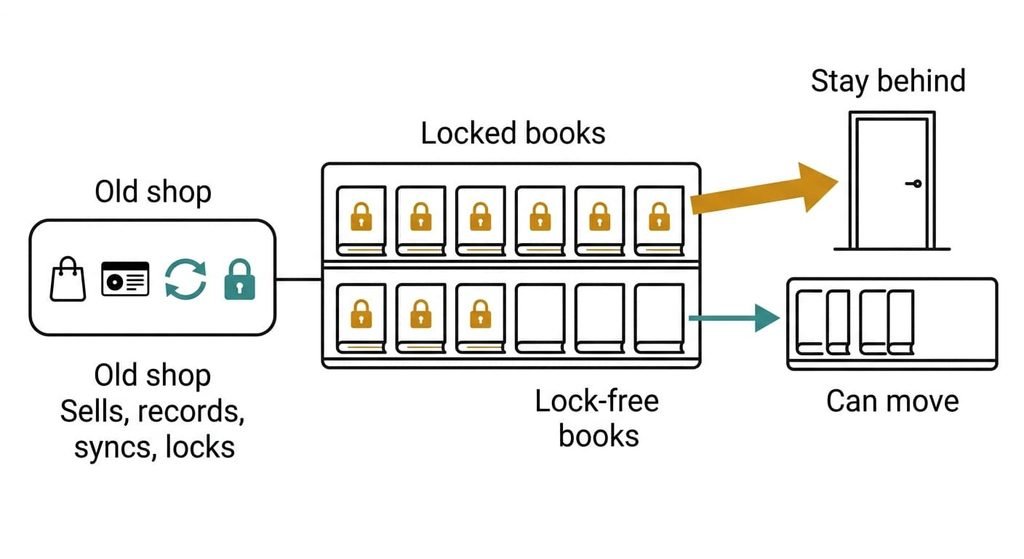
A shop does four jobs for a reader, and any exit has to cover whatever you rely on. It sells books and delivers them to the device. A record of what you own sits there too, so a wiped reader can refill itself. It syncs your place and your highlights between devices. Finally it applies a lock, so the files open only on hardware you’ve registered.
The lock decides how much you can take. A locked book is a licence with a key tied to your account, and only devices signed in to that account can use the key. A lock-free book in an open format is an ordinary file you can copy and open anywhere. Say your shelf holds 120 purchased books and 84 are locked, which is 70%. Those 84 stay behind in practice, because another shop’s app can’t open them. If you’d like alternatives to your e-reader’s own book store, start from that count.
What no alternative carries over is a bought book that is locked to your account.
Three alternatives to your e-reader’s own book store
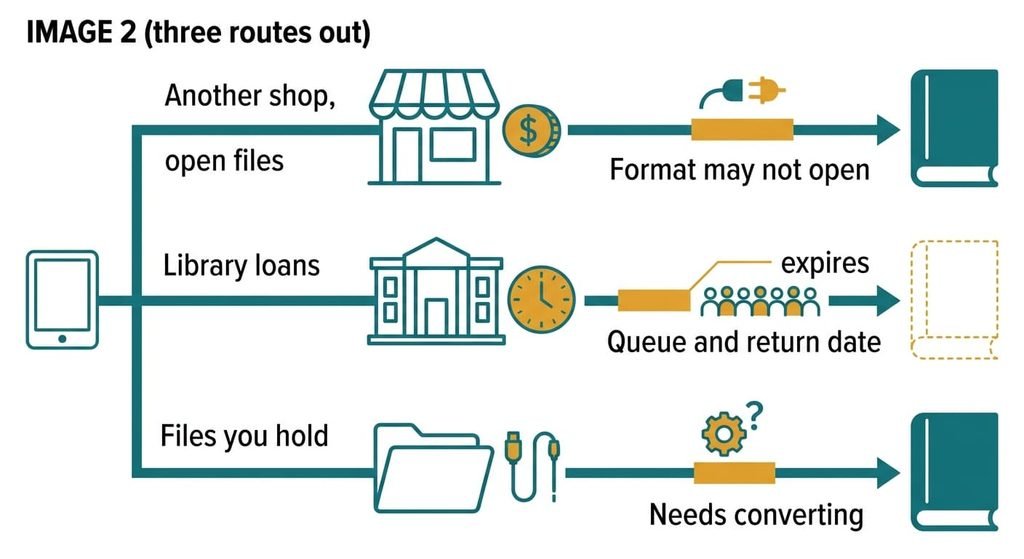
1. Another retailer’s books in an open format. This is the money route: you buy new titles from a different shop that sells files you can download. It suits readers who buy new releases and like to compare costs. The trade-off is range, since some releases appear only at the maker’s store, and prices shift from week to week. New books arrive as ordinary files, so your future reading moves and your old purchases stay put. It fails when a file arrives locked to an app your reader can’t run, so check the format on the product page before you pay, and favour shops that state it plainly.
2. Your public library’s lending service. That makes it the effort route: you borrow digital books on a loan clock and send them to the reader through an app or a download. It suits heavy readers with patience. The cost is time. Popular titles queue, and every loan ends on a set date. Most services let you join a waiting list and tell you when your turn comes. A borrowed book lands whole while it lasts, and its highlights may vanish at the return, depending on the service. It fails when the title you want has a long queue or the loan ends mid-chapter.
3. Files you hold yourself. This is the feature-loss route: out-of-copyright texts, books from sellers who supply lock-free files and books you’ve already converted. They reach the reader by cable, or by a send-to-reader address where one exists. It suits readers of older books and niche titles. You give up the one-tap shop and the sync that came with it. Your future reading lands best here, because a lock-free file is yours for good. It fails when the format is one the reader can’t open, which needs converting. Free programs exist for most common formats.
Month three with alternatives to your e-reader’s book store
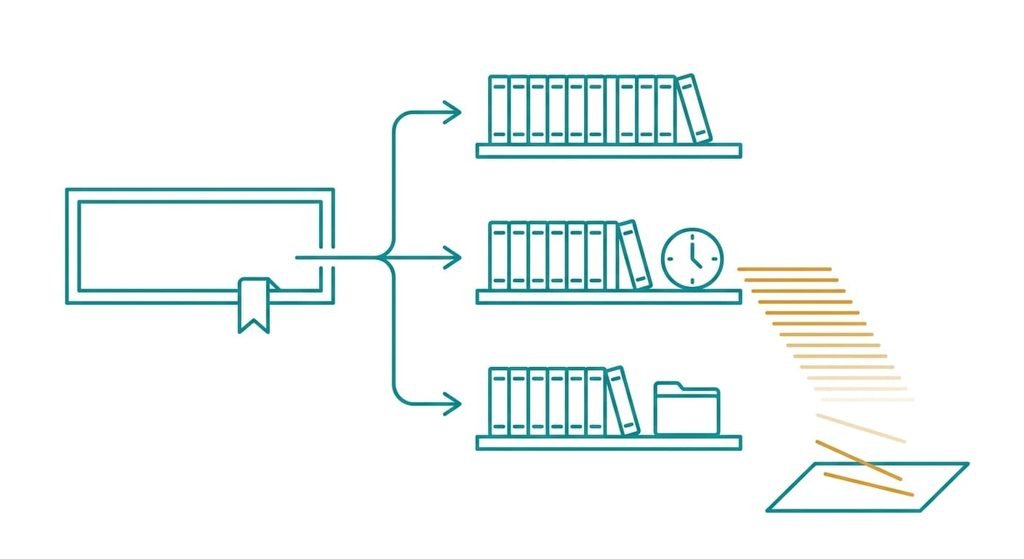
Leaving swaps one shelf that knew everything for three that each know a part. In week one you check the new shop first. By month three your reading position lives in one place and the library loan sits in another. Your own files wait in a folder you haven’t opened. Take 30 books a year across the routes. Twelve come from the new shop. Ten are on loan, and eight are held as files. Ten loans of 15 highlights each put 150 notes on a clock that stops with every return.
The shortfall shows when you want a quote from March and can’t find the book it came from. I’d choose one place for notes before the first loan, and copy them out in the week each book ends. A single shared note file serves every source, and a weekly slot such as Sunday evening keeps it current.
How to move without losing a shelf
Before you try any of the alternatives to your e-reader’s own book store, make the count described in the last section. Keep the old shop’s account open throughout, because it holds the only key to the locked books. Closing it would strand them. Back up the folder of lock-free files on a computer before you change anything else.
Next, buy your next book elsewhere and confirm it opens on the reader, including after a restart. Then borrow one library title to learn the loan routine on a low-stakes read. As you finish each book, copy any notes you want into a plain file. After a month, decide whether the old shop still earns a place for new releases. The sums often look different once you have read three books through the new route, and a book that fails to open stops the plan until its format is settled.
When to stay with the shop
Staying is the right call when most of your bought books are locked. At 70% locked, 84 of 120 titles would stay readable only through the old shop’s apps, and a second library would split your shelf in two. Stay too if you buy two or more books a month and the one-tap purchase suits you. The habit costs little next to managing three sources. A reader who rereads old favourites gets the most from the old shelf, since those titles are already locked in.
The shop can win this one.
Adding library lending beside the shop costs nothing and keeps both. That is the mild version of exiting, and it is where many readers end up. That also lets you test a loan-based habit before you give anything up. Leaving fully is a poor trade whenever your library is mostly locked, since the new routes would serve only your future reading.
The count to make before you decide
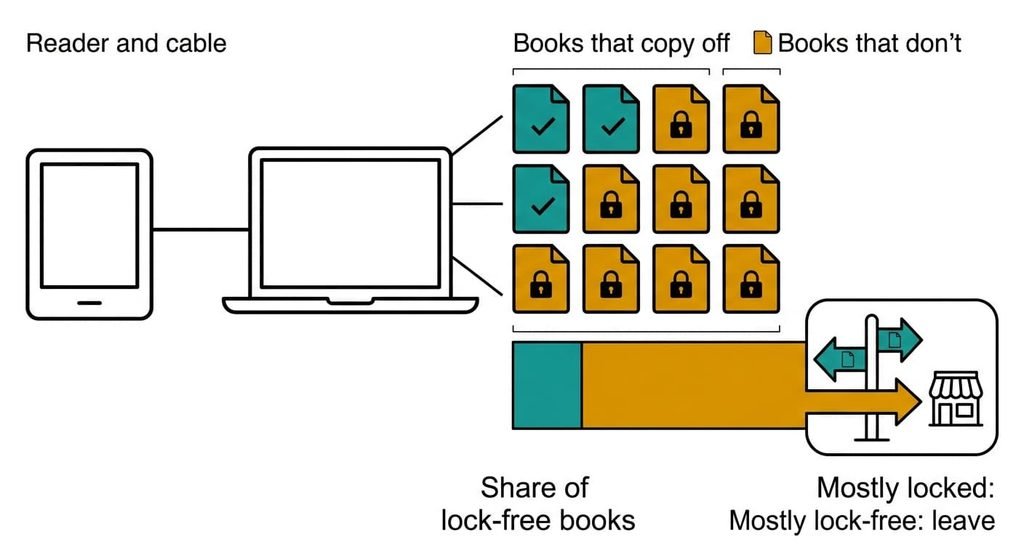
Make a list of every book you’ve bought and whether it is locked. Open the account’s purchase history and count the total. Then connect the reader to a computer by cable and look in its books folder. A book file you can copy off and open in a reading program on that machine is lock-free. A file that won’t open, or isn’t there, is locked.
Say 36 of your 120 books copy off. That is 30% lock-free, so a move would strand 70%. Above 80% lock-free, leaving costs almost nothing. Below 30%, stay for the old shelf and use the other routes only for new reads. The count takes one evening.
The lock sets what you can take, and the count measures it. Run it this week, then add a first route from among the alternatives to your e-reader’s own book store as a supplement before you commit to any move. Write the share down. Check it again in a year, since habits shift. New purchases change the balance.
Questions readers keep asking
Can I move the books I’ve already bought?
Only the lock-free ones. A locked book is a licence tied to the original login, so another shop’s app can’t open it. Connect the reader to a computer by cable and see which files copy off and open on a second machine. Keep the old account for the rest.
Is buying elsewhere cheaper than the reader’s own store?
Sometimes, though prices move week to week and a saving can cost you a format problem. Library lending is the cheapest route and costs time. Compare the current price on one book you plan to buy anyway before you judge.
Is it worth leaving if I only buy a few books a year?
Probably not. Under about six purchases a year the saving is small, and an extra source adds more admin than it removes. Add library lending as a free supplement, and revisit the question if your buying rises or your shelf grows.