Take the stand if one window at a time is enough for your work, and take the monitor if you need two pages side by side. That rule decides between a laptop stand or a second monitor on a desk that’s short of space. The deciding property is screen width at life size: two A4 pages need 42 cm, and a 14-inch laptop screen offers about 31 cm.
The desk in question sits in a rented flat in the UK and measures 100 cm by 55 cm. All numbers here are rounded, so measure your own screen and desk. No brands or prices appear here, since both change fast.
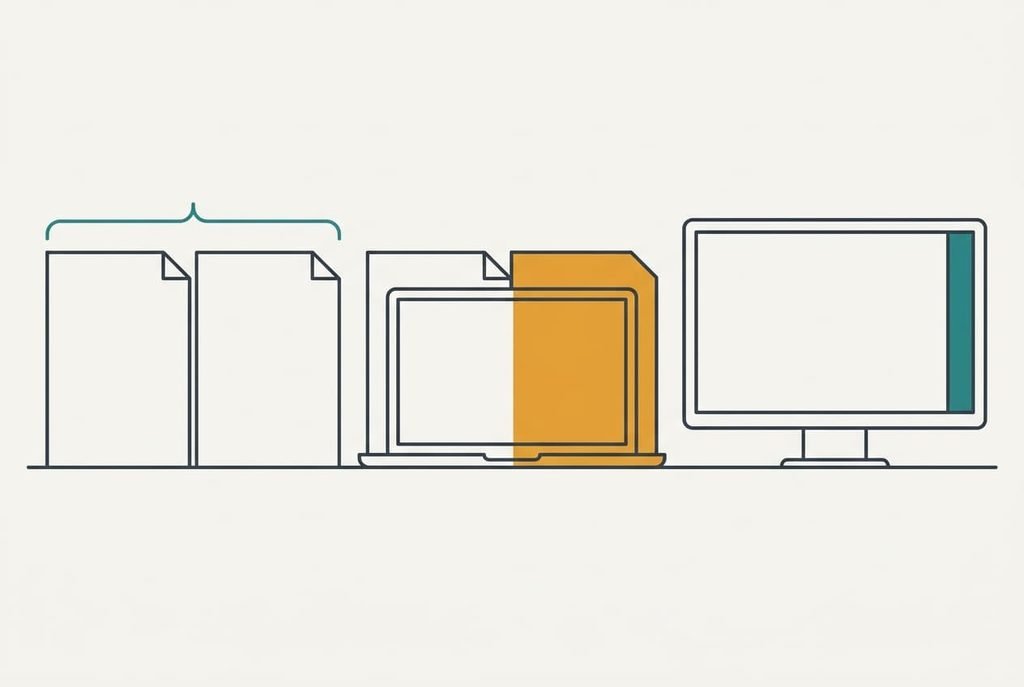
The one property that decides a laptop stand or a second monitor
Each A4 page measures 21 cm across, so two at life size need 42 cm. A screen can’t show more than its own width, and a 14-inch laptop panel is about 31 cm across. It falls 11 cm short, which means shrinking both pages to 74% of their size. A 24-inch monitor is about 53 cm wide and has 11 cm to spare.
Zooming out to fit doesn’t rescue the laptop, because text then shrinks with the page. You lean in or enlarge it again, and the saving disappears.
The stand fixes only height. With your eyes 44 cm above the desk (a 118 cm seated eye height less a 74 cm desk) and the screen 55 cm away, a flat laptop with its centre 19 cm up sits 25 cm below your eye line. That’s a 24° downward gaze, which is steep. A 10 cm stand lifts the centre to 29 cm and shortens the drop to 15 cm, or 15°. A monitor on its own stand puts the centre near 27 cm, a 17° gaze.
So both options fix the angle, and only the monitor adds width. The stand wins when you don’t need the extra width, because it costs less desk. Everything below hangs on that.
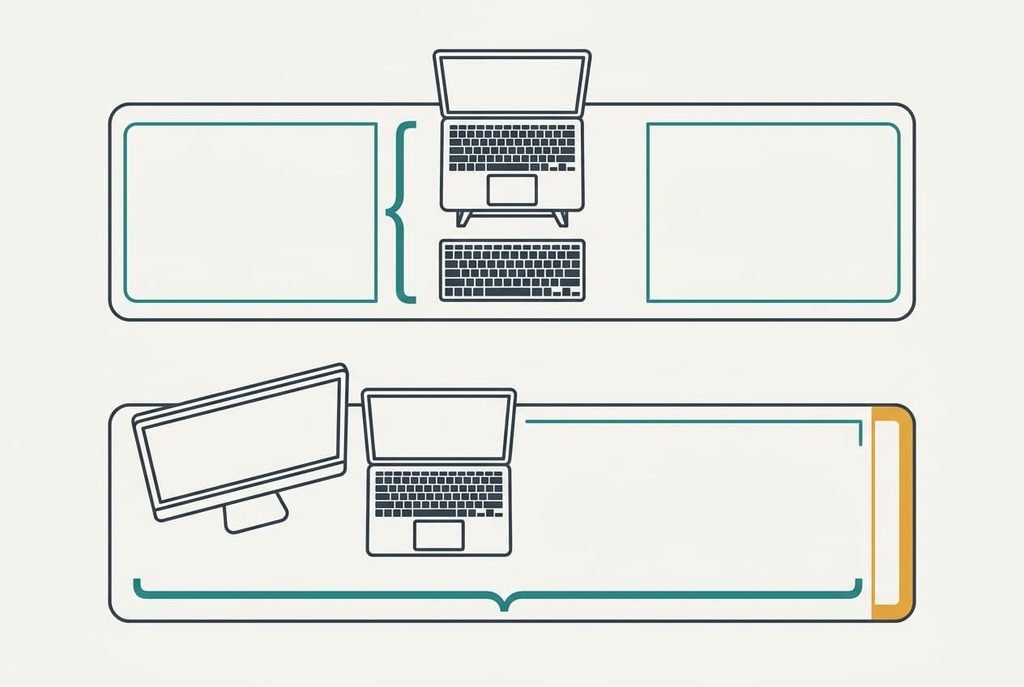
Head to head
| Question | Laptop stand | Second monitor |
|---|---|---|
| What it changes | Screen height only | Screen height and width |
| What it needs besides itself | A separate keyboard and mouse | A video cable and a socket |
| Desk width it uses (100 cm desk) | 36 cm for the keyboard | 86 cm for monitor and laptop |
| Typing height afterwards | 10 cm above the desk unless you add a keyboard | Unchanged, at desk height |
| How it usually fails | A thin base that wobbles when you type | A loose cable that drops the picture |
| What it cannot do | Add any screen width | Travel with you |
| What goes in your bag | The folded stand | Nothing, the monitor stays put |
One row hides a second purchase. Raising a laptop 10 cm raises its keyboard 10 cm too, so a stand almost always brings a second purchase. A monitor leaves the laptop’s keyboard at desk height and ready to use. Nothing else on the desk has to move. Owning a spare keyboard removes that cost, and the stand then asks for nothing more. Without one, add that keyboard to the stand’s side of the sum, because that one row often decides a laptop stand or a second monitor.

Where a laptop stand wins
Work that lives in one window gives the stand its home turf in any contest between a laptop stand or a second monitor: writing, email, a video call. None of it needs more than 31 cm, so a monitor’s extra width goes unused. The stand with a keyboard in front uses 36 cm of your 100 cm desk and leaves 64 cm for paper and a lamp.
It also wins on a plainer point: nothing to power and nothing to unplug. There’s no cable to loosen, so the whole setup is a folded piece of aluminium or wood plus a keyboard. If the desk is shared, or the table gets cleared each evening in a rental, the stand goes into a bag in seconds. A monitor can’t make that trade.
A stand needs no power and no driver, and its cable never loosens.
The gaze angle is fixed too. At a 10 cm height it lands on 15°, which is where most monitors are set. Choose one whose height you can change. Desks and bodies differ by a few centimetres.
Where a second monitor wins
Work that needs two things in view favours the monitor. Reading a source in one window while writing in another needs the 42 cm that two A4 pages take, and the 53 cm panel covers it with 11 cm spare. A laptop screen alone shrinks both pages to 74% and sends you back to switching windows all day.
There’s a plain reason too: the laptop’s keyboard keeps working. You need no extra keyboard. The monitor stands on its own foot, so it can’t wobble under your typing the way a thin stand can. Beside it, the laptop becomes a small second screen for a video call or a chat that you can glance at.
The price is width. Monitor and laptop side by side take 86 cm of a 100 cm desk, leaving 14 cm. If you keep paper on the desk, that number should worry you. A strip of tape marking the outline on the desk is worth laying before you order anything.
[IMAGE 5 HERE – replace this box with the generated image]
When neither is right
One monitor with the laptop shut away is the third option, and it suits a particular pattern that neither a laptop stand or a second monitor serves well. If you sit at the desk through the working day in a single wide window, a lone monitor uses 53 cm of width, not the 86 cm that monitor and laptop need. It frees the 32 cm the laptop took, and a spare keyboard moves into that space.
The price is a separate keyboard and mouse, plus a way to keep the closed laptop awake and powered. That’s why it suits a permanent desk and not a shared one. If you only work at the desk twice a week, changing nothing is cheaper than any of these, because a few sessions a week don’t repay a purchase. It also spares you the choice, which is a saving of its own.
Check this route against your own week before you drop the other two.
[IMAGE 6 HERE – replace this box with the generated image]
How to decide between a laptop stand and a second monitor in thirty seconds
Measure the widest document you read at life size and double it. Compare that number with your laptop screen’s width, then pick the branch that matches.
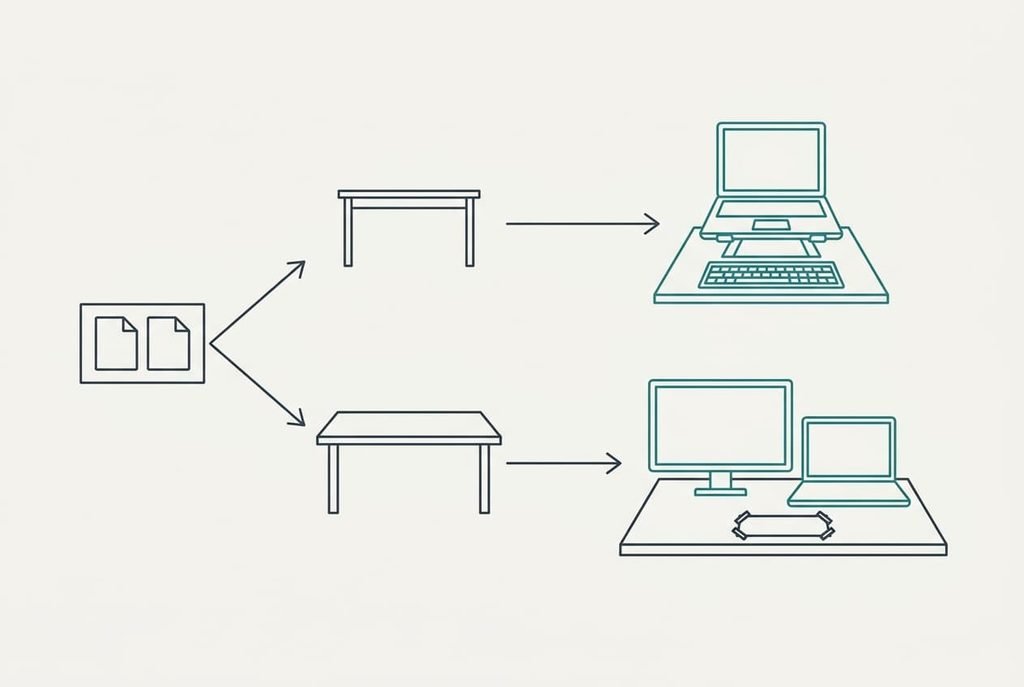
If your work fits one window at a time, or your desk is under 90 cm wide, take the stand and add a keyboard. Aim for a height that puts the screen’s centre about 15 cm below your eyes, which is 29 cm up in our example. If you read one page while writing another, and the desk is 90 cm wide or more, take the monitor and mark its footprint with tape first, before anything arrives.
The stand fixes the angle. The monitor fixes the angle and the width, so width at life size is the only question that matters here. A desk with room for both gets the monitor if two pages must stay open together. A narrower desk gets the stand, and the pages stay in one window at a time. Measure first, because a tape costs less than a return.
[IMAGE 7 HERE – replace this box with the generated image]
Questions readers keep asking
How much should I spend on a laptop stand or a monitor?
Spend least on the stand, since a plain one only needs a firm base and a height you can adjust. Put more into the monitor, because you’ll look at it for hours. Check the specification sheet for the stand height and the monitor width before you check the price.
Will a laptop stand wobble when I type?
A thin, tall stand can, because the keys push on a lever. Choose a wide base and the lowest height that gets your gaze to about 15° below your eye line. A shorter stand is steadier, and an external keyboard keeps your hands off the laptop altogether.
Which suits a small rented flat better?
The stand, usually. It folds away when work stops and uses 36 cm of a 100 cm desk. A monitor stays put and takes 86 cm of width with the laptop. Choose the monitor only if two pages must stay open together.

