Alternatives to a paid website builder only make sense once you know what the club actually owns on that site. Denise, secretary of a village choir in Shrewsbury, runs an eight-page site on a builder, and the renewal notice has just landed in her inbox. She would like something lighter to look after. Below are three ways out, each with a different drawback, plus the checks that protect what the choir has built. Her figures are invented samples. Count your own pages and photos before you judge. No product names or money amounts appear below.
What Alternatives to a Paid Website Builder Must Carry Over
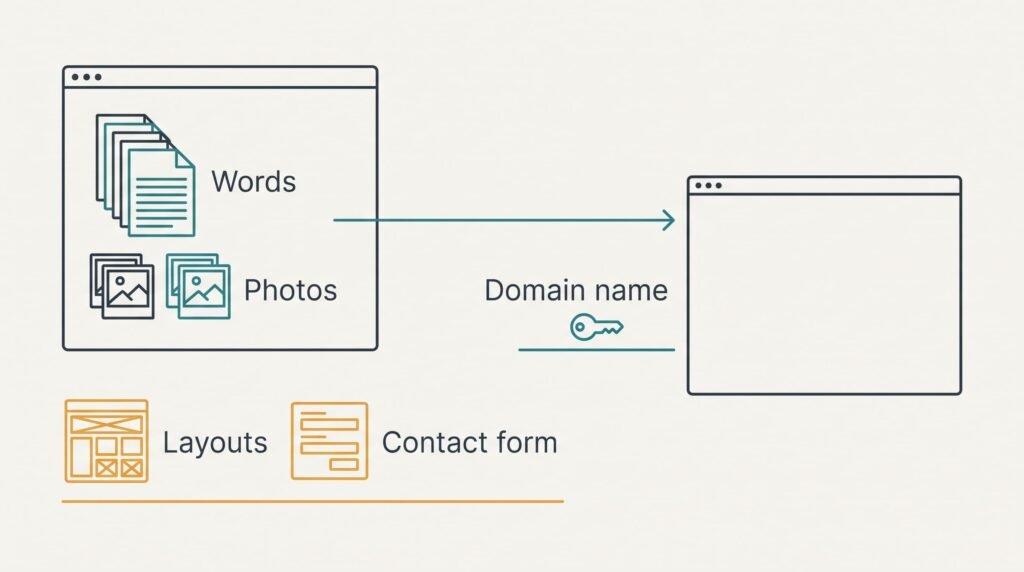
The choir’s words and photos are the payload, and they weigh far less than the site that displays them. Denise’s eight pages hold about 6,000 words and 112 photos. The photos average 2.4 MB each. Their originals come to 112 × 2.4 = 268.8 MB. Resized for the web at 0.3 MB each, the same set shrinks to 33.6 MB.
A good deal stays with the builder, and that costs the club little. Layouts and templates are the builder’s property. The contact form and the calendar block stay put. Hosting does too. Visitors will meet none of them on a new site unless somebody rebuilds them.
One item needs checking before any move, and few secretaries ever do it. The web address, called the domain name, is registered to a named owner, and the owner may be the builder rather than the club. Check the account settings for the owner and the renewal date. A club that can’t change the owner or move the address is only renting the name. A rented name can vanish. Denise found hers registered in her own name.
Three Alternatives to the Paid Website Builder, Compared
Weighing alternatives to a paid website builder means trading money against effort and features, because each route asks something different of the secretary.
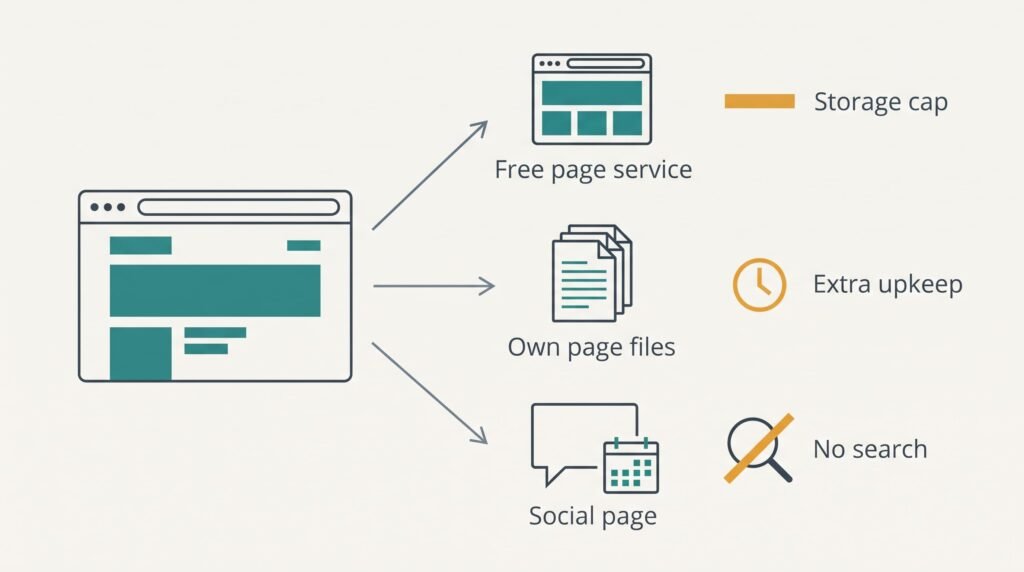
1. Money: a free page service. Several services host a simple site without charge, and they fit clubs whose pages are mainly text. The catch is limits, because a free tier may cap storage or display adverts. Some also refuse a custom address. A cap of a sample 50 MB would hold the 33.6 MB of resized photos but never the 268.8 MB of originals. The content lands by pasting each page’s text and uploading smaller pictures. Confirm that the service lets you keep the choir’s address before committing an evening. It fails when the terms change, which leaves the club facing a second move.
2. Effort: pages you maintain yourself. A handful of simple page files on a small hosting space need no builder, and they suit someone comfortable editing text. The catch is time. Each update means opening a file where a button once sufficed. Denise makes six edits a month. At 12 minutes each, against 5 now, she spends 6 × 7 = 42 extra minutes a month. The content lands as eight files and a folder of pictures. It fails when the only person who understands the files steps down.
3. Feature loss: a social page with a shared calendar. Drop the website and post news on the choir’s social page. Rehearsal dates go into a shared online calendar, and sign-ups into a mailing list. Nothing remains to host or to maintain. The club loses a searchable site and a permanent home for its history. The content lands as posts and calendar entries, with sign-ups in a single list. It fails when members without an account can’t see the page, or when the platform changes who gets shown what.
Month Three at the Choir
By month three the pages look plainer and nobody has complained. Convenience has been swapped for control, and the swap soon shows. The contact form has gone. Enquiries arrive by email, and Denise answers them from her phone. The calendar block is now a link to the shared calendar. Visitors notice little, because three pages carry most visits. Rehearsals draw 120 of the 300 monthly visits. Concerts draw 75, and the join page draws 45. That adds up to 240, or 80%.
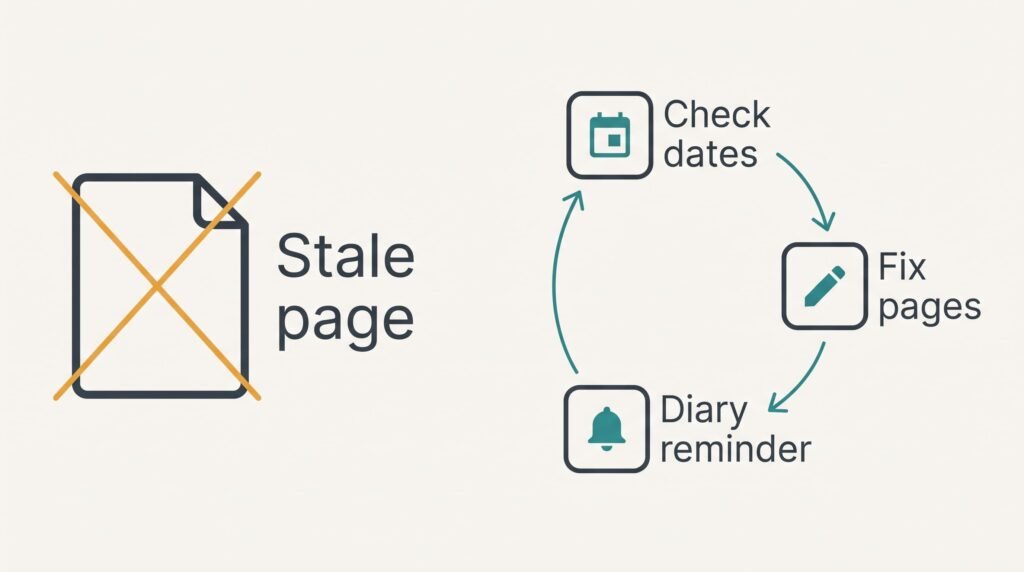
Upkeep absorbs the effort. A stale page does more damage than a plain one, since a rehearsal time wrong by an hour sends members to a locked hall. Denise reserves one evening a month to check dates against the choir’s diary. Skip two months and errors pile up until she trusts none of it. A repeating diary entry costs nothing and prevents that.
A Single Evening to Move the Choir’s Pages
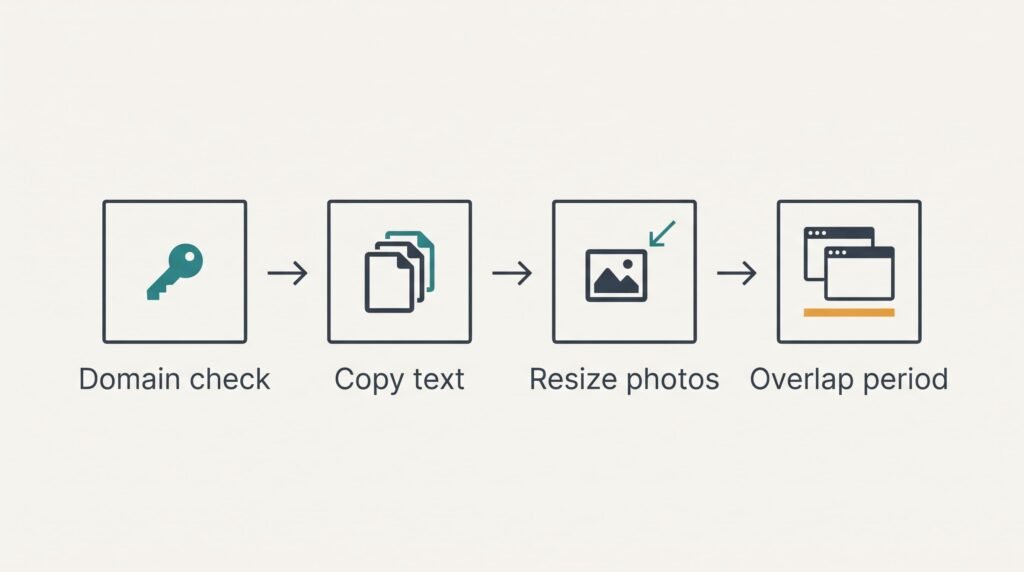
The move to any of these alternatives to a paid website builder fits one evening when the order is fixed. Start with the domain check, about 30 minutes. Next copy each page’s text into a document at roughly 15 minutes a page, which is 8 × 15 = 120 minutes. Resize the photos in one batch, about 20 minutes. The total is 170 minutes, nearly three hours. A short second sitting for the pictures is realistic.
Once the new pages are ready, point the choir’s address at the new place and leave the old site running for a fortnight. An address change can take a day or so to reach every visitor, and the overlap means nobody lands on an empty page. Cancel the builder only after the new site has served members for those two weeks.
Fourteen days is long enough to expose any gap.
When to Keep the Builder
Keep the builder if bookings run through it, because a contact form that feeds a members’ list or a ticket page that members depend on can’t be rebuilt in a single evening. Moving it means testing every step with a real member before the old one goes. Staying also wins when nobody else could maintain a different setup, because one person leaving would strand the site. A club whose site brings in more sign-ups than the renewal costs has little reason to move.
Denise moves because her site is eight static pages and the form receives about two messages a month. Her deciding question is simple: would the form bring in five enquiries a week? If it did, she’d stay. Any of these alternatives to a paid website builder is justified only by saved effort or saved money. Three evenings of work that return nothing amount to a hobby project, however tidy the result looks.
Save a Copy Before Anything Changes
Save the text and photos before touching the account, then check the copies. Paste every page’s text into one document and download the original photos into a dated folder. Capture each page as a screenshot to record the layout. Write down who owns the domain and when it renews. Add the email address tied to the account. Label each folder with the date it was saved, and repeat the copy before any later change. Open the files and count them: eight pages of text and 112 photos. A copy that nobody has opened can’t be trusted. Keep another one on a separate device, because a single failed laptop shouldn’t carry the choir’s history away.
Denise finishes with two saved folders and one rule: leave everything in place for a fortnight. The content now belongs to the choir rather than to a service, and that outranks the choice of tool. Should the new route fail, she can rebuild from the saved folder in an evening.
Questions and Answers
Will my pages and photos transfer automatically?
Rarely. Most builders let you download images, but page text usually has to be copied by hand, and layouts never travel. Denise’s eight pages took about two hours to paste across. Look for an export option among the account settings before assuming anything, and save a copy of everything either way.
What does each route cost, in relative terms?
A free page service costs nothing in money but sets limits on storage and adverts. Pages you edit yourself cost little in money and more in monthly effort, about 42 extra minutes in our sample. A social page costs nothing, though you lose the searchable site. The largest expense in every case is the evening of moving.
Is it worth the disruption for a small club?
It is when the site is mostly static and the renewal feels like a burden. Eight pages and two messages a month make a strong case. A club that takes bookings through its site should usually stay. Keep both sites live together for a fortnight and you can judge on evidence.